Solved Is there a way to delete a game provider Brink?

Pilot232

New member
Local time
12:27 AM
Messages
5
Location
UK
Hi all,

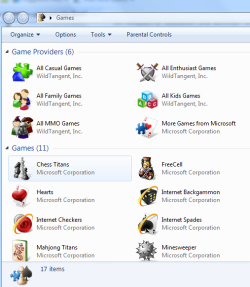
I have a new HP Destop with Windows 7, which included HP/WildTangent games console. I decided to remove this via Programs and Features which seemed to work OK, but when I opened up the Windows 7 Games Explorer, there are still 5 icons listed as Game Providers that I cant remove, which relate to WildTangent.

I have contacted HP about this, & they have been really helpful with step by step instructions, but I have just realised that all they have done is use Brinks excellent tutorial "how to delete a game in the Windows 7 games explorer folder"!

http://www.sevenforums.com/tutorials/42496-games-explorer-folder-delete-game.html

Is there anyway that I can do away with the middle man (HP), & ask BRINK, or anyone else that may know, is there a way of deleting these 5 "Game Provider" icons?
Games capture.PNG

The only real purpose that these icons have I guess, is to check updates for the latest games on offer.

Many thanks for your time.

Ian.
 

My Computer My Computer

At a glance

Windows 7
Computer Manufacturer/Model Number
HP Pavillion
OS
Windows 7
Have you tried right clicking on each one and clicking "hide this game provider"? Once all of them are hidden, the "game provider" group heading will also disappear and just leave all your games listed.
 

My Computer My Computer

At a glance

Windows 8.1 Pro x64Intel Core i7 4790k8GB Corsair Dominator 1600MHzMSI TwinFrozr GeForce GTX770
Computer type
PC/Desktop
Computer Manufacturer/Model Number
Custom Built
OS
Windows 8.1 Pro x64
CPU
Intel Core i7 4790k
Motherboard
MSI Z97S Krait Edition
Memory
8GB Corsair Dominator 1600MHz
Graphics Card(s)
MSI TwinFrozr GeForce GTX770
Sound Card
ASUS Xonar DX/XD 7.1
Monitor(s) Displays
Dell 24" S2409W + Dell 20" E207WFP
Screen Resolution
1920x1080 + 1680x1050
Hard Drives
1x 120GB OCZ Agility 3, 1x 750GB Western Digital Caviar Black, 1x 1TB Western Digital Caviar Blue
PSU
Corsair HX850 modular
Case
Fractal Design Define R4
Cooling
Corsair H60 w/ twin Corsair SP120 fans
Keyboard
Logitech G510S Keyboard
Mouse
Logitech G500S Laser Mouse
Internet Speed
40Mbps
Antivirus
Microsoft Security Essentials
Browser
Google Chrome
Other Info
LG Blu-Ray player
^ Yup, that's what I did. Very simple.

On another note, it would be funny if HP just copy and pasted the information.
 

My Computer My Computer

At a glance

Windows 7 Professional (x64)AMD Phenom II X4 955 Black Edition6GB (3 x 2GB) Kingston DDR3 1333 SDRAMNVIDIA GeForce GTX 260
Computer Manufacturer/Model Number
Cyberpower, Inc.
OS
Windows 7 Professional (x64)
CPU
AMD Phenom II X4 955 Black Edition
Motherboard
Gigabyte AMD MA770T-UD3P AM3 DDR3 1666+/1333/1066
Memory
6GB (3 x 2GB) Kingston DDR3 1333 SDRAM
Graphics Card(s)
NVIDIA GeForce GTX 260
Sound Card
Onboard 7.1 Sound
Monitor(s) Displays
Samsung 24" SyncMaster 2422
Screen Resolution
1920 x 1200
Hard Drives
500GB Sata II 3.0GB 16MB 7200RPM,
Western Digital 1TB USB 2.0 External Hard Drive
PSU
Kingwin 700 Watt Power Supply
Case
Silver X-Cruiser 2 Mid No Power
Cooling
Asetek 120MM Watercooler
Keyboard
HTK-1001
Mouse
Razer Viper
Internet Speed
Incoming: 2496 kbps, Outgoing: 512 kbps
Hello Ian, and welcome to Seven Forums.

Were you able to remove them using the tutorial?
 
Last edited:

My Computer My Computer

At a glance

64-bit Windows 11 Pro for WorkstationsIntel i7-8700K OC'd to 5 GHz64 GB (4x16GB) G.SKILL TridentZ RGB DDR4 3600...ASUS ROG-STRIX-GTX1080TI-O11G-GAMING
Computer type
PC/Desktop
Computer Manufacturer/Model Number
Self built custom
OS
64-bit Windows 11 Pro for Workstations
CPU
Intel i7-8700K OC'd to 5 GHz
Motherboard
ASUS ROG Maximus XI Formula Z390
Memory
64 GB (4x16GB) G.SKILL TridentZ RGB DDR4 3600 MHz
Graphics Card(s)
ASUS ROG-STRIX-GTX1080TI-O11G-GAMING
Sound Card
Integrated
Monitor(s) Displays
2 x Samsung Odyssey G7 27"
Screen Resolution
2560x1440
Hard Drives
1TB Samsung 990 PRO M.2,
4TB Samsung 990 PRO PRO M.2,
TerraMaster F8 SSD Plus NAS
PSU
Seasonic Prime Titanium 850W
Case
Thermaltake Core P3
Cooling
Corsair Hydro H115i
Keyboard
Logitech wireless K800
Mouse
Logitech MX Master 4
Internet Speed
2 Gb/s Download and 100 Mb/s Upload
Antivirus
Malwarebyte Anti-Malware Premium
Browser
Google Chrome
Other Info
Logitech Z625 speaker system,
Logitech BRIO 4K Pro webcam,
HP Color LaserJet Pro MFP M477fdn,
APC SMART-UPS RT 1000 XL - SURT1000XLI,
Galaxy S23 Plus phone
Hi again,

Thank you for the prompt replies!

In all honesty, I have always been cautious about touching the registry on my previous computers, & even more so with this being a new machine! Furthermore, if I follow HP`s advice (BRINKS advice, but with his name replaced by Gaven, lol), then is this going to make matters worse, as it not an actual game, but 5 icons which are updaters?

I have also found a HP Games folder which relates to WildTangent files, so I guess I shall use the "hide game providers" advice for the time being, & see if any fixes appear at a later date.

Thanks again for your help.

Ian.
 

My Computer My Computer

At a glance

Windows 7
Computer Manufacturer/Model Number
HP Pavillion
OS
Windows 7
Reason numbr one why I always format any machine from HP , Dell etc.. Always come bloated with unnecessary software.

If you go to Windows Features and uncheck the "Games" folder, what happens?
 

My Computer My Computer

At a glance

Windows 8.1 PRO3rd Generation Intel Core i7‐3612QM CPU @ 2.1...8GB DDR3NVIDIA GeForce GT 525M (128 bit), 1GB Grpahics
Computer type
PC/Desktop
Computer Manufacturer/Model Number
DELL VOSTRO 3650
OS
Windows 8.1 PRO
CPU
3rd Generation Intel Core i7‐3612QM CPU @ 2.10GHZ
Memory
8GB DDR3
Graphics Card(s)
NVIDIA GeForce GT 525M (128 bit), 1GB Grpahics
Screen Resolution
1920X1080
Hard Drives
750GB 5400RPM
Reason numbr one why I always format any machine from HP , Dell etc.. Always come bloated with unnecessary software.

If you go to Windows Features and uncheck the "Games" folder, what happens?

Hi TGSoldier,

When I uncheck the "Games Folder", & then click on Games in the Start Menu, the same 5 icons appear as game providers, but all of the Microsoft games disappear.

Many thanks,

Ian.
 

My Computer My Computer

At a glance

Windows 7
Computer Manufacturer/Model Number
HP Pavillion
OS
Windows 7
Reason numbr one why I always format any machine from HP , Dell etc.. Always come bloated with unnecessary software.

If you go to Windows Features and uncheck the "Games" folder, what happens?

Hi TGSoldier,

When I uncheck the "Games Folder", & then click on Games in the Start Menu, the same 5 icons appear as game providers, but all of the Microsoft games disappear.

Many thanks,

Ian.

Hi yet again,

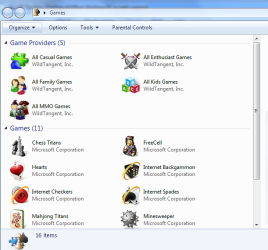
Since re-checking the "Games Folder", & then click on Games in the Start Menu, the same 5 icons appear as game providers, along with all of the the Microsoft games as before, but now with a new Microsoft game provider icon? So it seems you have made matters worse now, or better, lol.

Games capture 2.PNG

It is interesting actually, because thinking about it now, this icon was there prior to uninstalling the HP/WildTangent games console, & it certainly was not hidden, as I have clicked the "Unhide all items" button a couple of times since then?

Thanks again.

Ian.
 

My Computer My Computer

At a glance

Windows 7
Computer Manufacturer/Model Number
HP Pavillion
OS
Windows 7
Ian,

You can hide them if you like, but it will not hurt anything to delete them using that tutorial if you do not want them there anymore. It is only bloatware added by HP and not part of Windows 7. :)
 

My Computer My Computer

At a glance

64-bit Windows 11 Pro for WorkstationsIntel i7-8700K OC'd to 5 GHz64 GB (4x16GB) G.SKILL TridentZ RGB DDR4 3600...ASUS ROG-STRIX-GTX1080TI-O11G-GAMING
Computer type
PC/Desktop
Computer Manufacturer/Model Number
Self built custom
OS
64-bit Windows 11 Pro for Workstations
CPU
Intel i7-8700K OC'd to 5 GHz
Motherboard
ASUS ROG Maximus XI Formula Z390
Memory
64 GB (4x16GB) G.SKILL TridentZ RGB DDR4 3600 MHz
Graphics Card(s)
ASUS ROG-STRIX-GTX1080TI-O11G-GAMING
Sound Card
Integrated
Monitor(s) Displays
2 x Samsung Odyssey G7 27"
Screen Resolution
2560x1440
Hard Drives
1TB Samsung 990 PRO M.2,
4TB Samsung 990 PRO PRO M.2,
TerraMaster F8 SSD Plus NAS
PSU
Seasonic Prime Titanium 850W
Case
Thermaltake Core P3
Cooling
Corsair Hydro H115i
Keyboard
Logitech wireless K800
Mouse
Logitech MX Master 4
Internet Speed
2 Gb/s Download and 100 Mb/s Upload
Antivirus
Malwarebyte Anti-Malware Premium
Browser
Google Chrome
Other Info
Logitech Z625 speaker system,
Logitech BRIO 4K Pro webcam,
HP Color LaserJet Pro MFP M477fdn,
APC SMART-UPS RT 1000 XL - SURT1000XLI,
Galaxy S23 Plus phone
Ian,

You can hide them if you like, but it will not hurt anything to delete them using that tutorial if you do not want them there anymore. It is only bloatware added by HP and not part of Windows 7. :)


Hi Brink,

Many thanks for your reply, it`s good to know that removing the icons won`t do any damage. :D

Thanks again,

Ian.
 

My Computer My Computer

At a glance

Windows 7
Computer Manufacturer/Model Number
HP Pavillion
OS
Windows 7
You're welcome. :)
 

My Computer My Computer

At a glance

64-bit Windows 11 Pro for WorkstationsIntel i7-8700K OC'd to 5 GHz64 GB (4x16GB) G.SKILL TridentZ RGB DDR4 3600...ASUS ROG-STRIX-GTX1080TI-O11G-GAMING
Computer type
PC/Desktop
Computer Manufacturer/Model Number
Self built custom
OS
64-bit Windows 11 Pro for Workstations
CPU
Intel i7-8700K OC'd to 5 GHz
Motherboard
ASUS ROG Maximus XI Formula Z390
Memory
64 GB (4x16GB) G.SKILL TridentZ RGB DDR4 3600 MHz
Graphics Card(s)
ASUS ROG-STRIX-GTX1080TI-O11G-GAMING
Sound Card
Integrated
Monitor(s) Displays
2 x Samsung Odyssey G7 27"
Screen Resolution
2560x1440
Hard Drives
1TB Samsung 990 PRO M.2,
4TB Samsung 990 PRO PRO M.2,
TerraMaster F8 SSD Plus NAS
PSU
Seasonic Prime Titanium 850W
Case
Thermaltake Core P3
Cooling
Corsair Hydro H115i
Keyboard
Logitech wireless K800
Mouse
Logitech MX Master 4
Internet Speed
2 Gb/s Download and 100 Mb/s Upload
Antivirus
Malwarebyte Anti-Malware Premium
Browser
Google Chrome
Other Info
Logitech Z625 speaker system,
Logitech BRIO 4K Pro webcam,
HP Color LaserJet Pro MFP M477fdn,
APC SMART-UPS RT 1000 XL - SURT1000XLI,
Galaxy S23 Plus phone
Another option for eliminating WildTangent

If you want to use the hidden WildTangent uninstaller, it can be found here:

C:\Program Files (x86)\HP Games\uninstall.exe

That is, if you're running an HP machine (they buddied up with WildTangent for some reason and these things come standard on all HP W7 installs.)

If not, you may have to dig for it, but I'm willing to bet it's buried in the "Program Files (x86)" folder.

I ran a search via Windows Explorer (not to be confused with Internet Explorer) and found 3 locations for WildTangent related files, this being one of them. The others are benign or can be removed using the Program Uninstall feature found in the Control Panel.

It's a little easier/safer than digging around in your registry and it definitely did the job in getting rid of the game providers.

Brink's tutorial is the way to go if you're looking to remove the other Windows 7 games, though.


Good luck with your removal!

-Monkey
 

My Computer My Computer

At a glance

Windows 7, Win XP, Ubuntu, OS XAMD Athlon Neo X2 1.60GHz4GBIntel Graphics Media Accelerator 4500MHD
Computer Manufacturer/Model Number
HP Pavilion dm3
OS
Windows 7, Win XP, Ubuntu, OS X
CPU
AMD Athlon Neo X2 1.60GHz
Memory
4GB
Graphics Card(s)
Intel Graphics Media Accelerator 4500MHD
Back
Top