No Sound when Playing DVDs in Media Player

Benway

New member
Local time
8:14 AM
Messages
26
Hey all,
I've got full sound in everything else and the latest sound blaster drivers. I insert a DVD and play it in Windows Media Player or Center and I get no Audio (*shakes head).

I play the DVD in VLC and it plays and sounds fine, but the Quality of the DVD video in VLC blows.

What's the fix (and why does there need to be a fix) for Windows Media Player? You'd think Windows Media CENTER could at least play a DVD... :mad:
 

My Computer My Computer

At a glance

xp/Windows 7
OS
xp/Windows 7
Try removing WMC and reinstalling it. Open "Turn Windows features on or off" and remove it, reboot, and check the box again.
 

My Computer My Computer

At a glance

Windows 7 Professional x64Intel i7 2600K OC'd @ 4620 MHz16GB GSkill Sniper 2133 Mhz (4x4GB)EVGA GeForce GTX 480 SuperClocked+
Computer Manufacturer/Model Number
Custom
OS
Windows 7 Professional x64
CPU
Intel i7 2600K OC'd @ 4620 MHz
Motherboard
Asus P8Z68-V Pro
Memory
16GB GSkill Sniper 2133 Mhz (4x4GB)
Graphics Card(s)
EVGA GeForce GTX 480 SuperClocked+
Sound Card
Realtek High Definition Audio
Monitor(s) Displays
2x Acer S273HLbmii 27"
Screen Resolution
2 x 1920x1080
Hard Drives
64GB Crucial M4 SSD

Storage: Hitachi 1TB 5400RPM, Samsung 1.5TB 5400RPM
PSU
Corsair HW Series 750w (modular)
Case
Cooler Master HAF 932 Advanced Blue Edition
Cooling
CM Hyper 212+ CPU cooler, 3x 230mm + 1x 140mm case fans
Keyboard
Logitech MK320 (wireless)
Mouse
Logitech MK320 (wireless)
Internet Speed
30 Mb/s : 2 Mb/s
Still unresolved

Dudes, I have a similar problem but its not just DVD's
I cannot get sound from any video files that have an audio encoding of MPEG Version 1 Audio
I think many DVD's have MPEG Version 1 Audio format and so you may have the same issue

The problem just happened randomly one day as everything used to play fine.

I have tried
- uninstalling / re-installing sound drivers
- uninstalling reinstalling shark 2007 codecs
- installing most recent Klite codecs
- uninstalling reinstalling media player
- Restoring Media Library
- Playing with every setting for my sound card
- Playing with every setting in Media Player including advanced - codecs

Nothing so far has fixed the problem. Every other type of video works.
Also theres no problem at all from any other type of media player e.g. media player classic is fine
Most of my older AVI files have MPEG Version 1 Audio !! I cant use my playlists now !!
(p.s. You can tell what type of audio encoding has been used in a file by running Media Info (for Klite codec pack) or choosing Analyse Media File (Shark 2007 codec advanced settings)
 

My Computer My Computer

At a glance

Windows 7
OS
Windows 7
Hey all,
I've got full sound in everything else and the latest sound blaster drivers. I insert a DVD and play it in Windows Media Player or Center and I get no Audio (*shakes head).

I play the DVD in VLC and it plays and sounds fine, but the Quality of the DVD video in VLC blows.

What's the fix (and why does there need to be a fix) for Windows Media Player? You'd think Windows Media CENTER could at least play a DVD... :mad:

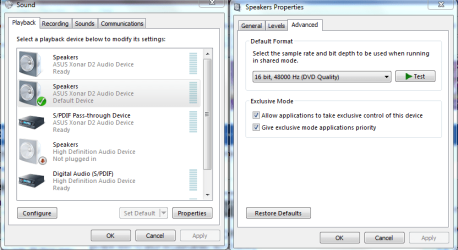
It might help to go into the sound settings and change to this setting 16 bit 48000hz in the picture below.
 

Attachments

  • application control of this device.PNG
    application control of this device.PNG
    34.8 KB · Views: 647

My Computer My Computer

At a glance

Windows 7 Ult, Windows 8.1 Pro,Q9650-4.275GHz, E8600 4.5GHz, E6750-3.8GHzG.Skill PC2 9600 1200Mhz 5 5 5 15 2TGTX480
Computer type
PC/Desktop
Computer Manufacturer/Model Number
Home built
OS
Windows 7 Ult, Windows 8.1 Pro,
CPU
Q9650-4.275GHz, E8600 4.5GHz, E6750-3.8GHz
Motherboard
Evga 780i FTW
Memory
G.Skill PC2 9600 1200Mhz 5 5 5 15 2T
Graphics Card(s)
GTX480
Sound Card
Asus Xonar D2
Monitor(s) Displays
HannsG
Screen Resolution
1680X1050
Hard Drives
GSkill Phoenix Pro 120GB SSD
PSU
ThermalTake Toughpower 1000Watt modular
Case
ThermalTake XaserV
Cooling
Xigmatek S1283
Keyboard
Logitech G15
Mouse
Logitech G9
Internet Speed
T1
Back
Top