ANN: Classic Shell - start menu and other features

If the classic menu was able to be called programatically then the task of setting an alternate launch button next to the start orb is possible using normal UI options for the taskbar

Using a taskbar toolbar containing a shortcut to launch the classic menu and placing the toolbar next to the start orb
 

My Computers My Computers

  • At a glance

    Windows 11 Pro x64 [Latest Release and Releas...Ryzen 9 5950X, 3.8 - 5.2 MHz64GB [2 x 32GB] DDR4 3200MHz4GB NVIDIA GEFORCE GTX 1650 Ti
    Computer type
    PC/Desktop
    Computer Manufacturer/Model Number
    ChillBlast - Custom to my design
    OS
    Windows 11 Pro x64 [Latest Release and Release Preview]
    CPU
    Ryzen 9 5950X, 3.8 - 5.2 MHz
    Motherboard
    Asus Prime X570-Pro
    Memory
    64GB [2 x 32GB] DDR4 3200MHz
    Graphics Card(s)
    4GB NVIDIA GEFORCE GTX 1650 Ti
    Sound Card
    On-board SPDIF to 5.1 System + HDMI [5.1 system]
    Monitor(s) Displays
    32" UHD 32 Bit HDR Monitor + 43" UHD 4K 32Bit HDR TV
    Screen Resolution
    2 x 3840 x 2160 @60Hz
    Hard Drives
    1TB M2 SSD OS, 500GB Fast Access SSD, 2 x 8TB Data + Various Externals from 1TB to 4TB, 10TB NAS
    PSU
    NZXT C750 80 PLUS Gold 750W Modular PSU
    Case
    Workstation Case [Matt Black]
    Cooling
    NZXT Kraken X63 280mm CPU Cooler +2x Quiet Case fans
    Keyboard
    Logitech Wireless MX Keys & K400 + others
    Mouse
    Logitech Wireless MX Master 3S
    Internet Speed
    920 MB Down 50 MB Up
    Antivirus
    BitDefender Total Security Pro
    Browser
    Chrome (always run latest Non-Beta)
    Other Info
    Also run ...
    Laptop - Quad 8GB - Windows 10 Pro x64
    Nexus 7 Android tablet x2
    Samsung 10.2" tablet
    Blackview TAB 8 4G Android Tablet c/w Keyboard
    Wacom Intuos Pro Medium Pen Pad
    Wacom Intuos Pro Small Pen Pad
    Wacom Expresskeys Remote
    Loopdeck+ Graphics Controller
    Shuttle Pro v2 Control
  • At a glance

    Windows 11 Pro x64 Latest RPIntel I7 10750H 5.0GHz32GB [2x16GB] DDR4 2933 MHznVidia GTX1650Ti 4 GB GDDR6
    Computer type
    Laptop
    System Manufacturer/Model Number
    Dell XPS 17 10750H
    OS
    Windows 11 Pro x64 Latest RP
    CPU
    Intel I7 10750H 5.0GHz
    Motherboard
    Dell XPS
    Memory
    32GB [2x16GB] DDR4 2933 MHz
    Graphics Card(s)
    nVidia GTX1650Ti 4 GB GDDR6
    Sound Card
    Stock [Realtek] 4 Speaker
    Monitor(s) Displays
    17" IPS UHD+ Infinity Edge Touchscreen
    Screen Resolution
    3840 x 2400
    Hard Drives
    2TB M2 NVMe, 4TB External + various 500GB & 1TB External NVMe (also have access to spinner HDD from
    PSU
    Stock
    Case
    Stock XPS Aluminium & Carbon Fibre
    Cooling
    Stock - Active Fan Control
    Keyboard
    Backlit + Various Logitech
    Mouse
    Stock Track Pad + Logitech MX Trackball
    Internet Speed
    72 MB Down 18MB Up
    Browser
    Chrome
    Other Info
    Also run ...
    Laptop - Quad 8GB - Windows 10 Pro x64
    Nexus 7 Android tablet x2
    10.2" tablet
    Sony Z3 Android Smartphone
    Wacom Intuos Pro Medium Pen Pad
    Wacom Intuos Pro Small Pen Pad
    Wacom Expresskeys Remote
    Loopdeck+ Graphics Controller
    Shuttle Pro v2 Control Pad
    10TB NAS
If the classic menu was able to be called programatically then the task of setting an alternate launch button next to the start orb is possible using normal UI options for the taskbar

Using a taskbar toolbar containing a shortcut to launch the classic menu and placing the toolbar next to the start orb

Oh, I have no doubt this can be done. But before I go and implement a whole new feature I'm trying to understand the exact need of the user.

It is not just the task of launching the menu through alternate means - that's easy. Simply locate the start button and post a private message to it.

I also need to add an option to not launch it through normal click on the orb. Adding a new options makes the UI more complex for everybody else.

And things are complicated further because the "start button" may not be at the corner of the screen. You can place that toolbar in the middle of the taskbar. That creates a whole new set of situations that need to be tested - should the menu expand to the left or to the right?
 

My Computer My Computer

At a glance

Windows 7 Home 64, Vista Ultimate 64
Computer Manufacturer/Model Number
Me :) I build all my PCs
OS
Windows 7 Home 64, Vista Ultimate 64
The next version will have a customizable hotkey.
Sorry, but you misunderstand me. I am not asking for a hotkey.

I wish to have the ability (in the setting menu) to have a separate icon for "Classic Start Menu" – just like a pinned program in taskbar.
------------------------------------------------------------
And I found a small error:

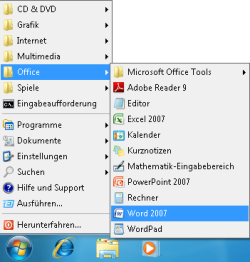
When I create a "top" menu then I can not sort the corresponding sub menu entries. "Drag-and-move-and-drop" is not possible. The sub menu is strict alphabetical sorted.

But when I copy that "top" menu as sub menu to "Program" then I can sort the corresponding sub menu entries. "Drag-and-move-and-drop" is then possible.

See picture: I want to sort "top" menu "Office" so that "Word", "Excel" and "Powerpoint" is on the top. As sub menu of "Program" I can sort.
 

Attachments

  • Office-Menue-not-sorted.png
    Office-Menue-not-sorted.png
    11.7 KB · Views: 41
  • Office-Sub-Menue-sorted.png
    Office-Sub-Menue-sorted.png
    13.8 KB · Views: 237

My Computer My Computer

At a glance

Windows 7
OS
Windows 7
Sorry, but you misunderstand me. I am not asking for a hotkey.

I wish to have the ability (in the setting menu) to have a separate icon for "Classic Start Menu" – just like a pinned program in taskbar.

Yes, I understand what you are asking. I was wonding if this new coming feature will solve your problem, even if it is not the solution you are proposing.

Edit: How about middle-click? This way you can have the new menu on left-click and classic menu on middle-click. This is by far easier to implement than adding an extra button. The extra button will significantly increase the complexity of the code without adding any significant benefit.

And I found a small error:
....

Yes, I am able to reproduce the problem. Will try to fix it in the next version.
 

My Computer My Computer

At a glance

Windows 7 Home 64, Vista Ultimate 64
Computer Manufacturer/Model Number
Me :) I build all my PCs
OS
Windows 7 Home 64, Vista Ultimate 64
I was wonding if this new coming feature will solve your problem, even if it is not the solution you are proposing.
Your main focus is to make it easy to use for keyboard junkies.
My intention is to make it also easy to use for mouse pusher.

Edit: How about middle-click? This way you can have the new menu on left-click and classic menu on middle-click.
OK - that's also a good way. But then: Left-click for classic menu and middle-click for Windows 7 menu. Because: When you install classic menu you mainly want to have the classic menu - and only seldom use the Windows 7 menu.

Then it's like the behaviour of the using of icons in taskbar:
Left-click - the normal using: Open / minimize / maximize a program.
Middle-click - seldom used function: Opens a second instance of a program.

This is by far easier to implement than adding an extra button. The extra button will significantly increase the complexity of the code without adding any significant benefit.
I understand.

I followed the development of another classic menu. There was the first step to create a separate program with an separate icon - like a "normal" program. In further development the programmer disables the appearance of a separate program icon and move the function to the start orb. In this case it was easier to rollback the last development step.

I think your way is just the opposite: You start with "start orb" replacement - and now it's more work to create a separate icon.
--------------------------------------------
Remarks:
In the settings menu - what are the function of: "Show Undock"? I don't see any difference.

And perhaps in the help file it should make clearer that "Use Current Theme" not complete uses all theme abilities; e.g. not the transparency and not menu background color. I see only the hover button from the current theme.
 

My Computer My Computer

At a glance

Windows 7
OS
Windows 7
Edit: How about middle-click? This way you can have the new menu on left-click and classic menu on middle-click.
OK - that's also a good way. But then: Left-click for classic menu and middle-click for Windows 7 menu. Because: When you install classic menu you mainly want to have the classic menu - and only seldom use the Windows 7 menu.
Ah, even better. Then we don't need an option for that. I don't want to add options for everything anyone can think of. I've seen many open-source projects with tons of options because they want to cover every wish of every user. I don't want to go there. Part of a good design is to know what to make customizable and what not.

I followed the development of another classic menu. There was the first step to create a separate program with an separate icon - like a "normal" program. In further development the programmer disables the appearance of a separate program icon and move the function to the start orb. In this case it was easier to rollback the last development step.
That's because the developer didn't know how to do it right from the beginning :p. And BTW, I am not "replacing" the orb. It is still the system orb, but my menu opens up when you click it. There is a big difference (both on the inside, and in the look and feel).

In the settings menu - what are the function of: "Show Undock"? I don't see any difference.
The "Undock computer" menu item appears only for notebooks attached to a docking station. There is also "Disconnect", which is only visible when you are connected through Remote Desktop.

And perhaps in the help file it should make clearer that "Use Current Theme" not complete uses all theme abilities; e.g. not the transparency and not menu background color. I see only the hover button from the current theme.
I intentionally left it vague, because in the future I want to add more themed graphical elements. Currently the menu background color, the text color, and the selection highlight use the theme settings. I'm guessing (I hope) if you run on a theme with green menus, my menu will be green too.
I tried adding some glass but couldn't make it look good enough to be worth the trouble. I need to consult a graphic designer. Also glass doesn't play nice with the menu animations (fade, slide, etc). I will look into this again, but after I have a fully functioning and stable version (like 1.0)
 

My Computer My Computer

At a glance

Windows 7 Home 64, Vista Ultimate 64
Computer Manufacturer/Model Number
Me :) I build all my PCs
OS
Windows 7 Home 64, Vista Ultimate 64
New version 0.9.6

A new version is available for download: http://classicshell.sourceforge.net/

The new versions fixes all reported problems and adds some new features:
- fixed the bug when you click next to the orb and the default menu shows up
- fixed the bug where you can't edit the folders at the top level menu (including the Favorites folder)
- added Properties button in the Explorer toolbar
- added hotkey setting (so you can open the classic menu with a hotkey and the default menu with the Win key)
- added support for group policies, like "Hide Run", "Always show Log Off", etc
- check the HISTORY.txt file for all changes

What didn't make it in this version:
- use middle click to open the default menu (instead of Shift+click). This is much harder than initially anticipated, partially because middle click is used by Win7 for other tasks. I will revisit this but after the first official version 1.0 is released
- glass effects. Again, this is planned after 1.0
 

My Computer My Computer

At a glance

Windows 7 Home 64, Vista Ultimate 64
Computer Manufacturer/Model Number
Me :) I build all my PCs
OS
Windows 7 Home 64, Vista Ultimate 64
Woaa this is nice :), and do you have plans on implementing a code to disable the auto-arrange thing?? and also to have the status bar with free space label??

thnx
 

My Computer My Computer

At a glance

XP
OS
XP
What exactly do you mean by the "auto-arrange thing"?
 

My Computer My Computer

At a glance

Windows 7 Home 64, Vista Ultimate 64
Computer Manufacturer/Model Number
Me :) I build all my PCs
OS
Windows 7 Home 64, Vista Ultimate 64
Very nice work bro, 1 Question, how to make the new menu of Windows 7 as the default menu and Classic Shell as the alternative, from what I see, when doing the Shift and click on Windows start button, it will bring the new menu of Windows 7.
 

My Computer My Computer

At a glance

Windows 7
OS
Windows 7
Normal click on the start button opens the classic menu.
Shift+click opens the new menu.
By default the Win key opens the classic menu. There is an option to pick an alternative hotkey, in which case the hotkey will open the classic menu and the Win key will open the new menu.
 

My Computer My Computer

At a glance

Windows 7 Home 64, Vista Ultimate 64
Computer Manufacturer/Model Number
Me :) I build all my PCs
OS
Windows 7 Home 64, Vista Ultimate 64
A new version (0.9.7) is available for download: http://classicshell.sourceforge.net/

The biggest change is showing the file size in the status bar of Explorer. You can see the total size of the selected files or of all files if none are selected. It also shows the free disk space.

Besides the status bar there are some improvements for the start menu: namely dragging with the right mouse button and other drag/drop fixes.
 

My Computer My Computer

At a glance

Windows 7 Home 64, Vista Ultimate 64
Computer Manufacturer/Model Number
Me :) I build all my PCs
OS
Windows 7 Home 64, Vista Ultimate 64
Thanks very much for this. Amazing little program that makes some progress towards making Windows 7 usage practical.

Just wanted to offer some suggestions for a future version if these things are possible.

  • Option to Disable Breadcrumbs. I'd never survive if I had to hit Alt+D or always have to look for an empty space to click on to bring up the address bar with the full path. I do quite a bit of path copying, pasting, and typing in the address bar, so this would be great.
  • Show the full created/modified/accessed times in Explorer's Properties dialog for recently created/modified/accessed files and folders. It normally shows things like "5 Hours Ago" when I need the time down to the second as XP and earlier show.
  • Force the menu bar up to the top of each Explorer window. I like my menu bars present when I need them, but out of the way (ideally at the top) the rest of the time as every sensible program does.
  • Hide the "Show Desktop" button on the far right of the taskbar, or move it to the far left next to Start button so that it isn't so far away.
If even one of these gets implemented I'll be very pleased. :)

Thanks again for the great program.
 

My Computer My Computer

At a glance

Windows 2000 Pro SP4; Windows XP Pro SP3; Win...
OS
Windows 2000 Pro SP4; Windows XP Pro SP3; Windows 7 Enterprise (trial)
You can click on the folder icon at the left corner of the breadcrumb bar if you want to do it with the mouse, or Alt+D with the keyboard. I don't think it can be made much easier than that.

The Details panel shows the created/modified time down to a minute. I don't think it is possible to manipulate what's shown in the Properties page.

I think the menu bar is as high as it can be. If you mean, put it above the address bar, that's not possible without significant changes to the Explorer code. And for that one needs the source code (which only Microsoft has)

I don't understand what you mean about the "Show Desktop". Do you want it gone or easier to access? You can't have both :)
 

My Computer My Computer

At a glance

Windows 7 Home 64, Vista Ultimate 64
Computer Manufacturer/Model Number
Me :) I build all my PCs
OS
Windows 7 Home 64, Vista Ultimate 64
I don't understand what you mean about the "Show Desktop". Do you want it gone or easier to access? You can't have both :)

Thanks for the reply. I should have been a bit more clear. At least for my wrist (don't know about other people), flicking down to the bottom-right too much can lead to discomfort, whereas flicking down to the bottom-left is never a problem. I'm sure I can add a "Show Desktop" icon to the Quick Launch bar if necessary, in which case I would prefer that the button on the far-right go away since in that case it's just wasting space. If that far-right button could be swapped over to the left side (adjacent to either side of the Start button) then that would put the button in a more convenient location and allow the full functionality of the new "Show Desktop" button to be used.
 

My Computer My Computer

At a glance

Windows 2000 Pro SP4; Windows XP Pro SP3; Win...
OS
Windows 2000 Pro SP4; Windows XP Pro SP3; Windows 7 Enterprise (trial)
Still using this, and liking the little program. I originally set it up just to test it, and then fell for in love with it. Great little application. Thanks Ivo. :D
 

My Computer My Computer

At a glance

Win 7 Pro x64, VM Win XP, Win7 Pro Sandbox, K...AMD Athlon(tm) II X4 640 @ 3.0 Gbz12GB 1066MHz DDR3 SDRAM - 2x4GB, 2x2GBATI Radeon HD 4350 HD Graphics/Audio with 512MB
Computer Manufacturer/Model Number
HP Pavilion a4302f
OS
Win 7 Pro x64, VM Win XP, Win7 Pro Sandbox, Kubuntu 11
CPU
AMD Athlon(tm) II X4 640 @ 3.0 Gbz
Memory
12GB 1066MHz DDR3 SDRAM - 2x4GB, 2x2GB
Graphics Card(s)
ATI Radeon HD 4350 HD Graphics/Audio with 512MB
Sound Card
Realtek High Definition Audio
Monitor(s) Displays
1. Dell 23" SP2307, 2. Mitsublishi 40" HDTV, Hannspree 25"
Screen Resolution
1. 2048x1152, 2. 1920-1080, 3. 1920x1200
Hard Drives
Int: 1 120 Gig SSD i
1 - 2.5" 500 USB External HDD
1 -1 Tb USB External HDD
Case
Mid Tower
Cooling
Standard Fans - 5 fans (very quiet)
Keyboard
Microsoft Wireless 2000
Mouse
Microsoft Wireless Mouse 5000
Internet Speed
10 Mbit (realistically 500 Kbit - 1.2 Mbit)
Other Info
Speakers - Bose Desktop (Excellent Sound)
1 external CD|DVD\Blue-ray Recorders/Players (Sony)
What about Win 7 Explorer background color ?

I have been reading about this app., but cannot find anywhere where it says that it can change the Win 7 Explorer background color. I know that you can change it with the Classic Theme but not the others. Can anyone tell me if this app. changes the background color or if that might be added to the app ? Also, if not, can anyone point me at a way of doing so. THANKS to Ivo for working so hard to give everyone this free app.
 

My Computer My Computer

At a glance

win 7
OS
win 7
No, Classic Shell will do nothing to change the background color in Explorer. You may have to tweak your msstyles file somehow, but I don't know how. I've seen other threads on this forum asking the same question. Look for them and maybe you'll find your answer.
 

My Computer My Computer

At a glance

Windows 7 Home 64, Vista Ultimate 64
Computer Manufacturer/Model Number
Me :) I build all my PCs
OS
Windows 7 Home 64, Vista Ultimate 64
you didn't answer my question about the auto-arrange in explorer, so i'll ask again,
is it possible to implement that function?

btw, the size in status bar is superb!, thnk you.
 

My Computer My Computer

At a glance

XP
OS
XP
Back
Top