ALBUM ART on WMP12

jonatasmz

New member
Local time
3:41 PM
Messages
69
guys...
i have some musics...(5gb), and i´m trying to search the artwork on WMP..
but...when i select the artwork, nothing appears, the musics still with the simbol that shows that i don´t have artwork fot this music..

someone is having the same problem?


cya
 

My Computer My Computer

At a glance

Windows 7 7077
OS
Windows 7 7077
Anyone?

i have another question
there´s a way to make WMP change the TAGS of the mp3´s, not just the library?
 
Last edited:

My Computer My Computer

At a glance

Windows 7 7077
OS
Windows 7 7077
The only thing I can tell you is to search with Google images. Right click on the album cover, then 'save as' to your pictures. Then right click on the saved .jpg, copy and paste it to the album in WMP. It should then show in Media Center as well as WMP. (you can delete it in your pictures after that)

It works, but it's slow going ... especially with several albums :p
 

My Computer My Computer

At a glance

Windows 7 Ultimate 32bit SP1Intel(R) Core(TM)2 Quad CPU @ 2.40GHz, 2400 MHz4 GBATI Radeon HD 2600 Pro
Computer type
PC/Desktop
Computer Manufacturer/Model Number
Bruce ... somewhere in his 40's
OS
Windows 7 Ultimate 32bit SP1
CPU
Intel(R) Core(TM)2 Quad CPU @ 2.40GHz, 2400 MHz
Motherboard
INTEL/D975XBX2
Memory
4 GB
Graphics Card(s)
ATI Radeon HD 2600 Pro
Monitor(s) Displays
Samsung SyncMaster 914v
Screen Resolution
1280 x 1024
Hard Drives
2/500GB each ... ST3500630AS ATA Device.
One is not connected
PSU
Rocketfish 700 W
Case
G.Skill Gigabyte Chassis
Keyboard
Standard PS/2 Keyboard
Mouse
Microsoft PS/2 Mouse
Internet Speed
DSL
Antivirus
Avira Internet Security
Browser
IE 11
Other Info
ATI HDMI Audio
guys...
i have some musics...(5gb), and i´m trying to search the artwork on WMP..
but...when i select the artwork, nothing appears, the musics still with the simbol that shows that i don´t have artwork fot this music..

someone is having the same problem?


cya

Everyone that uses it has seen the same problem if the album they are trying to get the art for has only a few songs -- i.e. many are missing. So far I've not found a definitive cut point where the art is applied only that more complete albums fare better than albums with one or two songs.

The workaround is to paste the album art from a browser that you can get WMP12 to open for you. Right click the album, and select find album info. Locate the proper album and click the more... link below it. A browser window will open displaying the album art. Right click it and select copy. Close browser and complete the find album operation. When done and the find album window is closed you'll note the album art is not updated. Just right click and select paste.

Click the scales above to reward me for the correct answer. Thanks!
 

My Computer My Computer

At a glance

El Capitan / Windows 10i7-4980HQ16GBIris 5200
Computer type
Laptop
Computer Manufacturer/Model Number
Apple
OS
El Capitan / Windows 10
CPU
i7-4980HQ
Memory
16GB
Graphics Card(s)
Iris 5200
Anyone?

i have another question
there´s a way to make WMP change the TAGS of the mp3´s, not just the library?

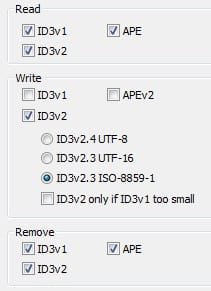
Yup. WMP12 can only update tags in formats it understands. If your mp3s have tags in unsupported formats WMP will silently ignore them and never write the tag data out. The fastest way to fix your collection so WMP12 will write tag data and even album art directly to the files is to use mp3tag Mp3tag - Download to set the mp3 tag options like this:
Untitled.jpg

Use ID3v2.3 tags only. You can use mp3tag to remove other tag formats.
 

My Computer My Computer

At a glance

El Capitan / Windows 10i7-4980HQ16GBIris 5200
Computer type
Laptop
Computer Manufacturer/Model Number
Apple
OS
El Capitan / Windows 10
CPU
i7-4980HQ
Memory
16GB
Graphics Card(s)
Iris 5200

My Computer My Computer

At a glance

Windows 7 Ultimate 32bit SP1Intel(R) Core(TM)2 Quad CPU @ 2.40GHz, 2400 MHz4 GBATI Radeon HD 2600 Pro
Computer type
PC/Desktop
Computer Manufacturer/Model Number
Bruce ... somewhere in his 40's
OS
Windows 7 Ultimate 32bit SP1
CPU
Intel(R) Core(TM)2 Quad CPU @ 2.40GHz, 2400 MHz
Motherboard
INTEL/D975XBX2
Memory
4 GB
Graphics Card(s)
ATI Radeon HD 2600 Pro
Monitor(s) Displays
Samsung SyncMaster 914v
Screen Resolution
1280 x 1024
Hard Drives
2/500GB each ... ST3500630AS ATA Device.
One is not connected
PSU
Rocketfish 700 W
Case
G.Skill Gigabyte Chassis
Keyboard
Standard PS/2 Keyboard
Mouse
Microsoft PS/2 Mouse
Internet Speed
DSL
Antivirus
Avira Internet Security
Browser
IE 11
Other Info
ATI HDMI Audio
thanks guys
 

My Computer My Computer

At a glance

Windows 7 7077
OS
Windows 7 7077
No c'mon guys isn't there a solution for getting WMP 12 to automatically download artwork for your music files? I don't embed artwork into my mp3s because it's against my principles. I also have that 1 song syndrome and therefore have just 1 or 2 songs by many artists. Can anyone help?
 

My Computer My Computer

At a glance

Win7
OS
Win7
The only music player that can find and download album art but not embed it into the music files is the stupid Winamp. With Winamp, you can download the album art while tagging any music file of the same album. When it downloads the album art, you simply choose the correct one and hit OK. Winamp will, instead of embedding the art into the music files, place a (usually) .jpg file in the folder. But if I remember correctly, WMP will stil not be able to display that file as album art.
 

My Computer My Computer

At a glance

Windows 7 Home Premium x64Intel Core i5 2500K8GB DDR3nVidia GeForce GTX650 Ti BOOST
Computer type
Laptop
Computer Manufacturer/Model Number
Custom
OS
Windows 7 Home Premium x64
CPU
Intel Core i5 2500K
Motherboard
MSI MS-7750
Memory
8GB DDR3
Graphics Card(s)
nVidia GeForce GTX650 Ti BOOST
Sound Card
Realtek
Monitor(s) Displays
21' Philips
Screen Resolution
Full HD
Hard Drives
1TB
PSU
500W
As silly as this sounds (it's not really):

A) Remove the watched folders from WMP and WMC.
B) Move all your songs to one folder (not the default my music folder). Move not copy. Do not move any thumbnail files or images.
C) Open WMP and make sure you can connect to the internet and that you allow WMP12 to arrange music into folders.
D) With WMP closed, add the files to your default music location.

WMP12 will automatically arrange your music into folders, add the thumbnails, and add the tag information, etc. This may take a long time for large collections especially with a slow internet connections so let WMP do the work..once complete, review songs that were not added to an album...the content provider(s) used by WMP do not recognize them, so manually update them if possible.
 
WMP seems to be generally good at finding the cover art for my songs, just as long as the artist name is correct and the album name. I usually change the covers to fan made version, from Coverlandia - The #1 Place for Album & Single Cover's - they have fan made as well as the original covers. Also good search the cover, I always try to get one that is 600 x 600 or bigger, then enlarge the image and right click and "Copy Image" in Firefox, or "Copy Image to Clipboard" in Opera. Then in the main WMP view, right click on the existing album art and choose option "Paste album art".
 

My Computer My Computer

At a glance

Windows 7 Ultimate 32 BitCore 2 QuadCorsair 2 x 2GBATI Radeon HD2400 x2
Computer Manufacturer/Model Number
AsRock
OS
Windows 7 Ultimate 32 Bit
CPU
Core 2 Quad
Motherboard
AsRock
Memory
Corsair 2 x 2GB
Graphics Card(s)
ATI Radeon HD2400 x2
Sound Card
IDK
Monitor(s) Displays
IDK
Hard Drives
500GB
PSU
IDK
Case
XBlade
Cooling
IDK
No c'mon guys isn't there a solution for getting WMP 12 to automatically download artwork for your music files? I don't embed artwork into my mp3s because it's against my principles. I also have that 1 song syndrome and therefore have just 1 or 2 songs by many artists.Can anyone help?
I do not understand this:confused:.....why wouldn't you want it embedded into the files? Embedding it is a better solution than adding a .jpg into each folder like WMP11 did, I would think, as not every DAP will display a separate cover.jpg.

Thus far I have kept my MP3 and WMA files out of WMP12 because I don't want those additional .jpg's to be added in, when I've already embedded art with MP3Tag. I don't think it will matter with the .flac files, but I'm keeping them separate too for now while I continue to rip CD's.

If I have misconstrued anything, please help me to understand.:geek:
 

My Computer My Computer

At a glance

Win 7 Ultimate 64-bit SP1 (desktop)Intel Core 2 Duo E84002x 2GB OCZ DDR II SDRAM PC2-6400NVIDIA GeForce 9400GT
Computer type
PC/Desktop
Computer Manufacturer/Model Number
Gigabyte Technology Co., Ltd.
OS
Win 7 Ultimate 64-bit SP1 (desktop)
CPU
Intel Core 2 Duo E8400
Motherboard
Gigabyte GA-EP35-DS3R
Memory
2x 2GB OCZ DDR II SDRAM PC2-6400
Graphics Card(s)
NVIDIA GeForce 9400GT
Monitor(s) Displays
HP 2009m(primary), Acer P191W
Screen Resolution
1600x900, 1440x900
Hard Drives
Internal:WD Caviar Black 640GB 32MB cache 7200RPM
External:Samsung Story Station 1TB HDD desktop drive
500GB Toshiba portable drive
PSU
Antec Earthwatts EA500D
Case
Antec Sonata III
Cooling
4 fans
Keyboard
Logitech Wave
Mouse
Logitech M-SBF90
Internet Speed
Slow due to home Wireless-G router
Antivirus
MSE, Hitman Pro, Malwarebytes
Browser
Chrome and Palemoon
Other Info
Laptop....Acer 5750Z-4835
15.6" HD Widescreen CineCrystal™ LED-backlit LCD Display: (1366x768 resolution, 16:9 aspect ratio)
Intel® Pentium® Processor B940 (2.0GHz, 2MB L3 cache)
Windows® 7 Home Premium,500GB Hard Drive,4GB DDR3 RAM, Intel® HD Graphics,8X DVD-Super Multi Double-Layer Drive
Multi-in-1 Digital Media Card Reader,802.11b/g/n Wi-Fi
Chrome and Palemoon, MSE, Hitman Pro
You don't need to stay away from WMP12. You can simply uncheck the option to prevent WMP from downloading and adding additional information to the files. Easy as that :)
 

My Computer My Computer

At a glance

Windows 7 Home Premium x64Intel Core i5 2500K8GB DDR3nVidia GeForce GTX650 Ti BOOST
Computer type
Laptop
Computer Manufacturer/Model Number
Custom
OS
Windows 7 Home Premium x64
CPU
Intel Core i5 2500K
Motherboard
MSI MS-7750
Memory
8GB DDR3
Graphics Card(s)
nVidia GeForce GTX650 Ti BOOST
Sound Card
Realtek
Monitor(s) Displays
21' Philips
Screen Resolution
Full HD
Hard Drives
1TB
PSU
500W
You don't need to stay away from WMP12. You can simply uncheck the option to prevent WMP from downloading and adding additional information to the files. Easy as that :)
Thanks for that. I'll add all my old lossy files to it and see how it works.:)
 

My Computer My Computer

At a glance

Win 7 Ultimate 64-bit SP1 (desktop)Intel Core 2 Duo E84002x 2GB OCZ DDR II SDRAM PC2-6400NVIDIA GeForce 9400GT
Computer type
PC/Desktop
Computer Manufacturer/Model Number
Gigabyte Technology Co., Ltd.
OS
Win 7 Ultimate 64-bit SP1 (desktop)
CPU
Intel Core 2 Duo E8400
Motherboard
Gigabyte GA-EP35-DS3R
Memory
2x 2GB OCZ DDR II SDRAM PC2-6400
Graphics Card(s)
NVIDIA GeForce 9400GT
Monitor(s) Displays
HP 2009m(primary), Acer P191W
Screen Resolution
1600x900, 1440x900
Hard Drives
Internal:WD Caviar Black 640GB 32MB cache 7200RPM
External:Samsung Story Station 1TB HDD desktop drive
500GB Toshiba portable drive
PSU
Antec Earthwatts EA500D
Case
Antec Sonata III
Cooling
4 fans
Keyboard
Logitech Wave
Mouse
Logitech M-SBF90
Internet Speed
Slow due to home Wireless-G router
Antivirus
MSE, Hitman Pro, Malwarebytes
Browser
Chrome and Palemoon
Other Info
Laptop....Acer 5750Z-4835
15.6" HD Widescreen CineCrystal™ LED-backlit LCD Display: (1366x768 resolution, 16:9 aspect ratio)
Intel® Pentium® Processor B940 (2.0GHz, 2MB L3 cache)
Windows® 7 Home Premium,500GB Hard Drive,4GB DDR3 RAM, Intel® HD Graphics,8X DVD-Super Multi Double-Layer Drive
Multi-in-1 Digital Media Card Reader,802.11b/g/n Wi-Fi
Chrome and Palemoon, MSE, Hitman Pro
Organize -> Options -> Library -> (uncheck) Retrieve additional information..." ;)
Glad I could help
 

My Computer My Computer

At a glance

Windows 7 Home Premium x64Intel Core i5 2500K8GB DDR3nVidia GeForce GTX650 Ti BOOST
Computer type
Laptop
Computer Manufacturer/Model Number
Custom
OS
Windows 7 Home Premium x64
CPU
Intel Core i5 2500K
Motherboard
MSI MS-7750
Memory
8GB DDR3
Graphics Card(s)
nVidia GeForce GTX650 Ti BOOST
Sound Card
Realtek
Monitor(s) Displays
21' Philips
Screen Resolution
Full HD
Hard Drives
1TB
PSU
500W
Reply

So then where is the list of folders that WMP 12 watches? I don't want to delete any of those files from my WMP library but just make WMP stop monitoring the folders for new files. Can you do that?
 

My Computer My Computer

At a glance

Win7
OS
Win7
I don't think so, like I said, the WMP library is directly connected to the new Library feature of Windows 7, so if you add or remove a folder from the Library, it will change in WMP as well, and vice versa.
 

My Computer My Computer

At a glance

Windows 7 Home Premium x64Intel Core i5 2500K8GB DDR3nVidia GeForce GTX650 Ti BOOST
Computer type
Laptop
Computer Manufacturer/Model Number
Custom
OS
Windows 7 Home Premium x64
CPU
Intel Core i5 2500K
Motherboard
MSI MS-7750
Memory
8GB DDR3
Graphics Card(s)
nVidia GeForce GTX650 Ti BOOST
Sound Card
Realtek
Monitor(s) Displays
21' Philips
Screen Resolution
Full HD
Hard Drives
1TB
PSU
500W
No c'mon guys isn't there a solution for getting WMP 12 to automatically download artwork for your music files? I don't embed artwork into my mp3s because it's against my principles. I also have that 1 song syndrome and therefore have just 1 or 2 songs by many artists.Can anyone help?
I do not understand this:confused:.....why wouldn't you want it embedded into the files? Embedding it is a better solution than adding a .jpg into each folder like WMP11 did, I would think, as not every DAP will display a separate cover.jpg.

Thus far I have kept my MP3 and WMA files out of WMP12 because I don't want those additional .jpg's to be added in, when I've already embedded art with MP3Tag. I don't think it will matter with the .flac files, but I'm keeping them separate too for now while I continue to rip CD's.

If I have misconstrued anything, please help me to understand.:geek:

I just don't want any artwork embedded in my music files. I don't mind that the artwork doesn't go wherever the file goes because that's normal for audio files. The only jukebox programs I use are WMP and iTunes and just have both of them download artwork to my hard drive except for downloaded songs from iTunes which come with embedded artwork. Besides embedding artwork into the file also increases the file size.
 

My Computer My Computer

At a glance

Win7
OS
Win7
There is no way to NOT embed artwork into music files but still make them show up in WMP12. It's as simple as that.
Besides, if you're concerned with the size of files, may I suggest that you consider changing your music files to another format?
I use the HE-AAC encoder in Winamp to produce .m4a files that are also supported in WMP12, the bitrate that sounds good enough for me is only 64kb/s and it sounds great, unlike the standard AAC codec which is even worse than MP3 (and we all know that MP3 is one of the worse compression formats out there, very outdated and surpassed by many other formats by far).

Another way is that you keep embedding album art into the files, but make them smaller. 200x200 is my choice and saved as .jpg they really don't take that much space. I don't really see another solution for you.
 

My Computer My Computer

At a glance

Windows 7 Home Premium x64Intel Core i5 2500K8GB DDR3nVidia GeForce GTX650 Ti BOOST
Computer type
Laptop
Computer Manufacturer/Model Number
Custom
OS
Windows 7 Home Premium x64
CPU
Intel Core i5 2500K
Motherboard
MSI MS-7750
Memory
8GB DDR3
Graphics Card(s)
nVidia GeForce GTX650 Ti BOOST
Sound Card
Realtek
Monitor(s) Displays
21' Philips
Screen Resolution
Full HD
Hard Drives
1TB
PSU
500W
Back
Top