only 2.5 gigs ram in 64 bit?

Alright i guess i was freaking out over nothing
+rep to both of you
Thanks for all the help
 

My Computer My Computer

At a glance

Windows 7 Ultimate 64 BitIntel Core 2 T7200 @ 2.00GHZ2x2GB DDR2 -only 2.5 available due to chipset :(SLI: 2xNvidia Geforce Go 7950GTX
Computer Manufacturer/Model Number
Alienware m9750 Laptop
OS
Windows 7 Ultimate 64 Bit
CPU
Intel Core 2 T7200 @ 2.00GHZ
Memory
2x2GB DDR2 -only 2.5 available due to chipset :(
Graphics Card(s)
SLI: 2xNvidia Geforce Go 7950GTX
Screen Resolution
1440x900

My Computer My Computer

At a glance

Windows 7 Ultimate x64AMD Phenom II X4 940 Black Edition @ 3.4GHz (...Corsair CM2X4096-8500C5 (4 X 2GB)XFX Radeon HD 5770 / Diamond Radeon HD 5770 C...
Computer Manufacturer/Model Number
Rig 1
OS
Windows 7 Ultimate x64
CPU
AMD Phenom II X4 940 Black Edition @ 3.4GHz (AM2+)
Motherboard
Gigabyte GA-MA790X-UD4P (AM2+)
Memory
Corsair CM2X4096-8500C5 (4 X 2GB)
Graphics Card(s)
XFX Radeon HD 5770 / Diamond Radeon HD 5770 CrossFireX
Sound Card
Asus Xonar DS (PCI)
Monitor(s) Displays
Samsung SyncMaster 932bw+ (3)
Screen Resolution
4320x900
Hard Drives
OCZ Vertex 2 80 GB - Windows 7 System --
WD Caviar Black 1TB - Music, Movies, Vids, Pics --
WD Caviar Black 640GB - User Profiles & Games --
WD My Book 320GB external
PSU
Corsair CMPSU-750TX
Case
Cooler Master HAF 932
Cooling
Corsair Hydro Series H50
Keyboard
Logitech Desktop Wave
Mouse
Logitech LX8 Laser
Internet Speed
20 down / 2 up
Other Info
LG GGC-H20L Blu-Ray / HDDVD combo --
Hauppauge HVR-1250 --
Silverstone MFP-51 --
Logitech Webcam C600
In a system that can use all installed memory that usage is not correct.

You have a 945 chipset, right? That means you are limited to 4GB total address space, just like you were in the 32bit OS-days.
 

My Computer My Computer

At a glance

Windows
OS
Windows
I think that you have too much Hardware reserved memory...

I have only 2MB:

Untitled.jpg

but, if you have an onboard video card that's another thing... or even old chipset limitations...
 

My Computer My Computer

At a glance

Windows7 Enterprise SP1 x64 (Technet)
OS
Windows7 Enterprise SP1 x64 (Technet)
Memory remap feature must be enabled in BIOS for x64 systems
 

My Computer My Computer

At a glance

Windows 10 Pro x64, Arch LinuxIntel Core 2 Quad Q8200 OC'd 3.08GHz8GB DDR2 900MhzMSI GT730 2GB GDDR5 (Kepler)
Computer type
PC/Desktop
Computer Manufacturer/Model Number
Custom Build
OS
Windows 10 Pro x64, Arch Linux
CPU
Intel Core 2 Quad Q8200 OC'd 3.08GHz
Motherboard
Asus Rampage formula LGA775
Memory
8GB DDR2 900Mhz
Graphics Card(s)
MSI GT730 2GB GDDR5 (Kepler)
Sound Card
Supreme FX2
Monitor(s) Displays
Samsung LS22F350 LED
Screen Resolution
1080P
Hard Drives
Kingston SSDNow UV400 120GB, 500GB Hitachi, 2TB Samsung, 500GB Seagate FreeAgent, 640GB Samsung, 160GB Toshiba (Arch)
PSU
AeroCool 500W Bronze
Cooling
Cooler Master V6 + 3X fans
Keyboard
Prolink keyboard
Mouse
Logitech M705
Internet Speed
1MiB/s
Browser
Chrome Beta
I don't understand what the hysteria is all about.

I too have a 4GB machine running Win7 Pro 64-bit.

Right-click on Computer, select properties, shows 4.00GB installed memory. This is correct. Same shown by CPUZ and Resource Monitor and any other tool you care to run.

In X64 all of that memory is available for use. The OS takes a portion of the physically installed memory for its own use, running apps take pieces for their own use, hardware/drivers may take pieces for their own use, and when you finally look at usage at any point in time there will be the sum of all those pieces subtracted from whatever physical memory you started with.

In my case, at this very moment Everest easily shows the two parts that make the whole of 4GB installed: USED 1631MB, FREE 2465MB, MEMORY UTILIZATION 40%.

memoryusagex64.jpg


What is the ambiguity?
 

My Computer My Computer

At a glance

Windows 7 Pro x64 (1), Win7 Pro X64 (2)i5-3350p 3.1Ghz/6MB-cache (1); E8400 3.0Ghz/6...8GB PC3-12800 DDR3 (1); 4GB PC3-10600 DDR3 (2)ATI HD7750 (1), (see TV cards); ATI R7 250 (2)
Computer type
PC/Desktop
Computer Manufacturer/Model Number
Home-built, two systems (1) and (2)
OS
Windows 7 Pro x64 (1), Win7 Pro X64 (2)
CPU
i5-3350p 3.1Ghz/6MB-cache (1); E8400 3.0Ghz/6MB-cache (2)
Motherboard
ASUS P8Z77-V Pro (1); ASUS P5Q3 (2)
Memory
8GB PC3-12800 DDR3 (1); 4GB PC3-10600 DDR3 (2)
Graphics Card(s)
ATI HD7750 (1), (see TV cards); ATI R7 250 (2)
Sound Card
Realtek ALC892 HD Audio (1); Realtek ALC1200 HD Audio (2)
Monitor(s) Displays
Eizo HD2441W LCD, Eizo S2433W (1); Eizo 24" S2433W (2)
Screen Resolution
1920x1200, 1920x1200 (1); 1920x1200 (2)
Hard Drives
(1) 1TB SATA-II (7200RPM), 2x2TB SATA-III (7200RPM), 250GB SATA-III (10000RPM) for OS; 2x2TB external USB 3.0

(2) 320GB SATA-II (7200RPM), 750GB SATA-II (7200RPM), 150GB SATA-II (10000RPM) for OS; 2TB external USB 3.0
PSU
Nesteq ECS-6001 600W (1); Nesteq ECS-5001 500W (2)
Case
Acousti-Case 360 (1) and (2)
Cooling
Noctua NH-U12P SE2 for CPU, 2x120mm case fans (1) and (2)
Keyboard
IBM PS/2 (1) and (2)
Mouse
Logitech MX Revolution wireless (1); Microsoft wired (2)
Internet Speed
100mbps down / 10mbps up
Antivirus
Microsoft Security Essentials; Malwarebyte Anti-Malware Pro
Browser
Firefox
Other Info
Ceton InfiniTV 4-tuner cablecard-enabled TV card as well as Hauppauge HVR-2250 OTA/ATSC 2-tuner TV card in (1), running under Win7 WMC
I don't understand what the hysteria is all about.
It is about installed vs usable amount. Not all hardware can make use of all the installed ram. This thread is an example of that, because the 945 chipset cannot make 4GB DRAM usable.

Just checked bios-
it says total recognized ram is 4000
but total usable ram is 2500
Is the first clue. Memory remapping is how you solve that, but that involves a chipset that has more than 4GB address space and supports remapping.
 

My Computer My Computer

At a glance

Windows
OS
Windows
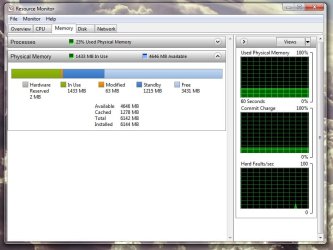
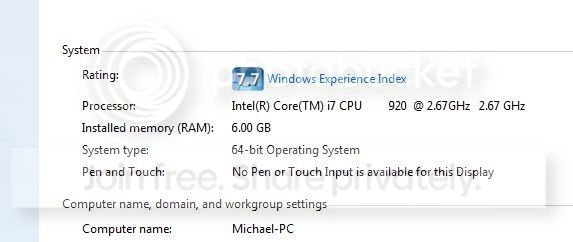
Mine shows all 6GB's as usable?


Just wondering, not really complaining.


memory.jpg
 

My Computer My Computer

At a glance

Windows 7 Ultimate 64bitIntel Core i7 9206gb Mushkin 1866 DDR32x EVGA GTX 285
Computer Manufacturer/Model Number
Home Built
OS
Windows 7 Ultimate 64bit
CPU
Intel Core i7 920
Motherboard
ASUS P6T Deluxe
Memory
6gb Mushkin 1866 DDR3
Graphics Card(s)
2x EVGA GTX 285
Sound Card
Onboard
Monitor(s) Displays
ASUS 24inch LCD 2ms delay
Screen Resolution
1920x1080
Hard Drives
4x OCZ-Vertex 60gb in RAID0 & one 300GB Velociraptor HDD, 1TB Western Digital Caviar Black
PSU
Corsair 1000W
Case
Coolermaster HAF 932
Cooling
Water Cooling
Keyboard
Saitek Cyborg
Mouse
MS Generic w/wheel
Internet Speed
Cable - 15mbps
Other Info
None
Mine shows all 6GB's as usable?


Just wondering, not really complaining.


memory.jpg

Go on Resource Monitor and see the Hardware Reserved amount...
 

My Computer My Computer

At a glance

Windows7 Enterprise SP1 x64 (Technet)
OS
Windows7 Enterprise SP1 x64 (Technet)
Wondering if something is not right with one of those sticks of ram, there is a memory test came with Windows 7. Just type memory into the search bar and it will come up with diagnose your systems memory problems, it will restart and do some testing at a lower level at restart. Maybe this will give you some indication on what the problem is.
 

My Computer My Computer

At a glance

Windows 7 Ultimate 64 bitAMD Athlon II X4 640 Quad Core Processor AM3 ...Mushkin Enhanced Silverline Stiletto 8GB 2X4G...Radeon HD 6850 775MHZ 1GB 4.0GHZ GDDR5
Computer type
PC/Desktop
Computer Manufacturer/Model Number
Own built
OS
Windows 7 Ultimate 64 bit
CPU
AMD Athlon II X4 640 Quad Core Processor AM3 3.0GHZ 2MB L2 C
Motherboard
GA-890GPA-UD3H (rev. 3.1)
Memory
Mushkin Enhanced Silverline Stiletto 8GB 2X4GB PC3-1066
Graphics Card(s)
Radeon HD 6850 775MHZ 1GB 4.0GHZ GDDR5
Sound Card
Realtek (onboard) dig. out to Yamaha RX-V573
Monitor(s) Displays
Samsung 32" Smart TV HD UN32EH5300F
Screen Resolution
1920 x 1080 i
Hard Drives
2 x SSD (OS) & 1 x HDD (data)
PSU
Antec 850W
Case
Lion Li
Cooling
Stock
Keyboard
i-rocks (usb)
Mouse
Logitec G700S (run usb)
Internet Speed
325 KB/sec
Antivirus
Bitdefender Total Security
Browser
IE 11
Other Info
Windows Base Score: 5.3
This is a do it all PC / Media Center with sound output to an external receiver. Plays all games, TV, Video, all controlled via a tablet. A second computer acts as a backup for data, and in case the main goes down.
Which cards are you running in that laptop, 7950GTX or the 8800GTX. the 8800's have 768MB/card which with SLI equals the exact total that is reserved for your hardware.
 

My Computer My Computer

At a glance

Windows 7 Ultimate 64bitIntel i7 3770K16GB DDR3 1333 Corsair XMS3XFX HD6950 2GB EyeFinity
Computer Manufacturer/Model Number
HAL-9000
OS
Windows 7 Ultimate 64bit
CPU
Intel i7 3770K
Motherboard
Asus Sabertooth Z77
Memory
16GB DDR3 1333 Corsair XMS3
Graphics Card(s)
XFX HD6950 2GB EyeFinity
Sound Card
Logitech G35 & Sennheiser PC135 & VIA HD
Monitor(s) Displays
23" HP 2310e, 23" Samsung B2230, 21.5" Viewsonic
Screen Resolution
5760x1080
Hard Drives
16TB of Storage
128GB & 256GB Crucial M4 SSD's, 2X 1TB WD Black, 3x 2TB WD, 3x 2TB Samsung F4, 1.5TB Seagate, WD 500GB,
PSU
Antec True Power New 650watt
Case
Cooler Master HAF-932
Cooling
Corsair H60 Hydro Cooler, 3x 230mm Fans, 2x120mm Fan
Keyboard
Logitech G15 and G13
Mouse
Logitech G700 Gaming Mouse
Internet Speed
50/10 Mbit
Other Info
Speakers : Alesis M1 Active Mk2 Studio Monitors , APC RS 1200 UPS, HP 4500DN Color Laser, HP P1006 mono Laser, Kodak 8500 Dye-Sub, Epson 1280 inkjet, Epson Worforce 610 MFC
Back
Top