Best/Savest way to install a Custom Windows 7 Theme ?

KNiGHTWRiTAZ

New member
Local time
12:55 PM
Messages
8
Hello everybody,

First a very nice Win 7 forum y'all got going on in here my compliments for that and keep up the hard and dedicated work.

As the subject title says, want to become more familiar on what is the best way to install a custom windows 7 theme.

For example I want to use this theme a very nice theme if I may say so dESATURATED for Windows Seven by Redmile

dESATURATED_for_Windows_Seven_by_Redmile.png


once unrarred, the folder contained the following sub-folders


-Cursors
-System Files
-Themes
-uxtheme patch


Okay the Themes and the included sub folders goes to in C:/Windows/Resources/Themes << This I did !

okay I got a Win 7 Ultimate x64 (RTM) !
The System Files contains the following files Explorer, ExplorerFrame.dll & Shell32.dll

so the explorer to goe into >> C:/Windows by copy and replacing it ! (This I didn't try, so the question is, is it save to do so without messing up my system !)

so the ExplorerFrame.dll & Shell32.dll goes into C:/Windows/System32 by copy and replacing the original after making a backup of the original files !
(This I didn't try also, so the question is, is it save to do so without messing up my system !)

So this leave me with the UniversalThemePatcher-x64 as I got a x64 OS !
do I must use the UniversalThemePatcher in order to get the custom win 7 theme by Redmile, or by replacing the files is good enuff ?

and does VistaGlazz do the same thing that UniversalThemepatcher does ! which one is better or saver for the system. ?

Hope that someone is willing or has the time to help me out !

read something in the tutorial section : Enable Custom themes without modifying system files << Is this the savest way to go ?

reason for my question is , my system is running perfect at the moment, just curious on how things works with the custom theme designs and how to install it in a proper way without messing things up.

Best Regards,
 

My Computer My Computer

At a glance

Windows 7 Ultimate x64Q6600 2.4 GHz Overclocked to 3.6 GHz4 GB (DDR2-800 DDR2 SDRAM)EVGA NVIDIA GeForce 8800 Ultra (768 MB)
Computer Manufacturer/Model Number
6.1.7600 (Win7 RTM)
OS
Windows 7 Ultimate x64
CPU
Q6600 2.4 GHz Overclocked to 3.6 GHz
Motherboard
Asus Formula SE X38
Memory
4 GB (DDR2-800 DDR2 SDRAM)
Graphics Card(s)
EVGA NVIDIA GeForce 8800 Ultra (768 MB)
Sound Card
SoundMAX Integrated Digital HD Audio
Monitor(s) Displays
Samsung SyncMaster 206BW (20")
Hard Drives
Seagate 2x 1 TB
Hitachi 2x 1 TB
Case
NZXT BLackline Lexa Blue Lad
Cooling
Antec Tricolor Blue
First, make a system image of your drive and save it to a seperate drive/partition!! Now go ahead and install the theme as you normally would.... it should not effect the way your system runs, but just in case it does, you have an image to restore from...
 

My Computer My Computer

At a glance

64-bit Windows 8.1 ProCore(TM) i5 CPU 4330 Haswell @ 3.20GHz12.00 GBIntel(R) HD Graphics
Computer type
PC/Desktop
Computer Manufacturer/Model Number
LENOVO K450 @3.0GHZ
OS
64-bit Windows 8.1 Pro
CPU
Core(TM) i5 CPU 4330 Haswell @ 3.20GHz
Motherboard
LENOVO
Memory
12.00 GB
Graphics Card(s)
Intel(R) HD Graphics
Sound Card
Intel HD integtrated
Monitor(s) Displays
HP 25' ISP Monitor
Screen Resolution
1900/1020
Hard Drives
(1) ST1000DM003-1CH162 (2) Generic STORAGE DEVICE USB Device (3) Generic STORAGE DEVICE USB Device
Internet Speed
100mb down/10mb up
First, make a system image of your drive and save it to a seperate drive/partition!! Now go ahead and install the theme as you normally would.... it should not effect the way your system runs, but just in case it does, you have an image to restore from...

Okay tnx for your quick reply Tews,
but which method to use, the Enable Custom themes without modifying system files ! or do you suggest something else !
 

My Computer My Computer

At a glance

Windows 7 Ultimate x64Q6600 2.4 GHz Overclocked to 3.6 GHz4 GB (DDR2-800 DDR2 SDRAM)EVGA NVIDIA GeForce 8800 Ultra (768 MB)
Computer Manufacturer/Model Number
6.1.7600 (Win7 RTM)
OS
Windows 7 Ultimate x64
CPU
Q6600 2.4 GHz Overclocked to 3.6 GHz
Motherboard
Asus Formula SE X38
Memory
4 GB (DDR2-800 DDR2 SDRAM)
Graphics Card(s)
EVGA NVIDIA GeForce 8800 Ultra (768 MB)
Sound Card
SoundMAX Integrated Digital HD Audio
Monitor(s) Displays
Samsung SyncMaster 206BW (20")
Hard Drives
Seagate 2x 1 TB
Hitachi 2x 1 TB
Case
NZXT BLackline Lexa Blue Lad
Cooling
Antec Tricolor Blue
Personally I use the Universal Uxtheme.dll patcher...
 

My Computer My Computer

At a glance

64-bit Windows 8.1 ProCore(TM) i5 CPU 4330 Haswell @ 3.20GHz12.00 GBIntel(R) HD Graphics
Computer type
PC/Desktop
Computer Manufacturer/Model Number
LENOVO K450 @3.0GHZ
OS
64-bit Windows 8.1 Pro
CPU
Core(TM) i5 CPU 4330 Haswell @ 3.20GHz
Motherboard
LENOVO
Memory
12.00 GB
Graphics Card(s)
Intel(R) HD Graphics
Sound Card
Intel HD integtrated
Monitor(s) Displays
HP 25' ISP Monitor
Screen Resolution
1900/1020
Hard Drives
(1) ST1000DM003-1CH162 (2) Generic STORAGE DEVICE USB Device (3) Generic STORAGE DEVICE USB Device
Internet Speed
100mb down/10mb up
First, make a system image of your drive and save it to a seperate drive/partition!! Now go ahead and install the theme as you normally would.... it should not effect the way your system runs, but just in case it does, you have an image to restore from...

Okay tnx for your quick reply Tews,
but which method to use, the Enable Custom themes without modifying system files ! or do you suggest something else !

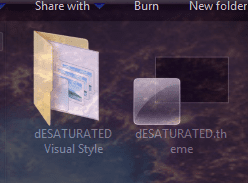
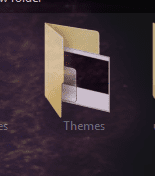
I am using this & just installed the theme you want just follow the guide & then put the 2 files (1st screenshot) open the folder you downloaded then open Themes folder (2nd screenshot) you will see the 2 folders (1st screenshot) to put in C:/Windows/Resources/Themes that's it. Right click desktop click on personalize.
 

Attachments

  • Capture1.PNG
    Capture1.PNG
    20 KB · Views: 1,555
  • Capture.PNG
    Capture.PNG
    7.6 KB · Views: 1,539

My Computer My Computer

At a glance

Win 7 Pro x64 / Win 10 ProIntel(R) Core(TM) i7-3630QM CPU @ 2.40GHz12 GB(1) Intel(R) HD Graphics 4000 (2) NVIDIA GeFo...
Computer type
Laptop
Computer Manufacturer/Model Number
Sager NP9170
OS
Win 7 Pro x64 / Win 10 Pro
CPU
Intel(R) Core(TM) i7-3630QM CPU @ 2.40GHz
Motherboard
CLEVO P170EM
Memory
12 GB
Graphics Card(s)
(1) Intel(R) HD Graphics 4000 (2) NVIDIA GeForce GTX 675M
Sound Card
(1) Realtek High Definition Audio (2) Intel(R) Display Aud
Monitor(s) Displays
17.3
Screen Resolution
1920x1080
Hard Drives
(1) Samsung 860 EVO 500GB(OS) (1) Samsung 860 EVO 500GB(Data)
Keyboard
Backlite
Antivirus
MSE, Malwarebytes Pro
Browser
Firefox
Other Info
DESKTOP: Custom-built.
OS: Win 10 Pro x64.
CASE: Rosewill R5.
CPU: Intel I5 4670K CPU @ 3.40GHz.
CPU COOLER: Cool Master Hyper 212 EVO.
MOTHERBOARD: Asus Z87-A.
MEMORY: Kingston HyperX 2x4 GB.
GPU: Nvidia Geforce 650 TI.
PSU: Corsair TX750.
DRIVES: (1) Samsung 840 120 GB SSD (2) Western Digital blue 500 GB 7200 RPM.
First, make a system image of your drive and save it to a seperate drive/partition!! Now go ahead and install the theme as you normally would.... it should not effect the way your system runs, but just in case it does, you have an image to restore from...

Okay tnx for your quick reply Tews,
but which method to use, the Enable Custom themes without modifying system files ! or do you suggest something else !

I am using this & just installed the theme you want just follow the guide & then put the 2 files (1st screenshot) open the folder you downloaded then open Themes folder (2nd screenshot) you will see the 2 folders (1st screenshot) to put in C:/Windows/Resources/Themes that's it. Right click desktop click on personalize.

But this I assume the Enable Custom themes without modifying system files option.
 

My Computer My Computer

At a glance

Windows 7 Ultimate x64Q6600 2.4 GHz Overclocked to 3.6 GHz4 GB (DDR2-800 DDR2 SDRAM)EVGA NVIDIA GeForce 8800 Ultra (768 MB)
Computer Manufacturer/Model Number
6.1.7600 (Win7 RTM)
OS
Windows 7 Ultimate x64
CPU
Q6600 2.4 GHz Overclocked to 3.6 GHz
Motherboard
Asus Formula SE X38
Memory
4 GB (DDR2-800 DDR2 SDRAM)
Graphics Card(s)
EVGA NVIDIA GeForce 8800 Ultra (768 MB)
Sound Card
SoundMAX Integrated Digital HD Audio
Monitor(s) Displays
Samsung SyncMaster 206BW (20")
Hard Drives
Seagate 2x 1 TB
Hitachi 2x 1 TB
Case
NZXT BLackline Lexa Blue Lad
Cooling
Antec Tricolor Blue
Okay tnx for your quick reply Tews,
but which method to use, the Enable Custom themes without modifying system files ! or do you suggest something else !

I am using this & just installed the theme you want just follow the guide & then put the 2 files (1st screenshot) open the folder you downloaded then open Themes folder (2nd screenshot) you will see the 2 folders (1st screenshot) to put in C:/Windows/Resources/Themes that's it. Right click desktop click on personalize.

But this I assume the Enable Custom themes without modifying system files option.

Yes
 

My Computer My Computer

At a glance

Win 7 Pro x64 / Win 10 ProIntel(R) Core(TM) i7-3630QM CPU @ 2.40GHz12 GB(1) Intel(R) HD Graphics 4000 (2) NVIDIA GeFo...
Computer type
Laptop
Computer Manufacturer/Model Number
Sager NP9170
OS
Win 7 Pro x64 / Win 10 Pro
CPU
Intel(R) Core(TM) i7-3630QM CPU @ 2.40GHz
Motherboard
CLEVO P170EM
Memory
12 GB
Graphics Card(s)
(1) Intel(R) HD Graphics 4000 (2) NVIDIA GeForce GTX 675M
Sound Card
(1) Realtek High Definition Audio (2) Intel(R) Display Aud
Monitor(s) Displays
17.3
Screen Resolution
1920x1080
Hard Drives
(1) Samsung 860 EVO 500GB(OS) (1) Samsung 860 EVO 500GB(Data)
Keyboard
Backlite
Antivirus
MSE, Malwarebytes Pro
Browser
Firefox
Other Info
DESKTOP: Custom-built.
OS: Win 10 Pro x64.
CASE: Rosewill R5.
CPU: Intel I5 4670K CPU @ 3.40GHz.
CPU COOLER: Cool Master Hyper 212 EVO.
MOTHERBOARD: Asus Z87-A.
MEMORY: Kingston HyperX 2x4 GB.
GPU: Nvidia Geforce 650 TI.
PSU: Corsair TX750.
DRIVES: (1) Samsung 840 120 GB SSD (2) Western Digital blue 500 GB 7200 RPM.
I am using this & just installed the theme you want just follow the guide & then put the 2 files (1st screenshot) open the folder you downloaded then open Themes folder (2nd screenshot) you will see the 2 folders (1st screenshot) to put in C:/Windows/Resources/Themes that's it. Right click desktop click on personalize.

But this I assume the Enable Custom themes without modifying system files option.

Yes

Tried it Bongo, but it didn't change, the most of the theme did, except for the Start button, which is still blue >> original win 7 ??
 

My Computer My Computer

At a glance

Windows 7 Ultimate x64Q6600 2.4 GHz Overclocked to 3.6 GHz4 GB (DDR2-800 DDR2 SDRAM)EVGA NVIDIA GeForce 8800 Ultra (768 MB)
Computer Manufacturer/Model Number
6.1.7600 (Win7 RTM)
OS
Windows 7 Ultimate x64
CPU
Q6600 2.4 GHz Overclocked to 3.6 GHz
Motherboard
Asus Formula SE X38
Memory
4 GB (DDR2-800 DDR2 SDRAM)
Graphics Card(s)
EVGA NVIDIA GeForce 8800 Ultra (768 MB)
Sound Card
SoundMAX Integrated Digital HD Audio
Monitor(s) Displays
Samsung SyncMaster 206BW (20")
Hard Drives
Seagate 2x 1 TB
Hitachi 2x 1 TB
Case
NZXT BLackline Lexa Blue Lad
Cooling
Antec Tricolor Blue

My Computer My Computer

At a glance

W7 RTM Ultimate x64Intel Q8400 @ 2.66GHZ4GB DDR2-800Gainward GTS 450 GLH 1GB Edition
Computer Manufacturer/Model Number
Custom Build
OS
W7 RTM Ultimate x64
CPU
Intel Q8400 @ 2.66GHZ
Motherboard
Gigabyte GA-EG45M-UD2H
Memory
4GB DDR2-800
Graphics Card(s)
Gainward GTS 450 GLH 1GB Edition
Sound Card
Integrated 8 Channel
Monitor(s) Displays
AOC 23.6 Inch Widescreen LCD
Screen Resolution
1920x1080
Hard Drives
Seagate 500GB Internal
Western Digital 1TB Internal

Hitachi 1TB External
PSU
Apevia Java Power 500W
Case
Cooler Master HAF 922 Black
Cooling
Stock Intel CPU Fan
Keyboard
HP SK-2960 Multimedia Keyboard
Mouse
Logitech M350 Wireless Gaming Mouse
Internet Speed
1.5MB

Tried it Bongo, but it didn't change, the most of the theme did, except for the Start button, which is still blue >> original win 7 ??

The start button cannot be changed by themes, the explorer.exe file must be edited to change the start button.

Tnx for your reply Uber Philf,
The explorer.exe was included in the dESATURATED Visual Style as for the
ExplorerFrame.dll & Shell32.dll, is it save to replace the original and if so, what is the worst that could happen, kept the original dll and .exe in a seperate folder !

hope to hear from you.
 

My Computer My Computer

At a glance

Windows 7 Ultimate x64Q6600 2.4 GHz Overclocked to 3.6 GHz4 GB (DDR2-800 DDR2 SDRAM)EVGA NVIDIA GeForce 8800 Ultra (768 MB)
Computer Manufacturer/Model Number
6.1.7600 (Win7 RTM)
OS
Windows 7 Ultimate x64
CPU
Q6600 2.4 GHz Overclocked to 3.6 GHz
Motherboard
Asus Formula SE X38
Memory
4 GB (DDR2-800 DDR2 SDRAM)
Graphics Card(s)
EVGA NVIDIA GeForce 8800 Ultra (768 MB)
Sound Card
SoundMAX Integrated Digital HD Audio
Monitor(s) Displays
Samsung SyncMaster 206BW (20")
Hard Drives
Seagate 2x 1 TB
Hitachi 2x 1 TB
Case
NZXT BLackline Lexa Blue Lad
Cooling
Antec Tricolor Blue
I highly advise keeping a copy of the files, just in case, not sure of the worst tho. it can go pretty bad apparently.
 

My Computer My Computer

At a glance

W7 RTM Ultimate x64Intel Q8400 @ 2.66GHZ4GB DDR2-800Gainward GTS 450 GLH 1GB Edition
Computer Manufacturer/Model Number
Custom Build
OS
W7 RTM Ultimate x64
CPU
Intel Q8400 @ 2.66GHZ
Motherboard
Gigabyte GA-EG45M-UD2H
Memory
4GB DDR2-800
Graphics Card(s)
Gainward GTS 450 GLH 1GB Edition
Sound Card
Integrated 8 Channel
Monitor(s) Displays
AOC 23.6 Inch Widescreen LCD
Screen Resolution
1920x1080
Hard Drives
Seagate 500GB Internal
Western Digital 1TB Internal

Hitachi 1TB External
PSU
Apevia Java Power 500W
Case
Cooler Master HAF 922 Black
Cooling
Stock Intel CPU Fan
Keyboard
HP SK-2960 Multimedia Keyboard
Mouse
Logitech M350 Wireless Gaming Mouse
Internet Speed
1.5MB
I highly advise keeping a copy of the files, just in case, not sure of the worst tho. it can go pretty bad apparently.

Bad like in, let's say, placing the original files back in win save mode and everything is back to normal / restored !

or bad like in having to format to whole damn thing << :sarc:

hope to hear from you or someone who already had that experience !
 

My Computer My Computer

At a glance

Windows 7 Ultimate x64Q6600 2.4 GHz Overclocked to 3.6 GHz4 GB (DDR2-800 DDR2 SDRAM)EVGA NVIDIA GeForce 8800 Ultra (768 MB)
Computer Manufacturer/Model Number
6.1.7600 (Win7 RTM)
OS
Windows 7 Ultimate x64
CPU
Q6600 2.4 GHz Overclocked to 3.6 GHz
Motherboard
Asus Formula SE X38
Memory
4 GB (DDR2-800 DDR2 SDRAM)
Graphics Card(s)
EVGA NVIDIA GeForce 8800 Ultra (768 MB)
Sound Card
SoundMAX Integrated Digital HD Audio
Monitor(s) Displays
Samsung SyncMaster 206BW (20")
Hard Drives
Seagate 2x 1 TB
Hitachi 2x 1 TB
Case
NZXT BLackline Lexa Blue Lad
Cooling
Antec Tricolor Blue
Not exactly sure of the consequences of not keeping a copy of the system files, altho if it all suddenly goes pair shaped, boot from your Windows 7 DVD into Startup repair, go to the CMD, and type SFC /scannow.

That will scan for and replace any modified, non-original system files back to the originals.

Hope this helps.
 

My Computer My Computer

At a glance

W7 RTM Ultimate x64Intel Q8400 @ 2.66GHZ4GB DDR2-800Gainward GTS 450 GLH 1GB Edition
Computer Manufacturer/Model Number
Custom Build
OS
W7 RTM Ultimate x64
CPU
Intel Q8400 @ 2.66GHZ
Motherboard
Gigabyte GA-EG45M-UD2H
Memory
4GB DDR2-800
Graphics Card(s)
Gainward GTS 450 GLH 1GB Edition
Sound Card
Integrated 8 Channel
Monitor(s) Displays
AOC 23.6 Inch Widescreen LCD
Screen Resolution
1920x1080
Hard Drives
Seagate 500GB Internal
Western Digital 1TB Internal

Hitachi 1TB External
PSU
Apevia Java Power 500W
Case
Cooler Master HAF 922 Black
Cooling
Stock Intel CPU Fan
Keyboard
HP SK-2960 Multimedia Keyboard
Mouse
Logitech M350 Wireless Gaming Mouse
Internet Speed
1.5MB
Back
Top