Combining SSD for system with standard HD for data

stolsvik

New member
Local time
1:23 PM
Messages
3
Short and sweet: I want to have a SSD for "C:\", but mount a slower but way cheaper and larger HD for C:\Users.

How can I accomplish this? .. given that Users obviously isn't empty at this time. (The entire system is on the SSD at this point).
 

My Computer My Computer

OS
Windows 7, XP - Linux
You don't need to mount the new HDD, just move your folders to the desired location!
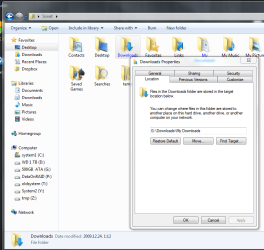
Right click on your folders (downloads,temp,pictures,etc) and select the location tab, then give the new path.
tosf.PNG
 

My Computer My Computer

Computer Manufacturer/Model Number
home made
OS
Windows 7 RTM x64
CPU
AMD X2 5000+
Motherboard
Asrock
Memory
4GB
Graphics Card(s)
Nvidia 9400GT
Sound Card
onboard 6Ch
Monitor(s) Displays
Medion 22" + HannSpree 22"
Screen Resolution
1680X1050 + 1920X1080
Hard Drives
Intel SSD 80GB
WD 1.5 TB
WD 1 TB
Samsung 1TB X 3
PSU
noname
Case
noname
Cooling
Zalman
Keyboard
DeLUX multimedia keyboard
Mouse
Microsoft
Internet Speed
25MB/s
Short and sweet: I want to have a SSD for "C:\", but mount a slower but way cheaper and larger HD for C:\Users.

How can I accomplish this? .. given that Users obviously isn't empty at this time. (The entire system is on the SSD at this point).
Short and sweet, not going to happen. Win 7 expects user accounts just were you see them, systemroot\users.
 

My Computer My Computer

Computer Manufacturer/Model Number
Home Grown
OS
Windows 7 Ultimate (64)
CPU
i7-2600K
Motherboard
Asus P8P67-M Pro
Memory
G.SKILL Ripjaws X Series 8GB (2 x 4GB)
Graphics Card(s)
ATI 5750
Sound Card
On-Board
Monitor(s) Displays
LG W2486L
Screen Resolution
1920X1080
Hard Drives
Intel X-25M 80 Gig SSD | Intel X-25M 160 Gig SSD | WD Black 500MB - External eSata
PSU
Zalman ZM770-XT 770 Watts
Case
Antec 180 mini
Cooling
Cooler Master V8
Internet Speed
15MB - Cable
Other Info
Sissy OC - 4.6 @ 1.3175 24/7 | 18' Idle - 55' Load
No problem. I have that setup. Do what Cartman says (Move). But make sure, you have defined Folders on the HDD - like Documents to where you want to move Documents, Music to where you want to move Music, etc. If you don't do that, you get an awful mess and lose the Location Button (in case you want to move those guys again). Plus you get the HDD as folder address.
Once you moved them, the path will have been automatically adjusted and the folders will behave as usual - except in the right click menu where you may have to navigate to Computer > HDD > Folder (not 100% sure though for Win7 because I moved them in my Vista and then included them into the Win7 libraries).
 

My Computer My Computer

Computer Manufacturer/Model Number
HP, Dell, Gateway, Toshiba - 4 laptops and 2 desktops
OS
Vista, Windows7, Mint Mate, Zorin, Windows 8
CPU
from 1.6GHz Duo to i7
Monitor(s) Displays
2x HP w2207
Hard Drives
5x HDD, 7x SSD, 12x Externals
Keyboard
with trackball - no mices
Mouse
Trackball mice
Internet Speed
DSL 6000
Short and sweet: I want to have a SSD for "C:\", but mount a slower but way cheaper and larger HD for C:\Users.

How can I accomplish this? .. given that Users obviously isn't empty at this time. (The entire system is on the SSD at this point).
Short and sweet, not going to happen. Win 7 expects user accounts just were you see them, systemroot\users.

I think you are wrong. I have done that several times. Can you explain please.
 

My Computer My Computer

Computer Manufacturer/Model Number
HP, Dell, Gateway, Toshiba - 4 laptops and 2 desktops
OS
Vista, Windows7, Mint Mate, Zorin, Windows 8
CPU
from 1.6GHz Duo to i7
Monitor(s) Displays
2x HP w2207
Hard Drives
5x HDD, 7x SSD, 12x Externals
Keyboard
with trackball - no mices
Mouse
Trackball mice
Internet Speed
DSL 6000
Maybe, I haven't tested it myself but since all the profile and app data info resides here, what's gonna tell Windows where you moved it... Simply moving folder isn't gonna do it.
 

My Computer My Computer

Computer Manufacturer/Model Number
Home Grown
OS
Windows 7 Ultimate (64)
CPU
i7-2600K
Motherboard
Asus P8P67-M Pro
Memory
G.SKILL Ripjaws X Series 8GB (2 x 4GB)
Graphics Card(s)
ATI 5750
Sound Card
On-Board
Monitor(s) Displays
LG W2486L
Screen Resolution
1920X1080
Hard Drives
Intel X-25M 80 Gig SSD | Intel X-25M 160 Gig SSD | WD Black 500MB - External eSata
PSU
Zalman ZM770-XT 770 Watts
Case
Antec 180 mini
Cooling
Cooler Master V8
Internet Speed
15MB - Cable
Other Info
Sissy OC - 4.6 @ 1.3175 24/7 | 18' Idle - 55' Load
Maybe, I haven't tested it myself but since all the profile and app data info resides here, what's gonna tell Windows where you moved it... Simply moving folder isn't gonna do it.

It is not YOU that moves the folder, but with the procedure recommended above it is the system that moves the folder and adjusts the path in the process.
Try it, you'll see it works. Just shrink your OS partition, define a data partition and move the folders. That is anyhow better because then your data and system are seperated. And when the system fails, the data will not be effected.
 

My Computer My Computer

Computer Manufacturer/Model Number
HP, Dell, Gateway, Toshiba - 4 laptops and 2 desktops
OS
Vista, Windows7, Mint Mate, Zorin, Windows 8
CPU
from 1.6GHz Duo to i7
Monitor(s) Displays
2x HP w2207
Hard Drives
5x HDD, 7x SSD, 12x Externals
Keyboard
with trackball - no mices
Mouse
Trackball mice
Internet Speed
DSL 6000
whs: Why not explain the procedure that you have used several times.... The instructions above will work for my pics, my docs, etc., not profile info.

Otherwise, if it's really important to him to do this he can follow your method or do it right by following this one...
 

My Computer My Computer

Computer Manufacturer/Model Number
Home Grown
OS
Windows 7 Ultimate (64)
CPU
i7-2600K
Motherboard
Asus P8P67-M Pro
Memory
G.SKILL Ripjaws X Series 8GB (2 x 4GB)
Graphics Card(s)
ATI 5750
Sound Card
On-Board
Monitor(s) Displays
LG W2486L
Screen Resolution
1920X1080
Hard Drives
Intel X-25M 80 Gig SSD | Intel X-25M 160 Gig SSD | WD Black 500MB - External eSata
PSU
Zalman ZM770-XT 770 Watts
Case
Antec 180 mini
Cooling
Cooler Master V8
Internet Speed
15MB - Cable
Other Info
Sissy OC - 4.6 @ 1.3175 24/7 | 18' Idle - 55' Load
whs: Why not explain the procedure that you have used several times.... The instructions above will work for my pics, my docs, etc., not profile info.

Otherwise, if it's really important to him to do this he can follow your method or do it right by following this one...


Look above at Robert Cartman's posting. That's all there is to it. And you are right, that moves only Docs, Pics, Videos, Music, etc. But that is what you usually want because that's where all the bytes are.
The link you gave is not recommended. Too iffy.
 

My Computer My Computer

Computer Manufacturer/Model Number
HP, Dell, Gateway, Toshiba - 4 laptops and 2 desktops
OS
Vista, Windows7, Mint Mate, Zorin, Windows 8
CPU
from 1.6GHz Duo to i7
Monitor(s) Displays
2x HP w2207
Hard Drives
5x HDD, 7x SSD, 12x Externals
Keyboard
with trackball - no mices
Mouse
Trackball mice
Internet Speed
DSL 6000
Too iffy - absolutely... That's been my point, the question wasn't move my doc, pics, or whatever. The post was move c:\users! No problem, happy holidays to all...
 

My Computer My Computer

Computer Manufacturer/Model Number
Home Grown
OS
Windows 7 Ultimate (64)
CPU
i7-2600K
Motherboard
Asus P8P67-M Pro
Memory
G.SKILL Ripjaws X Series 8GB (2 x 4GB)
Graphics Card(s)
ATI 5750
Sound Card
On-Board
Monitor(s) Displays
LG W2486L
Screen Resolution
1920X1080
Hard Drives
Intel X-25M 80 Gig SSD | Intel X-25M 160 Gig SSD | WD Black 500MB - External eSata
PSU
Zalman ZM770-XT 770 Watts
Case
Antec 180 mini
Cooling
Cooler Master V8
Internet Speed
15MB - Cable
Other Info
Sissy OC - 4.6 @ 1.3175 24/7 | 18' Idle - 55' Load
Oh my god.

Short and sweet: I want to have a SSD for "C:\", but mount a slower but way cheaper and larger HD for C:\Users.

How can I accomplish this? .. given that Users obviously isn't empty at this time. (The entire system is on the SSD at this point).
Short and sweet, not going to happen. Win 7 expects user accounts just were you see them, systemroot\users.
Okay, complete and utter edit: you were actually the one coming up with the link to the information which I assumed should exist in some way (Because that's kinda how I would have done it using any brand of Unix. Only on Unix things work - the root account have a home a completely different place than all other users - just exactly because you should be able to perform stuff like this).

So sorry for the full on flaming - your follow up when people pointed out that you were wrong was very good. Thanks.
 

My Computer My Computer

OS
Windows 7, XP - Linux
whs: Why not explain the procedure that you have used several times.... The instructions above will work for my pics, my docs, etc., not profile info.

Otherwise, if it's really important to him to do this he can follow your method or do it right by following this one...


Look above at Robert Cartman's posting. That's all there is to it. And you are right, that moves only Docs, Pics, Videos, Music, etc. But that is what you usually want because that's where all the bytes are.
The link you gave is not recommended. Too iffy.
Thanks for your suggestion.

But really, the way clutz is linking to was actually something like what I expected - go into some kind of "outside shell", do the actual physical move (or copy-and-delete), then do the linking (On unix, either using a symlink, or a mount point), then boot back up.

When you move the system's understanding of were to store stuff using the "approved way" you outline, what happens if an application goes directly to the old location due to hardcoded paths? Are new junction points (or whatever they're called) set up for this to not happen?
 

My Computer My Computer

OS
Windows 7, XP - Linux
The way I set up My SSD:

Basically what has been suggested above:

Create A folder for each item on the spinning Disc. My Music/ my Pictures/My Videos/Downloads/ and my Documents.

Then Start/ <user name> / right click each folder and choose: Properties/ Location Tab

Then direct it to the folder you created on the spinning drive.

If you have multiple users, you may want to set the folder on the spinning drive slightly differently.
I/E USERS/ <User name> /
And do the same for videos, documents, downloads etc for each user and do the same steps.

This works the same way for the Public Folder as well, although i personally do not use them and left them where they were.


You can also move TEMP folder to the spinning drive as well, to save space on your SSD as well as reduce amount of writes if you choose to.
Basically the same concept:

Create A Folder on the spinning Drive. (I called Mine System)
Inside I made 3 folders: TMP, Temp and Users
inside users: <User name> / App Data / local/ temp
and
<user name> / Temp

Name them as you wish, this is simply how I made mine.

((Youll need to do the user temp for each user name))

Then R/click My computer from start menu/ Properties/ Advanced System Settings
and choose Enviromental Variables at bottom

In the box that pops up youll see at top User variables and 2 folders:
TEMP and TMP

These are the USER temps.
highlight and choose edit and tell windows where you want them, the new folders you created for user temps.

If you set up your folders Similar to mine, the location will be very much the same, just a different drive letter. Again, you can name them as you choose, it doesnt matter.

The bottom box is a list of system variables:
Near the bottom you'll see the same 2 folders: TMP and TEMP
These 2 are for Windows itself.
Do the same.

This will keep TEMP files off the SSD


This all may be a few more steps than simply moving ALL of the User folder in one go, but it does work flawlessly and Win7 knows where everything is without issue.

Hope this helps.

 

My Computer My Computer

Computer Manufacturer/Model Number
Custom (Self Build)
OS
Windows 7 Home Premium 64bit
CPU
Intel Core i7 2700k
Motherboard
eVGA P67 SLI
Memory
8GB Mushkin Redline Ridgebacks @1866
Graphics Card(s)
EVGA GTX570 SC
Sound Card
XiFi Titanium HD
Monitor(s) Displays
LG W2453V
Screen Resolution
1920x1080
Hard Drives
Intel 320 80GB -- Intel X25-V 40GB --WD Black 1TB x2 -- WD Blue 640GB
PSU
Seasonic x750
Case
Corsair 600T SE White
Cooling
eVGA Superclocked CPU Cooler
Keyboard
Saitek Cyborg
Antivirus
Kaspersky
Browser
IE
Other Info
LG BD/DVD
Wishmaster, nice summary. You should make a tutorial out of it.
 

My Computer My Computer

Computer Manufacturer/Model Number
HP, Dell, Gateway, Toshiba - 4 laptops and 2 desktops
OS
Vista, Windows7, Mint Mate, Zorin, Windows 8
CPU
from 1.6GHz Duo to i7
Monitor(s) Displays
2x HP w2207
Hard Drives
5x HDD, 7x SSD, 12x Externals
Keyboard
with trackball - no mices
Mouse
Trackball mice
Internet Speed
DSL 6000
Back
Top