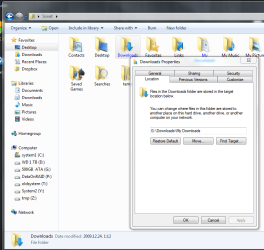
The way I set up My SSD:
Basically what has been suggested above:
Create A folder for each item on the spinning Disc. My Music/ my Pictures/My Videos/Downloads/ and my Documents.
Then Start/ <user name> / right click each folder and choose: Properties/ Location Tab
Then direct it to the folder you created on the spinning drive.
If you have multiple users, you may want to set the folder on the spinning drive slightly differently.
I/E USERS/ <User name> /
And do the same for videos, documents, downloads etc for each user and do the same steps.
This works the same way for the Public Folder as well, although i personally do not use them and left them where they were.
You can also move TEMP folder to the spinning drive as well, to save space on your SSD as well as reduce amount of writes if you choose to.
Basically the same concept:
Create A Folder on the spinning Drive. (I called Mine System)
Inside I made 3 folders: TMP, Temp and Users
inside users: <User name> / App Data / local/ temp
and
<user name> / Temp
Name them as you wish, this is simply how I made mine.
((Youll need to do the user temp for each user name))
Then R/click My computer from start menu/ Properties/ Advanced System Settings
and choose Enviromental Variables at bottom
In the box that pops up youll see at top User variables and 2 folders:
TEMP and TMP
These are the USER temps.
highlight and choose edit and tell windows where you want them, the new folders you created for user temps.
If you set up your folders Similar to mine, the location will be very much the same, just a different drive letter. Again, you can name them as you choose, it doesnt matter.
The bottom box is a list of system variables:
Near the bottom you'll see the same 2 folders: TMP and TEMP
These 2 are for Windows itself.
Do the same.
This will keep TEMP files off the SSD
This all may be a few more steps than simply moving ALL of the User folder in one go, but it does work flawlessly and Win7 knows where everything is without issue.
Hope this helps.