
You are using an out of date browser. It may not display this or other websites correctly.
You should upgrade or use an alternative browser.
You should upgrade or use an alternative browser.
Motherboard sata ports won't work
- Thread starter farbods0
- Start date

nope i think my hdd is just DOA and that really sucks because i wanted to use it for christmas and try out my 5870
Oh, I thought that you said it worked when connected to another computer.

My Computer
At a glance
64-bit Windows 11 Pro for WorkstationsIntel i7-8700K OC'd to 5 GHz64 GB (4x16GB) G.SKILL TridentZ RGB DDR4 3600...ASUS ROG-STRIX-GTX1080TI-O11G-GAMING
- Computer type
- PC/Desktop
- Computer Manufacturer/Model Number
- Self built custom
- OS
- 64-bit Windows 11 Pro for Workstations
- CPU
- Intel i7-8700K OC'd to 5 GHz
- Motherboard
- ASUS ROG Maximus XI Formula Z390
- Memory
- 64 GB (4x16GB) G.SKILL TridentZ RGB DDR4 3600 MHz
- Graphics Card(s)
- ASUS ROG-STRIX-GTX1080TI-O11G-GAMING
- Sound Card
- Integrated
- Monitor(s) Displays
- 2 x Samsung Odyssey G7 27"
- Screen Resolution
- 2560x1440
- Hard Drives
- 1TB Samsung 990 PRO M.2,
4TB Samsung 990 PRO PRO M.2,
TerraMaster F8 SSD Plus NAS
- PSU
- Seasonic Prime Titanium 850W
- Case
- Thermaltake Core P3
- Cooling
- Corsair Hydro H115i
- Keyboard
- Logitech wireless K800
- Mouse
- Logitech MX Master 4
- Internet Speed
- 2 Gb/s Download and 100 Mb/s Upload
- Antivirus
- Malwarebyte Anti-Malware Premium
- Browser
- Google Chrome
- Other Info
- Logitech Z625 speaker system,
Logitech BRIO 4K Pro webcam,
HP Color LaserJet Pro MFP M477fdn,
APC SMART-UPS RT 1000 XL - SURT1000XLI,
Galaxy S23 Plus phone

I'm confused here, did you not type that the SATA connection was bad, and that you tried the drive on another pc?nope i think my hdd is just DOA and that really sucks because i wanted to use it for christmas and try out my 5870
My Computer
At a glance
Windows 7 7600 1 X64AMD PHENOM II X 550 PROCESSOR 3.1 ghzCorsair 4 gig ddr 3ati radeon 3300
- Computer Manufacturer/Model Number
- Custom Build
- OS
- Windows 7 7600 1 X64
- CPU
- AMD PHENOM II X 550 PROCESSOR 3.1 ghz
- Motherboard
- ASUS M4A78-TE
- Memory
- Corsair 4 gig ddr 3
- Graphics Card(s)
- ati radeon 3300
- Sound Card
- ati hd
- Monitor(s) Displays
- syncmaster 2033sw
- Screen Resolution
- 1600X900 60 hz refresh
- Hard Drives
- twin_seagates SATA's 1 TB & 500 Gig, hitachi_slimline 160 gig
- PSU
- antec_550 watt
- Case
- cooler master GLite
- Cooling
- stock_heat sink
- Internet Speed
- 20mbs up/ 1.5mbs down
- Other Info
- favorite child "stewie"
favorite dog "brian"
So your issue no longer exists?Yeah I did but apparently it was the old drive in the computer =(
My Computer
At a glance
Windows 7 7600 1 X64AMD PHENOM II X 550 PROCESSOR 3.1 ghzCorsair 4 gig ddr 3ati radeon 3300
- Computer Manufacturer/Model Number
- Custom Build
- OS
- Windows 7 7600 1 X64
- CPU
- AMD PHENOM II X 550 PROCESSOR 3.1 ghz
- Motherboard
- ASUS M4A78-TE
- Memory
- Corsair 4 gig ddr 3
- Graphics Card(s)
- ati radeon 3300
- Sound Card
- ati hd
- Monitor(s) Displays
- syncmaster 2033sw
- Screen Resolution
- 1600X900 60 hz refresh
- Hard Drives
- twin_seagates SATA's 1 TB & 500 Gig, hitachi_slimline 160 gig
- PSU
- antec_550 watt
- Case
- cooler master GLite
- Cooling
- stock_heat sink
- Internet Speed
- 20mbs up/ 1.5mbs down
- Other Info
- favorite child "stewie"
favorite dog "brian"
well my issue is still there its just that no one can do anything about it because its defective
When you have it connected to another computer, check in Disk Management to make sure that the hard drive has been initialized and formated on it. A brand new hard drive is usually blank and has not been inialized or formated yet. This could be why it will not show up on a new system like this. Next, try it again to see if shows up with your motherboard.
My Computer
At a glance
64-bit Windows 11 Pro for WorkstationsIntel i7-8700K OC'd to 5 GHz64 GB (4x16GB) G.SKILL TridentZ RGB DDR4 3600...ASUS ROG-STRIX-GTX1080TI-O11G-GAMING
- Computer type
- PC/Desktop
- Computer Manufacturer/Model Number
- Self built custom
- OS
- 64-bit Windows 11 Pro for Workstations
- CPU
- Intel i7-8700K OC'd to 5 GHz
- Motherboard
- ASUS ROG Maximus XI Formula Z390
- Memory
- 64 GB (4x16GB) G.SKILL TridentZ RGB DDR4 3600 MHz
- Graphics Card(s)
- ASUS ROG-STRIX-GTX1080TI-O11G-GAMING
- Sound Card
- Integrated
- Monitor(s) Displays
- 2 x Samsung Odyssey G7 27"
- Screen Resolution
- 2560x1440
- Hard Drives
- 1TB Samsung 990 PRO M.2,
4TB Samsung 990 PRO PRO M.2,
TerraMaster F8 SSD Plus NAS
- PSU
- Seasonic Prime Titanium 850W
- Case
- Thermaltake Core P3
- Cooling
- Corsair Hydro H115i
- Keyboard
- Logitech wireless K800
- Mouse
- Logitech MX Master 4
- Internet Speed
- 2 Gb/s Download and 100 Mb/s Upload
- Antivirus
- Malwarebyte Anti-Malware Premium
- Browser
- Google Chrome
- Other Info
- Logitech Z625 speaker system,
Logitech BRIO 4K Pro webcam,
HP Color LaserJet Pro MFP M477fdn,
APC SMART-UPS RT 1000 XL - SURT1000XLI,
Galaxy S23 Plus phone
Farbods, If you are telling us that you bought a new hard drive and its USB, when you boot since the internal C drive is first boot thats in the first order of priority.bought the new hard drive but whenever i do boot from usb_Hdd it still boots from harddrive.
The USB drive has not been configured as a bootable drive so it will load up as a secondary /additional drive designated "D" drive.
In order to use the USB drive as a flash or you have executables that need to load after the bios posts before it boot straps and loads the OS you must make your USB drive bootable or go to your bios and change out the boot priority to your USB drive.
Best Regards from your friends at Windows 7 Support,
Adrian
My Computer
At a glance
Windows 7 7600 1 X64AMD PHENOM II X 550 PROCESSOR 3.1 ghzCorsair 4 gig ddr 3ati radeon 3300
- Computer Manufacturer/Model Number
- Custom Build
- OS
- Windows 7 7600 1 X64
- CPU
- AMD PHENOM II X 550 PROCESSOR 3.1 ghz
- Motherboard
- ASUS M4A78-TE
- Memory
- Corsair 4 gig ddr 3
- Graphics Card(s)
- ati radeon 3300
- Sound Card
- ati hd
- Monitor(s) Displays
- syncmaster 2033sw
- Screen Resolution
- 1600X900 60 hz refresh
- Hard Drives
- twin_seagates SATA's 1 TB & 500 Gig, hitachi_slimline 160 gig
- PSU
- antec_550 watt
- Case
- cooler master GLite
- Cooling
- stock_heat sink
- Internet Speed
- 20mbs up/ 1.5mbs down
- Other Info
- favorite child "stewie"
favorite dog "brian"
jradicle11
New member
- Local time
- 8:32 AM
- Messages
- 152
I'm actually having a similar problem. I have the same motherboard i believe, Gigabyta MA785GT-UDH3. When installing windows 7, it won't recognize my hard drive. Also, whatever I have plugged into the SATA0 port won't show up in my bios. Be sure to switch the SATA ports. I thought my hard drive was defective but it could be my motherboard.
On a side note, I was able to run the boot from a USB drive but still reached the same not recognizing hard drive thing.
On a side note, I was able to run the boot from a USB drive but still reached the same not recognizing hard drive thing.
My Computer
At a glance
windows 7/windows xp/windows vistaAMD Phenom II X2 550 Black Edition Callisto 3...Mushkin Enhanced Silverline 2GB 240-Pin DDR3
- OS
- windows 7/windows xp/windows vista
- CPU
- AMD Phenom II X2 550 Black Edition Callisto 3.1GHz
- Motherboard
- Gigabyte AM3 785G ATX
- Memory
- Mushkin Enhanced Silverline 2GB 240-Pin DDR3
- Hard Drives
- Western Digitial Cavier Blue 500GB
- PSU
- Earthwatts 500w
- Case
- Antec Sonata III
My harddrive is not usb it is internal and uses the sata ports. My usb is configured as a bootable device because I do it on my laptop boot from usb and it works. But when i do boot from usb on my desktop with this gigabyte motherboard it wont work.
My Computer
At a glance
windows 7
- OS
- windows 7
jradicle11
New member
- Local time
- 8:32 AM
- Messages
- 152
When you're at the bootscreen, press F12 to enter the boot order. Select USB_FDD and it should boot from the USB drive. I'll tell you my settings for my bios (though windows 7 doesn't recognize my hard drive so this may not be the best idea) if the aforementioned doesn't work.
My Computer
At a glance
windows 7/windows xp/windows vistaAMD Phenom II X2 550 Black Edition Callisto 3...Mushkin Enhanced Silverline 2GB 240-Pin DDR3
- OS
- windows 7/windows xp/windows vista
- CPU
- AMD Phenom II X2 550 Black Edition Callisto 3.1GHz
- Motherboard
- Gigabyte AM3 785G ATX
- Memory
- Mushkin Enhanced Silverline 2GB 240-Pin DDR3
- Hard Drives
- Western Digitial Cavier Blue 500GB
- PSU
- Earthwatts 500w
- Case
- Antec Sonata III
Ok, to be clear, your new PC has an internal drive that works?My harddrive is not usb it is internal and uses the sata ports. My usb is configured as a bootable device because I do it on my laptop boot from usb and it works. But when i do boot from usb on my desktop with this gigabyte motherboard it wont work.
The internal drive (we will call it C
 is where you installed Windows 7 and you can boot up succesfully with no external drive attached?
You want to connect a USB drive and be able to boot from it first? But its not recognised? But you can boot from this external drive on a laptop?
Are these statements accurate?
My Computer
At a glance
Windows 7 7600 1 X64AMD PHENOM II X 550 PROCESSOR 3.1 ghzCorsair 4 gig ddr 3ati radeon 3300
- Computer Manufacturer/Model Number
- Custom Build
- OS
- Windows 7 7600 1 X64
- CPU
- AMD PHENOM II X 550 PROCESSOR 3.1 ghz
- Motherboard
- ASUS M4A78-TE
- Memory
- Corsair 4 gig ddr 3
- Graphics Card(s)
- ati radeon 3300
- Sound Card
- ati hd
- Monitor(s) Displays
- syncmaster 2033sw
- Screen Resolution
- 1600X900 60 hz refresh
- Hard Drives
- twin_seagates SATA's 1 TB & 500 Gig, hitachi_slimline 160 gig
- PSU
- antec_550 watt
- Case
- cooler master GLite
- Cooling
- stock_heat sink
- Internet Speed
- 20mbs up/ 1.5mbs down
- Other Info
- favorite child "stewie"
favorite dog "brian"
jradicle11
New member
- Local time
- 8:32 AM
- Messages
- 152
I don't think he has anything on his hard drive. He suspects it being DOA. Try to put it in your SATA1 port. I have the same motherboard with a similar problem. Nothing in my SATA0 port is recognized.
My Computer
At a glance
windows 7/windows xp/windows vistaAMD Phenom II X2 550 Black Edition Callisto 3...Mushkin Enhanced Silverline 2GB 240-Pin DDR3
- OS
- windows 7/windows xp/windows vista
- CPU
- AMD Phenom II X2 550 Black Edition Callisto 3.1GHz
- Motherboard
- Gigabyte AM3 785G ATX
- Memory
- Mushkin Enhanced Silverline 2GB 240-Pin DDR3
- Hard Drives
- Western Digitial Cavier Blue 500GB
- PSU
- Earthwatts 500w
- Case
- Antec Sonata III
Updates
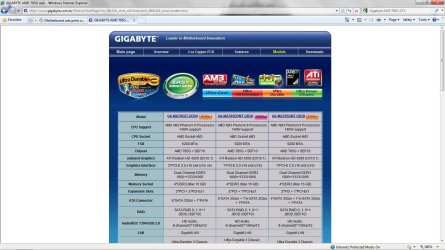
Follow this link and investigate if you have the most uptodate bios and chipsets.
GIGABYTE AMD 785G web
Here is an image for you to see.
Follow this link and investigate if you have the most uptodate bios and chipsets.
GIGABYTE AMD 785G web
Here is an image for you to see.
Attachments
My Computer
At a glance
Windows 7 7600 1 X64AMD PHENOM II X 550 PROCESSOR 3.1 ghzCorsair 4 gig ddr 3ati radeon 3300
- Computer Manufacturer/Model Number
- Custom Build
- OS
- Windows 7 7600 1 X64
- CPU
- AMD PHENOM II X 550 PROCESSOR 3.1 ghz
- Motherboard
- ASUS M4A78-TE
- Memory
- Corsair 4 gig ddr 3
- Graphics Card(s)
- ati radeon 3300
- Sound Card
- ati hd
- Monitor(s) Displays
- syncmaster 2033sw
- Screen Resolution
- 1600X900 60 hz refresh
- Hard Drives
- twin_seagates SATA's 1 TB & 500 Gig, hitachi_slimline 160 gig
- PSU
- antec_550 watt
- Case
- cooler master GLite
- Cooling
- stock_heat sink
- Internet Speed
- 20mbs up/ 1.5mbs down
- Other Info
- favorite child "stewie"
favorite dog "brian"
Adrian you are correct but my bios is up to date and still I cant do it
Jrdicle I did the f12 thing and boot from usb_FDD and it wont work still it just boots up the OS I have installed
Jrdicle I did the f12 thing and boot from usb_FDD and it wont work still it just boots up the OS I have installed
Last edited by a moderator:
My Computer
At a glance
windows 7
- OS
- windows 7
jradicle11
New member
- Local time
- 8:32 AM
- Messages
- 152
Did you follow:
http://www.sevenforums.com/tutorials/2432-usb-windows-7-installation-key-drive-create.html
to create a bootable USB drive, or did you just drag the .iso onto it?
I'm sure this has been suggested before but.
Does the light on your disc drive turn on? Is it connected to power? I think it should still open and close even if the SATA isn't working.
http://www.sevenforums.com/tutorials/2432-usb-windows-7-installation-key-drive-create.html
to create a bootable USB drive, or did you just drag the .iso onto it?
I'm sure this has been suggested before but.
Does the light on your disc drive turn on? Is it connected to power? I think it should still open and close even if the SATA isn't working.
My Computer
At a glance
windows 7/windows xp/windows vistaAMD Phenom II X2 550 Black Edition Callisto 3...Mushkin Enhanced Silverline 2GB 240-Pin DDR3
- OS
- windows 7/windows xp/windows vista
- CPU
- AMD Phenom II X2 550 Black Edition Callisto 3.1GHz
- Motherboard
- Gigabyte AM3 785G ATX
- Memory
- Mushkin Enhanced Silverline 2GB 240-Pin DDR3
- Hard Drives
- Western Digitial Cavier Blue 500GB
- PSU
- Earthwatts 500w
- Case
- Antec Sonata III
jradicle11
New member
- Local time
- 8:32 AM
- Messages
- 152
Your disc drive, not USB. If connected to power, your disc drive should still open and close and light up. If not, you most likely have a faulty disc drive.
My Computer
At a glance
windows 7/windows xp/windows vistaAMD Phenom II X2 550 Black Edition Callisto 3...Mushkin Enhanced Silverline 2GB 240-Pin DDR3
- OS
- windows 7/windows xp/windows vista
- CPU
- AMD Phenom II X2 550 Black Edition Callisto 3.1GHz
- Motherboard
- Gigabyte AM3 785G ATX
- Memory
- Mushkin Enhanced Silverline 2GB 240-Pin DDR3
- Hard Drives
- Western Digitial Cavier Blue 500GB
- PSU
- Earthwatts 500w
- Case
- Antec Sonata III
Similar threads


- Replies
- 5
- Views
- 4K
