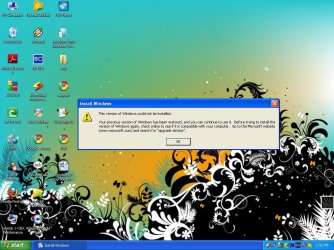
no able to install 7 on my pc

vikrantsjs

New member
Local time
1:15 AM
Messages
69
Location
Kasganj
:cry: i am not able to install windows 7 on my Intel(R) 82845G/GL/GE/PE/GV Graphics Controller.
my processor is intel p4 2.4
i have 1 GB RAM
it says code 5 error on booting from dvd
but i install it on core 2 duo processor it works on it.
HELP ME....THNX IN ADVANCE
 

My Computer My Computer

Computer Manufacturer/Model Number
compaq cq62
OS
windows 7
CPU
2.3
Memory
2 GB DDR3
Monitor(s) Displays
15.6"
Screen Resolution
1366*768
Hard Drives
320 GB
Internet Speed
BROADBAND
Other Info
PROCESSOR - I5, 320 GB HDD
Extract ISO files to XP desktop, try to run Setup.

Test the ISO by installing ImgBurn, select Verify Disk, then load ISO in using file icon. Make sure it says "bootable" in text on left side. If not, download ISO again.

Now insert the DVD, click Verify button to verify DVD. If necessary burn new DVD at 4x speed with Verify.

Try writing the ISO to a 4 gb+ flash stick using Ultra ISO trial version Bootable tab.

Boot the flash stick by tapping F-key given on first bootup screen for Boot Menu; flash will be listed as Hard Drive
 
If you cannot get it to work using gregs advice. Go to the microsoft site and download upgrade advisor, it will tell you what has to be changed to install.
 

My Computer My Computer

Computer type
PC/Desktop
Computer Manufacturer/Model Number
Dell XPS 420
OS
Windows 10, Home Clean Install
CPU
Intel Core2 processsor Q8200(2.33Ghz 1333FSB) Quad Core Tech
Motherboard
Dell
Memory
6 gb
Graphics Card(s)
ATI Radeon 256MB HD3650
Sound Card
Intergrated 7.1 Channel Audio
Monitor(s) Displays
Dell SP2009W 20"
Hard Drives
640 GB Serial ATA Hard drive
Cooling
Fan
Keyboard
Dell USB Keyboard
Mouse
Dell Premium Optical USB
Internet Speed
DSL 2.85
I see that you were able to extract and run Windows 7 from XP.

You ask how it can be formatted. The answer is it cannot be formatted when run from XP. You would need to be able to boot from DVD to use Custom Drive Tools to partition and format.

You can either overwrite XP completely, or install Win7 to a second partition.

If you want a Dual Boot with Win7 on another partition, you can use free Partition Wizard to shrink XP and create a new NTFS formatted partition to install Win7 from the XP desktop.

This achieves a formatted install for Win7. Later we can help you remove the Dual Boot and recover the XP partition into Win7.

View attachment 43925
 
Last edited:
:cry:today i extract iso file & then install it , it installs completely , but when it boots it said that CHANGES MADE DURING THE INSTALLATION ARE BEING UNCHANGED SOMETHING LIKE THIS. and then it roolback to xp- my previous windows & said something like the attached file

i have also attached the windows 7 upgrade advisor file.:cry:
 

Attachments

My Computer My Computer

Computer Manufacturer/Model Number
compaq cq62
OS
windows 7
CPU
2.3
Memory
2 GB DDR3
Monitor(s) Displays
15.6"
Screen Resolution
1366*768
Hard Drives
320 GB
Internet Speed
BROADBAND
Other Info
PROCESSOR - I5, 320 GB HDD
:cry:today i extract iso file & then install it , it installs completely , but when it boots it said that CHANGES MADE DURING THE INSTALLATION ARE BEING UNCHANGED SOMETHING LIKE THIS. and then it roolback to xp- my previous windows & said something like the attached file

i have also attached the windows 7 upgrade advisor file.:cry:

Hi

Are doing a Upgrade install, Clean install or custom install?

http://www.sevenforums.com/tutorials/31402-clean-install-upgrade-windows-7-version.html?ltr=C

http://www.sevenforums.com/tutorials/20146-custom-install-windows-7-a.html?ltr=C

http://www.sevenforums.com/tutorials/1649-clean-install-windows-7-a.html?ltr=C
 

My Computer My Computer

OS
ME/XP/Vista/Win7
:cry:today i extract iso file & then install it , it installs completely , but when it boots it said that CHANGES MADE DURING THE INSTALLATION ARE BEING UNCHANGED SOMETHING LIKE THIS. and then it roolback to xp- my previous windows & said something like the attached file

i have also attached the windows 7 upgrade advisor file.:cry:

i would have bet on this after seeing that your hard drive is pata. there comes a time when people must buy new hardware. your system is too old.
 

My Computer My Computer

Computer Manufacturer/Model Number
InternetLord
OS
Windows 7 Eternity Build 7600 RTM Activated x86
CPU
Core2Duo E8400
Motherboard
Asus Rampage Formula
Memory
3gis DDR2 6400
Graphics Card(s)
Asus NVidia 9500 GTX 512mb
Sound Card
Sound Blaster X-Fi Xtreme Audio PCI-e
Monitor(s) Displays
SCEPTRE X22WG-1080P 22"
Screen Resolution
1680 x 1050
Hard Drives
Western Digital 300gig SATA VelociRaptor 10,000rpm
two 320gig SATA Seagate Barracuda 7,200rpm
PSU
700 Watt
Case
U2-UFO Black Powder Coat - Solid Top www.mountainmod.com
Cooling
7 x 120mm 2,500rpm case fans, Ultra ChillTEC Thermoelectric
Keyboard
Logitech diNovo Edge
Mouse
Logitech LX8 Laser Mouse
Internet Speed
7mbps
Other Info
Hauppauge WinTV HRV-1800 PCI-e
Find these log files - the last entry should be useful:

C:\$WINDOWS.~BT\Sources\Panther\setuperr.log

C:\$WINDOWS.~BT\Sources\Panther\setupact.log

C:\$WINDOWS.~BT\Sources\Panther\PreGatherPnPList.log
 

My Computers My Computers

System One System Two

  • Computer type
    PC/Desktop
    OS
    7 X64
    CPU
    i5 8400
    Motherboard
    gigabyte b365m ds3h
    Memory
    2x8gb 3200mhz
    Hard Drives
    various
    PSU
    pure power 11 400w cm
    Case
    Coolermaster
    Cooling
    cryorig m9i
  • Computer type
    PC/Desktop
    OS
    7x64
    CPU
    g5400
    Motherboard
    ga b365m ds3h
    Memory
    8gb ddr4 2400
    PSU
    xfx pro 450w
:cry:today i extract iso file & then install it , it installs completely , but when it boots it said that CHANGES MADE DURING THE INSTALLATION ARE BEING UNCHANGED SOMETHING LIKE THIS. and then it roolback to xp- my previous windows & said something like the attached file

i have also attached the windows 7 upgrade advisor file.:cry:

i would have bet on this after seeing that your hard drive is pata. there comes a time when people must buy new hardware. your system is too old.

I see nothing in his report that indicates his system cannot run Windows 7. IDE drives work just fine, his processor is fine. He just won't have Aero effects, and even that might work after 7 is up and running.
 

My Computer My Computer

Computer Manufacturer/Model Number
Custom
OS
Windows 7 Ultimate RTM (Technet)
CPU
3.00 gigahertz Intel Core2 Duo E8400
Motherboard
ASUSTeK Computer INC. P5K/EPU Rev 1.xx
Memory
4GB
Graphics Card(s)
ATI Radeon X1950 Pro
Sound Card
Built in HD Audio
Monitor(s) Displays
22" Gateway LCD
Screen Resolution
1920 x 1200
Hard Drives
ST3160023A [Hard drive] (160.04 GB) -- drive 0, rev 8.01, ST3500630AS [Hard drive] (500.11 GB) -- drive 2, rev 3.AAK
ST3500630AS [Hard drive] (500.11 GB) -- drive 1, rev 3.AAK
Keyboard
Logitech G11
Mouse
Microsoft Wireless Laser Mouse 5000
Internet Speed
13.44 Mbps
:cry:today i extract iso file & then install it , it installs completely , but when it boots it said that CHANGES MADE DURING THE INSTALLATION ARE BEING UNCHANGED SOMETHING LIKE THIS. and then it roolback to xp- my previous windows & said something like the attached file

i have also attached the windows 7 upgrade advisor file.:cry:

i would have bet on this after seeing that your hard drive is pata. there comes a time when people must buy new hardware. your system is too old.

I see nothing in his report that indicates his system cannot run Windows 7. IDE drives work just fine, his processor is fine. He just won't have Aero effects, and even that might work after 7 is up and running.

the only reason for the os to rollback is because it cannot run on the hardware the person is trying to run it on. even though 7 will run on older hardware than vista does not mean it will run on everything. as for pata it is the older form of ide. he might try to do multiple wipes of the drive after backing up what he wants to keep and doing a clean install. upgrade attempts do not always work even when the os lets you install it.
 

My Computer My Computer

Computer Manufacturer/Model Number
InternetLord
OS
Windows 7 Eternity Build 7600 RTM Activated x86
CPU
Core2Duo E8400
Motherboard
Asus Rampage Formula
Memory
3gis DDR2 6400
Graphics Card(s)
Asus NVidia 9500 GTX 512mb
Sound Card
Sound Blaster X-Fi Xtreme Audio PCI-e
Monitor(s) Displays
SCEPTRE X22WG-1080P 22"
Screen Resolution
1680 x 1050
Hard Drives
Western Digital 300gig SATA VelociRaptor 10,000rpm
two 320gig SATA Seagate Barracuda 7,200rpm
PSU
700 Watt
Case
U2-UFO Black Powder Coat - Solid Top www.mountainmod.com
Cooling
7 x 120mm 2,500rpm case fans, Ultra ChillTEC Thermoelectric
Keyboard
Logitech diNovo Edge
Mouse
Logitech LX8 Laser Mouse
Internet Speed
7mbps
Other Info
Hauppauge WinTV HRV-1800 PCI-e
Can you try installing from XP to a new partition? The installer will configure a dual boot menu.

We can later help to remove the dual boot and recover the XP space into Win7. It need only be a transition.

You can use Partition Wizard to shrink the XP partition first, then Create a New partition formatted Primary NTFS. View attachment 43998

Install Win7 from XP to the new partiition.

Back up your files first and consider backing up an Image of XP which can be reimaged if you need to start over; shrinking operations can fail.
 
Last edited:
I would definately agree on the dual boot idea
Have had a code 5 error before caused by the fact win7 does not support some old IDE cd/dvd drives.
I attempted a clean install on this machine and it refused to boot from disk period
I eventually had to reinstall XP, run 7 from desktop then remove XP after

You will need to make a recovery disk as soon as you install 7 before you remove old os or if you have any probs you may not be able to run recovery software on win7 dvd, should boot fine from cd though

Hope this helps
Paul
 
Last edited:

My Computer My Computer

Computer type
PC/Desktop
Computer Manufacturer/Model Number
Pauly Special
OS
Win7 Ultimate X64
CPU
Intel i5 3570K
Motherboard
Gigabyte Z77X-DS3H
Memory
8GB DDR3 1600
Graphics Card(s)
Onboard
Sound Card
Onboard
Screen Resolution
1280x1024
Hard Drives
Samsung 840 Evo SSD (OS)
1TB Spinner (Data)
PSU
800W Arctic
Case
Cooler Master
Cooling
3x120mm Fans
Keyboard
MS Wireless
Mouse
MS Wireless
Internet Speed
20M
Uploading first 2 log files

i m uploading first 2 log files
3rd log file was not found.
 

Attachments

My Computer My Computer

Computer Manufacturer/Model Number
compaq cq62
OS
windows 7
CPU
2.3
Memory
2 GB DDR3
Monitor(s) Displays
15.6"
Screen Resolution
1366*768
Hard Drives
320 GB
Internet Speed
BROADBAND
Other Info
PROCESSOR - I5, 320 GB HDD
Hi

What size HD are you installing to?
 

My Computer My Computer

OS
ME/XP/Vista/Win7
Do you want to try running the installer from XP to a second partition, since it will run from XP?

The log shows failure trying to lay down the image which is probably because of the XP formatting when it tries to overwrite XP. XP has a slightly different partition table which could upset the installer on PATA drive.

If you instead create a second partition formatted NTFS using Partition Wizard linked in my post above, it should be able to lay down the image there.

Backup your files and an image of your XP if you want the ability to recover it.
 
Hi

Where did you buy your ISO & Licence from?
 

My Computer My Computer

OS
ME/XP/Vista/Win7
RE: 7 is not installing

hi GREG
:cry: i tried to burn using ultraISO with verify
it burns completely.
but when i boot from pen drive it says
"BOOTING FROM USB..OK"
something like this.
then it pause.
i leave it for 15 min.
but it remains pause after 15 min.
so it did't works. :cry:
plz help me
 

My Computer My Computer

Computer Manufacturer/Model Number
compaq cq62
OS
windows 7
CPU
2.3
Memory
2 GB DDR3
Monitor(s) Displays
15.6"
Screen Resolution
1366*768
Hard Drives
320 GB
Internet Speed
BROADBAND
Other Info
PROCESSOR - I5, 320 GB HDD
Look for the USB flash stick under Hard Drives in the Boot Menu, not Flash drives.

It will be listed by its make and model.

If the flash stick will not boot using UltraISO, then try formatting the stick Primary in Disk Management, loading Win7 files into the root and booting then. If this fails, then try Win2Flash: http://dottech.org/featured/9157

You never responded to the suggestion to install to a second partition from XP, since the installer would run in XP.

Please also respond to where you got Windows 7 ISO and key.
 
Back
Top