Picking out a soundcard

Bill

New member
Power User
Local time
12:19 PM
Messages
197
Hey folks,

I recently just got a new TV and want to run audio over my HDMI connection from my video card to my TV. Here is the video card I have:

ASUSTeK Computer Inc.

Now, inside the box came a SPDIF wire. I understand that with Nvidia cards, you have to use this cable to connect it to your soundcard to get audio. My motherboard's onboard audio isn't compatible with the wire.

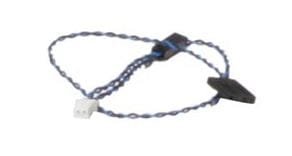
The wire itself has 2 ends, along with a small white power connector. One end is a 2 pin connector and the other is 4 pins (1 ground, 1 empty, and 2 spdif).

Does anyone know of a good decent soundcard that will take a connection from a 2pin SPDIF wire?

Thanks a lot! :)

-Bill
 

My Computer My Computer

Computer type
PC/Desktop
Computer Manufacturer/Model Number
Custom Built
OS
Windows 7 Enterprise x64
CPU
i7-5820K
Motherboard
Asus X99 A
Memory
16GB DDR4
Graphics Card(s)
ASUS 2GB Nvidia 960GTX OC'd
Monitor(s) Displays
24"
Screen Resolution
1920x1080
Hard Drives
Samsung 1TB 840 SSD
Western Digital 1TB Black Drive
Seagate 2TB NAS Drive
PSU
Antec Earthwatts 650w
Case
Antec DF-85
Why not just get a Video card that has the audio for the HDMI built into the Video card. That eliminates any additional cabling, etc. I have an ATI Radeon HD4850 Video card and it has audio on the video card for the HDMI output.
 

My Computer My Computer

Computer type
PC/Desktop
Computer Manufacturer/Model Number
My Own Build
OS
Windows 10 64 bit
CPU
Intel i7 6700K
Motherboard
ASUS ROG Maximus VIII Hero
Memory
16GB Corsair Dominator
Graphics Card(s)
Intel CPU Graphics
Sound Card
RealTek
Monitor(s) Displays
27" Dell S2719dgf
Screen Resolution
2560X1440
Hard Drives
1 TB Samsung 850 EVO SSD for Win 10 Pro
500GB Samsung 850 EVO SSD for Win 10 Insider
2 TB drive for backup
PSU
EVGA Supernova 750G2
Case
BeQuiet Silent Base 600
Cooling
Deepcool Captain 120EX
Keyboard
Microsoft Wireless 2000
Mouse
Microsoft wireless
Internet Speed
100 MB/sec (Cable)
Antivirus
Microsoft Defender and Malwarebytes
Browser
Edge/Firefox
Other Info
Cakewalk (Sonar) by BandLab and Studio One 4.1 Pro recording studio software. MOTU 896Mk3 Hybrid recording interface, Frontier Tranzport wireless control unit, Behringer X-Touch Control Surface.
Five USB connected optical drives for CD Audio production using Nero BurningROM
Now, inside the box came a SPDIF wire. I understand that with Nvidia cards, you have to use this cable to connect it to your soundcard to get audio. My motherboard's onboard audio isn't compatible with the wire.

The wire itself has 2 ends, along with a small white power connector. One end is a 2 pin connector and the other is 4 pins (1 ground, 1 empty, and 2 spdif).

Yes it is. You just need to figure out which of the two wires one the 4 pin end you need, the SPDIF header only uses two of its 3 pins (one ground and one that actually passes the audio).

Guide: 8800GT/9800GT/9800GTX Sound over HDMI (Now including Creative cards) - Overclock.net - Overclocking.net
 

My Computer My Computer

Computer type
PC/Desktop
Computer Manufacturer/Model Number
Me
OS
Win 7 Ultimate x64
CPU
FX-8350 @ 4.6 GHz so far
Motherboard
Asus M5A97 EVO
Memory
ADATA XPG V1 Series Black 8GB DDR3 1600
Graphics Card(s)
Sapphire R9 270x Dual-X
Sound Card
Xonar DGX w/ Corsair Vengence 1300
Monitor(s) Displays
Acer S232HL Abid
Screen Resolution
1920x1080
Hard Drives
120 GB OCZ Vertex 3
500 GB Seagate 7200.12
PSU
Antec Earthwatts 650W Green
Case
Antec Three Hundred
Cooling
Cooler Master 212 EVO
Keyboard
Logitech G510
Mouse
Logitech G500s
Internet Speed
35000/3000

My Computer My Computer

Computer type
PC/Desktop
Computer Manufacturer/Model Number
Home built
OS
Windows 7 Ult, Windows 8.1 Pro,
CPU
Q9650-4.275GHz, E8600 4.5GHz, E6750-3.8GHz
Motherboard
Evga 780i FTW
Memory
G.Skill PC2 9600 1200Mhz 5 5 5 15 2T
Graphics Card(s)
GTX480
Sound Card
Asus Xonar D2
Monitor(s) Displays
HannsG
Screen Resolution
1680X1050
Hard Drives
GSkill Phoenix Pro 120GB SSD
PSU
ThermalTake Toughpower 1000Watt modular
Case
ThermalTake XaserV
Cooling
Xigmatek S1283
Keyboard
Logitech G15
Mouse
Logitech G9
Internet Speed
T1
You can find the SPDIF audio header on your board by scrolling about half way down the page in the link below. It's labled as AA. It looks to be at the lower left hand side of the board.

http://downloadmirror.intel.com/18128/eng/DX58SO_TechProdSpec.pdf

Thanks for the link - I had checked the manual before -

"S/PDIF audio connector (1 x 3-pin connector) can be used for HDMI Video cards that do not work with the HD Audio header"

The cable that came with my video card only won't fit. Boo!

-Bill
 

My Computer My Computer

Computer type
PC/Desktop
Computer Manufacturer/Model Number
Custom Built
OS
Windows 7 Enterprise x64
CPU
i7-5820K
Motherboard
Asus X99 A
Memory
16GB DDR4
Graphics Card(s)
ASUS 2GB Nvidia 960GTX OC'd
Monitor(s) Displays
24"
Screen Resolution
1920x1080
Hard Drives
Samsung 1TB 840 SSD
Western Digital 1TB Black Drive
Seagate 2TB NAS Drive
PSU
Antec Earthwatts 650w
Case
Antec DF-85
This the cable that came with your video card?

asusspdif.JPG

If so you can cut it to make it work, and if necessary move the wires from one spot to another (can be a little tricky getting them out, but can be done). Easiest would be to cut the jumper in half and have one wire in each half, then just need to connect it to two of the three pins on the SPDIF header (pretty sure it is pins 1-2); if it doesn't work reverse the two wires (or try pins 1-3, don't think it would be pins 2-3).

If worse comes to worse and you have at least 4 unused front panel connectors you can always just make a cable as shown in that link I posted previously.
 

My Computer My Computer

Computer type
PC/Desktop
Computer Manufacturer/Model Number
Me
OS
Win 7 Ultimate x64
CPU
FX-8350 @ 4.6 GHz so far
Motherboard
Asus M5A97 EVO
Memory
ADATA XPG V1 Series Black 8GB DDR3 1600
Graphics Card(s)
Sapphire R9 270x Dual-X
Sound Card
Xonar DGX w/ Corsair Vengence 1300
Monitor(s) Displays
Acer S232HL Abid
Screen Resolution
1920x1080
Hard Drives
120 GB OCZ Vertex 3
500 GB Seagate 7200.12
PSU
Antec Earthwatts 650W Green
Case
Antec Three Hundred
Cooling
Cooler Master 212 EVO
Keyboard
Logitech G510
Mouse
Logitech G500s
Internet Speed
35000/3000
This the cable that came with your video card?

View attachment 43986

If so you can cut it to make it work, and if necessary move the wires from one spot to another (can be a little tricky getting them out, but can be done). Easiest would be to cut the jumper in half and have one wire in each half, then just need to connect it to two of the three pins on the SPDIF header (pretty sure it is pins 1-2); if it doesn't work reverse the two wires (or try pins 1-3, don't think it would be pins 2-3).

If worse comes to worse and you have at least 4 unused front panel connectors you can always just make a cable as shown in that link I posted previously.

Right that is the cable. Where would the white connector go?

Thanks for the help!

-Bill
 

My Computer My Computer

Computer type
PC/Desktop
Computer Manufacturer/Model Number
Custom Built
OS
Windows 7 Enterprise x64
CPU
i7-5820K
Motherboard
Asus X99 A
Memory
16GB DDR4
Graphics Card(s)
ASUS 2GB Nvidia 960GTX OC'd
Monitor(s) Displays
24"
Screen Resolution
1920x1080
Hard Drives
Samsung 1TB 840 SSD
Western Digital 1TB Black Drive
Seagate 2TB NAS Drive
PSU
Antec Earthwatts 650w
Case
Antec DF-85
I actually decided a Western Digital Media Player would be better for my needs... went to my local Best Buy and picked one up! Thanks again for the help.

-Bill
 

My Computer My Computer

Computer type
PC/Desktop
Computer Manufacturer/Model Number
Custom Built
OS
Windows 7 Enterprise x64
CPU
i7-5820K
Motherboard
Asus X99 A
Memory
16GB DDR4
Graphics Card(s)
ASUS 2GB Nvidia 960GTX OC'd
Monitor(s) Displays
24"
Screen Resolution
1920x1080
Hard Drives
Samsung 1TB 840 SSD
Western Digital 1TB Black Drive
Seagate 2TB NAS Drive
PSU
Antec Earthwatts 650w
Case
Antec DF-85
Back
Top