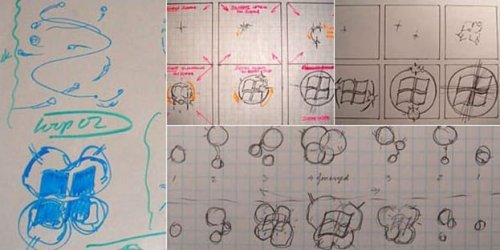
How one man designed the Windows 7 boot animation

raj11650

New member
Pro User
VIP
Local time
11:23 PM
Messages
851
Location
India ,Chennai
Rolf Ebeling, a senior user experience lead for the User Experience Design and Research Team for Windows, is the man who designed the Windows 7 boot animation.

Rolf Ebeling, a senior user experience lead for the User Experience Design and Research Team for Windows, Windows Live, and Internet Explorer, is the man who designed the 105-frame Windows 7 boot animation that millions see or will see every day for years to come. Along with developing the famous boot animation, he also helped with the appearance and functionality of the calculator. He's already confirmed that he'll be working on the next version of Windows.

Ebeling was only with the company for four months before he was asked to start designing what would become four swirling balls of light that come together to form a pulsing Windows 7 flag. Although the sketches of the early boot animation concept pictured above don't show it, Ebeling said he looked everywhere for inspiration, including street lights in the rain, light reflecting off water, and fireflies. A self-taught designer with a degree in English literature, Ebeling was a creative director for Newsweek.com in New York before joining Microsoft in April 2008, his first software job.

That means Ebeling started working on the Windows 7 boot animation in August 2008. It leaked to the Web in the form of a 24-second video in December 2008. Then, in February 2009, Microsoft announced that it would not support changing the Windows 7 boot animation by those who want to personalize their rigs further than just changing themes (you can read our guide to customizing Windows 7 with themes here.
Source
 

Attachments

  • windows_7_boot_animation_sketches.jpg
    windows_7_boot_animation_sketches.jpg
    38.1 KB · Views: 188
Last edited:

My Computer My Computer

Computer Manufacturer/Model Number
Custom Build
OS
win 7 build 7600.16385 x64
CPU
AMD Athlon Dual core 7750 2.7GHz
Motherboard
Gigabyte GA78MA s2h
Memory
4GB 800Mhz
Graphics Card(s)
ATI HD 3200 IGP
Monitor(s) Displays
Acer 15 inch
Screen Resolution
1280x720
Hard Drives
Seagate 1 TB
Keyboard
Logitech
Mouse
Logitech
Internet Speed
Airtel DSL 2Mbps
Can you post a link to the above article?

I am very interested in the ingenious "color flames" animation.
 
Er, I think you'll find that Windows 7 Boot Animation was my idea. :D
 

My Computer My Computer

Computer Manufacturer/Model Number
Sony Vaio FZ21Z
OS
Windows 7 Ultimate x64 ®™
CPU
Intel Core 2 Duo (2.2 GHz)
Motherboard
Sony (Intel Chipset)
Memory
2x 2GB Corsair (667 MHz)
Graphics Card(s)
NVIDIA 8600M GS (256MB)
Sound Card
Sigmatel
Monitor(s) Displays
15.4" TFT X-Black
Screen Resolution
1280x800
Hard Drives
Western Digital 300GB Scorpio Black (7200rpm)
Mouse
Logitech Anywhere MX
Internet Speed
Sky 5MB

My Computer My Computer

Computer Manufacturer/Model Number
Self Build 64bit
OS
Vista Ult64, Win7600
CPU
Intel Core 2 Quad Q6600 @ 2400 MHz 64bit OS
Motherboard
Asus P5E3 Deluxe WiFi @p 64 bit OS
Memory
4096 MB DDR3-SDRAM
Graphics Card(s)
ATI Radeon HD 3870 Series x2 Crossfired
Sound Card
Realtek on board
Monitor(s) Displays
Samsung SyncMaster - 23 inches
Screen Resolution
1680x1050 pixels at 60 Hz in True Colors
Hard Drives
Hitachi (250 GB)/Samsung 750 GB. /Barracuda 160 GB.
My Book 1 TB external..
PSU
Cooler Master 1000w
Case
Cooler Master Cosmos 1000.
Cooling
Fans and fresh air,
Keyboard
Wireless
Mouse
Wireless
Internet Speed
Never fast enough
Other Info
I use a Magnum.
What a lovely new year's read. Thanks :)
 

My Computer My Computer

OS
Windows XP - Now Windows 7 Home Premium (64-bit).
Reminds me of the PS2 startup.
 

My Computer My Computer

OS
Windows 7 Ultimate 32 bit
CPU
Intel Pentium 4 3.00 ghz
Motherboard
Asus p5gc-mx\1333
Memory
1 gb
Graphics Card(s)
Intel gma 950
Screen Resolution
1280*1024
Hard Drives
80 gb
Case
cheap steel and plastic
Other Info
Time of this report: 12/11/2009, 19:28:16
Machine name: SOUFIANE-PC
Operating System: Windows 7 Ultimate 32-bit (6.1, Build 7600) (7600.win7_rtm.090713-1255)
Language: English (Regional Setting: English)
System Manufacturer: System manufacturer
System Model: System Product Name
BIOS: BIOS Date: 08/01/07 09:47:33 Ver: 08.00.10
Processor: I
I turned the boot animation off to cut down on my loading time lol

But the first time I saw it I think it was kind of cool. I was hoping by the time the animation was done the loading would have been done as well so it would finish on par but that did not happen :(
 

My Computer My Computer

Computer Manufacturer/Model Number
Asus 15.4" laptop
OS
Windows 7 7100 build
CPU
Intel Core 2 Duo 2.5
Motherboard
Asus
Memory
4gig
Graphics Card(s)
Nvidia 9500 512mb mobile
Monitor(s) Displays
External 26" Samsung TOC (very nice!!)
Screen Resolution
19200 by 1200
Hard Drives
1 320gig 7200 rpm
Adamd

I would like to turn the animation off to shorten boot time. How do you do it?
Thanks
 

My Computer My Computer

Computer Manufacturer/Model Number
Dell Inspiron 600M
OS
windows 7 premium
CPU
Intel(R) Pentium(R) 1.6GHz
Memory
2.00 GB
That's really cool how one man designed the whole thing.
 

My Computer My Computer

Computer Manufacturer/Model Number
Hewlett Packard / Dv4-1120us
OS
Windows 7 Final
CPU
Intel Core 2 Duo @ 2.0Ghz
Memory
4GB DDR2 @ 800Mhz
Graphics Card(s)
Mobile Intel(R) 4 Series Express Chipset Family
Monitor(s) Displays
Generic PnP Monitor
Screen Resolution
1280 x 800
PSU
6-Cell Battery
Keyboard
Standard PS/2 Keyboard
Mouse
Synaptics PS/2 Port Touchpad
Internet Speed
Anywhere Between 11.0 and 48.0 Mbps
Interseting. Thanks for posting it.
 

My Computer My Computer

Computer Manufacturer/Model Number
Self Built
OS
Windows 7 ultimate 64 bit / XP Home sp3
CPU
intel Core 2 Duo E8400 3.0ghz
Motherboard
Asus P5ND bios 1401
Memory
8 gigs 1066 OCZ Fata1ty
Graphics Card(s)
EVGA GTX 580 Call of Duty Black Ops Edition
Sound Card
Creative Soundblaster Audigy 2zs
Monitor(s) Displays
Asus 24in LCD's 2MS X2
Screen Resolution
1920x1080p @60Hz
Hard Drives
WD Caviar 500 Black/ WD Caviar 200 Blue
PSU
OCZ 700W GameXtreme
Case
NZXT Apollo
Cooling
Corsair H50 CPU/120mm x3 /60mm x2 /Corsair Dominator Ram
Keyboard
Logitech Bluetooth Wireless MX5000
Mouse
Logitech Bluetooth Wireless MX1000
Internet Speed
Download 19.83 Upload 0.97
Other Info
Logitech Z2300 Speakers/ Bose Noise Cancelling Headphones/Avermedia PCI-e Hybrid TV Bravo/Epson NX415 all in one/ 4 Port Powered USB Hub/ LG 10x Bluray Burner /TSST Corp DVDRW External
Adamd

I would like to turn the animation off to shorten boot time. How do you do it?
Thanks

That is easy to do.

1. Start Menu
2. In the search box type "msconfig"
3. Then click the "Boot" tab
4. Check "No GUI boot"
5. Apply
6.Restart

Done.
 

My Computer My Computer

Computer Manufacturer/Model Number
Asus 15.4" laptop
OS
Windows 7 7100 build
CPU
Intel Core 2 Duo 2.5
Motherboard
Asus
Memory
4gig
Graphics Card(s)
Nvidia 9500 512mb mobile
Monitor(s) Displays
External 26" Samsung TOC (very nice!!)
Screen Resolution
19200 by 1200
Hard Drives
1 320gig 7200 rpm
Back
Top