Unidentified Network - Doesn't have valid IP Config.

joewin7

New member
Local time
7:08 AM
Messages
6
Hi, ever since I installed Windows 7 on my computer, I've been having trouble connecting to the internet. I have a wired connection to a Belkin router. I have the latest firmware for the router.

When I start my computer, sometimes it will automatically connect to the internet, however most of the time it doesn't. I see a yellow exclamation point over the networking icon at the bottom, which says "Unidentified Network - No Internet Access".

The only way to solve the problem is by running troubleshooter -- numerous times. When the troubleshooter doesn't work, it says "Local Area Connection doesn't have a valid IP Configuration". I then have to repeatedly troubleshoot, or disable and enable my internet. The troubleshooter "Resets the local area connection adapter" - which works sometimes, but sometimes it doesn't.

Other times, it connects to the Belkin router, but says that there is "No Internet Access."

I have disabled the Bonjour service, which was a suggestion I saw in previous threads.

Please help me stop this annoyance of troubleshooting my connection every day!
 

My Computer

Computer Manufacturer/Model Number
Dell Vostro 200
OS
Windows 7
Monitor(s) Displays
HP w1907
Screen Resolution
1440x900
Keyboard
Logitech
Mouse
Microsoft
Hello Joe, Welcome!

Try updating you network adapter drivers. Go into Device Manager and right-click on your network adapter. If that does not work, go to the manufacturer's site and download them there.

Hope this helps,
~Jonathan
 

My Computer

Computer Manufacturer/Model Number
Custom
OS
Windows 7 Professional x64
CPU
Intel i7 2600K OC'd @ 4620 MHz
Motherboard
Asus P8Z68-V Pro
Memory
16GB GSkill Sniper 2133 Mhz (4x4GB)
Graphics Card(s)
EVGA GeForce GTX 480 SuperClocked+
Sound Card
Realtek High Definition Audio
Monitor(s) Displays
2x Acer S273HLbmii 27"
Screen Resolution
2 x 1920x1080
Hard Drives
64GB Crucial M4 SSD

Storage: Hitachi 1TB 5400RPM, Samsung 1.5TB 5400RPM
PSU
Corsair HW Series 750w (modular)
Case
Cooler Master HAF 932 Advanced Blue Edition
Cooling
CM Hyper 212+ CPU cooler, 3x 230mm + 1x 140mm case fans
Keyboard
Logitech MK320 (wireless)
Mouse
Logitech MK320 (wireless)
Internet Speed
30 Mb/s : 2 Mb/s
You could also try using a static IP address, just in case the router isn't dishing out the correct IP via DHCP
 

My Computer

Computer type
PC/Desktop
Computer Manufacturer/Model Number
Self Built
OS
Windows 7 Ultimate 64bit
CPU
AMD Phenom Quad core 9950 black edition
Motherboard
Gigabyte
Memory
16Gb
Graphics Card(s)
2x XFX Radeon 5850
Sound Card
PCI Express X-Fi Titanium / Logitech G35
Monitor(s) Displays
2x HP 2410i
Screen Resolution
1920x1080
Hard Drives
2x 500Gb Seagate
1x 300Gb Seagate
1x 1Tb Seagate
2x 1Tb Hitatchi
PSU
Jean Tech Storm 700W
Case
Cooler Master COSMOS S
Cooling
Akasa Evo Blue Pro
Keyboard
Logitech G15
Mouse
Mad Catz M.M.O. 7
Internet Speed
12mb
Thanks for the welcome. I have already updated my network adapter driver to the latest version. I have a Intel(R) 82562V-2 10/100 Network Connection.

You could also try using a static IP address, just in case the router isn't dishing out the correct IP via DHCP

How do I do that?
 

My Computer

Computer Manufacturer/Model Number
Dell Vostro 200
OS
Windows 7
Monitor(s) Displays
HP w1907
Screen Resolution
1440x900
Keyboard
Logitech
Mouse
Microsoft
Where did you get the drivers? Regardless, try the other way. If you downloaded them from the manufacturer, try uninstalling them and using Windows Update, and vice versa.
 

My Computer

Computer Manufacturer/Model Number
Custom
OS
Windows 7 Professional x64
CPU
Intel i7 2600K OC'd @ 4620 MHz
Motherboard
Asus P8Z68-V Pro
Memory
16GB GSkill Sniper 2133 Mhz (4x4GB)
Graphics Card(s)
EVGA GeForce GTX 480 SuperClocked+
Sound Card
Realtek High Definition Audio
Monitor(s) Displays
2x Acer S273HLbmii 27"
Screen Resolution
2 x 1920x1080
Hard Drives
64GB Crucial M4 SSD

Storage: Hitachi 1TB 5400RPM, Samsung 1.5TB 5400RPM
PSU
Corsair HW Series 750w (modular)
Case
Cooler Master HAF 932 Advanced Blue Edition
Cooling
CM Hyper 212+ CPU cooler, 3x 230mm + 1x 140mm case fans
Keyboard
Logitech MK320 (wireless)
Mouse
Logitech MK320 (wireless)
Internet Speed
30 Mb/s : 2 Mb/s
I've tried both ways, actually. The first time I updated through device manager, then I went to the website and saw there was another update, so I updated through there.
 

My Computer

Computer Manufacturer/Model Number
Dell Vostro 200
OS
Windows 7
Monitor(s) Displays
HP w1907
Screen Resolution
1440x900
Keyboard
Logitech
Mouse
Microsoft

My Computer

Computer type
PC/Desktop
Computer Manufacturer/Model Number
Self Built
OS
Windows 7 Ultimate 64bit
CPU
AMD Phenom Quad core 9950 black edition
Motherboard
Gigabyte
Memory
16Gb
Graphics Card(s)
2x XFX Radeon 5850
Sound Card
PCI Express X-Fi Titanium / Logitech G35
Monitor(s) Displays
2x HP 2410i
Screen Resolution
1920x1080
Hard Drives
2x 500Gb Seagate
1x 300Gb Seagate
1x 1Tb Seagate
2x 1Tb Hitatchi
PSU
Jean Tech Storm 700W
Case
Cooler Master COSMOS S
Cooling
Akasa Evo Blue Pro
Keyboard
Logitech G15
Mouse
Mad Catz M.M.O. 7
Internet Speed
12mb
Okidoki

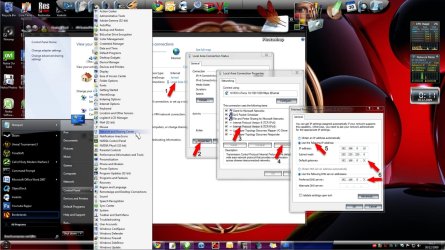
Firstly Open "control panel" click on "network and sharing center"

Click on "local area connection (1)" then follow the image clicking through to (5)
Once at 5 enter your IP address .... this will depend on what address your network is running on (I'm hoping that you know this already) I've given an example. If you router is set to eg 192.168.0.1 then you will need to enter this into the "default gateway" and "preferred DNS (6)" (I've marked the last number with an "X" as this could differ) When you enter your IP address just change the last number to anything between say 10 - 20 eg. 192.168.0.10


Once you've done all this click OK then wait a few seconds and try again.
 

Attachments

  • static_IP.jpg
    static_IP.jpg
    181.1 KB · Views: 3,723

My Computer

Computer type
PC/Desktop
Computer Manufacturer/Model Number
Self Built
OS
Windows 7 Ultimate 64bit
CPU
AMD Phenom Quad core 9950 black edition
Motherboard
Gigabyte
Memory
16Gb
Graphics Card(s)
2x XFX Radeon 5850
Sound Card
PCI Express X-Fi Titanium / Logitech G35
Monitor(s) Displays
2x HP 2410i
Screen Resolution
1920x1080
Hard Drives
2x 500Gb Seagate
1x 300Gb Seagate
1x 1Tb Seagate
2x 1Tb Hitatchi
PSU
Jean Tech Storm 700W
Case
Cooler Master COSMOS S
Cooling
Akasa Evo Blue Pro
Keyboard
Logitech G15
Mouse
Mad Catz M.M.O. 7
Internet Speed
12mb
I followed the steps but unfortunatley I still have the same problem :(
 

My Computer

Computer Manufacturer/Model Number
Dell Vostro 200
OS
Windows 7
Monitor(s) Displays
HP w1907
Screen Resolution
1440x900
Keyboard
Logitech
Mouse
Microsoft

My Computer

Computer type
PC/Desktop
Computer Manufacturer/Model Number
Self Built
OS
Windows 7 Ultimate 64bit
CPU
AMD Phenom Quad core 9950 black edition
Motherboard
Gigabyte
Memory
16Gb
Graphics Card(s)
2x XFX Radeon 5850
Sound Card
PCI Express X-Fi Titanium / Logitech G35
Monitor(s) Displays
2x HP 2410i
Screen Resolution
1920x1080
Hard Drives
2x 500Gb Seagate
1x 300Gb Seagate
1x 1Tb Seagate
2x 1Tb Hitatchi
PSU
Jean Tech Storm 700W
Case
Cooler Master COSMOS S
Cooling
Akasa Evo Blue Pro
Keyboard
Logitech G15
Mouse
Mad Catz M.M.O. 7
Internet Speed
12mb
Belkin N F5D8233-4 v. 1000. Microsoft's website lists it as compatible.
 

My Computer

Computer Manufacturer/Model Number
Dell Vostro 200
OS
Windows 7
Monitor(s) Displays
HP w1907
Screen Resolution
1440x900
Keyboard
Logitech
Mouse
Microsoft
Any other suggestions? :confused:
 

My Computer

Computer Manufacturer/Model Number
Dell Vostro 200
OS
Windows 7
Monitor(s) Displays
HP w1907
Screen Resolution
1440x900
Keyboard
Logitech
Mouse
Microsoft
Back
Top