chigwells
New member
Hello Everyone, I'm really sorry for having to post this thread. I've searched and searched both here and elsewhere for a solution, and I'm stumped. I see there are numerous threads with this problem, after reading them all I'm none the wiser.
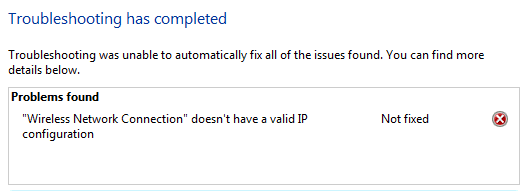
The network connection went down, and when I troubleshoot the answer I get is "Wireless Network Connection doesn't have a valid IP configuration". What I noticed is that similar to other threads, I lost the internet connection without any apparent reason. I have lost both wifi and ethernet connection.
I should add that this is my secondary laptop. My main laptop has no trouble whatsoever, I get a normal connection and my router shows no problem at all. I.e. the problem is solely within this laptop.
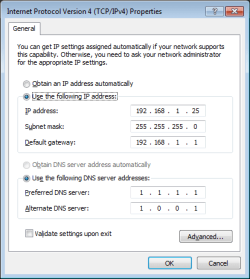
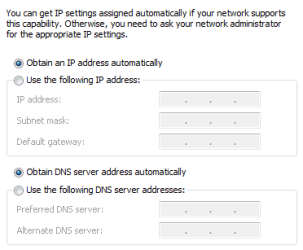
Here is as much info as I can think to offer, including ipconfig -all | list. I have run ipconfig /flushdns.
Ran scf /scannow and it found corrupted files, was able to repair. Reboot and sfc /scannow found no corrupted files, but still I cannot access internet.
Thank you to any and all that can assist:
[edit: thank you for moving me to the correct forum]
Windows IP Configuration
Host Name . . . . . . . . . . . . : Home-VAIO
Primary Dns Suffix . . . . . . . :
Node Type . . . . . . . . . . . . : Hybrid
IP Routing Enabled. . . . . . . . : No
WINS Proxy Enabled. . . . . . . . : No
Wireless LAN adapter Wireless Network Connection 2:
Media State . . . . . . . . . . . : Media disconnected
Connection-specific DNS Suffix . :
Description . . . . . . . . . . . : Microsoft Virtual WiFi Miniport Adapter
Physical Address. . . . . . . . . : 8C-A9-82-05-26-89
DHCP Enabled. . . . . . . . . . . : Yes
Autoconfiguration Enabled . . . . : Yes
Wireless LAN adapter Wireless Network Connection:
Media State . . . . . . . . . . . : Media disconnected
Connection-specific DNS Suffix . :
Description . . . . . . . . . . . : Intel(R) WiFi Link 1000 BGN
Physical Address. . . . . . . . . : 8C-A9-82-05-26-88
DHCP Enabled. . . . . . . . . . . : Yes
Autoconfiguration Enabled . . . . : Yes
Ethernet adapter Local Area Connection:
Connection-specific DNS Suffix . :
Description . . . . . . . . . . . : Marvell Yukon 88E8059 PCI-E Gigabit Ethernet Controller
Physical Address. . . . . . . . . : 78-84-3C-05-95-ED
DHCP Enabled. . . . . . . . . . . : Yes
Autoconfiguration Enabled . . . . : Yes
Link-local IPv6 Address . . . . . : fe80::1f1:6cf7:85c7:dd6f%23(Preferred)
Autoconfiguration IPv4 Address. . : 169.254.221.111(Preferred)
Subnet Mask . . . . . . . . . . . : 255.255.0.0
Default Gateway . . . . . . . . . :
DHCPv6 IAID . . . . . . . . . . . : 393774140
DHCPv6 Client DUID. . . . . . . . : 00-01-00-01-1E-4E-43-4D-78-84-3C-05-95-ED
DNS Servers . . . . . . . . . . . : fec0:0:0:ffff::1%1
fec0:0:0:ffff::2%1
fec0:0:0:ffff::3%1
NetBIOS over Tcpip. . . . . . . . : Enabled
Tunnel adapter isatap.{02D7FE33-1C2B-40E6-8E14-BA47D0A49E22}:
Media State . . . . . . . . . . . : Media disconnected
Connection-specific DNS Suffix . :
Description . . . . . . . . . . . : Microsoft ISATAP Adapter
Physical Address. . . . . . . . . : 00-00-00-00-00-00-00-E0
DHCP Enabled. . . . . . . . . . . : No
Autoconfiguration Enabled . . . . : Yes
Tunnel adapter isatap.{8FD1FE4E-EE3B-491F-9E26-7249E91E82B6}:
Media State . . . . . . . . . . . : Media disconnected
Connection-specific DNS Suffix . :
Description . . . . . . . . . . . : Microsoft ISATAP Adapter #2
Physical Address. . . . . . . . . : 00-00-00-00-00-00-00-E0
DHCP Enabled. . . . . . . . . . . : No
Autoconfiguration Enabled . . . . : Yes
Tunnel adapter Teredo Tunneling Pseudo-Interface:
Media State . . . . . . . . . . . : Media disconnected
Connection-specific DNS Suffix . :
Description . . . . . . . . . . . : Teredo Tunneling Pseudo-Interface
Physical Address. . . . . . . . . : 00-00-00-00-00-00-00-E0
DHCP Enabled. . . . . . . . . . . : No
Autoconfiguration Enabled . . . . : Yes
The network connection went down, and when I troubleshoot the answer I get is "Wireless Network Connection doesn't have a valid IP configuration". What I noticed is that similar to other threads, I lost the internet connection without any apparent reason. I have lost both wifi and ethernet connection.
I should add that this is my secondary laptop. My main laptop has no trouble whatsoever, I get a normal connection and my router shows no problem at all. I.e. the problem is solely within this laptop.
Here is as much info as I can think to offer, including ipconfig -all | list. I have run ipconfig /flushdns.
Ran scf /scannow and it found corrupted files, was able to repair. Reboot and sfc /scannow found no corrupted files, but still I cannot access internet.
Thank you to any and all that can assist:
[edit: thank you for moving me to the correct forum]
Windows IP Configuration
Host Name . . . . . . . . . . . . : Home-VAIO
Primary Dns Suffix . . . . . . . :
Node Type . . . . . . . . . . . . : Hybrid
IP Routing Enabled. . . . . . . . : No
WINS Proxy Enabled. . . . . . . . : No
Wireless LAN adapter Wireless Network Connection 2:
Media State . . . . . . . . . . . : Media disconnected
Connection-specific DNS Suffix . :
Description . . . . . . . . . . . : Microsoft Virtual WiFi Miniport Adapter
Physical Address. . . . . . . . . : 8C-A9-82-05-26-89
DHCP Enabled. . . . . . . . . . . : Yes
Autoconfiguration Enabled . . . . : Yes
Wireless LAN adapter Wireless Network Connection:
Media State . . . . . . . . . . . : Media disconnected
Connection-specific DNS Suffix . :
Description . . . . . . . . . . . : Intel(R) WiFi Link 1000 BGN
Physical Address. . . . . . . . . : 8C-A9-82-05-26-88
DHCP Enabled. . . . . . . . . . . : Yes
Autoconfiguration Enabled . . . . : Yes
Ethernet adapter Local Area Connection:
Connection-specific DNS Suffix . :
Description . . . . . . . . . . . : Marvell Yukon 88E8059 PCI-E Gigabit Ethernet Controller
Physical Address. . . . . . . . . : 78-84-3C-05-95-ED
DHCP Enabled. . . . . . . . . . . : Yes
Autoconfiguration Enabled . . . . : Yes
Link-local IPv6 Address . . . . . : fe80::1f1:6cf7:85c7:dd6f%23(Preferred)
Autoconfiguration IPv4 Address. . : 169.254.221.111(Preferred)
Subnet Mask . . . . . . . . . . . : 255.255.0.0
Default Gateway . . . . . . . . . :
DHCPv6 IAID . . . . . . . . . . . : 393774140
DHCPv6 Client DUID. . . . . . . . : 00-01-00-01-1E-4E-43-4D-78-84-3C-05-95-ED
DNS Servers . . . . . . . . . . . : fec0:0:0:ffff::1%1
fec0:0:0:ffff::2%1
fec0:0:0:ffff::3%1
NetBIOS over Tcpip. . . . . . . . : Enabled
Tunnel adapter isatap.{02D7FE33-1C2B-40E6-8E14-BA47D0A49E22}:
Media State . . . . . . . . . . . : Media disconnected
Connection-specific DNS Suffix . :
Description . . . . . . . . . . . : Microsoft ISATAP Adapter
Physical Address. . . . . . . . . : 00-00-00-00-00-00-00-E0
DHCP Enabled. . . . . . . . . . . : No
Autoconfiguration Enabled . . . . : Yes
Tunnel adapter isatap.{8FD1FE4E-EE3B-491F-9E26-7249E91E82B6}:
Media State . . . . . . . . . . . : Media disconnected
Connection-specific DNS Suffix . :
Description . . . . . . . . . . . : Microsoft ISATAP Adapter #2
Physical Address. . . . . . . . . : 00-00-00-00-00-00-00-E0
DHCP Enabled. . . . . . . . . . . : No
Autoconfiguration Enabled . . . . : Yes
Tunnel adapter Teredo Tunneling Pseudo-Interface:
Media State . . . . . . . . . . . : Media disconnected
Connection-specific DNS Suffix . :
Description . . . . . . . . . . . : Teredo Tunneling Pseudo-Interface
Physical Address. . . . . . . . . : 00-00-00-00-00-00-00-E0
DHCP Enabled. . . . . . . . . . . : No
Autoconfiguration Enabled . . . . : Yes
Attachments
Last edited:
My Computer
At a glance
W8.1 Pro, x64Intel Core i78GB
- Computer type
- Laptop
- Computer Manufacturer/Model Number
- Lenovo Thinkpad T440s
- OS
- W8.1 Pro, x64
- CPU
- Intel Core i7
- Memory
- 8GB
- Monitor(s) Displays
- Built-in, nice matt job
- Hard Drives
- 250GB SSD
- Mouse
- built-in track-pad
- Antivirus
- Panda Dome free
- Browser
- Firefox
- Other Info
- Binisoft WFC Windows Firewall Control, MBAM on-demand, SandboxIE