LAN Connects to "unidentified network" on startup

ath1337

New member
Local time
11:35 PM
Messages
34
I'm running Windows 7 Pro 32-bit on an ASUS laptop with a Realtek PCIe Gigabit Ethernet LAN. Every time I restart my computer the LAN connects to "linksys10" (the router it I want it to connect to) AND "Unidentified network". Both connections say internet access, however I cannot get online until I go to the adapter settings>disable the LAN>then enable it again, then it connects only to the "linksys10" network and the internet works fine.
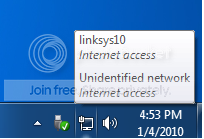
Screencap.png


The router I am connecting to is a Linksys WRT54GS (security disabled, SSID hidden). I have tried power cycling the router too.

It's very annoying to have to disable and enable the LAN device upon every startup...

I tried uninstalling the device, then rebooting and have windows install the driver again for me. This did not work.

Then I downloaded the updated driver for windows 7 from the Realtek website, installed it, reboot my system, but I still have the same problem.

I have no idea why it's connecting to two networks on startup...

Please help :(
 

My Computer My Computer

At a glance

Windows 7 Pro x64 RTMMerom T74002GB PC5300Ati Mobility 1600
Computer Manufacturer/Model Number
ASUS W2JB
OS
Windows 7 Pro x64 RTM
CPU
Merom T7400
Motherboard
Intel 945PM Express
Memory
2GB PC5300
Graphics Card(s)
Ati Mobility 1600
Sound Card
RealTek High Definition Audio/EMU 0202 USB
Hard Drives
WD 320 GB 7200 RPM
Are you perhaps connected wired and wirelessly ?
Could you maybe post a pic of your "full network map" ?
 

My Computer My Computer

At a glance

Windows 7 Ultimate 64bitAMD Phenom Quad core 9950 black edition16Gb2x XFX Radeon 5850
Computer type
PC/Desktop
Computer Manufacturer/Model Number
Self Built
OS
Windows 7 Ultimate 64bit
CPU
AMD Phenom Quad core 9950 black edition
Motherboard
Gigabyte
Memory
16Gb
Graphics Card(s)
2x XFX Radeon 5850
Sound Card
PCI Express X-Fi Titanium / Logitech G35
Monitor(s) Displays
2x HP 2410i
Screen Resolution
1920x1080
Hard Drives
2x 500Gb Seagate
1x 300Gb Seagate
1x 1Tb Seagate
2x 1Tb Hitatchi
PSU
Jean Tech Storm 700W
Case
Cooler Master COSMOS S
Cooling
Akasa Evo Blue Pro
Keyboard
Logitech G15
Mouse
Mad Catz M.M.O. 7
Internet Speed
12mb
I'm running Windows 7 Pro 32-bit on an ASUS laptop with a Realtek PCIe Gigabit Ethernet LAN. Every time I restart my computer the LAN connects to "linksys10" (the router it I want it to connect to) AND "Unidentified network". Both connections say internet access, however I cannot get online until I go to the adapter settings>disable the LAN>then enable it again, then it connects only to the "linksys10" network and the internet works fine.

Screencap.png


The router I am connecting to is a Linksys WRT54GS (security disabled, SSID hidden). I have tried power cycling the router too.

It's very annoying to have to disable and enable the LAN device upon every startup...

I tried uninstalling the device, then rebooting and have windows install the driver again for me. This did not work.

Then I downloaded the updated driver for windows 7 from the Realtek website, installed it, reboot my system, but I still have the same problem.

I have no idea why it's connecting to two networks on startup...

Please help :(

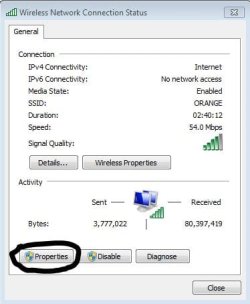
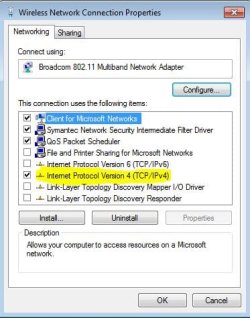
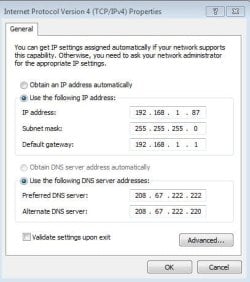
Try entering you Ip and dNs. Look at mine
and alll the pictures are in order

top left is picture number 1
top right is picture number 2
down left is picture number 3
down right is picture number 4
 

Attachments

  • Network.JPG
    Network.JPG
    72.8 KB · Views: 404
  • 1.JPG
    1.JPG
    27.9 KB · Views: 164
  • Network2.JPG
    Network2.JPG
    40.4 KB · Views: 172
  • Capture.JPG
    Capture.JPG
    36.2 KB · Views: 207
Last edited:

My Computer My Computer

At a glance

Windows 7Intel i3 Core3.00GbIntel Graphics Media Accelerator HD
Computer Manufacturer/Model Number
Acer Aspire 4740
OS
Windows 7
CPU
Intel i3 Core
Motherboard
Intel
Memory
3.00Gb
Graphics Card(s)
Intel Graphics Media Accelerator HD
Sound Card
Realtel HD Audio
Monitor(s) Displays
Laptop display
Screen Resolution
1280x800
Hard Drives
350GB
Cooling
Fans
Keyboard
Build in keyboard (laptop)
Mouse
touch pad mouse
Internet Speed
512 Kbps = 64 KBPS
I'm running Windows 7 Pro 32-bit on an ASUS laptop with a Realtek PCIe Gigabit Ethernet LAN. Every time I restart my computer the LAN connects to "linksys10" (the router it I want it to connect to) AND "Unidentified network". Both connections say internet access, however I cannot get online until I go to the adapter settings>disable the LAN>then enable it again, then it connects only to the "linksys10" network and the internet works fine.

Screencap.png


The router I am connecting to is a Linksys WRT54GS (security disabled, SSID hidden). I have tried power cycling the router too.

It's very annoying to have to disable and enable the LAN device upon every startup...

I tried uninstalling the device, then rebooting and have windows install the driver again for me. This did not work.

Then I downloaded the updated driver for windows 7 from the Realtek website, installed it, reboot my system, but I still have the same problem.

I have no idea why it's connecting to two networks on startup...

Please help :(

and if you are getting internet it does not matter if it says "Unidentified network" Hope it helped!:D
 

My Computer My Computer

At a glance

Windows 7Intel i3 Core3.00GbIntel Graphics Media Accelerator HD
Computer Manufacturer/Model Number
Acer Aspire 4740
OS
Windows 7
CPU
Intel i3 Core
Motherboard
Intel
Memory
3.00Gb
Graphics Card(s)
Intel Graphics Media Accelerator HD
Sound Card
Realtel HD Audio
Monitor(s) Displays
Laptop display
Screen Resolution
1280x800
Hard Drives
350GB
Cooling
Fans
Keyboard
Build in keyboard (laptop)
Mouse
touch pad mouse
Internet Speed
512 Kbps = 64 KBPS
I am using hardware version v1.0 of the WRT54GS router, so unfortunately the latest firmware update on the linksys page is from March 2008. The firmware upgrade did not fix the issue (if it's a problem with the router then I'm guess I'm stuck until I buy a newer router (but it's not a big deal since I'm going back to school soon.)) Perhaps I should try a third-party firmware?

And, no I'm not connected to wireless and wired simultaneously.

I'm going to try your idea retish right now...
 

My Computer My Computer

At a glance

Windows 7 Pro x64 RTMMerom T74002GB PC5300Ati Mobility 1600
Computer Manufacturer/Model Number
ASUS W2JB
OS
Windows 7 Pro x64 RTM
CPU
Merom T7400
Motherboard
Intel 945PM Express
Memory
2GB PC5300
Graphics Card(s)
Ati Mobility 1600
Sound Card
RealTek High Definition Audio/EMU 0202 USB
Hard Drives
WD 320 GB 7200 RPM
Manually setting the IP address fixed the issue!

Thanks retish, kudos.
 

My Computer My Computer

At a glance

Windows 7 Pro x64 RTMMerom T74002GB PC5300Ati Mobility 1600
Computer Manufacturer/Model Number
ASUS W2JB
OS
Windows 7 Pro x64 RTM
CPU
Merom T7400
Motherboard
Intel 945PM Express
Memory
2GB PC5300
Graphics Card(s)
Ati Mobility 1600
Sound Card
RealTek High Definition Audio/EMU 0202 USB
Hard Drives
WD 320 GB 7200 RPM
Back
Top