
Sound Not Working after Fresh windows 7 Install

Siema

New member
Local time
12:14 AM
Messages
6
Location
Charlotte, NC
I originally had a copy of windows 7 on my pc and decided that i wanted to try out ubuntu 9.1. Well after a couple days of playing on ubuntu i load windows and notice i have no sound. Sound in Ubuntu still works. I get tired of linux and making the switch back to windows decide to install windows 7 clean over my previous dual boot setup figuring that with a clean install sound should work flawlessly. Well now after hours and hours of installing creative and x-fi and asus drivers i dont know what to do. I put the previously working drivers i had on, the ones that came on my mobo cd, instead of the website. Windows says everything is working fine and the sound icon even moves when i play a song or something but no sound whatsoever. Please help and tell me that linux didnt screw my system up !!!
 

My Computer My Computer

At a glance

Windows 7AMD Phenom II X3 720 2.8GHz Socket AM3 95W Tr...Mushkin DDR3 1600MhzSAPPHIRE Vapor-X Radeon HD 4870 1GB 256-bit G...
OS
Windows 7
CPU
AMD Phenom II X3 720 2.8GHz Socket AM3 95W Triple-Core Black
Motherboard
ASUS Crosshair III Formula AM3 AMD 790FX ATX AMD Motherboard
Memory
Mushkin DDR3 1600Mhz
Graphics Card(s)
SAPPHIRE Vapor-X Radeon HD 4870 1GB 256-bit GDDR5 HDCP Ready
Sound Card
Supreme F/X X-Fi
Monitor(s) Displays
Sceptre 1080P 22" WideScreen HDMI Gaming Monitor
Screen Resolution
1680 x 1050 or 1080P
Hard Drives
150GB Raptor X
36GB RAptor
80GB WD Caviar Black
PSU
1000 Watt BFG
Case
Antec 900
Cooling
Scythe SCKTN-3000 92mm Sleeve "KATANA3" 3Heat Pipes CPU Cool
Mouse
Logitech G-18 Gaming Mouse
Internet Speed
Broadband
Other Info
DViCO FusionHDTV7 Dual Express DUAL HDTV/Analog TV Tuner Card Also on Board
ps. this is using an asus crosshair III formula with the oem supreme f/x x-fi sound card; the windows 7 is 64 bit btw also as it was the first time i had it up and running. Any help would be appreciated im going crazzy trying to fix this.
 

My Computer My Computer

At a glance

Windows 7AMD Phenom II X3 720 2.8GHz Socket AM3 95W Tr...Mushkin DDR3 1600MhzSAPPHIRE Vapor-X Radeon HD 4870 1GB 256-bit G...
OS
Windows 7
CPU
AMD Phenom II X3 720 2.8GHz Socket AM3 95W Triple-Core Black
Motherboard
ASUS Crosshair III Formula AM3 AMD 790FX ATX AMD Motherboard
Memory
Mushkin DDR3 1600Mhz
Graphics Card(s)
SAPPHIRE Vapor-X Radeon HD 4870 1GB 256-bit GDDR5 HDCP Ready
Sound Card
Supreme F/X X-Fi
Monitor(s) Displays
Sceptre 1080P 22" WideScreen HDMI Gaming Monitor
Screen Resolution
1680 x 1050 or 1080P
Hard Drives
150GB Raptor X
36GB RAptor
80GB WD Caviar Black
PSU
1000 Watt BFG
Case
Antec 900
Cooling
Scythe SCKTN-3000 92mm Sleeve "KATANA3" 3Heat Pipes CPU Cool
Mouse
Logitech G-18 Gaming Mouse
Internet Speed
Broadband
Other Info
DViCO FusionHDTV7 Dual Express DUAL HDTV/Analog TV Tuner Card Also on Board
Go here Creative Worldwide Support and select your X-Fi sound card and download the latest drivers from he Creative site not ASUS there drivers are always out of date.
 

My Computer My Computer

At a glance

Windows 7 Ultimate x64 Service Pack 1 (Build ...Intel Core 2 Quad Q6600 (G0 Kentsfield) LGA77...Corsair TW3X4G1333C9A 4GB PC-10600 (2x XMS3 2GB)ASUS nVIDIA GeForce 560
OS
Windows 7 Ultimate x64 Service Pack 1 (Build 6.1.7601)
CPU
Intel Core 2 Quad Q6600 (G0 Kentsfield) LGA775 (FC-LGA6)
Motherboard
GIGABYTE GA-EP35C-DS3R (Rev. 2.1)
Memory
Corsair TW3X4G1333C9A 4GB PC-10600 (2x XMS3 2GB)
Graphics Card(s)
ASUS nVIDIA GeForce 560
Sound Card
RealTek ALC885/889A/890
Monitor(s) Displays
ChiMei CMV CT-730D 17inch (LCD Monitor)
Screen Resolution
1280-1024 60Hertz (Ture Colour 32bit)
Hard Drives
2x Barracuda 7200.10 SATA 3.0Gb/s 160-GB Hard Drive ST3160815AS (AHCI)
PSU
ANTEC 750w Earthwatts
Case
Thermaltake Shark (VA7000SWA ATX) Full Tower
Cooling
Front 120mm fan (1400 RPM) /Rear 120mm (1400 RPM) blue LED
Keyboard
Labtec Media Desktop Y-SAD65
Mouse
Razer DeathAdder 3G Infrared Sensor (1800DPI)
Internet Speed
Telstra BigPond Elite Liberty ADSL2+ 24Mbps/256kbps
Other Info
ASUS PCE-N13 802.11n Wireless LAN card
Ubuntu 9.1, Supreme F/X X-Fi Oem, Windows 7, no sound

Tried that, my card isnt supported by them and the drivers im using right now in theory are working...just no sound coming out of my sound card...someone please help im going crazy... I will never put linux on my machine agian if someone can help me fix this. Ubuntu is great and all but this is rediculous. Ive read through some other forums and seen a couple of others with this problem but they all said it was fixed with shutting down linux and booting into windows instead of just rebooting. So far i think im the only one who ubuntu 9.1 just broke my sound :(
 

My Computer My Computer

At a glance

Windows 7AMD Phenom II X3 720 2.8GHz Socket AM3 95W Tr...Mushkin DDR3 1600MhzSAPPHIRE Vapor-X Radeon HD 4870 1GB 256-bit G...
OS
Windows 7
CPU
AMD Phenom II X3 720 2.8GHz Socket AM3 95W Triple-Core Black
Motherboard
ASUS Crosshair III Formula AM3 AMD 790FX ATX AMD Motherboard
Memory
Mushkin DDR3 1600Mhz
Graphics Card(s)
SAPPHIRE Vapor-X Radeon HD 4870 1GB 256-bit GDDR5 HDCP Ready
Sound Card
Supreme F/X X-Fi
Monitor(s) Displays
Sceptre 1080P 22" WideScreen HDMI Gaming Monitor
Screen Resolution
1680 x 1050 or 1080P
Hard Drives
150GB Raptor X
36GB RAptor
80GB WD Caviar Black
PSU
1000 Watt BFG
Case
Antec 900
Cooling
Scythe SCKTN-3000 92mm Sleeve "KATANA3" 3Heat Pipes CPU Cool
Mouse
Logitech G-18 Gaming Mouse
Internet Speed
Broadband
Other Info
DViCO FusionHDTV7 Dual Express DUAL HDTV/Analog TV Tuner Card Also on Board
Go here Creative Worldwide Support and select your X-Fi sound card and download the latest drivers from he Creative site not ASUS there drivers are always out of date.

That would be OK except that he doesn't have a X-Fi. What he has is an ADI/Soundmax based onboard sound card that gets to use some of the X-Fi software. He has to get the drivers and a 7 compatible version (if his isn't already) directly from Asus, Creative has nothing to do with it.
 

My Computer My Computer

At a glance

Win 7 Ultimate x64FX-8350 @ 4.6 GHz so farADATA XPG V1 Series Black 8GB DDR3 1600Sapphire R9 270x Dual-X
Computer type
PC/Desktop
Computer Manufacturer/Model Number
Me
OS
Win 7 Ultimate x64
CPU
FX-8350 @ 4.6 GHz so far
Motherboard
Asus M5A97 EVO
Memory
ADATA XPG V1 Series Black 8GB DDR3 1600
Graphics Card(s)
Sapphire R9 270x Dual-X
Sound Card
Xonar DGX w/ Corsair Vengence 1300
Monitor(s) Displays
Acer S232HL Abid
Screen Resolution
1920x1080
Hard Drives
120 GB OCZ Vertex 3
500 GB Seagate 7200.12
PSU
Antec Earthwatts 650W Green
Case
Antec Three Hundred
Cooling
Cooler Master 212 EVO
Keyboard
Logitech G510
Mouse
Logitech G500s
Internet Speed
35000/3000
Not supported by Creative, Asus drivers horrible

I did that I have correct drivers, i used the ones that came off my Mobo CD which I have used and worked before. The ones off Asus's Site took me forever to download then they sucked and didnt install properlly or work properly. I def went through about 7 sets of drivers and the original ones that used to work are hands down the best with ease of installation. There must be something else, I already checked all my cables, tried a million drivers, windows shows that sounds are playing i just don't hear any. Any ideas? Need any more information, feel free to ask.
 

My Computer My Computer

At a glance

Windows 7AMD Phenom II X3 720 2.8GHz Socket AM3 95W Tr...Mushkin DDR3 1600MhzSAPPHIRE Vapor-X Radeon HD 4870 1GB 256-bit G...
OS
Windows 7
CPU
AMD Phenom II X3 720 2.8GHz Socket AM3 95W Triple-Core Black
Motherboard
ASUS Crosshair III Formula AM3 AMD 790FX ATX AMD Motherboard
Memory
Mushkin DDR3 1600Mhz
Graphics Card(s)
SAPPHIRE Vapor-X Radeon HD 4870 1GB 256-bit GDDR5 HDCP Ready
Sound Card
Supreme F/X X-Fi
Monitor(s) Displays
Sceptre 1080P 22" WideScreen HDMI Gaming Monitor
Screen Resolution
1680 x 1050 or 1080P
Hard Drives
150GB Raptor X
36GB RAptor
80GB WD Caviar Black
PSU
1000 Watt BFG
Case
Antec 900
Cooling
Scythe SCKTN-3000 92mm Sleeve "KATANA3" 3Heat Pipes CPU Cool
Mouse
Logitech G-18 Gaming Mouse
Internet Speed
Broadband
Other Info
DViCO FusionHDTV7 Dual Express DUAL HDTV/Analog TV Tuner Card Also on Board
BTW here is more info on my hardware if it helps,

ASUS Crosshair III Formula AM3 AMD 790FX ATX AMD Motherboard

AMD Phenom II X3 720 2.8GHz Socket AM3 95W Triple-Core Black Processor

SAPPHIRE Vapor-X Radeon HD 4870 1GB 256-bit GDDR5 HDCP Ready PCI Express Video Card

Sceptre 1080P 22" WideScreen HDMI Gaming Monitor

DViCO FusionHDTV7 Dual Express DUAL HDTV/Analog TV Tuner Card Also on Board
 

My Computer My Computer

At a glance

Windows 7AMD Phenom II X3 720 2.8GHz Socket AM3 95W Tr...Mushkin DDR3 1600MhzSAPPHIRE Vapor-X Radeon HD 4870 1GB 256-bit G...
OS
Windows 7
CPU
AMD Phenom II X3 720 2.8GHz Socket AM3 95W Triple-Core Black
Motherboard
ASUS Crosshair III Formula AM3 AMD 790FX ATX AMD Motherboard
Memory
Mushkin DDR3 1600Mhz
Graphics Card(s)
SAPPHIRE Vapor-X Radeon HD 4870 1GB 256-bit GDDR5 HDCP Ready
Sound Card
Supreme F/X X-Fi
Monitor(s) Displays
Sceptre 1080P 22" WideScreen HDMI Gaming Monitor
Screen Resolution
1680 x 1050 or 1080P
Hard Drives
150GB Raptor X
36GB RAptor
80GB WD Caviar Black
PSU
1000 Watt BFG
Case
Antec 900
Cooling
Scythe SCKTN-3000 92mm Sleeve "KATANA3" 3Heat Pipes CPU Cool
Mouse
Logitech G-18 Gaming Mouse
Internet Speed
Broadband
Other Info
DViCO FusionHDTV7 Dual Express DUAL HDTV/Analog TV Tuner Card Also on Board
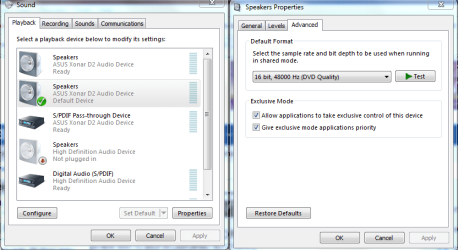
Maybe this setting needs some attention. Set to DVD quality 48000.
 

Attachments

  • application control of this device.PNG
    application control of this device.PNG
    34.8 KB · Views: 404

My Computer My Computer

At a glance

Windows 7 Ult, Windows 8.1 Pro,Q9650-4.275GHz, E8600 4.5GHz, E6750-3.8GHzG.Skill PC2 9600 1200Mhz 5 5 5 15 2TGTX480
Computer type
PC/Desktop
Computer Manufacturer/Model Number
Home built
OS
Windows 7 Ult, Windows 8.1 Pro,
CPU
Q9650-4.275GHz, E8600 4.5GHz, E6750-3.8GHz
Motherboard
Evga 780i FTW
Memory
G.Skill PC2 9600 1200Mhz 5 5 5 15 2T
Graphics Card(s)
GTX480
Sound Card
Asus Xonar D2
Monitor(s) Displays
HannsG
Screen Resolution
1680X1050
Hard Drives
GSkill Phoenix Pro 120GB SSD
PSU
ThermalTake Toughpower 1000Watt modular
Case
ThermalTake XaserV
Cooling
Xigmatek S1283
Keyboard
Logitech G15
Mouse
Logitech G9
Internet Speed
T1
No change

Set my quality to DVD and no change....

Also checked the two boxes below it that i did not have checked...

I feel like my computer problems are always unsolvable, please help so i dont have to buy a new sound card...
 

My Computer My Computer

At a glance

Windows 7AMD Phenom II X3 720 2.8GHz Socket AM3 95W Tr...Mushkin DDR3 1600MhzSAPPHIRE Vapor-X Radeon HD 4870 1GB 256-bit G...
OS
Windows 7
CPU
AMD Phenom II X3 720 2.8GHz Socket AM3 95W Triple-Core Black
Motherboard
ASUS Crosshair III Formula AM3 AMD 790FX ATX AMD Motherboard
Memory
Mushkin DDR3 1600Mhz
Graphics Card(s)
SAPPHIRE Vapor-X Radeon HD 4870 1GB 256-bit GDDR5 HDCP Ready
Sound Card
Supreme F/X X-Fi
Monitor(s) Displays
Sceptre 1080P 22" WideScreen HDMI Gaming Monitor
Screen Resolution
1680 x 1050 or 1080P
Hard Drives
150GB Raptor X
36GB RAptor
80GB WD Caviar Black
PSU
1000 Watt BFG
Case
Antec 900
Cooling
Scythe SCKTN-3000 92mm Sleeve "KATANA3" 3Heat Pipes CPU Cool
Mouse
Logitech G-18 Gaming Mouse
Internet Speed
Broadband
Other Info
DViCO FusionHDTV7 Dual Express DUAL HDTV/Analog TV Tuner Card Also on Board
I originally had a copy of windows 7 on my pc and decided that i wanted to try out ubuntu 9.1. Well after a couple days of playing on ubuntu i load windows and notice i have no sound. Sound in Ubuntu still works. I get tired of linux and making the switch back to windows decide to install windows 7 clean over my previous dual boot setup figuring that with a clean install sound should work flawlessly. Well now after hours and hours of installing creative and x-fi and asus drivers i dont know what to do. I put the previously working drivers i had on, the ones that came on my mobo cd, instead of the website. Windows says everything is working fine and the sound icon even moves when i play a song or something but no sound whatsoever. Please help and tell me that linux didnt screw my system up !!!
I highly doubt that installing Linux would've permanently changed or damaged anything on your system... Have you tried cleaning the existing drivers and installing only the drivers you know to have worked previously?

I'd suggest this: download Driver Sweeper and clean off all audio drivers, then restart and install the drivers you had working previously. If it is software or driver related, then that should sort it out.

Another ideo would be to check Windows Updates for drivers; the updater in Windows 7 does also check for driver updates along with Windows updates, but they're generally found under the 'Optional Updates' list which aren't downloaded by default.

Edit: I know this thread has been quiet for a while, but I hate seeing people having problems and not coming to a solution, and it doesn't look like this problem was really solved....
 

My Computer My Computer

At a glance

Win 10 x64 Pro x64 / Ubuntu 15.10 x64Intel i7-4960X4x8GB Corsair Dominator Platinum @2400MHz 10-...2x MSI GTX780Ti 3GB (SLI)
Computer type
PC/Desktop
OS
Win 10 x64 Pro x64 / Ubuntu 15.10 x64
CPU
Intel i7-4960X
Motherboard
Asus Rampage IV Black Edition
Memory
4x8GB Corsair Dominator Platinum @2400MHz 10-12-12-31
Graphics Card(s)
2x MSI GTX780Ti 3GB (SLI)
Sound Card
Onboard SupremeFX (Cirrus Logic CS4398)
Monitor(s) Displays
3x LG Cinema 27" IPS LED (27MP65)
Screen Resolution
[1920x1080]x3
Hard Drives
Crucial M500 120GB, Crucial M500 480GB, Toshiba DT01ACA200 2TB
PSU
CoolerMaster V1000
Case
Corsair Obsidian 750D
Cooling
ThermalTake Water 3.0 Extreme, 4xSP120, 3xAF120
Keyboard
Moshi Luna
Mouse
Logitech G700s / Roccat Tyon
Internet Speed
4Mb uncapped ADSL (Afrihost)
Antivirus
MS Security Essentials
Browser
Chrome... Duh. (:
I am having the exact same problem, installed ubuntu 2 days ago and last night I noticed that the sound that it makes when entering a folder was getting a little weird, like it was coming in double and with bad quality, everything else was fine (Videos, Winamp, Youtube). I also installed service pack 1 last night and the sound was working fine except for the click thing already mentioned.

Today in the morning I woke up and started my PC and there was no sound.
Windows says there's nothing wrong with my drivers or sound card, the file runs and says its playing but no sound comes out.

-Checked all the settings and tried different ones with no success;
-Re installed my drivers while on service pack 1, different drivers and also the same ones that used to work, no success;
-Disabled my Sound Card for a certain amount of time, no success.
-Uninstalled Service Pack 1 and did it all again, no success.

I don't know if this problem was solved i do wish it was cause i don't like the idea of waiting a year or more to get my sound to work. So someone please help me, pretty please.

PS: On Linux it is still working without any problem, so it's no cable or hardware problem.
 

My Computer My Computer

At a glance

Windows 7 Home Premium x64
OS
Windows 7 Home Premium x64
Ok so after a long research on this matter I found a topic which explained the problem, it affects people who have both Ubuntu or Ubuntu-based distros and Windows installed in dual boot mode, i don't know about other distros.
It's a problem with Pulseaudio, it mutes the sound card and resets the volume to 0. I won't give much details about it because I don't understand it completely, maybe not even a little bit.

You only get this problem if you boot to Linux and reboot to Windows.

A quick way of solving it is shutting down your computer and booting directly to Windows, though when you reboot to Linux it won't cut your sound immediately it might do it after a couple of times (after a few tries I did).

There are 2 other solutions I found on forums, which can fix this problem permanently, although this is a problem that affects the sound in Windows, I haven't found a solution that can be done in Windows and since this is a Windows 7 forum I'll just post the links to those who have to deal with this in Linux.

1-Edit the Pulseaudio line that causes this : https://bugs.launchpad.net/ubuntu/+source/linux/+bug/453395

2-Remove Pulseaudio: Ubuntu 9.04 Jaunty – Keeping the beast Pulseaudio at bay « Tux’s idyllic life.

Hope this helps
 

My Computer My Computer

At a glance

Windows 7 Home Premium x64
OS
Windows 7 Home Premium x64
Back
Top