
Ok, I thought I was pretty good but...HELP!!!

Issues

Ok, my friend.
Do you see any issues at this time?
 

My Computer My Computer

At a glance

Windows 7 7600 1 X64AMD PHENOM II X 550 PROCESSOR 3.1 ghzCorsair 4 gig ddr 3ati radeon 3300
Computer Manufacturer/Model Number
Custom Build
OS
Windows 7 7600 1 X64
CPU
AMD PHENOM II X 550 PROCESSOR 3.1 ghz
Motherboard
ASUS M4A78-TE
Memory
Corsair 4 gig ddr 3
Graphics Card(s)
ati radeon 3300
Sound Card
ati hd
Monitor(s) Displays
syncmaster 2033sw
Screen Resolution
1600X900 60 hz refresh
Hard Drives
twin_seagates SATA's 1 TB & 500 Gig, hitachi_slimline 160 gig
PSU
antec_550 watt
Case
cooler master GLite
Cooling
stock_heat sink
Internet Speed
20mbs up/ 1.5mbs down
Other Info
favorite child "stewie"
favorite dog "brian"

Attachments

  • Important Updates.jpg
    Important Updates.jpg
    79.4 KB · Views: 11
  • Optional Updates.jpg
    Optional Updates.jpg
    60.2 KB · Views: 9

My Computer My Computer

At a glance

Windows 7Intel Core 2 Quad Core Q66006 gigPNY Geforce 250 GTS
Computer Manufacturer/Model Number
Gateway DX4710
OS
Windows 7
CPU
Intel Core 2 Quad Core Q6600
Motherboard
Intel G33 express chipset
Memory
6 gig
Graphics Card(s)
PNY Geforce 250 GTS
Sound Card
Onboard Realtek
Monitor(s) Displays
Samsung 26"
Screen Resolution
1920x1200
Hard Drives
640 gig Western Digital internal SATA
500 gig maxtor USB external
2T maxtor USB external
PSU
650w Corsair
Keyboard
G15 logitech
Mouse
Razor Death Adder
Internet Speed
6Mbps DSL

My Computer My Computer

At a glance

Windows 7Intel Core 2 Quad Core Q66006 gigPNY Geforce 250 GTS
Computer Manufacturer/Model Number
Gateway DX4710
OS
Windows 7
CPU
Intel Core 2 Quad Core Q6600
Motherboard
Intel G33 express chipset
Memory
6 gig
Graphics Card(s)
PNY Geforce 250 GTS
Sound Card
Onboard Realtek
Monitor(s) Displays
Samsung 26"
Screen Resolution
1920x1200
Hard Drives
640 gig Western Digital internal SATA
500 gig maxtor USB external
2T maxtor USB external
PSU
650w Corsair
Keyboard
G15 logitech
Mouse
Razor Death Adder
Internet Speed
6Mbps DSL
Updates

This is going to suck, but if you want I suggest that you install each update individually and after each update create a restore point and reboot and install the next one. Or install all of them and see what happens.
"Call the Ball!"
 

My Computer My Computer

At a glance

Windows 7 7600 1 X64AMD PHENOM II X 550 PROCESSOR 3.1 ghzCorsair 4 gig ddr 3ati radeon 3300
Computer Manufacturer/Model Number
Custom Build
OS
Windows 7 7600 1 X64
CPU
AMD PHENOM II X 550 PROCESSOR 3.1 ghz
Motherboard
ASUS M4A78-TE
Memory
Corsair 4 gig ddr 3
Graphics Card(s)
ati radeon 3300
Sound Card
ati hd
Monitor(s) Displays
syncmaster 2033sw
Screen Resolution
1600X900 60 hz refresh
Hard Drives
twin_seagates SATA's 1 TB & 500 Gig, hitachi_slimline 160 gig
PSU
antec_550 watt
Case
cooler master GLite
Cooling
stock_heat sink
Internet Speed
20mbs up/ 1.5mbs down
Other Info
favorite child "stewie"
favorite dog "brian"
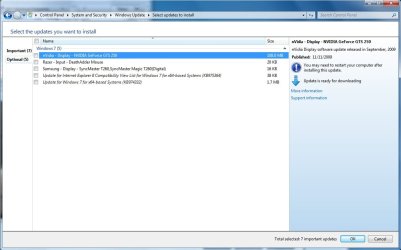
This is going to suck, but if you want I suggest that you install each update individually and after each update create a restore point and reboot and install the next one. Or install all of them and see what happens.
"Call the Ball!"

I'm calling the ball...one by one it is. Any suggestions on order? Device drives, then security, then remainder? Should I test in between?
 

My Computer My Computer

At a glance

Windows 7Intel Core 2 Quad Core Q66006 gigPNY Geforce 250 GTS
Computer Manufacturer/Model Number
Gateway DX4710
OS
Windows 7
CPU
Intel Core 2 Quad Core Q6600
Motherboard
Intel G33 express chipset
Memory
6 gig
Graphics Card(s)
PNY Geforce 250 GTS
Sound Card
Onboard Realtek
Monitor(s) Displays
Samsung 26"
Screen Resolution
1920x1200
Hard Drives
640 gig Western Digital internal SATA
500 gig maxtor USB external
2T maxtor USB external
PSU
650w Corsair
Keyboard
G15 logitech
Mouse
Razor Death Adder
Internet Speed
6Mbps DSL
This is going to suck, but if you want I suggest that you install each update individually and after each update create a restore point and reboot and install the next one. Or install all of them and see what happens.
"Call the Ball!"

I'm calling the ball...one by one it is. Any suggestions on order? Device drives, then security, then remainder? Should I test in between?
Ok then, one at a time.
Start with the security updates, then move onto the second screenshot.
I have a hunch and I hope I'm wrong. But I'm wary of the update for your GRFX card. Also, I seem to remember you have huge external drives that we have not begun to install yet?
If the updates install successfully then move onto the drives and install them one by one.
I will be going 10/7 on the side and I will be back at 19:30 Hours. So if I don't see anymore posts I'll know you were successful.
If you have any issues I suggest you review the action center and review the reliability report.
So I'll be back at 7:30PM

Regards,
Adrian
 

My Computer My Computer

At a glance

Windows 7 7600 1 X64AMD PHENOM II X 550 PROCESSOR 3.1 ghzCorsair 4 gig ddr 3ati radeon 3300
Computer Manufacturer/Model Number
Custom Build
OS
Windows 7 7600 1 X64
CPU
AMD PHENOM II X 550 PROCESSOR 3.1 ghz
Motherboard
ASUS M4A78-TE
Memory
Corsair 4 gig ddr 3
Graphics Card(s)
ati radeon 3300
Sound Card
ati hd
Monitor(s) Displays
syncmaster 2033sw
Screen Resolution
1600X900 60 hz refresh
Hard Drives
twin_seagates SATA's 1 TB & 500 Gig, hitachi_slimline 160 gig
PSU
antec_550 watt
Case
cooler master GLite
Cooling
stock_heat sink
Internet Speed
20mbs up/ 1.5mbs down
Other Info
favorite child "stewie"
favorite dog "brian"
This is going to suck, but if you want I suggest that you install each update individually and after each update create a restore point and reboot and install the next one. Or install all of them and see what happens.
"Call the Ball!"

I'm calling the ball...one by one it is. Any suggestions on order? Device drives, then security, then remainder? Should I test in between?
Ok then, one at a time.
Start with the security updates, then move onto the second screenshot.
I have a hunch and I hope I'm wrong. But I'm wary of the update for your GRFX card. Also, I seem to remember you have huge external drives that we have not begun to install yet?
If the updates install successfully then move onto the drives and install them one by one.
I will be going 10/7 on the side and I will be back at 19:30 Hours. So if I don't see anymore posts I'll know you were successful.
If you have any issues I suggest you review the action center and review the reliability report.
So I'll be back at 7:30PM

Regards,
Adrian

After some further testing, it might be the tuner card, which would be weird since it worked in the RC 7100, so I uninstalled it and removed the drivers. External drives are configured without issue so mooving onto updates.
 

My Computer My Computer

At a glance

Windows 7Intel Core 2 Quad Core Q66006 gigPNY Geforce 250 GTS
Computer Manufacturer/Model Number
Gateway DX4710
OS
Windows 7
CPU
Intel Core 2 Quad Core Q6600
Motherboard
Intel G33 express chipset
Memory
6 gig
Graphics Card(s)
PNY Geforce 250 GTS
Sound Card
Onboard Realtek
Monitor(s) Displays
Samsung 26"
Screen Resolution
1920x1200
Hard Drives
640 gig Western Digital internal SATA
500 gig maxtor USB external
2T maxtor USB external
PSU
650w Corsair
Keyboard
G15 logitech
Mouse
Razor Death Adder
Internet Speed
6Mbps DSL
All Important Updates are installed and system seems stable. Moving on to optional updates and then to drivers...
 

My Computer My Computer

At a glance

Windows 7Intel Core 2 Quad Core Q66006 gigPNY Geforce 250 GTS
Computer Manufacturer/Model Number
Gateway DX4710
OS
Windows 7
CPU
Intel Core 2 Quad Core Q6600
Motherboard
Intel G33 express chipset
Memory
6 gig
Graphics Card(s)
PNY Geforce 250 GTS
Sound Card
Onboard Realtek
Monitor(s) Displays
Samsung 26"
Screen Resolution
1920x1200
Hard Drives
640 gig Western Digital internal SATA
500 gig maxtor USB external
2T maxtor USB external
PSU
650w Corsair
Keyboard
G15 logitech
Mouse
Razor Death Adder
Internet Speed
6Mbps DSL
Best not to change drivers from what Win7 installer has provided unless performance issues require it.

This is not XP or Vista. MS sponsored the partnership with all manufacturers to build Win7 drivers so has them in the installer and via Windows Updates first, since they paid the bill.

Check for missing drivers or those in error in Device Manager, find them on the Support Downloads webpage for your computer model.
 
Best not to change drivers from what Win7 installer has provided unless performance issues require it.

This is not XP or Vista. MS sponsored the partnership with all manufacturers to build Win7 drivers so has them in the installer and via Windows Updates first, since they paid the bill.

Check for missing drivers or those in error in Device Manager, find them on the Support Downloads webpage for your computer model.

I agree and I haven't installed any drivers from any site other than through Windows Update or directly from Gateway, minus one short-lived install. I completely agree with you...

All non-driver updates have been installed and still stable so moving on to drivers next. Monitor, Mouse, Video Card, and Tuner card will be the order...
 

My Computer My Computer

At a glance

Windows 7Intel Core 2 Quad Core Q66006 gigPNY Geforce 250 GTS
Computer Manufacturer/Model Number
Gateway DX4710
OS
Windows 7
CPU
Intel Core 2 Quad Core Q6600
Motherboard
Intel G33 express chipset
Memory
6 gig
Graphics Card(s)
PNY Geforce 250 GTS
Sound Card
Onboard Realtek
Monitor(s) Displays
Samsung 26"
Screen Resolution
1920x1200
Hard Drives
640 gig Western Digital internal SATA
500 gig maxtor USB external
2T maxtor USB external
PSU
650w Corsair
Keyboard
G15 logitech
Mouse
Razor Death Adder
Internet Speed
6Mbps DSL
Well...the verdict is in and conclusive. Apparently my Hauppage HVR-1600 doesn't not play well with with either Windows 7 Home Premium Retail or just not well with my new video card. Either way, it's getting uninstalled...
 

My Computer My Computer

At a glance

Windows 7Intel Core 2 Quad Core Q66006 gigPNY Geforce 250 GTS
Computer Manufacturer/Model Number
Gateway DX4710
OS
Windows 7
CPU
Intel Core 2 Quad Core Q6600
Motherboard
Intel G33 express chipset
Memory
6 gig
Graphics Card(s)
PNY Geforce 250 GTS
Sound Card
Onboard Realtek
Monitor(s) Displays
Samsung 26"
Screen Resolution
1920x1200
Hard Drives
640 gig Western Digital internal SATA
500 gig maxtor USB external
2T maxtor USB external
PSU
650w Corsair
Keyboard
G15 logitech
Mouse
Razor Death Adder
Internet Speed
6Mbps DSL
Two thinks I want to say...
1. Jmack great job in giving the details up front in your first message. Especially answering many questions up front. :D

2. Adrian, GREAT JOB in your systematic approach in resolving the issues at hand.
:party:


My 2 cents.
Many thanks, Iggy
 

My Computer My Computer

At a glance

Windows 7 7600 1 X64AMD PHENOM II X 550 PROCESSOR 3.1 ghzCorsair 4 gig ddr 3ati radeon 3300
Computer Manufacturer/Model Number
Custom Build
OS
Windows 7 7600 1 X64
CPU
AMD PHENOM II X 550 PROCESSOR 3.1 ghz
Motherboard
ASUS M4A78-TE
Memory
Corsair 4 gig ddr 3
Graphics Card(s)
ati radeon 3300
Sound Card
ati hd
Monitor(s) Displays
syncmaster 2033sw
Screen Resolution
1600X900 60 hz refresh
Hard Drives
twin_seagates SATA's 1 TB & 500 Gig, hitachi_slimline 160 gig
PSU
antec_550 watt
Case
cooler master GLite
Cooling
stock_heat sink
Internet Speed
20mbs up/ 1.5mbs down
Other Info
favorite child "stewie"
favorite dog "brian"
Review

Good morning Jmack, I can deduce that you are now running Windows 7 in a stable environment!:geek:(yes,this is what I really look like LOL)
However I see that issues persist with your tuner card. Attached is a link from Windows 7 Support forums from a year ago when the OS was beta released for testing and I want to draw your attention to issues experienced with your tuner card. Here is the link: http://www.sevenforums.com/media-center/2412-wintv-hvr-1600-no-qam-signal.html

Regards,
Adrian
 

My Computer My Computer

At a glance

Windows 7 7600 1 X64AMD PHENOM II X 550 PROCESSOR 3.1 ghzCorsair 4 gig ddr 3ati radeon 3300
Computer Manufacturer/Model Number
Custom Build
OS
Windows 7 7600 1 X64
CPU
AMD PHENOM II X 550 PROCESSOR 3.1 ghz
Motherboard
ASUS M4A78-TE
Memory
Corsair 4 gig ddr 3
Graphics Card(s)
ati radeon 3300
Sound Card
ati hd
Monitor(s) Displays
syncmaster 2033sw
Screen Resolution
1600X900 60 hz refresh
Hard Drives
twin_seagates SATA's 1 TB & 500 Gig, hitachi_slimline 160 gig
PSU
antec_550 watt
Case
cooler master GLite
Cooling
stock_heat sink
Internet Speed
20mbs up/ 1.5mbs down
Other Info
favorite child "stewie"
favorite dog "brian"
Good morning Jmack, I can deduce that you are now running Windows 7 in a stable environment!:geek:(yes,this is what I really look like LOL)
However I see that issues persist with your tuner card. Attached is a link from Windows 7 Support forums from a year ago when the OS was beta released for testing and I want to draw your attention to issues experienced with your tuner card. Here is the link: http://www.sevenforums.com/media-center/2412-wintv-hvr-1600-no-qam-signal.html

Regards,
Adrian

I looked over that thread last night after getting everything but the tuner working but unfortunately, it's not exactly my problem. As soon as I install the drivers via Windows Update, my whole system starts to slow down, to the point where it took almost 10 minutes to boot yesterday and another 10 to get the drivers uninstalled.

Thanks for all of your help yesterday in troubleshooting my problem. It's just so odd that the tuner worked in RC, but not retail. My only other thought is to remove the video card, which was added in the transition, and see if the tuner starts work or exhibits the same issues.
 

My Computer My Computer

At a glance

Windows 7Intel Core 2 Quad Core Q66006 gigPNY Geforce 250 GTS
Computer Manufacturer/Model Number
Gateway DX4710
OS
Windows 7
CPU
Intel Core 2 Quad Core Q6600
Motherboard
Intel G33 express chipset
Memory
6 gig
Graphics Card(s)
PNY Geforce 250 GTS
Sound Card
Onboard Realtek
Monitor(s) Displays
Samsung 26"
Screen Resolution
1920x1200
Hard Drives
640 gig Western Digital internal SATA
500 gig maxtor USB external
2T maxtor USB external
PSU
650w Corsair
Keyboard
G15 logitech
Mouse
Razor Death Adder
Internet Speed
6Mbps DSL
For some reason I had a hunch that somthing was not sitting right with video card.
In my work experience the first question we always ask is: "Whats changed?"
Since you tested Release Candidate with no issues you changed out hardware and then installed the commercial release of Windows 7, its been my experience thru out the build that issues with graphics, usb , hard drives, redundancy and bios have posed challenges. I suggest you remove/ tuner and grafix card completely remove the external cards and reinstall windows 7 again and then do the updates again. I suspect that you have no issues with the hard drive and motherboard.
Once you have the system updated then add the graphics card and test it and then the tuner card so you can isolate the piece of hardware thats causing the issue and then return it for a replacement or credit.

Adrian
 

My Computer My Computer

At a glance

Windows 7 7600 1 X64AMD PHENOM II X 550 PROCESSOR 3.1 ghzCorsair 4 gig ddr 3ati radeon 3300
Computer Manufacturer/Model Number
Custom Build
OS
Windows 7 7600 1 X64
CPU
AMD PHENOM II X 550 PROCESSOR 3.1 ghz
Motherboard
ASUS M4A78-TE
Memory
Corsair 4 gig ddr 3
Graphics Card(s)
ati radeon 3300
Sound Card
ati hd
Monitor(s) Displays
syncmaster 2033sw
Screen Resolution
1600X900 60 hz refresh
Hard Drives
twin_seagates SATA's 1 TB & 500 Gig, hitachi_slimline 160 gig
PSU
antec_550 watt
Case
cooler master GLite
Cooling
stock_heat sink
Internet Speed
20mbs up/ 1.5mbs down
Other Info
favorite child "stewie"
favorite dog "brian"
For some reason I had a hunch that somthing was not sitting right with video card.
In my work experience the first question we always ask is: "Whats changed?"
Since you tested Release Candidate with no issues you changed out hardware and then installed the commercial release of Windows 7, its been my experience thru out the build that issues with graphics, usb , hard drives, redundancy and bios have posed challenges. I suggest you remove/ tuner and grafix card completely remove the external cards and reinstall windows 7 again and then do the updates again. I suspect that you have no issues with the hard drive and motherboard.
Once you have the system updated then add the graphics card and test it and then the tuner card so you can isolate the piece of hardware thats causing the issue and then return it for a replacement or credit.

Adrian

Well, agreeing with your hunch, I decided to do a clean install today as I ran into my original issue once again over the weekend while gaming. I pulled the video card and the tuner card out and put the system essentially back to stock, minus the PSU. I reloaded windows and did all the updates with no issues. I then installed the tuner card and drivers and was able to configure it within Media Center with no issues as well. I put the GTS 250 in and installed the drivers and upon reboot, I couldn't get to the login screen. This card is going back and I think I'm going to get a 9800 GTX+. I'll update more when I get the new card...
 

My Computer My Computer

At a glance

Windows 7Intel Core 2 Quad Core Q66006 gigPNY Geforce 250 GTS
Computer Manufacturer/Model Number
Gateway DX4710
OS
Windows 7
CPU
Intel Core 2 Quad Core Q6600
Motherboard
Intel G33 express chipset
Memory
6 gig
Graphics Card(s)
PNY Geforce 250 GTS
Sound Card
Onboard Realtek
Monitor(s) Displays
Samsung 26"
Screen Resolution
1920x1200
Hard Drives
640 gig Western Digital internal SATA
500 gig maxtor USB external
2T maxtor USB external
PSU
650w Corsair
Keyboard
G15 logitech
Mouse
Razor Death Adder
Internet Speed
6Mbps DSL
PNY Geforce 9800 GTX+ purchased and installed. Everything is running flawlessly at this point. I even got to play WoW for more than 5 minutes straight :) Thanks to everyone that helped with this issue!!!

Oh yeah, and the tuner card is installed and working at the same time as well :)
 

My Computer My Computer

At a glance

Windows 7Intel Core 2 Quad Core Q66006 gigPNY Geforce 250 GTS
Computer Manufacturer/Model Number
Gateway DX4710
OS
Windows 7
CPU
Intel Core 2 Quad Core Q6600
Motherboard
Intel G33 express chipset
Memory
6 gig
Graphics Card(s)
PNY Geforce 250 GTS
Sound Card
Onboard Realtek
Monitor(s) Displays
Samsung 26"
Screen Resolution
1920x1200
Hard Drives
640 gig Western Digital internal SATA
500 gig maxtor USB external
2T maxtor USB external
PSU
650w Corsair
Keyboard
G15 logitech
Mouse
Razor Death Adder
Internet Speed
6Mbps DSL
Back
Top