
You are using an out of date browser. It may not display this or other websites correctly.
You should upgrade or use an alternative browser.
You should upgrade or use an alternative browser.
windows media center play (rmvb) without swithout sound
- Thread starter alwazeer
- Start date

hi all
I have a problem in playing movies (rmvb)
The Windows Media Center run movies without sound
Please help me
For rmvb I'm using RealPlayer Download Video & Media Player for Free | RealPlayer its free
 You watch anime or something?
My Computer
At a glance
Windows 7 Ultimate x32DualCore Intel Pentium E2200, 2218 MHz (11 x ...2 GB DDR2-800 DDR2 SDRAMnVIDIA GeForce 9500GT 1GB
- Computer Manufacturer/Model Number
- Micro-Star International/MS-7529
- OS
- Windows 7 Ultimate x32
- CPU
- DualCore Intel Pentium E2200, 2218 MHz (11 x 202)
- Motherboard
- MSI G31M3 V2 (MS-7529) (2 PCI, 1 PCI-E x16,2 DDR2 DIMM)
- Memory
- 2 GB DDR2-800 DDR2 SDRAM
- Graphics Card(s)
- nVIDIA GeForce 9500GT 1GB
- Sound Card
- Realtek ALC888/1200 @ Intel 82801GB ICH7
- Monitor(s) Displays
- Samsung SyncMaster 2253BW (Digital) 22'' LCD
- Screen Resolution
- 1680x1050
- Hard Drives
- SAMSUNG HD322IJ ATA Device (298 GB , IDE)

Hi alwazeer,
The problem is most likely the codecs, either it is not using the correct ones or they are corrupt. Reinstall your codecs of choice.
I use The Real Alternative Codec to play Ream Media files inside media player.
But my player of choice that works flawlessly for me for every codec I need is GOM Media Player. It's also designed to work with the real alternative codec above.
Good luck.
The problem is most likely the codecs, either it is not using the correct ones or they are corrupt. Reinstall your codecs of choice.
I use The Real Alternative Codec to play Ream Media files inside media player.
But my player of choice that works flawlessly for me for every codec I need is GOM Media Player. It's also designed to work with the real alternative codec above.
Good luck.
My Computer
At a glance
Windows 7 Ultimate 64 bitIntel(R) Core(TM)2 Quad CPU Q8200 @ 2.33GHz8 GB KingstonNvidia GeForce 9600GT
- Computer Manufacturer/Model Number
- Custom Hack job
- OS
- Windows 7 Ultimate 64 bit
- CPU
- Intel(R) Core(TM)2 Quad CPU Q8200 @ 2.33GHz
- Motherboard
- GigaByte EP45-UD3
- Memory
- 8 GB Kingston
- Graphics Card(s)
- Nvidia GeForce 9600GT
- Sound Card
- Soundblaster Audigy
- Monitor(s) Displays
- AOC x2 22"
- Hard Drives
- 2 x Samsung 500GB (RAID)
2 x Samsung 2TB
1 x WD Green 2TB
1 x Seagate 1TB
1 x Samsung 500GB
- PSU
- Thermaltake QFan 750W
- Case
- CM Scout Gaming
- Cooling
- Coolermaster V10
- Keyboard
- Microsoft Wireless Keyboard 1000
- Mouse
- Microsoft Wireless Optical 2000
- Internet Speed
- 320
- Other Info
- Winfast PVR2000CP
LG DVD-RAM DVD/RW/DL Super Multi
Linksys WMP300Nx2 Wireless Adapter
Thanks TimStitt
All versions of sounds works well !!! But
(rmvb) works, but without sound, I see the picture but without sound.
I'm talking about Media Center and not any other program
Is this a general problem or just 4 me?
All versions of sounds works well !!! But
(rmvb) works, but without sound, I see the picture but without sound.
I'm talking about Media Center and not any other program
Is this a general problem or just 4 me?
My Computer
At a glance
windows 7 64 bit4 Gb
- OS
- windows 7 64 bit
- Memory
- 4 Gb
Thanks TimStitt
All versions of sounds works well !!! But
(rmvb) works, but without sound, I see the picture but without sound.
I'm talking about Media Center and not any other program
Is this a general problem or just 4 me?
Hi alwazeer,
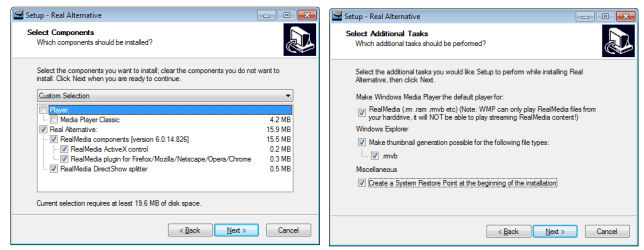
I understand your issue. What you need to do is install the real alternative codecs (not the player) and select the choices shown in my screen prints.
Once this is installed, the sound should work correctly in media player.
If this still doesn't work it is most likely still a codec issue. I gaurantee you that I can play rmvb files on media player in Windows 7, so we should be able to get yours working too.
My Installed codecs are as follows:
- Windows 7 Codec Pack (many codecs)
- Real Alternative (Real Media files)
- Mpeg2DSS codec. (MPEG2 - Special version required for some movies compliled in China, Japan, & Korea)
Attachments
My Computer
At a glance
Windows 7 Ultimate 64 bitIntel(R) Core(TM)2 Quad CPU Q8200 @ 2.33GHz8 GB KingstonNvidia GeForce 9600GT
- Computer Manufacturer/Model Number
- Custom Hack job
- OS
- Windows 7 Ultimate 64 bit
- CPU
- Intel(R) Core(TM)2 Quad CPU Q8200 @ 2.33GHz
- Motherboard
- GigaByte EP45-UD3
- Memory
- 8 GB Kingston
- Graphics Card(s)
- Nvidia GeForce 9600GT
- Sound Card
- Soundblaster Audigy
- Monitor(s) Displays
- AOC x2 22"
- Hard Drives
- 2 x Samsung 500GB (RAID)
2 x Samsung 2TB
1 x WD Green 2TB
1 x Seagate 1TB
1 x Samsung 500GB
- PSU
- Thermaltake QFan 750W
- Case
- CM Scout Gaming
- Cooling
- Coolermaster V10
- Keyboard
- Microsoft Wireless Keyboard 1000
- Mouse
- Microsoft Wireless Optical 2000
- Internet Speed
- 320
- Other Info
- Winfast PVR2000CP
LG DVD-RAM DVD/RW/DL Super Multi
Linksys WMP300Nx2 Wireless Adapter

Shark007
New member
hi all
I have a problem in playing movies (rmvb)
The Windows Media Center run movies without sound
Please help me
If you absolutely want to play rmvb in Media Center, you will need to install a 32bit operating system.
At this time no 64bit codec exists for 'cook audio'.
A few home produced realmedia video's contain aac for audio
but the majority of realmedia files contain cook audio.
Last edited:
My Computer
At a glance
Windows 7 Ultimate 64biti7 2600k16GB (4x4) corsair vengeanceIntel HD3000 iGPU / AMD HD6870 1024MB
- Computer Manufacturer/Model Number
- Selfbuilt
- OS
- Windows 7 Ultimate 64bit
- CPU
- i7 2600k
- Motherboard
- asus P8Z68-V LE
- Memory
- 16GB (4x4) corsair vengeance
- Graphics Card(s)
- Intel HD3000 iGPU / AMD HD6870 1024MB
- Sound Card
- bitstreamed to an Onkyo 609
- Monitor(s) Displays
- Asus VE278 27" LED / Bravia EX7 60" LED
- Screen Resolution
- native 1080p x2
- Hard Drives
- 4x 2TB int. + 2x 2TB external and a SSD for the boot drive.
- PSU
- 650w Antec
- Case
- NZXT tempest evo
- Cooling
- air/stock
- Keyboard
- Dell
- Mouse
- logitech m505
- Internet Speed
- dual: cable/blackberry tether for travel use
- Other Info
- BD re-writer //
asus notebook G73Jw
If you absolutely want to play rmvb in Media Center, you will need to install a 32bit operating system.
At this time no 64bit codec exists for 'cook audio'.
A few home produced realmedia video's contain aac for audio
but the majority of realmedia files contain cook audio.
Thanks
We will wait until the issuance of the appropriate codec
My Computer
At a glance
windows 7 64 bit4 Gb
- OS
- windows 7 64 bit
- Memory
- 4 Gb
hi all
I have a problem in playing movies (rmvb)
The Windows Media Center run movies without sound
Please help me
If you absolutely want to play rmvb in Media Center, you will need to install a 32bit operating system.
At this time no 64bit codec exists for 'cook audio'.
A few home produced realmedia video's contain aac for audio
but the majority of realmedia files contain cook audio.
Hi Shark007,
This is interesting. I just checked over 10 different rmvb files that I have from a variety of sources and they all play under my Windows 64bit box through media player. Can you point me in the direction of a small rmvb with cook audio so I can look into this?
Cheers
Tim
BTW - I can play both rmvb files (with sound) in the cook directory here http://samples.mplayerhq.hu/real/AC-cook/cook_5.1/
However I do agree that there is information on the web suggesting that rmvb files encoded with cook audio won't work on 64 bit. I just can't find that doesn't work.
Last edited:
My Computer
At a glance
Windows 7 Ultimate 64 bitIntel(R) Core(TM)2 Quad CPU Q8200 @ 2.33GHz8 GB KingstonNvidia GeForce 9600GT
- Computer Manufacturer/Model Number
- Custom Hack job
- OS
- Windows 7 Ultimate 64 bit
- CPU
- Intel(R) Core(TM)2 Quad CPU Q8200 @ 2.33GHz
- Motherboard
- GigaByte EP45-UD3
- Memory
- 8 GB Kingston
- Graphics Card(s)
- Nvidia GeForce 9600GT
- Sound Card
- Soundblaster Audigy
- Monitor(s) Displays
- AOC x2 22"
- Hard Drives
- 2 x Samsung 500GB (RAID)
2 x Samsung 2TB
1 x WD Green 2TB
1 x Seagate 1TB
1 x Samsung 500GB
- PSU
- Thermaltake QFan 750W
- Case
- CM Scout Gaming
- Cooling
- Coolermaster V10
- Keyboard
- Microsoft Wireless Keyboard 1000
- Mouse
- Microsoft Wireless Optical 2000
- Internet Speed
- 320
- Other Info
- Winfast PVR2000CP
LG DVD-RAM DVD/RW/DL Super Multi
Linksys WMP300Nx2 Wireless Adapter
Shark007
New member
I have a problem in playing movies (rmvb)
The Windows Media Center run movies without sound
[ This is interesting. I just checked over 10 different rmvb files that I have from a variety of sources and they all play under my Windows 64bit box through media player.
Sometimes assuming that people read is not enough. Sometimes to pull them out of that assuming cloud, you have to hold thier hand. It is akin to teaching a man to fish, cause then he gets to sit back, enjoy the sunshine, and drink beer all day.
On x64 Windows installations...
media player = 32bit (uses 32bit codecs)
media centrer = 64bit (uses 64bit codecs)
After you fire up the proper player and test your files, assume nothing more, and open a beer.
Last edited:
My Computer
At a glance
Windows 7 Ultimate 64biti7 2600k16GB (4x4) corsair vengeanceIntel HD3000 iGPU / AMD HD6870 1024MB
- Computer Manufacturer/Model Number
- Selfbuilt
- OS
- Windows 7 Ultimate 64bit
- CPU
- i7 2600k
- Motherboard
- asus P8Z68-V LE
- Memory
- 16GB (4x4) corsair vengeance
- Graphics Card(s)
- Intel HD3000 iGPU / AMD HD6870 1024MB
- Sound Card
- bitstreamed to an Onkyo 609
- Monitor(s) Displays
- Asus VE278 27" LED / Bravia EX7 60" LED
- Screen Resolution
- native 1080p x2
- Hard Drives
- 4x 2TB int. + 2x 2TB external and a SSD for the boot drive.
- PSU
- 650w Antec
- Case
- NZXT tempest evo
- Cooling
- air/stock
- Keyboard
- Dell
- Mouse
- logitech m505
- Internet Speed
- dual: cable/blackberry tether for travel use
- Other Info
- BD re-writer //
asus notebook G73Jw
I have a problem in playing movies (rmvb)
The Windows Media Center run movies without sound
[ This is interesting. I just checked over 10 different rmvb files that I have from a variety of sources and they all play under my Windows 64bit box through media player.
Sometimes assuming that people read is not enough. Sometimes to pull them out of that assuming cloud, you have to hold thier hand. It is akin to teaching a man to fish, cause then he gets to sit back, enjoy the sunshine, and drink beer all day.
On x64 Windows installations...
media player = 32bit (uses 32bit codecs)
media centrer = 64bit (uses 64bit codecs)
After you fire up the proper player and test your files, assume nothing more, and open a beer.
Gotcha - I'll test later this afternoon... and bring the beer.
Also, I understand the 32 bit codecs on 32 bit systems etc, that is old news to me, but what I don't get is why Microsoft auto update would default-install the 32bit player on my 64bit install (and it did, I just checked), I think this is the "assumption cloud" you mentioned.

Ah, this may give us a clue as to why the 32bit is installed http://www.mydigitallife.info/2007/...yer-11-wmp11-in-windows-vista-x64-as-default/
@alwazeer - Changing to the 32bit version on your 64bit may an option for you. The 'how to change' is in the above link (providing it works for your set-up, perhaps Shark007 knows). I have both installed now. Another option may be to only play real media files on the 32bit WMP and everything else on the 64bit, i.e. set the 'open with' to default to the required *.exe (workaround only I realise, not a solution).
Last edited:
My Computer
At a glance
Windows 7 Ultimate 64 bitIntel(R) Core(TM)2 Quad CPU Q8200 @ 2.33GHz8 GB KingstonNvidia GeForce 9600GT
- Computer Manufacturer/Model Number
- Custom Hack job
- OS
- Windows 7 Ultimate 64 bit
- CPU
- Intel(R) Core(TM)2 Quad CPU Q8200 @ 2.33GHz
- Motherboard
- GigaByte EP45-UD3
- Memory
- 8 GB Kingston
- Graphics Card(s)
- Nvidia GeForce 9600GT
- Sound Card
- Soundblaster Audigy
- Monitor(s) Displays
- AOC x2 22"
- Hard Drives
- 2 x Samsung 500GB (RAID)
2 x Samsung 2TB
1 x WD Green 2TB
1 x Seagate 1TB
1 x Samsung 500GB
- PSU
- Thermaltake QFan 750W
- Case
- CM Scout Gaming
- Cooling
- Coolermaster V10
- Keyboard
- Microsoft Wireless Keyboard 1000
- Mouse
- Microsoft Wireless Optical 2000
- Internet Speed
- 320
- Other Info
- Winfast PVR2000CP
LG DVD-RAM DVD/RW/DL Super Multi
Linksys WMP300Nx2 Wireless Adapter
Hey Shark007,
*Tim cracks open 3 beers, hands them around*
Now I have both 64bit and 32bit WMP set up, I can see Alwazeer's issue. On 64bit WMP there is no sound for the cook audio rmvb's. On 32bit, it works like a dream. I've set my default to 64bit and I'll use this moving forward (at least as a trial for a while). As explained above, I have set rmvb's to open with the 32bit version of WMP. I guess until someone releases a 64bit version rmvb/cook codec we'll all stuck.
Cheers
Tim
*Tim cracks open 3 beers, hands them around*
Now I have both 64bit and 32bit WMP set up, I can see Alwazeer's issue. On 64bit WMP there is no sound for the cook audio rmvb's. On 32bit, it works like a dream. I've set my default to 64bit and I'll use this moving forward (at least as a trial for a while). As explained above, I have set rmvb's to open with the 32bit version of WMP. I guess until someone releases a 64bit version rmvb/cook codec we'll all stuck.
Cheers
Tim
My Computer
At a glance
Windows 7 Ultimate 64 bitIntel(R) Core(TM)2 Quad CPU Q8200 @ 2.33GHz8 GB KingstonNvidia GeForce 9600GT
- Computer Manufacturer/Model Number
- Custom Hack job
- OS
- Windows 7 Ultimate 64 bit
- CPU
- Intel(R) Core(TM)2 Quad CPU Q8200 @ 2.33GHz
- Motherboard
- GigaByte EP45-UD3
- Memory
- 8 GB Kingston
- Graphics Card(s)
- Nvidia GeForce 9600GT
- Sound Card
- Soundblaster Audigy
- Monitor(s) Displays
- AOC x2 22"
- Hard Drives
- 2 x Samsung 500GB (RAID)
2 x Samsung 2TB
1 x WD Green 2TB
1 x Seagate 1TB
1 x Samsung 500GB
- PSU
- Thermaltake QFan 750W
- Case
- CM Scout Gaming
- Cooling
- Coolermaster V10
- Keyboard
- Microsoft Wireless Keyboard 1000
- Mouse
- Microsoft Wireless Optical 2000
- Internet Speed
- 320
- Other Info
- Winfast PVR2000CP
LG DVD-RAM DVD/RW/DL Super Multi
Linksys WMP300Nx2 Wireless Adapter
geezageeza
New member
- Local time
- 9:45 PM
- Messages
- 8
codecs doesnt resolve my problem
Dudes, I have a similar problem
I cannot get sound from any video files that have an audio encoding of MPEG Version 1 Audio
The problem just happened randomly one day as everything used to play fine.
I have tried
- uninstalling / re-installing sound drivers
- uninstalling reinstalling shark 2007 codecs
- installing most recent Klite codecs
- uninstalling reinstalling media player
- Restoring Media Library
- Playing with every setting for my sound card
- Playing with every setting in Media Player including advanced - codecs
Nothing so far has fixed the problem. Every other type of video works.
Also theres no problem at all from any other type of media player e.g. media player classic is fine
Most of my older AVI files have MPEG Version 1 Audio !! I cant use my playlists now !!
(p.s. You can tell what type of audio encoding has been used in a file by running Media Info (for Klite codec pack) or choosing Analyse Media File (Shark 2007 codec advanced settings)
Dudes, I have a similar problem
I cannot get sound from any video files that have an audio encoding of MPEG Version 1 Audio
The problem just happened randomly one day as everything used to play fine.
I have tried
- uninstalling / re-installing sound drivers
- uninstalling reinstalling shark 2007 codecs
- installing most recent Klite codecs
- uninstalling reinstalling media player
- Restoring Media Library
- Playing with every setting for my sound card
- Playing with every setting in Media Player including advanced - codecs
Nothing so far has fixed the problem. Every other type of video works.
Also theres no problem at all from any other type of media player e.g. media player classic is fine
Most of my older AVI files have MPEG Version 1 Audio !! I cant use my playlists now !!
(p.s. You can tell what type of audio encoding has been used in a file by running Media Info (for Klite codec pack) or choosing Analyse Media File (Shark 2007 codec advanced settings)
My Computer
At a glance
Windows 7
- OS
- Windows 7
Hi geezageeza,
Is your Operating System Windows 7 64bit or 32bit? If 64bit, are you using the 32bit or 64bit Windows Media Player?
Also is it possible to upload a small sample of the file you are having problems with, I can check under my environment for you, have a closer look and maybe we can solve it for you.
To clarify, you are saying that the files play under other media players... just not Windows Media Player.. correct?
Is your Operating System Windows 7 64bit or 32bit? If 64bit, are you using the 32bit or 64bit Windows Media Player?
Also is it possible to upload a small sample of the file you are having problems with, I can check under my environment for you, have a closer look and maybe we can solve it for you.
To clarify, you are saying that the files play under other media players... just not Windows Media Player.. correct?
My Computer
At a glance
Windows 7 Ultimate 64 bitIntel(R) Core(TM)2 Quad CPU Q8200 @ 2.33GHz8 GB KingstonNvidia GeForce 9600GT
- Computer Manufacturer/Model Number
- Custom Hack job
- OS
- Windows 7 Ultimate 64 bit
- CPU
- Intel(R) Core(TM)2 Quad CPU Q8200 @ 2.33GHz
- Motherboard
- GigaByte EP45-UD3
- Memory
- 8 GB Kingston
- Graphics Card(s)
- Nvidia GeForce 9600GT
- Sound Card
- Soundblaster Audigy
- Monitor(s) Displays
- AOC x2 22"
- Hard Drives
- 2 x Samsung 500GB (RAID)
2 x Samsung 2TB
1 x WD Green 2TB
1 x Seagate 1TB
1 x Samsung 500GB
- PSU
- Thermaltake QFan 750W
- Case
- CM Scout Gaming
- Cooling
- Coolermaster V10
- Keyboard
- Microsoft Wireless Keyboard 1000
- Mouse
- Microsoft Wireless Optical 2000
- Internet Speed
- 320
- Other Info
- Winfast PVR2000CP
LG DVD-RAM DVD/RW/DL Super Multi
Linksys WMP300Nx2 Wireless Adapter

pgalko
New member
- Local time
- 3:45 AM
- Messages
- 1
Hi guys!
Ive got a very simple sulution for your headake of this lack of sound whilest playing rmvb files in wmp or wmc regardles you have installed xp/vista/7 or 32-64-bit os!
there in shark007's settings window
> go to the 1st tab and click on "FFDshow Audio config" button
> in "FFDshow audio decoder configuration" window select "Codecs" >> and search for "cook" >> then change and select a "libavcodec" setting option
> click on "OK" button and exit
all done!

> try to play .rmvb file now

regards mates!
Ive got a very simple sulution for your headake of this lack of sound whilest playing rmvb files in wmp or wmc regardles you have installed xp/vista/7 or 32-64-bit os!
there in shark007's settings window
> go to the 1st tab and click on "FFDshow Audio config" button
> in "FFDshow audio decoder configuration" window select "Codecs" >> and search for "cook" >> then change and select a "libavcodec" setting option
> click on "OK" button and exit
all done!
> try to play .rmvb file now
regards mates!
My Computer
At a glance
Windows 7 Ultimate x86 (EN)Intel "Centrino" Core 2 Duo T7500 @2.2GHzDual DDR2 2GB SDRAM @667MHzbuild-in PCI-expres 1.0 x16 NVIDIA geforce 87...
- Computer Manufacturer/Model Number
- Notebook model Clevo M570RU (Evesham UK seller)
- OS
- Windows 7 Ultimate x86 (EN)
- CPU
- Intel "Centrino" Core 2 Duo T7500 @2.2GHz
- Motherboard
- Clevo CO. manuf M570RU, chipset: PM965
- Memory
- Dual DDR2 2GB SDRAM @667MHz
- Graphics Card(s)
- build-in PCI-expres 1.0 x16 NVIDIA geforce 8700M GT 512MB
- Sound Card
- 1)Realtek HD Audio Device;2)Creative X-Fi Extreme PCI card
- Monitor(s) Displays
- build-in notebook LCD 17" display
- Hard Drives
- SATA1 100GB 7200rpm 8M cache (WDC WD2500BEVS-00UST0)
Shark007
New member
Ive got a very simple sulution....
Since I choose system stability over playback ability,
I do not enable this because for many people it will cause Media Center to crash.
When the COOK audio codec implementation in FFDshows matures to the point of not crashing peoples systems, i will enable it by default.
My Computer
At a glance
Windows 7 Ultimate 64biti7 2600k16GB (4x4) corsair vengeanceIntel HD3000 iGPU / AMD HD6870 1024MB
- Computer Manufacturer/Model Number
- Selfbuilt
- OS
- Windows 7 Ultimate 64bit
- CPU
- i7 2600k
- Motherboard
- asus P8Z68-V LE
- Memory
- 16GB (4x4) corsair vengeance
- Graphics Card(s)
- Intel HD3000 iGPU / AMD HD6870 1024MB
- Sound Card
- bitstreamed to an Onkyo 609
- Monitor(s) Displays
- Asus VE278 27" LED / Bravia EX7 60" LED
- Screen Resolution
- native 1080p x2
- Hard Drives
- 4x 2TB int. + 2x 2TB external and a SSD for the boot drive.
- PSU
- 650w Antec
- Case
- NZXT tempest evo
- Cooling
- air/stock
- Keyboard
- Dell
- Mouse
- logitech m505
- Internet Speed
- dual: cable/blackberry tether for travel use
- Other Info
- BD re-writer //
asus notebook G73Jw
Similar threads
- Replies
- 1
- Views
- 4K

- Replies
- 0
- Views
- 2K

- Replies
- 3
- Views
- 2K

