Cannot open links in IE 8 in a new Tab

dtroake

New member
Local time
6:27 AM
Messages
6
Location
Australia
I have recently upgraded to a new PC Running Win 7 Home Premium 64 bit.

When using IE8 I cannot open a link in a new tab.

I tried to open a thread on the main forum page by right click on link and click 'Open in new Tab'. All I get is a new tab with 'connecting' in the tab heading and a blank page. This indicitive of the problem as it started well before I entered this forum

This happens whenever I try to open a link in a new Tab ( or window). The main problem this causes is where a site opens a new page when you attempt to login.

I originally thought the problem was with the popup bloker but I get the same result with it turned off.

My wife is giving me considerable grief as she uses IE and I use Firefox. She cannot login in to her credit card site and has to use firefox to login.

Sometimes I get a message error on page but cannot get any information on what the error is. I got a new computer at the same time for another family member. It is running Win 7 Home Premium 32 bit, and everything works ok on that
I hope that the problem is not due to having 64 bit Win 7

Has anyone got any ideas of what to check next as I have run out of ideas

Thanks

DT
 

My Computer My Computer

At a glance

Windows 7 Home premium 64 bitIntel I7 8604 GigATI 4670
Computer Manufacturer/Model Number
Built to my specifictaions
OS
Windows 7 Home premium 64 bit
CPU
Intel I7 860
Motherboard
Gigabyte P55UD3R
Memory
4 Gig
Graphics Card(s)
ATI 4670
Sound Card
Built in
Monitor(s) Displays
LG 19" Wide LCD
Screen Resolution
1400 x 900
Hard Drives
Seagate 1 TB
PSU
???
Case
Coolermaster
Cooling
Standard
Keyboard
Logitech Wireless
Mouse
Microsft wireless
Internet Speed
ADSL 2
64 Bit

look in your start menu and see if you have 32 bit internet explorer and 64 bit internet explorer if you try to access a site that uses flash content with the 64 bit browser you will run into problems
 

My Computer My Computer

At a glance

Windows 7 Ultimate 32 bitAMD Athlon 64 X2 4200+ Overclocked to 3.0Ghz2 Gigs of G.Skill DDR2 800HIS ATI Radeon HD 2600 Pro With IceQ cooler
Computer Manufacturer/Model Number
Custom Built
OS
Windows 7 Ultimate 32 bit
CPU
AMD Athlon 64 X2 4200+ Overclocked to 3.0Ghz
Motherboard
Biostar TF560 A2+
Memory
2 Gigs of G.Skill DDR2 800
Graphics Card(s)
HIS ATI Radeon HD 2600 Pro With IceQ cooler
Sound Card
6.1 Channel Sound Blaster Live 24 Bit
Monitor(s) Displays
Dual 20.5 " LG Flatrons W2052TO
Screen Resolution
1152x864
Hard Drives
Dual 36 Gig 10,000 RPM Raptors
PSU
430 watt Seasonic 80%+ Dual 12v Rails 2x80mm fans
Case
CHIEFMAX YA-5X
Cooling
4-80mm case fans 1-140mm case fan freezer 64 Pro CPU cooler
Keyboard
Saitek Eclipse II
Mouse
A4Tech wireless battery free optical scroll mouse
Internet Speed
1.5 meg down 384 up
Other Info
Logisys LED fan/light controller and dual 16" LED sticks mounted inside top of case all fans are LED all lighting is blue
DVD RW and CD RW both and Memory card reader
with the above advice, you can run IE with no addons too and check. Start - Accessories - System tools and IE with no addons.
 

My Computer My Computer

At a glance

Lioni54GBIntel
Computer Manufacturer/Model Number
MacBook Pro
OS
Lion
CPU
i5
Memory
4GB
Graphics Card(s)
Intel
Screen Resolution
1200x800
Hard Drives
Seagate FreeAgent GO 250GB Ext. HDD
I have investigated further and it appears the problem is related to not having Javascript enabled.

I get a message 'No Such interface supported'
ib.js
and a reference to a file on the site.

I have tried to activate Java script from advice on other forums,
by Changing Active scripting to enable and
Scripting - Java Applet enable.

Someone also mentioned running IE8 with addons disabled, I did and still had the problem.

Someone also mentioned that their IE8 has stopped working with JavaScript after a windows update.

If my wife was not complaining so much, I would be happy not to use IE, but I must at least look like I am trying to fix it, as all other problems with the new computer and transfer of programs have been fixed, only IE to go
 

My Computer My Computer

At a glance

Windows 7 Home premium 64 bitIntel I7 8604 GigATI 4670
Computer Manufacturer/Model Number
Built to my specifictaions
OS
Windows 7 Home premium 64 bit
CPU
Intel I7 860
Motherboard
Gigabyte P55UD3R
Memory
4 Gig
Graphics Card(s)
ATI 4670
Sound Card
Built in
Monitor(s) Displays
LG 19" Wide LCD
Screen Resolution
1400 x 900
Hard Drives
Seagate 1 TB
PSU
???
Case
Coolermaster
Cooling
Standard
Keyboard
Logitech Wireless
Mouse
Microsft wireless
Internet Speed
ADSL 2
Reset to default

did you try to reset IE to defaults in internet options
 

My Computer My Computer

At a glance

Windows 7 Ultimate 32 bitAMD Athlon 64 X2 4200+ Overclocked to 3.0Ghz2 Gigs of G.Skill DDR2 800HIS ATI Radeon HD 2600 Pro With IceQ cooler
Computer Manufacturer/Model Number
Custom Built
OS
Windows 7 Ultimate 32 bit
CPU
AMD Athlon 64 X2 4200+ Overclocked to 3.0Ghz
Motherboard
Biostar TF560 A2+
Memory
2 Gigs of G.Skill DDR2 800
Graphics Card(s)
HIS ATI Radeon HD 2600 Pro With IceQ cooler
Sound Card
6.1 Channel Sound Blaster Live 24 Bit
Monitor(s) Displays
Dual 20.5 " LG Flatrons W2052TO
Screen Resolution
1152x864
Hard Drives
Dual 36 Gig 10,000 RPM Raptors
PSU
430 watt Seasonic 80%+ Dual 12v Rails 2x80mm fans
Case
CHIEFMAX YA-5X
Cooling
4-80mm case fans 1-140mm case fan freezer 64 Pro CPU cooler
Keyboard
Saitek Eclipse II
Mouse
A4Tech wireless battery free optical scroll mouse
Internet Speed
1.5 meg down 384 up
Other Info
Logisys LED fan/light controller and dual 16" LED sticks mounted inside top of case all fans are LED all lighting is blue
DVD RW and CD RW both and Memory card reader
Just tried reset to default, and got the same result as I did when I first started, without the message about ib.js file, which came when I enabled 'Display notification of script error'

DJT
 

My Computer My Computer

At a glance

Windows 7 Home premium 64 bitIntel I7 8604 GigATI 4670
Computer Manufacturer/Model Number
Built to my specifictaions
OS
Windows 7 Home premium 64 bit
CPU
Intel I7 860
Motherboard
Gigabyte P55UD3R
Memory
4 Gig
Graphics Card(s)
ATI 4670
Sound Card
Built in
Monitor(s) Displays
LG 19" Wide LCD
Screen Resolution
1400 x 900
Hard Drives
Seagate 1 TB
PSU
???
Case
Coolermaster
Cooling
Standard
Keyboard
Logitech Wireless
Mouse
Microsft wireless
Internet Speed
ADSL 2
Download IE

download and reinstall IE8
 

My Computer My Computer

At a glance

Windows 7 Ultimate 32 bitAMD Athlon 64 X2 4200+ Overclocked to 3.0Ghz2 Gigs of G.Skill DDR2 800HIS ATI Radeon HD 2600 Pro With IceQ cooler
Computer Manufacturer/Model Number
Custom Built
OS
Windows 7 Ultimate 32 bit
CPU
AMD Athlon 64 X2 4200+ Overclocked to 3.0Ghz
Motherboard
Biostar TF560 A2+
Memory
2 Gigs of G.Skill DDR2 800
Graphics Card(s)
HIS ATI Radeon HD 2600 Pro With IceQ cooler
Sound Card
6.1 Channel Sound Blaster Live 24 Bit
Monitor(s) Displays
Dual 20.5 " LG Flatrons W2052TO
Screen Resolution
1152x864
Hard Drives
Dual 36 Gig 10,000 RPM Raptors
PSU
430 watt Seasonic 80%+ Dual 12v Rails 2x80mm fans
Case
CHIEFMAX YA-5X
Cooling
4-80mm case fans 1-140mm case fan freezer 64 Pro CPU cooler
Keyboard
Saitek Eclipse II
Mouse
A4Tech wireless battery free optical scroll mouse
Internet Speed
1.5 meg down 384 up
Other Info
Logisys LED fan/light controller and dual 16" LED sticks mounted inside top of case all fans are LED all lighting is blue
DVD RW and CD RW both and Memory card reader
^^ we cant download IE8 for Win 7. For re-installing,
start - run - appwiz.cpl - turn windows features on off - uncheck IE. Restart machine, follow the same steps and check mark IE.
Try.
If doesnt work,
fire the following command in command prompt(u can run it as an admin)
sfc /scannow
 

My Computer My Computer

At a glance

Lioni54GBIntel
Computer Manufacturer/Model Number
MacBook Pro
OS
Lion
CPU
i5
Memory
4GB
Graphics Card(s)
Intel
Screen Resolution
1200x800
Hard Drives
Seagate FreeAgent GO 250GB Ext. HDD
I am running Win7 Pro 32 bit and I am having the same problem. It is very irritating. A left click on links in some websites simply does nothing (although I can see the url in the status bar). A right click on a link to "open in new window" also does nothing or to "open in new tab" opens a new tab but "connecting... " without end.

I have played around with the security settings, uninstalled AVG, to no avail. I downloaded IE Tweaker (nice little app) but this didn't fix the problem. For example, I used IE Tweaker to set default settings for IE8 which amounts to a reinstall. Again, no success.

It seems that the problem occurs only on certain websites which implies that it is a compatibility issue. I have tried changing the Compatibility Views mode in IE8 but this doesn't fix the problem.

Incidentally, I installed Win7 about a week ago and this problem just arose today.

I'm used to IE8 but I am considering a permanent move to either Chrome or Firefox.
 

My Computer My Computer

At a glance

Windows 7 Professional 32 bit
OS
Windows 7 Professional 32 bit
To get the latest Java do this:

  • Download the latest version of Java Runtime Environment (JRE) 6.
  • Scroll down to where it says "Java Runtime Environment (JRE) 6u17 allows end-users to run Java applications".
  • Click the "Download" button to the right.
  • Check the box that says: "Accept License Agreement".
  • The page will refresh.
  • Click on the link to download Windows Offline Installation with or without Multi-language and save to your desktop.
  • Close any programs you may have running - especially your web browser.
  • Go to Start > Control Panel double-click on Add/Remove programs and remove all older versions of Java.
  • Check any item with Java Runtime Environment (JRE or J2SE) in the name.
  • Click the Remove or Change/Remove button.
  • Repeat as many times as necessary to remove each Java versions.
  • Reboot your computer once all Java components are removed.
  • Then from your desktop double-click on jre-6u17-windows-i586-p.exe to install the newest version.

Make sure you click on 'compatibility view settings' for the web site and also make sure that AVG's "Linkscanner" isn't blocking the site.
 

My Computer My Computer

At a glance

Windows 7 Ultimate 32bit SP1Intel(R) Core(TM)2 Quad CPU @ 2.40GHz, 2400 MHz4 GBATI Radeon HD 2600 Pro
Computer type
PC/Desktop
Computer Manufacturer/Model Number
Bruce ... somewhere in his 40's
OS
Windows 7 Ultimate 32bit SP1
CPU
Intel(R) Core(TM)2 Quad CPU @ 2.40GHz, 2400 MHz
Motherboard
INTEL/D975XBX2
Memory
4 GB
Graphics Card(s)
ATI Radeon HD 2600 Pro
Monitor(s) Displays
Samsung SyncMaster 914v
Screen Resolution
1280 x 1024
Hard Drives
2/500GB each ... ST3500630AS ATA Device.
One is not connected
PSU
Rocketfish 700 W
Case
G.Skill Gigabyte Chassis
Keyboard
Standard PS/2 Keyboard
Mouse
Microsoft PS/2 Mouse
Internet Speed
DSL
Antivirus
Avira Internet Security
Browser
IE 11
Other Info
ATI HDMI Audio
One of the posts led me to java.sun.com website. They have a suggestion which makes sense. Go to Tools, Internet options, Advanced, and scroll down to java(Sun).

Only problem-- That is not there. No Java(Sun) item. Ihave reinstalled both 32 bit & 64 bit Java and checked again. Still not there.

This would indicate why I am having trouble with *.js files but not why it is not there in the first place.

Another idea that has not yet solved the problem
 

My Computer My Computer

At a glance

Windows 7 Home premium 64 bitIntel I7 8604 GigATI 4670
Computer Manufacturer/Model Number
Built to my specifictaions
OS
Windows 7 Home premium 64 bit
CPU
Intel I7 860
Motherboard
Gigabyte P55UD3R
Memory
4 Gig
Graphics Card(s)
ATI 4670
Sound Card
Built in
Monitor(s) Displays
LG 19" Wide LCD
Screen Resolution
1400 x 900
Hard Drives
Seagate 1 TB
PSU
???
Case
Coolermaster
Cooling
Standard
Keyboard
Logitech Wireless
Mouse
Microsft wireless
Internet Speed
ADSL 2
dtroake, have you done what I suggested? Do you see Java in your Programs and Features? It should be there if you followed my instructions.
 

My Computer My Computer

At a glance

Windows 7 Ultimate 32bit SP1Intel(R) Core(TM)2 Quad CPU @ 2.40GHz, 2400 MHz4 GBATI Radeon HD 2600 Pro
Computer type
PC/Desktop
Computer Manufacturer/Model Number
Bruce ... somewhere in his 40's
OS
Windows 7 Ultimate 32bit SP1
CPU
Intel(R) Core(TM)2 Quad CPU @ 2.40GHz, 2400 MHz
Motherboard
INTEL/D975XBX2
Memory
4 GB
Graphics Card(s)
ATI Radeon HD 2600 Pro
Monitor(s) Displays
Samsung SyncMaster 914v
Screen Resolution
1280 x 1024
Hard Drives
2/500GB each ... ST3500630AS ATA Device.
One is not connected
PSU
Rocketfish 700 W
Case
G.Skill Gigabyte Chassis
Keyboard
Standard PS/2 Keyboard
Mouse
Microsoft PS/2 Mouse
Internet Speed
DSL
Antivirus
Avira Internet Security
Browser
IE 11
Other Info
ATI HDMI Audio
Yes I downloaded the files. That is how I found the instructions.

I have downloaded Java 32 bit and 64 bit and installed both as was suggested on the Sun site.

They actually were already installed. There were no older versions as this is a brand new computer, which has had this problem from the beginning

The only problem was that the reference to Java did not appear in Internet options, Advanced.

If it was just the Credit card site that was the problem I would blame the Credit card site as when I run 64 bit IE get a message that the site is not compatible with Windows 7, but I get the problem of not able to open another tab from a link and numerous other sites have problems opening windows or tabs from links

DJT
 

My Computer My Computer

At a glance

Windows 7 Home premium 64 bitIntel I7 8604 GigATI 4670
Computer Manufacturer/Model Number
Built to my specifictaions
OS
Windows 7 Home premium 64 bit
CPU
Intel I7 860
Motherboard
Gigabyte P55UD3R
Memory
4 Gig
Graphics Card(s)
ATI 4670
Sound Card
Built in
Monitor(s) Displays
LG 19" Wide LCD
Screen Resolution
1400 x 900
Hard Drives
Seagate 1 TB
PSU
???
Case
Coolermaster
Cooling
Standard
Keyboard
Logitech Wireless
Mouse
Microsft wireless
Internet Speed
ADSL 2
Simple fix install a better web browser

Simple fix install Firefox then remove IE permanently , go to control panel then choose uninstall program under programs then choose turn off windows features then click the ticked IE 8 box.

Now ie 8 is not wasting space or testing your patience, enjoy
 

My Computer My Computer

At a glance

windows 7 x64Intel E84004gb corsair dd2 800Asus gtx 275
OS
windows 7 x64
CPU
Intel E8400
Motherboard
ga-g31m-s2l
Memory
4gb corsair dd2 800
Graphics Card(s)
Asus gtx 275
Sound Card
Azalia
Monitor(s) Displays
Samsung 2233
Hard Drives
samsung 320gb sata
PSU
Gigabyte Odin 550w
Case
Areo Cool (model with massive side fan)
Cooling
Air cooled 5 speed contolled fans
Simple fix install Firefox then remove IE permanently , go to control panel then choose uninstall program under programs then choose turn off windows features then click the ticked IE 8 box.

Now ie 8 is not wasting space or testing your patience, enjoy

Excuse me but that advise doesn't help at all.

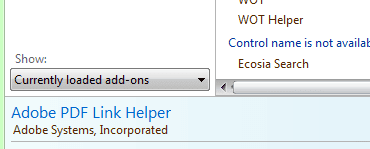
Have tried Managing your Add-ons in Tools? When you are there please choose All Add-ons and Run without Permission to view the Java plug-in.
 

Attachments

  • IE Add-ons show menu.PNG
    IE Add-ons show menu.PNG
    4 KB · Views: 19

My Computer My Computer

At a glance

Windows 7 Ultimate 32-bit Version 6.1 (build ...Intel Pentium Dual CPU T2390 @ 1.86GHzSiS Mirage 3 Graphics SiS627 series
Computer Manufacturer/Model Number
Neo Vivid V2121
OS
Windows 7 Ultimate 32-bit Version 6.1 (build 7600.16385)
CPU
Intel Pentium Dual CPU T2390 @ 1.86GHz
Motherboard
SiS M720SR
Graphics Card(s)
SiS Mirage 3 Graphics SiS627 series
Sound Card
Built-in
Monitor(s) Displays
Generic PnP Monitor
Screen Resolution
1280x800
Hard Drives
Fujitsu MHZ2160BH G1 ATA Device 160GB
Keyboard
Standard PS/2 Keyboard
Mouse
Synaptics PS/2 Port Pointing Device
Yes I downloaded the files. That is how I found the instructions.

I have downloaded Java 32 bit and 64 bit and installed both as was suggested on the Sun site.

They actually were already installed. There were no older versions as this is a brand new computer, which has had this problem from the beginning

The only problem was that the reference to Java did not appear in Internet options, Advanced.

If it was just the Credit card site that was the problem I would blame the Credit card site as when I run 64 bit IE get a message that the site is not compatible with Windows 7, but I get the problem of not able to open another tab from a link and numerous other sites have problems opening windows or tabs from links

DJT
Java does not appear for me in Internet Options Advanced as well, why don't you try this:
Java Early Access Downloads
 

My Computer My Computer

At a glance

Windows 7 Home Premium 64bitIntel Core i3-2310M8GBIntel HD3000
Computer Manufacturer/Model Number
Acer Aspire 5750
OS
Windows 7 Home Premium 64bit
CPU
Intel Core i3-2310M
Motherboard
Acer OEM
Memory
8GB
Graphics Card(s)
Intel HD3000
Screen Resolution
1366x768
Hard Drives
320GB Toshiba
For those interested, I posted my "solution" to my problem on a Microsoft support forum.

Here's a link to the thread.
 

My Computer My Computer

At a glance

Windows 7 Professional 32 bit
OS
Windows 7 Professional 32 bit
Using the above link I ended up with this site, Links in will not open a new window or tab in Windows 7 IE8, and after using the batch file to register the files IE8 now works. I can open links in new tabs and most site that logon in a new page also work. The original problem with my wifes Credit card site still does not work, but that is a problem with the site. It tells us that it does not support the browser version. They are very slow at checkiing and updating their site

Glad to see that the problem is finally fixed
 

My Computer My Computer

At a glance

Windows 7 Home premium 64 bitIntel I7 8604 GigATI 4670
Computer Manufacturer/Model Number
Built to my specifictaions
OS
Windows 7 Home premium 64 bit
CPU
Intel I7 860
Motherboard
Gigabyte P55UD3R
Memory
4 Gig
Graphics Card(s)
ATI 4670
Sound Card
Built in
Monitor(s) Displays
LG 19" Wide LCD
Screen Resolution
1400 x 900
Hard Drives
Seagate 1 TB
PSU
???
Case
Coolermaster
Cooling
Standard
Keyboard
Logitech Wireless
Mouse
Microsft wireless
Internet Speed
ADSL 2
glad you guys got it figured out!
 

My Computer My Computer

At a glance

Windows 7 Ultimate 32 bitAMD Athlon 64 X2 4200+ Overclocked to 3.0Ghz2 Gigs of G.Skill DDR2 800HIS ATI Radeon HD 2600 Pro With IceQ cooler
Computer Manufacturer/Model Number
Custom Built
OS
Windows 7 Ultimate 32 bit
CPU
AMD Athlon 64 X2 4200+ Overclocked to 3.0Ghz
Motherboard
Biostar TF560 A2+
Memory
2 Gigs of G.Skill DDR2 800
Graphics Card(s)
HIS ATI Radeon HD 2600 Pro With IceQ cooler
Sound Card
6.1 Channel Sound Blaster Live 24 Bit
Monitor(s) Displays
Dual 20.5 " LG Flatrons W2052TO
Screen Resolution
1152x864
Hard Drives
Dual 36 Gig 10,000 RPM Raptors
PSU
430 watt Seasonic 80%+ Dual 12v Rails 2x80mm fans
Case
CHIEFMAX YA-5X
Cooling
4-80mm case fans 1-140mm case fan freezer 64 Pro CPU cooler
Keyboard
Saitek Eclipse II
Mouse
A4Tech wireless battery free optical scroll mouse
Internet Speed
1.5 meg down 384 up
Other Info
Logisys LED fan/light controller and dual 16" LED sticks mounted inside top of case all fans are LED all lighting is blue
DVD RW and CD RW both and Memory card reader
Back
Top