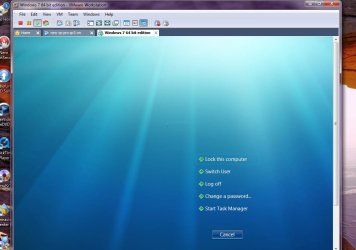
Gee? No one liked my creature feature. I couldn't grab a screen showing the logon button while that was simply a quick test with the first jpg file with nothing to do here. The problem that comes up at first is seeing the image you select stuck in one corner until adjusted after at times with the 7000 builds.
Even after setting it to pixel and 1440x900 used here you saw that until a good overwrite.
W7 Ultimate x64/W10 Pro x64/W11 Pro Triple Bo...AMD Phenom II X4 975 Deneb 3.6ghz - 965 2nd r...Kingston Hyper X DDR3 1600 1.5v 16gb - Hyper ...MSI HD Radeon 5750 1gb - MSI HD Radeon 6450 o...
Computer type
PC/Desktop
Computer Manufacturer/Model Number
Custom builds = 2
OS
W7 Ultimate x64/W10 Pro x64/W11 Pro Triple Boot - Main PC W7 Remote PC Micro ATX W7 Pro x64/W11 Pro
CPU
AMD Phenom II X4 975 Deneb 3.6ghz - 965 2nd remote pc
Motherboard
Gigabyte GA-790XTA-UD4-Gigabyte GA-880GM-D2H remote pc
Memory
Kingston Hyper X DDR3 1600 1.5v 16gb - Hyper X Fury 8gb 2nd
Graphics Card(s)
MSI HD Radeon 5750 1gb - MSI HD Radeon 6450 on mini tower
Sound Card
Creative Labs X-Fi Xtreme Audio P - Realtek onooard 2nd case
Monitor(s) Displays
ASUS VW199T-P 19" HP 2082a Main-HP 2082a 20" remote pc
Screen Resolution
Asus 1440x900 - HP 1600x900
Hard Drives
WD Black 1TB HD per OS W7, W10, and pending W11 presently on 500gb OS Drive - Pending Triple 1TB HDs for Spanned Storage/backup volume
Single 2TB external USB enclosure, single 1TB System 7 Host/Boot drive, Pending 8TB external HD for system image b
PSU
Corsair 750TX - primary / Corsair CX600 - second
Case
Antec 900-2 - SSD compatible / NZXT Vulcan mini tower
Looks good Ted, I am using that Cat pic as well, if any one wants it you can use my log on screen, just open the Zip and put the folder in the Windows folder and it will make all the necessary folders.
One way found to avoid needing the use of paint altogether when going to replace one screen for another is to first look at the images to see which ones look closest to your existing screen resolution and renaming the one you choose to simply overwrite the current. The image sees an instant swap without doing anything else!
W7 Ultimate x64/W10 Pro x64/W11 Pro Triple Bo...AMD Phenom II X4 975 Deneb 3.6ghz - 965 2nd r...Kingston Hyper X DDR3 1600 1.5v 16gb - Hyper ...MSI HD Radeon 5750 1gb - MSI HD Radeon 6450 o...
Computer type
PC/Desktop
Computer Manufacturer/Model Number
Custom builds = 2
OS
W7 Ultimate x64/W10 Pro x64/W11 Pro Triple Boot - Main PC W7 Remote PC Micro ATX W7 Pro x64/W11 Pro
CPU
AMD Phenom II X4 975 Deneb 3.6ghz - 965 2nd remote pc
Motherboard
Gigabyte GA-790XTA-UD4-Gigabyte GA-880GM-D2H remote pc
Memory
Kingston Hyper X DDR3 1600 1.5v 16gb - Hyper X Fury 8gb 2nd
Graphics Card(s)
MSI HD Radeon 5750 1gb - MSI HD Radeon 6450 on mini tower
Sound Card
Creative Labs X-Fi Xtreme Audio P - Realtek onooard 2nd case
Monitor(s) Displays
ASUS VW199T-P 19" HP 2082a Main-HP 2082a 20" remote pc
Screen Resolution
Asus 1440x900 - HP 1600x900
Hard Drives
WD Black 1TB HD per OS W7, W10, and pending W11 presently on 500gb OS Drive - Pending Triple 1TB HDs for Spanned Storage/backup volume
Single 2TB external USB enclosure, single 1TB System 7 Host/Boot drive, Pending 8TB external HD for system image b
PSU
Corsair 750TX - primary / Corsair CX600 - second
Case
Antec 900-2 - SSD compatible / NZXT Vulcan mini tower
I'll give that one a try on the 32bit side of life here besides having some 347 pages full of logon screens to choose from with the 3rd party tool at WinCustomize: LogonStudio Vista Gallery
Here's how that key looks in the 32bit beta seeing "Background\OEMbackground" as the DWord value there.
Once you've created a picture you can't get rid of it again even if you totally uninstall the program.
It changes system files -- not a good idea.
Use the standard tutorial in these forums to change the logon pic.
You now don't need 3rd party apps for this (especilly those that actually alter Windows System files).
Not saying LOGON VISTA is guilty but "clones" of this program and others that change system files can in some cases be an easy method of injecting trojans / spy / ad / other mal or crapware into a system.
BTW Nighthawk
if you use a VM you can capture the Logon Image via the VM's image / screen capture at logon time (or even the Host machine's capture progrm including the "Bog standard Print Screen").
For example (Bog std W7 X-64 build 7048 logon screen)
Cheers
jimbo
Attachments
W7stdlogon.jpg
58.7 KB
· Views: 203
Last edited:
My Computer
At a glance
Linux CENTOS 7 / various Windows OS'es and se...Intel i7 Intel i58GB, 16GBOn Motherboard
Computer type
PC/Desktop
Computer Manufacturer/Model Number
Custom built, several laptops HP/ASUS
OS
Linux CENTOS 7 / various Windows OS'es and servers
When going to remove LogonStudio Vista you first reapply the 7 default welcome screen. That will remove the custom screen you downloaded from their 300 page selection where you can replace that with the mod.
The format for their screens is not the usual jpg, bmp, png file type there. Instead of seeing "image.3 digit file extension" you see "image.logonstudio" binding it to that program alone. To see a much better look I came across one screen that almost looks like a "7" at the bottom traveling down the information highway.
Simply renaming it to backgroundDefault.jpg and overwriting the previous screen by copy+paste saw that applied without a need to adjust anything. The mod works on the 7000 build well while the LogonStudio has it's place on Vista there at least until someone comes with a tweak for that.
W7 Ultimate x64/W10 Pro x64/W11 Pro Triple Bo...AMD Phenom II X4 975 Deneb 3.6ghz - 965 2nd r...Kingston Hyper X DDR3 1600 1.5v 16gb - Hyper ...MSI HD Radeon 5750 1gb - MSI HD Radeon 6450 o...
Computer type
PC/Desktop
Computer Manufacturer/Model Number
Custom builds = 2
OS
W7 Ultimate x64/W10 Pro x64/W11 Pro Triple Boot - Main PC W7 Remote PC Micro ATX W7 Pro x64/W11 Pro
CPU
AMD Phenom II X4 975 Deneb 3.6ghz - 965 2nd remote pc
Motherboard
Gigabyte GA-790XTA-UD4-Gigabyte GA-880GM-D2H remote pc
Memory
Kingston Hyper X DDR3 1600 1.5v 16gb - Hyper X Fury 8gb 2nd
Graphics Card(s)
MSI HD Radeon 5750 1gb - MSI HD Radeon 6450 on mini tower
Sound Card
Creative Labs X-Fi Xtreme Audio P - Realtek onooard 2nd case
Monitor(s) Displays
ASUS VW199T-P 19" HP 2082a Main-HP 2082a 20" remote pc
Screen Resolution
Asus 1440x900 - HP 1600x900
Hard Drives
WD Black 1TB HD per OS W7, W10, and pending W11 presently on 500gb OS Drive - Pending Triple 1TB HDs for Spanned Storage/backup volume
Single 2TB external USB enclosure, single 1TB System 7 Host/Boot drive, Pending 8TB external HD for system image b
PSU
Corsair 750TX - primary / Corsair CX600 - second
Case
Antec 900-2 - SSD compatible / NZXT Vulcan mini tower


 I couldn't grab a screen showing the logon button while that was simply a quick test with the first jpg file with nothing to do here. The problem that comes up at first is seeing the image you select stuck in one corner until adjusted after at times with the 7000 builds.


 Ted
Ted