RDP -- a Plea to Microsoft for "Home Premium" Users

jimbo45

New member
Guru
Gold Member
VIP
Local time
12:38 AM
Messages
5,941
Location
Hafnarfjörður IS
Hi guys
Maybe if we can get our oars in now Microsoft might just listen.

It would appear that at Retail time most bought computers will ship with the Home Premium version.

This does NOT have the RDP SERVER in it --which means if you install this on a Home computer you won't be able to remotely connect to it from Work, the Internet etc etc.

So all those lovely new features of the new RDP will be useless on your nice Laptop when trying to connect to a home computer.

Since Networking is also very much mainstream in HOME computers as well as work computers this to me seems a HORRIBLE omission in an OS that Microsoft wants to make a rip-roaring sucess. Some other nice features will be hobbled in the Home Premium version -- such as changing Logon screens, and theme customisation. -- Now in my experience these are the sort of things HOME users like to do on their machines much more than WORK computers -- and a lot of offices block the RDP port anyway.

Most Office machines are usually locked down exactly to prevent people doing this sort of tinkering anyway so why not remove these from the BUSINESS editions and leave them in the HOME versions.

Same with Multi-media -- most offices basically use Windows Office, Email and some corporate ERP / Database type apps. It's usually HOME USERS and GAMERS who really tinker around and these seem to be exactly the features which will be hobbled in the HOME PREMIUM version.

Of course one could buy the Ultimate version but pricing - especially if you have a few machines could become quite expensive.

So PLEASE Microsoft -- in HOME PREMIUM DO ALLOW RDP SERVER and theme customisation.

No RDP Server on a Home desktop would be a total SHOWSTOPPER for me.


And also (but perhaps another topic) allow say a HOME 5 computer license pack -- hardly any Home I know now has only 1 computer in it any more.

At least the Mac fanboys have a winner here -- Apple does allow (I think 5) multiple home licensing.

Cheers
jimbo
 
Last edited by a moderator:

My Computer My Computer

Computer type
PC/Desktop
Computer Manufacturer/Model Number
Custom built, several laptops HP/ASUS
OS
Linux CENTOS 7 / various Windows OS'es and servers
CPU
Intel i7 Intel i5
Memory
8GB, 16GB
Graphics Card(s)
On Motherboard
Sound Card
Realtek HD audio
Monitor(s) Displays
Apple Cinema display, Samsung LCD
Screen Resolution
1920 X 1080
Hard Drives
4 X 1TB SATA
Mouse
Toshiba wireless laser
Internet Speed
> 20MB up
I'm agree with you ;)

But thanks to Microsoft you can have RDP without RDP via Live Mesh.

Live Mesh Remote desktop work on Home Premium edition and it work fine :)
 

My Computer My Computer

OS
Vista H.P. SP1 x32 Seven RC x64
CPU
Q6600 @ 3.4Ghz
Motherboard
GA-EP45-DS3L
Memory
4Go PC2-6400
Graphics Card(s)
8500GT @ 700/500
Sound Card
Audigy Platinium
Monitor(s) Displays
Mitsubishi Diamond Pro 920 + Mitsubishi Diamond Pro 720
Screen Resolution
1600x1200 twice
Hard Drives
Hitachi 160Go
Maxtor 160Go (system drive)
Maxtor 200Go in Antec MX-1 EC external box (eSATA-USB2.0)
PSU
Corsair VX550W
Case
Thermaltake Xaser III
Cooling
Watercooling (CPU, GPU, HDD, NB)
Keyboard
MS Wireless Multimedia 6000 V2.0
Mouse
IntellEye Explorer 3.0
Internet Speed
ADSL 18Mbit/s/1Mbit/s
I'm agree with you ;)

But thanks to Microsoft you can have RDP without RDP via Live Mesh.

Live Mesh Remote desktop work on Home Premium edition and it work fine :)

That's not the SAME as RDP -- Live mesh essentially shares files etc -- and you have to use that abomination Windows Live.

If you just want to do that you are much better off installing your own VPN (Virtual Private Network).

With RDP you get to use the computer just like you are sitting at home in front of it.

Tight VNC is a "Get around" but doesn't work properly on X-64 build 7048).

For example if I want to listen to Saturday Afternoon Live football from the UK via the BBC's R5L net braodcasts and I'm outside the UK then all you'll get is "Unfortuantely due to licensing restrictions we can't Netcast this program outside the UK.

However login to a desktop with RDP in the UK and fire up Internet Explorer and logon to the BBC you'll get the UK broadcast. RDP will transfer audio to your client machine.

Windows Live won't do this properly.

Maybe I should hang on to a Linux server for a while yet and just use W7 as a Virtual machine -- but I still of course have the problem of VNC on W7 X-64 so I can't logon to the Liinux machine's X-Server -- it's the GUI for non Linux people-- either.

Command line is fine -- but you need the GUI to get a browser with the audio plugin to work

Cheers

jimbo
 

My Computer My Computer

Computer type
PC/Desktop
Computer Manufacturer/Model Number
Custom built, several laptops HP/ASUS
OS
Linux CENTOS 7 / various Windows OS'es and servers
CPU
Intel i7 Intel i5
Memory
8GB, 16GB
Graphics Card(s)
On Motherboard
Sound Card
Realtek HD audio
Monitor(s) Displays
Apple Cinema display, Samsung LCD
Screen Resolution
1920 X 1080
Hard Drives
4 X 1TB SATA
Mouse
Toshiba wireless laser
Internet Speed
> 20MB up
That's not the SAME as RDP -- Live mesh essentially shares files etc -- and you have to use that abomination Windows Live.


With RDP you get to use the computer just like you are sitting at home in front of it.

Did you test it before saying that ?

At this time I prefere connect to my home computer via Live Mesh Remote desktop (which use same technologie than RDP I saw..) for some reason.

First: RDP is not quicker and not smoother
Second: for RDP you must have a Password to your account. I dont want that
Third: I allready use Live mesh for file sync, so mesh client is allready running on my home computer

As for RDP you can have full screen remote desktop. So you are it's just like if you are "sitting at home in front of it" (as you said)
 

My Computer My Computer

OS
Vista H.P. SP1 x32 Seven RC x64
CPU
Q6600 @ 3.4Ghz
Motherboard
GA-EP45-DS3L
Memory
4Go PC2-6400
Graphics Card(s)
8500GT @ 700/500
Sound Card
Audigy Platinium
Monitor(s) Displays
Mitsubishi Diamond Pro 920 + Mitsubishi Diamond Pro 720
Screen Resolution
1600x1200 twice
Hard Drives
Hitachi 160Go
Maxtor 160Go (system drive)
Maxtor 200Go in Antec MX-1 EC external box (eSATA-USB2.0)
PSU
Corsair VX550W
Case
Thermaltake Xaser III
Cooling
Watercooling (CPU, GPU, HDD, NB)
Keyboard
MS Wireless Multimedia 6000 V2.0
Mouse
IntellEye Explorer 3.0
Internet Speed
ADSL 18Mbit/s/1Mbit/s
As I said you have to use Windows LIVE -- I don't want that rubbish anywhere NEAR my machines.

https://www.mesh.com/Welcome/howto/setup.aspx

also what do you do if your remote computer is behind an ISP router and you have a "Dynamic IP" address.

Things like No IP No-IP - Dynamic DNS, Static DNS for Your Dynamic IP ) work seamlessly with RDP -- in theory should be the same since presumably all you need is a domain name for the remote computer.

My 100% gripe is having to use Windows Live and my 99% Gripe is having to use a Browser to logon to the remote machine -- Browsers are too easily "Hi-Jacked" especially if you are logging on from a public Wi-Fi / Hotel / Internet Cafe site and the encryption is pretty sh---y as well.

merci beacoup

a sante.

jimbo
 
Last edited:

My Computer My Computer

Computer type
PC/Desktop
Computer Manufacturer/Model Number
Custom built, several laptops HP/ASUS
OS
Linux CENTOS 7 / various Windows OS'es and servers
CPU
Intel i7 Intel i5
Memory
8GB, 16GB
Graphics Card(s)
On Motherboard
Sound Card
Realtek HD audio
Monitor(s) Displays
Apple Cinema display, Samsung LCD
Screen Resolution
1920 X 1080
Hard Drives
4 X 1TB SATA
Mouse
Toshiba wireless laser
Internet Speed
> 20MB up
Sorry but you're wrong for many things.

First you dont need to use a browser. You can make a connection directly from the live mesh Client.
For RDP you do must use RDP client.. other machine than yours may not have this client (windows home edition). The Website logging can be really usefull! RDP do not allow this feature.

About the ISP routing and dynamic IP: explain me what is the différence with RDP ??? You need No-IP or similar in both case.
Moreover: for live mesh you don't have to open port on your routeur, with RDP you need to open the port #3389 on the routeur or your firewall.


Finally: what's your problem with "Live" ? All you need is a live ID.. and a live ID can be based on every single email you own. I do not have even one live.com or hotmail.com (or many other) email adress. Live ID can be associate with the mail adress you want.
Maybe have you some probleme with Microsoft product, then what are you doing here with your Windows OS ?


Last thing about:

For example if I want to listen to Saturday Afternoon Live football from the UK via the BBC's R5L net braodcasts and I'm outside the UK then all you'll get is "Unfortuantely due to licensing restrictions we can't Netcast this program outside the UK.

Or: "Using a Caterpillar to plants carrot"

Remote desktop is really not the better solution for streaming. Why don't you put a little Proxy on your "local" machine so you can acces UK website via the proxy from all over the world ?? This is more efficient by far !!!
 

My Computer My Computer

OS
Vista H.P. SP1 x32 Seven RC x64
CPU
Q6600 @ 3.4Ghz
Motherboard
GA-EP45-DS3L
Memory
4Go PC2-6400
Graphics Card(s)
8500GT @ 700/500
Sound Card
Audigy Platinium
Monitor(s) Displays
Mitsubishi Diamond Pro 920 + Mitsubishi Diamond Pro 720
Screen Resolution
1600x1200 twice
Hard Drives
Hitachi 160Go
Maxtor 160Go (system drive)
Maxtor 200Go in Antec MX-1 EC external box (eSATA-USB2.0)
PSU
Corsair VX550W
Case
Thermaltake Xaser III
Cooling
Watercooling (CPU, GPU, HDD, NB)
Keyboard
MS Wireless Multimedia 6000 V2.0
Mouse
IntellEye Explorer 3.0
Internet Speed
ADSL 18Mbit/s/1Mbit/s
Does Live Mesh work with Win7?
I can't get it installed.
 

My Computer My Computer

Computer Manufacturer/Model Number
Gateway FX-510X
OS
Windows 7 Ultimate x64 RTM
CPU
Intel(R) Pentium(R) D CPU 3.00GHz
Motherboard
Intel OEMD975XW2G1
Memory
6 GB dual channel DDR2 333 MHz
Graphics Card(s)
NVIDIA GeForce 7800 GTX 256 MB
Sound Card
Creative X-Fi Fatal1ty Extreme Gamer
Monitor(s) Displays
15" Planar PL170 LCD, 17" Gateway FPD1965 LCD
Screen Resolution
1280 x 1024
Hard Drives
64 GB SSD Crucial
2000 GB internal WDC
500 GB internal WDC

My Computer My Computer

OS
Vista H.P. SP1 x32 Seven RC x64
CPU
Q6600 @ 3.4Ghz
Motherboard
GA-EP45-DS3L
Memory
4Go PC2-6400
Graphics Card(s)
8500GT @ 700/500
Sound Card
Audigy Platinium
Monitor(s) Displays
Mitsubishi Diamond Pro 920 + Mitsubishi Diamond Pro 720
Screen Resolution
1600x1200 twice
Hard Drives
Hitachi 160Go
Maxtor 160Go (system drive)
Maxtor 200Go in Antec MX-1 EC external box (eSATA-USB2.0)
PSU
Corsair VX550W
Case
Thermaltake Xaser III
Cooling
Watercooling (CPU, GPU, HDD, NB)
Keyboard
MS Wireless Multimedia 6000 V2.0
Mouse
IntellEye Explorer 3.0
Internet Speed
ADSL 18Mbit/s/1Mbit/s
Won't install on Build 7057 x86..
 

My Computer My Computer

Computer Manufacturer/Model Number
Gateway FX-510X
OS
Windows 7 Ultimate x64 RTM
CPU
Intel(R) Pentium(R) D CPU 3.00GHz
Motherboard
Intel OEMD975XW2G1
Memory
6 GB dual channel DDR2 333 MHz
Graphics Card(s)
NVIDIA GeForce 7800 GTX 256 MB
Sound Card
Creative X-Fi Fatal1ty Extreme Gamer
Monitor(s) Displays
15" Planar PL170 LCD, 17" Gateway FPD1965 LCD
Screen Resolution
1280 x 1024
Hard Drives
64 GB SSD Crucial
2000 GB internal WDC
500 GB internal WDC
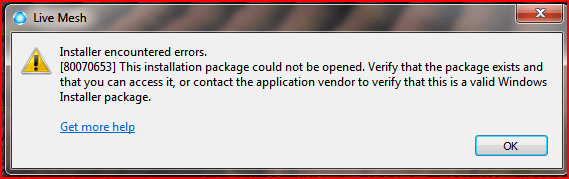
Error message or something ?


Live mesh client is sometimes capricious for installation. On my working machine with XP SP2 it refuse installation many and many times.. and one day without any reason (as far as I know) it worked :confused:

This is a Beta.. we know why, lol
 

My Computer My Computer

OS
Vista H.P. SP1 x32 Seven RC x64
CPU
Q6600 @ 3.4Ghz
Motherboard
GA-EP45-DS3L
Memory
4Go PC2-6400
Graphics Card(s)
8500GT @ 700/500
Sound Card
Audigy Platinium
Monitor(s) Displays
Mitsubishi Diamond Pro 920 + Mitsubishi Diamond Pro 720
Screen Resolution
1600x1200 twice
Hard Drives
Hitachi 160Go
Maxtor 160Go (system drive)
Maxtor 200Go in Antec MX-1 EC external box (eSATA-USB2.0)
PSU
Corsair VX550W
Case
Thermaltake Xaser III
Cooling
Watercooling (CPU, GPU, HDD, NB)
Keyboard
MS Wireless Multimedia 6000 V2.0
Mouse
IntellEye Explorer 3.0
Internet Speed
ADSL 18Mbit/s/1Mbit/s
Installer encountered errors.
[80070653].....etc
 

Attachments

  • Capture.PNG
    Capture.PNG
    13.2 KB · Views: 23

My Computer My Computer

Computer Manufacturer/Model Number
Gateway FX-510X
OS
Windows 7 Ultimate x64 RTM
CPU
Intel(R) Pentium(R) D CPU 3.00GHz
Motherboard
Intel OEMD975XW2G1
Memory
6 GB dual channel DDR2 333 MHz
Graphics Card(s)
NVIDIA GeForce 7800 GTX 256 MB
Sound Card
Creative X-Fi Fatal1ty Extreme Gamer
Monitor(s) Displays
15" Planar PL170 LCD, 17" Gateway FPD1965 LCD
Screen Resolution
1280 x 1024
Hard Drives
64 GB SSD Crucial
2000 GB internal WDC
500 GB internal WDC
Strange :huh:

Did you choose the good one for your system... I Mean 32bit or 64bit ?

Hum I don't think so, because the default one is the x86 version and you work on Seven x86.

Maybe something with new release of seven... With built 7000 it's ok for me.

Try the compatibility mode of Seven (Vista or Vista SP1 compatibility mode)
 

My Computer My Computer

OS
Vista H.P. SP1 x32 Seven RC x64
CPU
Q6600 @ 3.4Ghz
Motherboard
GA-EP45-DS3L
Memory
4Go PC2-6400
Graphics Card(s)
8500GT @ 700/500
Sound Card
Audigy Platinium
Monitor(s) Displays
Mitsubishi Diamond Pro 920 + Mitsubishi Diamond Pro 720
Screen Resolution
1600x1200 twice
Hard Drives
Hitachi 160Go
Maxtor 160Go (system drive)
Maxtor 200Go in Antec MX-1 EC external box (eSATA-USB2.0)
PSU
Corsair VX550W
Case
Thermaltake Xaser III
Cooling
Watercooling (CPU, GPU, HDD, NB)
Keyboard
MS Wireless Multimedia 6000 V2.0
Mouse
IntellEye Explorer 3.0
Internet Speed
ADSL 18Mbit/s/1Mbit/s
Yep, I did the 32 bit one.
I have it installed on the Vista partition.
I just installed it on the laptop running Win 7 (7000) ok.
It just won't install on my desktop running Win 7 (7057)..
I have a partition with 7057 x64, maybe I should try that one...

EDIT:
I booted into the 7057 x64, went to Live Mesh site, logged in, DL'd the 64 bit version, it installed and worked perfectly....
 
Last edited:

My Computer My Computer

Computer Manufacturer/Model Number
Gateway FX-510X
OS
Windows 7 Ultimate x64 RTM
CPU
Intel(R) Pentium(R) D CPU 3.00GHz
Motherboard
Intel OEMD975XW2G1
Memory
6 GB dual channel DDR2 333 MHz
Graphics Card(s)
NVIDIA GeForce 7800 GTX 256 MB
Sound Card
Creative X-Fi Fatal1ty Extreme Gamer
Monitor(s) Displays
15" Planar PL170 LCD, 17" Gateway FPD1965 LCD
Screen Resolution
1280 x 1024
Hard Drives
64 GB SSD Crucial
2000 GB internal WDC
500 GB internal WDC
Back
Top