Windows 7 can't detect my external hard drive

Ray Chisk

New member
Local time
11:23 AM
Messages
7
Hi,

Wondered if you guys can help me out.
I've spent most of the day trawling through this forum trying to look for an answer to my problem to no avail.
I have tried the following links:

http://www.sevenforums.com/hardware-devices/43735-my-devices-printers-wont-show-up.html

http://www.sevenforums.com/hardware-devices/49858-windows-7-failing-pick-up-external-hard-drive.html

and have had no luck therefore, I have decided to start a new thread....sorry:o

I have a Toshiba Sat Pro laptop about six months old and running with an external hard drive Western Digital My Book (works fine).

This is where my problems start.....I purchased a second hard drive to simply use as a back up for my main external hard drive (Western Digital).

The new Hard Drive is a Fujitsu Siemens Storagebird 35EV840 - 400GB. My problem is that my laptop will not recognise it at all. When I click on my computer it's just not there.

I have tried all different configurations of putting the USB into a different port / rebooting everything with no luck at all.

Any help would be much appreciated.

Thanks in advance

Ray Chisk
 

My Computer My Computer

Computer Manufacturer/Model Number
Toshiba Satellite Pro
OS
Windows 7
CPU
Genuine Intel (R)
On the toshiba sattilite pro could you please inform us on the model please... under the laptop

it might be as easy as updating your usb drivrs
 

My Computer My Computer

Computer Manufacturer/Model Number
HP Pavilion Elite HPE-410f
OS
Windows 7 Ultimate x64
CPU
AMD Phenom x6 1045t
Motherboard
N/A
Memory
8 GB
Graphics Card(s)
ATI Radeon HD 5570
Sound Card
Realtek Highdefinition Audio / 5.1 Dolby Setup
Monitor(s) Displays
HP w2207h Widescreen
Screen Resolution
1680*1050
Hard Drives
1 TB (fixed), 320 Portable maxtor, Server Hard drives
PSU
350 Watt
Case
HP CASE
Cooling
Bass
Keyboard
Logitech MX 5500
Mouse
Logitech MX 5500
Internet Speed
ROAD RUNNER 16MB D/512 U
Hi

Thanks for replying so swiftly.

It's a Toshiba Satellite Pro L300-1FJ

Many thanks

Ray Chisk
 

My Computer My Computer

Computer Manufacturer/Model Number
Toshiba Satellite Pro
OS
Windows 7
CPU
Genuine Intel (R)
Hi,

I have tried updating the USB drivers (all were aparently current).
It still doesn't work.

Regards

Ray Chisk
 

My Computer My Computer

Computer Manufacturer/Model Number
Toshiba Satellite Pro
OS
Windows 7
CPU
Genuine Intel (R)
Have you installed the intel matrix storage manager - you would have the intel chipset - what happens if AHCI is enabled in the bios W7 installs a intel driver for it during installation, but for correct functionality you need to install the intel matrix storage manager after the OS installation is complete.
If you get an error saying your system doesnt meet the minimun requirements when you try to install the software you dont need it. The latest version is 8.9.0.1023 and can be found here : http://downloadcenter.intel.com/default.aspx
Please reply if it works as others can benefit.
 

My Computer My Computer

OS
XP, Vista, W7 64bit Home Premium
CPU
Intel Core Duo 6850 3.0 ghz @ 3.7 ghz
Motherboard
Asus P5E
Memory
4GB Corsair DDR 2 PC-6400
Graphics Card(s)
Ati 4870 1ghz
Sound Card
Supreme FX 11
Monitor(s) Displays
View Sonic VX1962wm
Screen Resolution
1680 X1050
Hard Drives
3 Seagate Sata Drives 160gb 250gb 500gb
PSU
Thermaltake 600 watt
Case
NZXT Alpha
Cooling
3X120cm Fans
Keyboard
Microsoft Digital Media Pro Keyboard
Mouse
Microsoft Wheel Mouse Optical
Internet Speed
1.5Mb to 8Mb/384k
It could be the external harddrive you just bought is FUBAR. Try plugging it into another computer as a test or just trading it in.
 

My Computer My Computer

OS
Windows 7
Next question i am asking people along with their model is what country they live in...

I found out that Ray bought the computer and/or lives in the UK

Your support website for the computer:

Laptop Support - Toshiba

Satellite Pro

/
Satellite Pro L300 Series

/
Satellite Pro L300-1FJ


Here is the chipset for: Windows 7 64-Bit
http://support1.toshiba-tro.de/tedd-files2/0/csutil-20091027134400.zip

Here is the chipset for: Windows 7 32-Bit
http://support1.toshiba-tro.de/tedd-files2/0/csutil-20091027134334.zip
 

My Computer My Computer

Computer Manufacturer/Model Number
HP Pavilion Elite HPE-410f
OS
Windows 7 Ultimate x64
CPU
AMD Phenom x6 1045t
Motherboard
N/A
Memory
8 GB
Graphics Card(s)
ATI Radeon HD 5570
Sound Card
Realtek Highdefinition Audio / 5.1 Dolby Setup
Monitor(s) Displays
HP w2207h Widescreen
Screen Resolution
1680*1050
Hard Drives
1 TB (fixed), 320 Portable maxtor, Server Hard drives
PSU
350 Watt
Case
HP CASE
Cooling
Bass
Keyboard
Logitech MX 5500
Mouse
Logitech MX 5500
Internet Speed
ROAD RUNNER 16MB D/512 U
After you connect up your external Hard Drive, open up Device Manager and click on Scan for Hardware Changes. You should find that it will then be picked up!
You shouldn't really have to do this of course, but at least that may be a solution for you for now.

Hope this helps?
 

My Computer My Computer

Computer Manufacturer/Model Number
Self Built
OS
Windows 7 Ultimate x64
CPU
AMD Phenom II x4 965
Motherboard
Gigabyte
Memory
8Gb Corsair XMS3 DDR3
Graphics Card(s)
Asus EN9600GT 512Mb DDR3 Fanless
Sound Card
Integrated
Monitor(s) Displays
Belinea 22" LCD (Primary) and HP 19" LCD (secondary)
Screen Resolution
1680 x 1050 / 1440 x 900
Hard Drives
4 x 1Tb
1 x 250Gb
+ Backup Drives
PSU
800w Silent
Case
Nifty looking Midi Case
Cooling
3 x Super Cooling Quiet Case Fans. Water Cooled CPU.
Keyboard
Saitek USB Illuminated
Mouse
Optical Wireless/Batteryless Mouse
Internet Speed
5Mb BT Total Broadband (True Unlimited Downloads)
Hi all,

Thanks for all of your replys. I tried all the above and I even tried it in another laptop and it still didn't work so I decided to send it back to DABS where I got it from.
I then came accross this advice in the customer reviews section:

This is a fantastic value product and very well built
Just one tip though, it may need initialising and formatting before it shows up as a new drive. Just let your PC see the drive and install the drivers then go to My Computer -> Manage -> Disk Management - select you new drive, select initialise, then format Very straightforward but because slightly different from other external USB drives may confuse at first.


Firstly the drive didn't come with any drivers and I've no idea how to execute the above instructions in Windows 7.

Thanks once again for your help.

Regards

Ray Chisk
 

My Computer My Computer

Computer Manufacturer/Model Number
Toshiba Satellite Pro
OS
Windows 7
CPU
Genuine Intel (R)
Sorry - i would of put this up only i read you tried everything - its very easy to initialise the disc just follow the instructions and select MBR(Master boot record).

To initialize new disks
In Disk Management, right-click the disk you want to initialize, and then click Initialize Disk.
In the Initialize Disk dialog box, select the disk(s) to initialize. You can select whether to use the master boot record (MBR) or GUID partition table (GPT) partition style.
Note the disk is initialized as a basic disk.

Additional considerations :
New disks appear as Not Initialized. Before you can use a disk, you must first initialize it. If you start Disk Management after adding a disk, the Initialize Disk Wizard appears so you can initialize the disk.
 

My Computer My Computer

OS
XP, Vista, W7 64bit Home Premium
CPU
Intel Core Duo 6850 3.0 ghz @ 3.7 ghz
Motherboard
Asus P5E
Memory
4GB Corsair DDR 2 PC-6400
Graphics Card(s)
Ati 4870 1ghz
Sound Card
Supreme FX 11
Monitor(s) Displays
View Sonic VX1962wm
Screen Resolution
1680 X1050
Hard Drives
3 Seagate Sata Drives 160gb 250gb 500gb
PSU
Thermaltake 600 watt
Case
NZXT Alpha
Cooling
3X120cm Fans
Keyboard
Microsoft Digital Media Pro Keyboard
Mouse
Microsoft Wheel Mouse Optical
Internet Speed
1.5Mb to 8Mb/384k
You have tried assinging a letter via disc management?

If not,go to Control Panel (select small icons)
Then click Administrative Tools
From that new Windows click Computer Management
From the new Window click Disk Management
Try assinging a drive letter via right clicking the external HD and left click assign letter (of your choosing)

If this does not work,leave that page showing the disc's open.
Use the snipping tool (just type "snipping" into the search bar in the start menu)
Take a snip of the new window showing the hard drives.
Then upload it here as attachments by clicking reply (or quick reply>go advanced)
Under the page where you type it says Manage Attachments
Click that and upload your pic.

Dan
 

My Computer My Computer

Computer Manufacturer/Model Number
Blue Shards 1.0
OS
Windows 7 Ultimate 64bit
CPU
AMD Phenom II 555 Black Edition Quad Core OC'd to 4.0GHz
Motherboard
ASUS M4A88T-M
Memory
G Skill RipJaw 1333MHz 4GB
Graphics Card(s)
ATI raideon 4250 HD/XFX ATI Radeon 1GB HD4650
Sound Card
Realteck HD Audio
Monitor(s) Displays
2x 22" Widescreen HD Monitors
Hard Drives
500GB Sata 7500RPM
80GB IDE
PSU
850W OCUK Modular
Case
Antec Dark Fleet DF-30
Cooling
Titan Fenrir Pro (CPU)
Keyboard
Logitech Wireless
Mouse
Logitech Wireless
Internet Speed
24Meg
Other Info
Getting soon-
2TB 7200RPM HDD
+8GB RAM
30GB SSD
HD6950/70
Hi Dan,

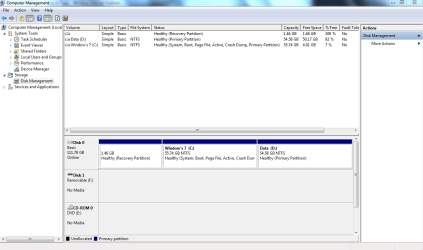
I have tried all that with still no luck.
I have attached a screen print as advised.
I look forward to your response.

Thanks once again.

Regards

Ray Chisk
 

Attachments

  • Disc Mgmt.PNG
    Disc Mgmt.PNG
    30.1 KB · Views: 547

My Computer My Computer

Computer Manufacturer/Model Number
Toshiba Satellite Pro
OS
Windows 7
CPU
Genuine Intel (R)
Hi Dan,

I have tried all that with still no luck.
I have attached a screen print as advised.
I look forward to your response.

Thanks once again.

Regards

Ray Chisk
Can you go to Control Panel>Small Icon View>Device Manager
Can you see your hard drive there under disc drives?
Or is there any Yellow Triangles ?
If there i can you post a screenshot?
 

My Computer My Computer

Computer Manufacturer/Model Number
Blue Shards 1.0
OS
Windows 7 Ultimate 64bit
CPU
AMD Phenom II 555 Black Edition Quad Core OC'd to 4.0GHz
Motherboard
ASUS M4A88T-M
Memory
G Skill RipJaw 1333MHz 4GB
Graphics Card(s)
ATI raideon 4250 HD/XFX ATI Radeon 1GB HD4650
Sound Card
Realteck HD Audio
Monitor(s) Displays
2x 22" Widescreen HD Monitors
Hard Drives
500GB Sata 7500RPM
80GB IDE
PSU
850W OCUK Modular
Case
Antec Dark Fleet DF-30
Cooling
Titan Fenrir Pro (CPU)
Keyboard
Logitech Wireless
Mouse
Logitech Wireless
Internet Speed
24Meg
Other Info
Getting soon-
2TB 7200RPM HDD
+8GB RAM
30GB SSD
HD6950/70
Hi Dan,

I have tried all that with still no luck.
I have attached a screen print as advised.
I look forward to your response.

Thanks once again.

Regards

Ray Chisk
Can you go to Control Panel>Small Icon View>Device Manager
Can you see your hard drive there under disc drives?
Or is there any Yellow Triangles ?
If there i can you post a screenshot?

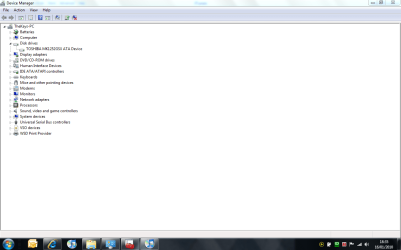
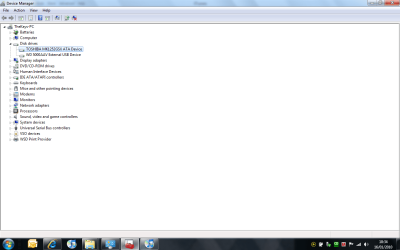
I have done as you said. I also tried it with my Western Digital HD too. See the two screenshots I've attached. One with the WD HD and the other with the FS HD.
As you can see it still doesn't show up.

Regards

Ray Chisk
 

Attachments

  • Device Manager with Fujitsu Siemens.PNG
    Device Manager with Fujitsu Siemens.PNG
    34.2 KB · Views: 255
  • Device Manager with West Digital Attached.PNG
    Device Manager with West Digital Attached.PNG
    36.9 KB · Views: 262

My Computer My Computer

Computer Manufacturer/Model Number
Toshiba Satellite Pro
OS
Windows 7
CPU
Genuine Intel (R)
Hi Dan,

I have tried all that with still no luck.
I have attached a screen print as advised.
I look forward to your response.

Thanks once again.

Regards

Ray Chisk
Can you go to Control Panel>Small Icon View>Device Manager
Can you see your hard drive there under disc drives?
Or is there any Yellow Triangles ?
If there i can you post a screenshot?

I have done as you said. I also tried it with my Western Digital HD too. See the two screenshots I've attached. One with the WD HD and the other with the FS HD.
As you can see it still doesn't show up.

Regards

Ray Chisk
Sounds like a hardware problem so.
Can you get it replaced?
 

My Computer My Computer

Computer Manufacturer/Model Number
Blue Shards 1.0
OS
Windows 7 Ultimate 64bit
CPU
AMD Phenom II 555 Black Edition Quad Core OC'd to 4.0GHz
Motherboard
ASUS M4A88T-M
Memory
G Skill RipJaw 1333MHz 4GB
Graphics Card(s)
ATI raideon 4250 HD/XFX ATI Radeon 1GB HD4650
Sound Card
Realteck HD Audio
Monitor(s) Displays
2x 22" Widescreen HD Monitors
Hard Drives
500GB Sata 7500RPM
80GB IDE
PSU
850W OCUK Modular
Case
Antec Dark Fleet DF-30
Cooling
Titan Fenrir Pro (CPU)
Keyboard
Logitech Wireless
Mouse
Logitech Wireless
Internet Speed
24Meg
Other Info
Getting soon-
2TB 7200RPM HDD
+8GB RAM
30GB SSD
HD6950/70
Yeah, my suspicions also.

The drive is FUBAR.
 

My Computer My Computer

OS
Windows 7
Thanks for your help guys.
All your help really appreciated
Back to Dabs it goes.
 

My Computer My Computer

Computer Manufacturer/Model Number
Toshiba Satellite Pro
OS
Windows 7
CPU
Genuine Intel (R)
Back
Top