
You are using an out of date browser. It may not display this or other websites correctly.
You should upgrade or use an alternative browser.
You should upgrade or use an alternative browser.
creating a 2 OS thumb drive
- Thread starter Jonathan_King
- Start date

- Local time
- 11:08 PM
- Messages
- 16,784
I think Johnathan wants a multiboot flash drive - similar to a multiboot cd.
That's pretty neat - tho.
What have you done there?
I have added .iso's and winpe to my boot menu - but that's from the HD - I think J wants something portable and external.
Good idea, as it may be impossible to access the options from windows boot menu if something goes wrong with the windows boot process.
In fact it is often precisely because the windows boot process is damaged that people need to repair/restore an image.
That's pretty neat - tho.
What have you done there?
I have added .iso's and winpe to my boot menu - but that's from the HD - I think J wants something portable and external.
Good idea, as it may be impossible to access the options from windows boot menu if something goes wrong with the windows boot process.
In fact it is often precisely because the windows boot process is damaged that people need to repair/restore an image.
My Computers
System One System Two
-
- Computer type
- PC/Desktop
- OS
- 7 X64
- CPU
- i5 8400
- Motherboard
- gigabyte b365m ds3h
- Memory
- 2x8gb 3200mhz
- Hard Drives
- various
- PSU
- pure power 11 400w cm
- Case
- Coolermaster
- Cooling
- cryorig m9i
-
- Computer type
- PC/Desktop
- OS
- 7x64
- CPU
- g5400
- Motherboard
- ga b365m ds3h
- Memory
- 8gb ddr4 2400
- PSU
- xfx pro 450w

How does the Repair Disc handle the BCD?
How would this work: Open BCDEDIT and delete all the entries. Then add entries for the Windows installation files and repair files. Export the bcd, and then replace the BCD on the thumb drive with the newly generated file.
See any flaws in this?
How would this work: Open BCDEDIT and delete all the entries. Then add entries for the Windows installation files and repair files. Export the bcd, and then replace the BCD on the thumb drive with the newly generated file.
See any flaws in this?
My Computer
- Computer Manufacturer/Model Number
- Custom
- OS
- Windows 7 Professional x64
- CPU
- Intel i7 2600K OC'd @ 4620 MHz
- Motherboard
- Asus P8Z68-V Pro
- Memory
- 16GB GSkill Sniper 2133 Mhz (4x4GB)
- Graphics Card(s)
- EVGA GeForce GTX 480 SuperClocked+
- Sound Card
- Realtek High Definition Audio
- Monitor(s) Displays
- 2x Acer S273HLbmii 27"
- Screen Resolution
- 2 x 1920x1080
- Hard Drives
- 64GB Crucial M4 SSD
Storage: Hitachi 1TB 5400RPM, Samsung 1.5TB 5400RPM
- PSU
- Corsair HW Series 750w (modular)
- Case
- Cooler Master HAF 932 Advanced Blue Edition
- Cooling
- CM Hyper 212+ CPU cooler, 3x 230mm + 1x 140mm case fans
- Keyboard
- Logitech MK320 (wireless)
- Mouse
- Logitech MK320 (wireless)
- Internet Speed
- 30 Mb/s : 2 Mb/s
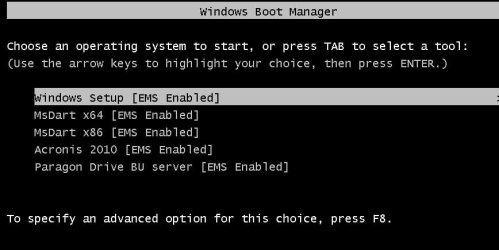
The above menu is from my USB flashdrive!
I copied the Win 7 dvd content to a HD folder
Copied the Dart, Acronis and Paragon iso's (renamed as *.wim) to the source folder.
Than just edit the BCD to add the entries to the menu.
In my case, the files are in k:\7test
start cmd in dir k:\7test\boot
bcdedit /store bcd /enum
bcdedit /store bcd /copy {default} /d "MsDart x64"
bcdedit /store bcd /set {a4e7aa72-cfce-11de-a773-00248c40c635} OSDEVICE ramdisk=[boot]\sources\erd6564.wim,{7619dcc8-fafe-11d9-b411-000476eba25f}
etc..... like you would edit the normal bcd
The point is you can run the bcdedit in a folder with bcdedit /store bcd /.........
Finally copy the complete folder to a Bootable USB flash drive OR create an ISO with Osdimage
My BCD looks like this:
I copied the Win 7 dvd content to a HD folder
Copied the Dart, Acronis and Paragon iso's (renamed as *.wim) to the source folder.
Than just edit the BCD to add the entries to the menu.
In my case, the files are in k:\7test
start cmd in dir k:\7test\boot
bcdedit /store bcd /enum
bcdedit /store bcd /copy {default} /d "MsDart x64"
bcdedit /store bcd /set {a4e7aa72-cfce-11de-a773-00248c40c635} OSDEVICE ramdisk=[boot]\sources\erd6564.wim,{7619dcc8-fafe-11d9-b411-000476eba25f}
etc..... like you would edit the normal bcd
The point is you can run the bcdedit in a folder with bcdedit /store bcd /.........
Finally copy the complete folder to a Bootable USB flash drive OR create an ISO with Osdimage
My BCD looks like this:
Windows Boot Manager
--------------------
identifier {bootmgr}
description Windows Boot Manager
locale en-US
inherit {globalsettings}
default {default}
displayorder {default}
{a4e7aa72-cfce-11de-a773-00248c40c635}
{ae19286c-cfcf-11de-a773-00248c40c635}
{f3deae7a-d043-11de-8193-00248c40c635}
{768a2a8e-e313-11de-8536-00248c40c635}
{c7365542-052f-11df-884e-00248c40c635}
toolsdisplayorder {memdiag}
timeout 10
Windows Boot Loader
-------------------
identifier {default}
device ramdisk=[boot]\sources\boot.wim,{7619dcc8-fafe-11d9-b411-000476eba25f}
path \windows\system32\boot\winload.exe
description Windows Setup
locale en-US
inherit {bootloadersettings}
osdevice ramdisk=[boot]\sources\boot.wim,{7619dcc8-fafe-11d9-b411-000476eba25f}
systemroot \windows
detecthal Yes
winpe Yes
ems Yes
Windows Boot Loader
-------------------
identifier {a4e7aa72-cfce-11de-a773-00248c40c635}
device ramdisk=[boot]\sources\erd6564.wim,{7619dcc8-fafe-11d9-b411-000476eba25f}
path \windows\system32\boot\winload.exe
description MsDart x64
locale en-US
inherit {bootloadersettings}
osdevice ramdisk=[boot]\sources\erd6564.wim,{7619dcc8-fafe-11d9-b411-000476eba25f}
systemroot \windows
detecthal Yes
winpe Yes
ems Yes
Windows Boot Loader
-------------------
identifier {ae19286c-cfcf-11de-a773-00248c40c635}
device ramdisk=[boot]\sources\erd6532.wim,{7619dcc8-fafe-11d9-b411-000476eba25f}
path \windows\system32\boot\winload.exe
description MsDart x86
locale en-US
inherit {bootloadersettings}
osdevice ramdisk=[boot]\sources\erd6532.wim,{7619dcc8-fafe-11d9-b411-000476eba25f}
systemroot \windows
detecthal Yes
winpe Yes
ems Yes
Windows Boot Loader
-------------------
identifier {f3deae7a-d043-11de-8193-00248c40c635}
device ramdisk=[boot]\sources\acronis.wim,{7619dcc8-fafe-11d9-b411-000476eba25f}
path \windows\system32\boot\winload.exe
description Acronis 2010
locale en-US
inherit {bootloadersettings}
osdevice ramdisk=[boot]\sources\acronis.wim,{7619dcc8-fafe-11d9-b411-000476eba25f}
systemroot \windows
detecthal Yes
winpe Yes
ems Yes
Windows Boot Loader
-------------------
identifier {768a2a8e-e313-11de-8536-00248c40c635}
device ramdisk=[boot]\sources\paragon.wim,{7619dcc8-fafe-11d9-b411-000476eba25f}
path \windows\system32\boot\winload.exe
description Paragon DriveBackup Server
locale en-US
inherit {bootloadersettings}
osdevice ramdisk=[boot]\sources\paragon.wim,{7619dcc8-fafe-11d9-b411-000476eba25f}
systemroot \windows
detecthal Yes
winpe Yes
ems Yes
Windows Boot Loader
-------------------
identifier {c7365542-052f-11df-884e-00248c40c635}
device ramdisk=[boot]\sources\paragonpm.wim,{7619dcc8-fafe-11d9-b411-000476eba25f}
path \windows\system32\boot\winload.exe
description Paragon Partition Manager
locale en-US
inherit {bootloadersettings}
osdevice ramdisk=[boot]\sources\paragonpm.wim,{7619dcc8-fafe-11d9-b411-000476eba25f}
systemroot \windows
detecthal Yes
winpe Yes
ems Yes
K:\7test\boot>
My Computer
- OS
- WIN 7 x64
- Local time
- 11:08 PM
- Messages
- 16,784
Can you do similar on cd /dvd?
My Computers
System One System Two
-
- Computer type
- PC/Desktop
- OS
- 7 X64
- CPU
- i5 8400
- Motherboard
- gigabyte b365m ds3h
- Memory
- 2x8gb 3200mhz
- Hard Drives
- various
- PSU
- pure power 11 400w cm
- Case
- Coolermaster
- Cooling
- cryorig m9i
-
- Computer type
- PC/Desktop
- OS
- 7x64
- CPU
- g5400
- Motherboard
- ga b365m ds3h
- Memory
- 8gb ddr4 2400
- PSU
- xfx pro 450w
Yes, just create a dvd from the folder, like thisCan you do similar on cd /dvd?
oscdimg -bk:\7test\boot\etfsboot.com -n -m -lMultiboot k:\7test k:\multiboot.iso
My Computer
- OS
- WIN 7 x64
- Local time
- 11:08 PM
- Messages
- 16,784
Hi,
Sorry my post was not clear. The issue is not booting .wims, or creating .iso's - both of which are very well known.
I would be interested in creating a dvd - from which you could select to boot winpe/re and/or Linux recovery environments.
I tried it using grub - which worked fine off the HD - but not after burning the multiboot .iso to cd/dvd.
I think what you suggested would probably be fine for what Johnathan was asking ( now I have looked back thru the thread).
Any ideas?
Sorry my post was not clear. The issue is not booting .wims, or creating .iso's - both of which are very well known.
I would be interested in creating a dvd - from which you could select to boot winpe/re and/or Linux recovery environments.
I tried it using grub - which worked fine off the HD - but not after burning the multiboot .iso to cd/dvd.
I think what you suggested would probably be fine for what Johnathan was asking ( now I have looked back thru the thread).
Any ideas?
My Computers
System One System Two
-
- Computer type
- PC/Desktop
- OS
- 7 X64
- CPU
- i5 8400
- Motherboard
- gigabyte b365m ds3h
- Memory
- 2x8gb 3200mhz
- Hard Drives
- various
- PSU
- pure power 11 400w cm
- Case
- Coolermaster
- Cooling
- cryorig m9i
-
- Computer type
- PC/Desktop
- OS
- 7x64
- CPU
- g5400
- Motherboard
- ga b365m ds3h
- Memory
- 8gb ddr4 2400
- PSU
- xfx pro 450w
Would anyone be willing to walk me through the steps of adding the entries to the BCD as outlined by woebetide? I am lost already when it comes to BCDEDIT, and when I get the error messages, it totally messes me up.
My Computer
- Computer Manufacturer/Model Number
- Custom
- OS
- Windows 7 Professional x64
- CPU
- Intel i7 2600K OC'd @ 4620 MHz
- Motherboard
- Asus P8Z68-V Pro
- Memory
- 16GB GSkill Sniper 2133 Mhz (4x4GB)
- Graphics Card(s)
- EVGA GeForce GTX 480 SuperClocked+
- Sound Card
- Realtek High Definition Audio
- Monitor(s) Displays
- 2x Acer S273HLbmii 27"
- Screen Resolution
- 2 x 1920x1080
- Hard Drives
- 64GB Crucial M4 SSD
Storage: Hitachi 1TB 5400RPM, Samsung 1.5TB 5400RPM
- PSU
- Corsair HW Series 750w (modular)
- Case
- Cooler Master HAF 932 Advanced Blue Edition
- Cooling
- CM Hyper 212+ CPU cooler, 3x 230mm + 1x 140mm case fans
- Keyboard
- Logitech MK320 (wireless)
- Mouse
- Logitech MK320 (wireless)
- Internet Speed
- 30 Mb/s : 2 Mb/s
I can only help with PE, no GRUB or Linux.
@Jonathan_King
If you can tell me which iso's you want to add to the bcd, I can maybe explain here step by step howto.
It would also help if you can send me the bcd file from the boot dir, so we can build on that.
@Jonathan_King
If you can tell me which iso's you want to add to the bcd, I can maybe explain here step by step howto.
It would also help if you can send me the bcd file from the boot dir, so we can build on that.
My Computer
- OS
- WIN 7 x64
woebetide;I can only help with PE, no GRUB or Linux.
@Jonathan_King
If you can tell me which iso's you want to add to the bcd, I can maybe explain here step by step howto.
It would also help if you can send me the bcd file from the boot dir, so we can build on that.
I would like to have the two, 32 & 64 bit, "System Repair" iso's on one CD. I have the iso's and can use bcdedit, can you get me started?
Thanks!
Robert
My Computer
- OS
- ...
I want to use Partition Wizard Bootable CD, Windows 7 x86 Installation files (merged using imagex, as SIW2 showed me earlier), and the x64 Repair Disc.I can only help with PE, no GRUB or Linux.
@Jonathan_King
If you can tell me which iso's you want to add to the bcd, I can maybe explain here step by step howto.
It would also help if you can send me the bcd file from the boot dir, so we can build on that.
The BCD is attached.
View attachment bcd.zip
My Computer
- Computer Manufacturer/Model Number
- Custom
- OS
- Windows 7 Professional x64
- CPU
- Intel i7 2600K OC'd @ 4620 MHz
- Motherboard
- Asus P8Z68-V Pro
- Memory
- 16GB GSkill Sniper 2133 Mhz (4x4GB)
- Graphics Card(s)
- EVGA GeForce GTX 480 SuperClocked+
- Sound Card
- Realtek High Definition Audio
- Monitor(s) Displays
- 2x Acer S273HLbmii 27"
- Screen Resolution
- 2 x 1920x1080
- Hard Drives
- 64GB Crucial M4 SSD
Storage: Hitachi 1TB 5400RPM, Samsung 1.5TB 5400RPM
- PSU
- Corsair HW Series 750w (modular)
- Case
- Cooler Master HAF 932 Advanced Blue Edition
- Cooling
- CM Hyper 212+ CPU cooler, 3x 230mm + 1x 140mm case fans
- Keyboard
- Logitech MK320 (wireless)
- Mouse
- Logitech MK320 (wireless)
- Internet Speed
- 30 Mb/s : 2 Mb/s
@iseeuu
You mean the bootable iso's right?
Create a folder and extract the content of the x86 iso in it. (let's say in k:\dart)
Rename the boot.wim from the x64 to something like dart64.wim.
Copy the dart64.wim to the k:\dart\sources folder.
You also need the etfsboot.com from a Windows 7 setup dvd, and copy to k:\dart\boot.
open a CMD window in k:\dart\boot (hold shift and right click --> Open Command Window here)
I assume you know how to copy and paste ind the CMD windowd (I find it easy to create a txt file and copy/paste things)
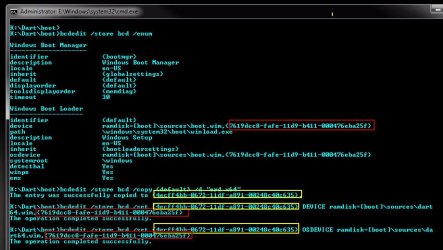
bcdedit /store bcd /enum
bcdedit /store bcd /copy {default} /d "ERD x64" (replace ERD x64 with anything)
The entry was successfully copied to {4ecff4bb-0672-11df-a891-00248c40c635}
{4ecff4bb-0672-11df-a891-00248c40c635} is the new ID
Next set DEVICE:
bcdedit /store bcd /set {4ecff4bb-0672-11df-a891-00248c40c635} DEVICE ramdisk=[boot]\sources\dart64.wim,{7619dcc8-fafe-11d9-b411-000476eba25f}
And OSDEVICE:
bcdedit /store bcd /set {4ecff4bb-0672-11df-a891-00248c40c635} OSDEVICE ramdisk=[boot]\sources\dart64.wim,{7619dcc8-fafe-11d9-b411-000476eba25f}
That's it!
bcdedit /store bcd /enum (again to check)
The description of the first entry is Windows Setup, so you might change that!
bcdedit /store bcd /set {default} description "ERD x86"
Create bootable cd from the folder!
You mean the bootable iso's right?
Create a folder and extract the content of the x86 iso in it. (let's say in k:\dart)
Rename the boot.wim from the x64 to something like dart64.wim.
Copy the dart64.wim to the k:\dart\sources folder.
You also need the etfsboot.com from a Windows 7 setup dvd, and copy to k:\dart\boot.
open a CMD window in k:\dart\boot (hold shift and right click --> Open Command Window here)
I assume you know how to copy and paste ind the CMD windowd (I find it easy to create a txt file and copy/paste things)
bcdedit /store bcd /enum
bcdedit /store bcd /copy {default} /d "ERD x64" (replace ERD x64 with anything)
The entry was successfully copied to {4ecff4bb-0672-11df-a891-00248c40c635}
{4ecff4bb-0672-11df-a891-00248c40c635} is the new ID
Next set DEVICE:
bcdedit /store bcd /set {4ecff4bb-0672-11df-a891-00248c40c635} DEVICE ramdisk=[boot]\sources\dart64.wim,{7619dcc8-fafe-11d9-b411-000476eba25f}
And OSDEVICE:
bcdedit /store bcd /set {4ecff4bb-0672-11df-a891-00248c40c635} OSDEVICE ramdisk=[boot]\sources\dart64.wim,{7619dcc8-fafe-11d9-b411-000476eba25f}
That's it!
bcdedit /store bcd /enum (again to check)
The description of the first entry is Windows Setup, so you might change that!
bcdedit /store bcd /set {default} description "ERD x86"
Create bootable cd from the folder!
Attachments
My Computer
- OS
- WIN 7 x64
Thanks! So I have the repair disk files, and renamed the boot.wim to dart64.wim. Now what do I do?@Jonathan_King
Rename the boot.wim from your Repair disk to dart64.wim
Copy to your sources folder
Copy the attached bcd to your boot folder.( overwrite the old one).
My Computer
- Computer Manufacturer/Model Number
- Custom
- OS
- Windows 7 Professional x64
- CPU
- Intel i7 2600K OC'd @ 4620 MHz
- Motherboard
- Asus P8Z68-V Pro
- Memory
- 16GB GSkill Sniper 2133 Mhz (4x4GB)
- Graphics Card(s)
- EVGA GeForce GTX 480 SuperClocked+
- Sound Card
- Realtek High Definition Audio
- Monitor(s) Displays
- 2x Acer S273HLbmii 27"
- Screen Resolution
- 2 x 1920x1080
- Hard Drives
- 64GB Crucial M4 SSD
Storage: Hitachi 1TB 5400RPM, Samsung 1.5TB 5400RPM
- PSU
- Corsair HW Series 750w (modular)
- Case
- Cooler Master HAF 932 Advanced Blue Edition
- Cooling
- CM Hyper 212+ CPU cooler, 3x 230mm + 1x 140mm case fans
- Keyboard
- Logitech MK320 (wireless)
- Mouse
- Logitech MK320 (wireless)
- Internet Speed
- 30 Mb/s : 2 Mb/s
Awesome instructions. I'm going to give that a try today. Thanks very much!
Cheers!
Robert
My Computer
- OS
- ...
Awesome instructions, easy to follow. However, when I executed the "set OSDEVICE"Awesome instructions. I'm going to give that a try today. Thanks very much!
Cheers!
Robert
Code:
E:\dart\boot>bcdedit /store bcd /set
{7619dcc8-fafe-11d9-b411-000476eba25f}
DEVICE ramdisk=[boot]\sources\dart64.wim,
{0fea2987-06ec-11df-9a32-001558508051}
The operation completed successfully.

E:\dart\boot>bcdedit /store bcd /set
{7619dcc8-fafe-11d9-b411-000476eba25f}
OSDEVICE ramdisk=[boot]\sources\dart64.wim,
{0fea2987-06ec-11df-9a32-001558508051}
The element data type specified is not recognized,
or does not apply to the specified entry.
Run "bcdedit /?" for command line assistance.
Element not found.
The only difference between the two commands is DEVICE and OSDEVICE
So why the error?
My Computer
- OS
- ...
- Local time
- 11:08 PM
- Messages
- 16,784
Hi Johnathan,
Sorry, afaik, this method is only for .wim ( winpe/winre) .I don't believe it will work for Linux .iso's. Only for .wim's containing winload.exe.
I will have a think - as you know - I would like to include both Linux and Windows recovery tools.
Sorry, afaik, this method is only for .wim ( winpe/winre) .I don't believe it will work for Linux .iso's. Only for .wim's containing winload.exe.
I will have a think - as you know - I would like to include both Linux and Windows recovery tools.
I want to use Partition Wizard Bootable CD, Windows 7 x86 Installation files (merged using imagex, as SIW2 showed me earlier), and the x64 Repair Disc.I can only help with PE, no GRUB or Linux.
@Jonathan_King
If you can tell me which iso's you want to add to the bcd, I can maybe explain here step by step howto.
It would also help if you can send me the bcd file from the boot dir, so we can build on that.
The BCD is attached.
View attachment 48933
My Computers
System One System Two
-
- Computer type
- PC/Desktop
- OS
- 7 X64
- CPU
- i5 8400
- Motherboard
- gigabyte b365m ds3h
- Memory
- 2x8gb 3200mhz
- Hard Drives
- various
- PSU
- pure power 11 400w cm
- Case
- Coolermaster
- Cooling
- cryorig m9i
-
- Computer type
- PC/Desktop
- OS
- 7x64
- CPU
- g5400
- Motherboard
- ga b365m ds3h
- Memory
- 8gb ddr4 2400
- PSU
- xfx pro 450w
@iseeuu
E:\dart\boot>bcdedit /store bcd /set
{7619dcc8-fafe-11d9-b411-000476eba25f}
DEVICE ramdisk=[boot]\sources\dart64.wim,
{0fea2987-06ec-11df-9a32-001558508051}
/QUOTE]
The default identifier is
{7619dcc8-fafe-11d9-b411-000476eba25f}
When you did the copy {default} you get a new identifier, in your case
{0fea2987-06ec-11df-9a32-001558508051}
So it must be:
E:\dart\boot>bcdedit /store bcd /set
{0fea2987-06ec-11df-9a32-001558508051}<------------ new id
DEVICE ramdisk=[boot]\sources\dart64.wim,
{7619dcc8-fafe-11d9-b411-000476eba25f}<------------ Default id
And the same for OSDEVICE
My Computer
- OS
- WIN 7 x64
@iseeuu
DOH! I had it backwards, didn't I?E:\dart\boot>bcdedit /store bcd /set
{7619dcc8-fafe-11d9-b411-000476eba25f}
DEVICE ramdisk=[boot]\sources\dart64.wim,
{0fea2987-06ec-11df-9a32-001558508051}
/QUOTE]
The default identifier is
{7619dcc8-fafe-11d9-b411-000476eba25f}
When you did the copy {default} you get a new identifier, in your case
{0fea2987-06ec-11df-9a32-001558508051}
So it must be:
E:\dart\boot>bcdedit /store bcd /set
{0fea2987-06ec-11df-9a32-001558508051}<------------ new id
DEVICE ramdisk=[boot]\sources\dart64.wim,
{7619dcc8-fafe-11d9-b411-000476eba25f}<------------ Default id
And the same for OSDEVICE
At times I can be so lystecdic!
Thanks, I'll give it another go ...
.
My Computer
- OS
- ...
- Local time
- 11:08 PM
- Messages
- 16,784
Johnathan, if you have a winpe cd for Paragon , or similar - you can also include that, instead of Partition Wizard. Unfortunately, Partition Wizard uses a Linux based cd.
I included Paragon Paragon Hard Disk Manager 2010 Server.
I see woebetide has included Paragon Drive backup and Paragon Partition Manager on his.
I included Paragon Paragon Hard Disk Manager 2010 Server.
I see woebetide has included Paragon Drive backup and Paragon Partition Manager on his.
Code:
G:\ALL\boot>bcdedit /store bcd

Windows Boot Loader
-------------------
identifier              {default}
device                  ramdisk=[boot]\sources\boot.wim,{7619dcc8-fafe-11d9-b411-000476eba25f}
path                    \windows\system32\boot\winload.exe
description             Windows Setup
locale                  en-US
inherit                 {bootloadersettings}
osdevice                ramdisk=[boot]\sources\boot.wim,{7619dcc8-fafe-11d9-b411-000476eba25f}
systemroot              \windows
detecthal               Yes
winpe                   Yes
ems                     Yes

G:\ALL\boot>bcdedit /store bcd /copy {default} /d "Repair Vista/7 64 bit"
The entry was successfully copied to {6529b406-0715-11df-8d40-001966657855}.

G:\ALL\boot>bcdedit /store bcd /set {6529b406-0715-11df-8d40-001966657855} DEVICE ramdisk=[boot]\sources\REC64.wim,{7619
dcc8-fafe-11d9-b411-000476eba25f}
The operation completed successfully.

G:\ALL\boot>bcdedit /store bcd /set {6529b406-0715-11df-8d40-001966657855} OSDEVICE ramdisk=[boot]\sources\REC64.wim,{76
19dcc8-fafe-11d9-b411-000476eba25f}
The operation completed successfully.

G:\ALL\boot>bcdedit /store bcd /copy {default} /d "Paragon HDM 2010 Server"
The entry was successfully copied to {ceef3303-0715-11df-8d40-001966657855}.

G:\ALL\boot>bcdedit /store bcd /set {ceef3303-0715-11df-8d40-001966657855} DEVICE ramdisk=[boot]\sources\HDM2010.wim,{76
19dcc8-fafe-11d9-b411-000476eba25f}
The operation completed successfully.

G:\ALL\boot>bcdedit /store bcd /set {ceef3303-0715-11df-8d40-001966657855} OSDEVICE ramdisk=[boot]\sources\HDM2010.wim,{
7619dcc8-fafe-11d9-b411-000476eba25f}
The operation completed successfully.

G:\ALL\boot>
My Computers
System One System Two
-
- Computer type
- PC/Desktop
- OS
- 7 X64
- CPU
- i5 8400
- Motherboard
- gigabyte b365m ds3h
- Memory
- 2x8gb 3200mhz
- Hard Drives
- various
- PSU
- pure power 11 400w cm
- Case
- Coolermaster
- Cooling
- cryorig m9i
-
- Computer type
- PC/Desktop
- OS
- 7x64
- CPU
- g5400
- Motherboard
- ga b365m ds3h
- Memory
- 8gb ddr4 2400
- PSU
- xfx pro 450w
Similar threads
- Replies
- 8
- Views
- 4K


