
Logon Changer for Windows 7 build 7057

yogi365

Banned
Local time
5:09 AM
Messages
86
Location
india
One of interesting finding in leaked win 7 build 7057is ability to change Windows 7 Logon background images without need of any third party tools. Now you can have custom logon background for your Windows 7.
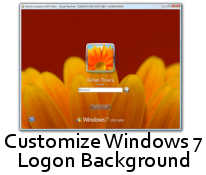
windows-7-login-customized.png

However the manual process of changing background wallpaper of windows 7 is not easy and requires you edit registry and place image files in system folder. Here is an small utility Logon Changer for Windows 7 developed by Steve Sinchak one of member of winvistaclub .
Logon Changer for Windows 7 provides an easy way to customize the logon screen background with just a few clicks. Simply download the free application, run it and click Change Logon Screen.
select-image-for-windows-7-logon-background.jpg

The application will prompt for the location of the new background image and then install the new screen behind the scenes. Tweaks.com Logon Changer will even provide a preview of your new background on a logon screen.
You can also Test your Custom background before actually changing Windows 7 Logon background.
logon-changer-for-windows-7.jpg

If you wish to revert back to default Logon background then simply click on Revert to Default of Logon Screen.
Download Logon Changer Windows 7 to change logon background wallpaper.


(note : if u found these is useful dont forget to add me reputation)
 
Last edited:

My Computer My Computer

Computer Manufacturer/Model Number
HP NX6115
OS
windows7 build7100 64x,xpsp3
Motherboard
Board: Hewlett-Packard 308E KBC Version 45.27
Memory
1500 Megabytes
Sound Card
Conexant AC-Link Audio
Monitor(s) Displays
ATI RADEON XPRESS 200M SERIES [Display adapter] Digital Flat
Hard Drives
160 gb
This is a great little app, thank you! I suppose it would be nice if it could automatically drop the image size and such, but I can do that myself so no probs for me.

Once again, thanks!
 

My Computer My Computer

Computer Manufacturer/Model Number
Compaq CQ50-107NR
OS
Windows 7 Build 7077 x64
CPU
AMD Athlon Dual Core QL-60 - 1.9Ghz
Memory
2GB
Graphics Card(s)
NVIDIA GeForce 8200 M G
Screen Resolution
1280 x 800
Hard Drives
120GB, Not sure of RPM but prolly 5400 or lower.

My Computer My Computer

Computer type
PC/Desktop
Computer Manufacturer/Model Number
Airbot 2.0
OS
Windows 7 Ultimate x64 SP1
CPU
Core i7 920 (D0) @ 4Ghz, *26c idle *65c full load on air
Motherboard
Asus P6X58D Premium - Sata 6Gb/s - USB 3.0
Memory
12GB DDR3 Corsair Dominator -CMD12GX3M6A1600C8 at 1600MHz
Graphics Card(s)
Zotac Geforce GTX 770
Sound Card
ASUS Xonar D2X
Monitor(s) Displays
1 LG 24" Flatron W2453V-PF 1 Samsung 24" P2450H both 2ms RT
Screen Resolution
1920x1080@60hz
Hard Drives
1 Samsung 250GB 840 Evo SSD
1 OCZ Vertex2 180GB SSD
1 TB Samsung Spinpoint F1 7200RPM 32MB cache
2 500GB WD Caviar Blacks 7200RPM 32MB cache (WD5001AALS)

Pioneer DVD Burner DVR-S18M
PSU
Corsair HX1000W
Case
Cooler Master HAF 932
Cooling
Case Fans *3 230mm, *1 140mm/CPU - *Tuniq Tower 120 Extreme
Keyboard
Logitech Wireless MK700
Mouse
Logitech Wireless MK700
Internet Speed
DL 15 Mbps UL 0.98 Mbps
Antivirus
None
Browser
Firefox Nightly
Other Info
Processor-7.7 *RAM- 7.9 *Graphics-7.9 *Gaming Graphics- 7.9 *SSD- 7.8 W.E.I final score= 7.7
*Phone- LG Nexus 5
Yea but I mean, seriously, the tutorial is a 14 step process. This is quite frankl much simpler than having to enter a system folder, rename files, edit the registry somewhat, and going through all the trial and error of seeing if an image works or not. This is just download, extract, select an image and your good to go. If it doesn't work you can test right there and easily restore the app. Not that I'm not grateful for the tutorial, I had used that, but this is a great time-saver for fickle minds :P
 

My Computer My Computer

Computer Manufacturer/Model Number
Compaq CQ50-107NR
OS
Windows 7 Build 7077 x64
CPU
AMD Athlon Dual Core QL-60 - 1.9Ghz
Memory
2GB
Graphics Card(s)
NVIDIA GeForce 8200 M G
Screen Resolution
1280 x 800
Hard Drives
120GB, Not sure of RPM but prolly 5400 or lower.
A year ago, I'd be with you Airbot but I don't have the time to waste for such things anymore.

BTW this pic works well with this tweak (something generic, looks nice, not obtrusive, and doesn't warrant a frequent change):
Request by *chiwou on deviantART
 

My Computer My Computer

Computer Manufacturer/Model Number
Dell Vostro 1500 Laptop
OS
Windows 7 b7057 / Windows Server 2008 / Arch Linux
CPU
Core 2 Duo
Memory
2 GB
Graphics Card(s)
NVIDIA 8600M GT
Monitor(s) Displays
22" WS LCD
Screen Resolution
1680x1050 / 1280x800
Hard Drives
500GB WD 5400RPM
I'm all for 'one click' wonders unfortunately my login/out screens revert back to original without my authoritah (said in best Cartman voice).

After two or three reboots (I go back and forth between 7 and XP) it will revert. Am I missing something?

Tx....
 

My Computer My Computer

OS
Windows 7 build7057
I'm all for 'one click' wonders unfortunately my login/out screens revert back to original without my authoritah (said in best Cartman voice).

After two or three reboots (I go back and forth between 7 and XP) it will revert. Am I missing something?

Tx....

Hmm, I had that problem at first, but then it just stopped happening lol. I wonder why it happens. Perhaps changing themes may cause it to revert? IDK.
 

My Computer My Computer

Computer Manufacturer/Model Number
Compaq CQ50-107NR
OS
Windows 7 Build 7077 x64
CPU
AMD Athlon Dual Core QL-60 - 1.9Ghz
Memory
2GB
Graphics Card(s)
NVIDIA GeForce 8200 M G
Screen Resolution
1280 x 800
Hard Drives
120GB, Not sure of RPM but prolly 5400 or lower.
welcome all
 

My Computer My Computer

Computer Manufacturer/Model Number
HP NX6115
OS
windows7 build7100 64x,xpsp3
Motherboard
Board: Hewlett-Packard 308E KBC Version 45.27
Memory
1500 Megabytes
Sound Card
Conexant AC-Link Audio
Monitor(s) Displays
ATI RADEON XPRESS 200M SERIES [Display adapter] Digital Flat
Hard Drives
160 gb
I'm all for 'one click' wonders unfortunately my login/out screens revert back to original without my authoritah (said in best Cartman voice).

After two or three reboots (I go back and forth between 7 and XP) it will revert. Am I missing something?

Tx....

Hmm, I had that problem at first, but then it just stopped happening lol. I wonder why it happens. Perhaps changing themes may cause it to revert? IDK.


Yes, changing the themes will revert it back to normal, if you read Brinks tutorial I posted on the third page, it will tell you that, as the tutorial way has the added fix for stopping it from reverting.

http://www.sevenforums.com/tutorials/5382-log-screen-change-3.html
 

My Computer My Computer

Computer type
PC/Desktop
Computer Manufacturer/Model Number
Airbot 2.0
OS
Windows 7 Ultimate x64 SP1
CPU
Core i7 920 (D0) @ 4Ghz, *26c idle *65c full load on air
Motherboard
Asus P6X58D Premium - Sata 6Gb/s - USB 3.0
Memory
12GB DDR3 Corsair Dominator -CMD12GX3M6A1600C8 at 1600MHz
Graphics Card(s)
Zotac Geforce GTX 770
Sound Card
ASUS Xonar D2X
Monitor(s) Displays
1 LG 24" Flatron W2453V-PF 1 Samsung 24" P2450H both 2ms RT
Screen Resolution
1920x1080@60hz
Hard Drives
1 Samsung 250GB 840 Evo SSD
1 OCZ Vertex2 180GB SSD
1 TB Samsung Spinpoint F1 7200RPM 32MB cache
2 500GB WD Caviar Blacks 7200RPM 32MB cache (WD5001AALS)

Pioneer DVD Burner DVR-S18M
PSU
Corsair HX1000W
Case
Cooler Master HAF 932
Cooling
Case Fans *3 230mm, *1 140mm/CPU - *Tuniq Tower 120 Extreme
Keyboard
Logitech Wireless MK700
Mouse
Logitech Wireless MK700
Internet Speed
DL 15 Mbps UL 0.98 Mbps
Antivirus
None
Browser
Firefox Nightly
Other Info
Processor-7.7 *RAM- 7.9 *Graphics-7.9 *Gaming Graphics- 7.9 *SSD- 7.8 W.E.I final score= 7.7
*Phone- LG Nexus 5
Thanks bot of air ^_^
 

My Computer My Computer

Computer Manufacturer/Model Number
Compaq CQ50-107NR
OS
Windows 7 Build 7077 x64
CPU
AMD Athlon Dual Core QL-60 - 1.9Ghz
Memory
2GB
Graphics Card(s)
NVIDIA GeForce 8200 M G
Screen Resolution
1280 x 800
Hard Drives
120GB, Not sure of RPM but prolly 5400 or lower.
So is the one that I downloaded wil do the trick?
 

My Computer My Computer

OS
windows 7 ultimate 7057
Back
Top