windows 7 and xp dual boot problems

SP2 should be sufficient. You only need to slipstream into XP the SATA drivers for your mobo, recompile the ISO and burn from the Nlite dropdown menu to CD.

Do you have the SATA drivers?
 
Last edited:
Sorry, but my comments I do not believe will help with your drive problem.

So, maybe we should work on that. So, you put in the XP CD and it boots and does the checking system configuration and what screen does it start on.

It should be something like "if you want to install XP, hit enter." The next page, after inserting the supporting OS CD if you use an upgrade will give you a list of partitions. If you do not get the list of partitions, where does the install go next?

Something not quite normal seems to be going on in your system. Specifics are essential, as to what screen is showing up and what you choose to do from that screen. Redo the XP install and write down the exact sequence as to what happens and what possible choices you are given.

Do you have an OEM version of XP?
 

My Computer My Computer

Computer Manufacturer/Model Number
Homebuilt
OS
Windows 7 x64
CPU
i7-2600K
Motherboard
Asus P8Z77-v Pro
Memory
8 G
Graphics Card(s)
GTX 480
Sound Card
Onboard
Monitor(s) Displays
LG W2753V
Screen Resolution
1920x1080
Hard Drives
Crucial M4 128 G SSD
gregrocker,
i downloaded nlite, i imagine where it says insert drivers i insert my sata drivers. but where do i get the sata drivers? please be specific as possible. i am not super techie.
 

My Computer My Computer

Computer Manufacturer/Model Number
acer aspire 5534-1096
OS
windows 7 home premium 64 bit
Memory
amd anthon x2 dual core processor l310 4gb
Hard Drives
250hdd
Do you know what SATA controller?
 

My Computer My Computer

OS
ME/XP/Vista/Win7
Look in your Device manager for the exact name, version and date of your SATA controller.

If you can't find the exact driver, then slipstream in the chipset from your maker's Support Downloads webpage for your exact model.
 
okay, big problems!!! so i was reading somewhere that if I go into BIOS and changed the SATA mode it might help. so I changed the SATA mode from AHCI to IDE, put in the xp disk and it started loading. It got to the screen where I could chose which partition to download to (partition 4)and it worked. So now I have xp on my E drive. but i don't have any of the drivers and can't get on the internet. So...I feel like I'm dead in the water. I don't know how to get back to my Windows 7 D drive or if I even can. If I restart the computer, load from my dvd drive the win 7 recovery disks, it says it is loading to C drive. But if I go into my device manager on xp is has the following:
Acer D: Healthy
E: Healthy Boot (this is where I have XP, I believe)
PQ Service Healthy (unknow partition)
System Reserved C: Healthy System
So what do I do now?
 

My Computer My Computer

Computer Manufacturer/Model Number
acer aspire 5534-1096
OS
windows 7 home premium 64 bit
Memory
amd anthon x2 dual core processor l310 4gb
Hard Drives
250hdd
Not sure I follow. What do you mean by "Loading" to C ?

Boot the 7 dvd , Select "Repair My Computer" at the bottom of the screen saying Install Now.

It may automatically do start up repair.

If not, after it has searched for installations, click Next. Click Command prompt.

Type : (press enter after each line )

diskpart

lis vol
( make a note of exactly what it says and post it up here)

exi

to leave diskpart.
 
Last edited:

My Computers My Computers

System One System Two

  • Computer type
    PC/Desktop
    OS
    7 X64
    CPU
    i5 8400
    Motherboard
    gigabyte b365m ds3h
    Memory
    2x8gb 3200mhz
    Hard Drives
    various
    PSU
    pure power 11 400w cm
    Case
    Coolermaster
    Cooling
    cryorig m9i
  • Computer type
    PC/Desktop
    OS
    7x64
    CPU
    g5400
    Motherboard
    ga b365m ds3h
    Memory
    8gb ddr4 2400
    PSU
    xfx pro 450w
SIW2, would not the bootsect /nt60 C: work here. It appears he has lettered the System Reserve Partition C:, which is where the boot files are.

Bcdboot should not be needed because those files are already present.
 

My Computer My Computer

Computer Manufacturer/Model Number
Homebuilt
OS
Windows 7 x64
CPU
i7-2600K
Motherboard
Asus P8Z77-v Pro
Memory
8 G
Graphics Card(s)
GTX 480
Sound Card
Onboard
Monitor(s) Displays
LG W2753V
Screen Resolution
1920x1080
Hard Drives
Crucial M4 128 G SSD
okay, big problems!!! I go into BIOS and changed the SATA mode it might help. so I changed the SATA mode from AHCI to IDE,


You may need to change your BIOS setting back.

Do you know what SATA controller?
 

My Computer My Computer

OS
ME/XP/Vista/Win7
If booting the DVD Repair console to run Startup Repair up to 3 separate times with reboots does not work to start Win7, then you may need to change back the IDE setting to ACHI.

You can then try running a Repair install with the XP CD to see if it will run in ACHI setting.

Find the XP drivers by looking on the manufacturer's Support Downloads webpage for your computer model, or Google the exact hardware name with missing driver in Device manager. Start with the network adapter so you can get online to search Windows Updates for the other drivers.
 
I don't know how to get back to my Windows 7 D drive or if I even can. If I restart the computer, load from my dvd drive the win 7 recovery disks, it says it is loading to C drive. But if I go into my device manager on xp is has the following:
Acer D: Healthy
E: Healthy Boot (this is where I have XP, I believe)
PQ Service Healthy (unknow partition)
System Reserved C: Healthy System
So what do I do now?
Try this, while in XP, put in the Win 7 install DVD. Open a command prompt and type the following with F: being replaced by the DVD drive letter:

f:\boot\bootsect /nt60 SYS

This should return the MBR to look for a Win 7 boot sequence and allow you to boot into Win 7. If you decide to go back to xp, subsitiute 52 for 60

But it is getting confusing, maybe another disk managment picture would help.
 

My Computer My Computer

Computer Manufacturer/Model Number
Homebuilt
OS
Windows 7 x64
CPU
i7-2600K
Motherboard
Asus P8Z77-v Pro
Memory
8 G
Graphics Card(s)
GTX 480
Sound Card
Onboard
Monitor(s) Displays
LG W2753V
Screen Resolution
1920x1080
Hard Drives
Crucial M4 128 G SSD
when i open the command prompt the window itself reads this : E:\Windows\system32\cmd.exe
then the path inside the window reads E:\Documents and Settings\Administrator>
i typed in the above info (my dvd drive is f:) (fyi) but get the following message: not recognised as an internal or external command.......
i had my win 7 recovery disk 1 in the drive.

is there a way just to start all over?
 

My Computer My Computer

Computer Manufacturer/Model Number
acer aspire 5534-1096
OS
windows 7 home premium 64 bit
Memory
amd anthon x2 dual core processor l310 4gb
Hard Drives
250hdd
Do you want to attempt to start Win7? If so you need to mark it active again then run Startup Repair up to 3 separate times with reboots to repair the MBR>

Boot the Win7 DVD Repair console or Repair CD, click through to recovery tools list, open a Command Line and type:

DISKPART
LIST DISK
SELECT DISK # (# for Win7 HD)
LIST PARTITION
SELECT PARTITION # (# for Win7 partition)
ACTIVE
EXIT

Now return to Recovery tools list and run Startup Repair at least 3 times with reboots to start Win7.

If Win7 will not start, then go into BIOS and change SATA controller back to ACHI then repeat above steps.
 

My Computer My Computer

Computer Manufacturer/Model Number
Homebuilt
OS
Windows 7 x64
CPU
i7-2600K
Motherboard
Asus P8Z77-v Pro
Memory
8 G
Graphics Card(s)
GTX 480
Sound Card
Onboard
Monitor(s) Displays
LG W2753V
Screen Resolution
1920x1080
Hard Drives
Crucial M4 128 G SSD
Yes, the bootsect.exe utility is not on the Win 7 Repair, but is on the Install DVD. If you decide you need it, there is probably a place from where you can download it.

For now, some more reading..hopefully it will help.

Windows no longer starts after you install an earlier version of the Windows operating system in a dual-boot configuration

Bootsect.exe Modifies the Bootsector Not the MBR!! — The NeoSmart Files
Saltgrass;

I know also that there is no "bootsect.exe" in the boot folder of the "System Repair" CD, but I have been using that command for all of my current posts about bootsect!

http://www.sevenforums.com/installation-setup/58188-added-xp-7-but-now-wont-boot.html

http://www.sevenforums.com/installation-setup/57634-dual-boot.html


There should be no problem using it as described here: MBR - Restore Windows 7 Master Boot Record - Windows 7 Forums

It is working for me!
Robert
 

My Computer My Computer

OS
...
Iseeu is correct.

The original version of bootsect.exe included with Vista ( on the dvd ) did not include writing the mbr.

There was a misleading ms article implying that it did. You could easily see that for yourself , using a disk editor.

The newer versions of bootsect.exe included in Vista SP2 and 7 do include the optional switch to write the mbr.

The 7 recovery disc also includes it. There was a functioning beta recdisc.exe in the beta versions of Vista - it was disabled in the rtm.

That beta recdisc.exe can be used to create Vista recovery disc - such as the one hosted by Neosmart, but it is fairly rudimentary. The disc it creates not only requires the user to already have a Vista dvd - it also doesn't include bootsect.

However , it is easy to add the newer version of SP2/7 bootsect.exe to the boot folder and rebuild the .iso of the Vista rudimentary recovery disc.

View attachment bootsect.zip

You can put a copy in \Windows\system32 , then run the commands from within windows, if you like.
 

My Computers My Computers

System One System Two

  • Computer type
    PC/Desktop
    OS
    7 X64
    CPU
    i5 8400
    Motherboard
    gigabyte b365m ds3h
    Memory
    2x8gb 3200mhz
    Hard Drives
    various
    PSU
    pure power 11 400w cm
    Case
    Coolermaster
    Cooling
    cryorig m9i
  • Computer type
    PC/Desktop
    OS
    7x64
    CPU
    g5400
    Motherboard
    ga b365m ds3h
    Memory
    8gb ddr4 2400
    PSU
    xfx pro 450w
gregrocker is a genius!!! thank you so much for your help. i am back on my windows 7 drive. but i still want everything to work. i can't quit now, i've come too far. so now i have xp on my drive E and 7 on my drive D. do i download Easybcd now and run that? i still need to get the drivers for my xp. i went to the manufacturers page with my model computer and they don't have any xp drivers for me. only vista and 7. i guess if i get the network adapter driver as you suggested in an earlier post then i can download (update) the rest of them. btw, my SATA controller is still in IDE mode and 7 seems to be fully functional. so where do i go from here? i am confused after reading all the posts and after so many problems which step is next.
thank you again for everyone's help. it is much appreciated.
 

My Computer My Computer

Computer Manufacturer/Model Number
acer aspire 5534-1096
OS
windows 7 home premium 64 bit
Memory
amd anthon x2 dual core processor l310 4gb
Hard Drives
250hdd
Download and install EasyBCD 2.0 beta after doing the quick registration to use the beta.

Add XP on the Add/Remove tab by Name and Type. It should autocomplete the drive letter after asking you if you want to download boot files. Then highlight new XP listing in the list above and Save.

There is sometimes a hitch if you have the 100mb System Reserved partition installed with Win7 - you might need to assign it a drive letter in Disk Mgmt, then remove and Add XP again..

If any problems arise, post back a screenshot of the Easy listings using the Snipping tool in Start Menu, attaching file with paper clip in reply box.
 
Last edited:
Saltgrass;

I know also that there is no "bootsect.exe" in the boot folder of the "System Repair" CD, but I have been using that command for all of my current posts about bootsect!

There should be no problem using it as described here: MBR - Restore Windows 7 Master Boot Record - Windows 7 Forums

It is working for me!
Robert

I did not see any reference to bootsect.exe in your first reference. I did see a quite a few bcdedit.exe references.

As far as I know, bootsect is only on the Win 7 Install DVD, not on a normal Win 7 install. If you have installed EasyBCD, you will have it in that directory. It is not on a Win 7 Repair CD.

From my standpoint, Bootsect will aim the boot sequence at either a XP or Win 7 boot sequence, and that is what I though might be going on. I said nothing about repairing the MBR...

SWI2, I do not understand your comment about Iseeu being correct...about what?

 

My Computer My Computer

Computer Manufacturer/Model Number
Homebuilt
OS
Windows 7 x64
CPU
i7-2600K
Motherboard
Asus P8Z77-v Pro
Memory
8 G
Graphics Card(s)
GTX 480
Sound Card
Onboard
Monitor(s) Displays
LG W2753V
Screen Resolution
1920x1080
Hard Drives
Crucial M4 128 G SSD
Saltgrass;

I know also that there is no "bootsect.exe" in the boot folder of the "System Repair" CD, but I have been using that command for all of my current posts about bootsect!

There should be no problem using it as described here: MBR - Restore Windows 7 Master Boot Record - Windows 7 Forums

It is working for me!
Robert

I did not see any reference to bootsect.exe in your first reference. I did see a quite a few bcdedit.exe references.

As far as I know, bootsect is only on the Win 7 Install DVD, not on a normal Win 7 install. If you have installed EasyBCD, you will have it in that directory. It is not on a Win 7 Repair CD.

From my standpoint, Bootsect will aim the boot sequence at either a XP or Win 7 boot sequence, and that is what I though might be going on. I said nothing about repairing the MBR...

SWI2, I do not understand your comment about Iseeu being correct...about what?
Yes, I could be totally mistaken. At my age, I get confused easily. It wouldn't be the first time I have been wrong, and I am sure it won't be the last.

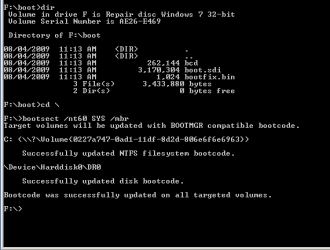
Not to argue, but in the kindest way I know how, I would like to show you what I have just done using the 32 bit repair CD I burned off of my 32 bit Windows 7 Ultimate RC awhile back.

part_01.PNG
part_02.PNG

I first used "list volume" to display the CD Rom.
Then I opened the directories to show there is no "bootsect.exe" visible the way it appears on the install DVD.
I went back to the F: root (not in the boot folder) and executed the command.
It says it was successful. I did have Ubuntu installed at one time and had used this CD to overwrite Grub a few times. I believe it is present on the cd and can be used successfully.

Again I could be wrong. Perhaps it is accessing bootsect from the recovery partition or the Windows 7 partition? I would just be happy to have a definite answer.

Thank you and cheers!
Robert
 

My Computer My Computer

OS
...
Back
Top