No sound after win 7 upgrade

Aileen

New member
Local time
6:00 AM
Messages
2
:(

I bought windows 7 ultimate and I am afraid that I will be out all of this money if I cannot get the sound to work! Since I do not believe you can return opened software. I need serious help!!!

I upgraded to Windows 7 and installed the drivers for my Toshiba m55-2932 sound card and before installing checked the windows XP box under the compatibility tab. No sound. I did windows update for this driver and it installed an updated driver. No sound. I went to Realtek and installed the windows 7 driver for the Realtek AC 97 sound card and got LOW sound. Now I rebooted and back to No sound.

Before windows 7 sound, after no sound.


I called Toshiba and the told me to try "this" driver and it turns out it was the same on as on the Realtek website. So no, still no sound. They said to call Realtek....


I don't know know what to do! I don't want to go back to using XP but sound is REALLY important. I'm sure this is an integrated sound card (Toshiba isn't making service manuals public) so I cannot remove it. I don't think I have any available PCI slots to install a new one internally and I don't want external speakers since I do a lot of traveling. And I looked at PCMCIA sound cards but I don't even think Windows 7 supports PCMCIA technology.


Is there a fix I don't know about? What can I do? Please HELP!!!
 

My Computer My Computer

Computer Manufacturer/Model Number
Toshiba Satellite M55-3293
OS
Windows 7 32-bit
Memory
1 GB
Sound Card
Realtek AC 97
Can you use an external USB sound card?

Might be the path of least resistance if you can buy one that is known to work--it might get you off the Realtek bandwagon. I know some people have had to use them to restore all the sound capabilities they had in Vista. For whatever reason, Microsoft has made sound into an issue of some kind for a lot of people on Windows 7.

General advice if you stay with integrated sound is to try all possible drivers in all possible modes and all possible configuration options within sound control panel. It ain't fun. Took me 10 or 15 hours of cursing to finally get mine going the way I want it, but I don't have Realtek or Toshiba.
 

My Computer My Computer

Computer type
PC/Desktop
Computer Manufacturer/Model Number
Ignatz Special; 4 speed manual gearbox; factory air conditioning; one of one
OS
Windows 7 Home Premium SP1, 64-bit
CPU
Intel Skylake i5-6600K, not overclocked
Motherboard
AsRock Z170M Extreme 4, micro ATX
Memory
8 GB HyperX DDR4-2666 (2 x 4 GB)
Graphics Card(s)
none; graphics are integrated on CPU
Sound Card
onboard: Realtek ALC1150; external: USB Behringer UF0-202
Monitor(s) Displays
Dell S2340M 23 inch IPS
Screen Resolution
1600 x 900
Hard Drives
System: Crucial MX100 series SSD, 128 GB;
Data: Samsung Spinpoint 103SJ, 1 TB;
Backup: WD Caviar Green WD30EZRX-00D8PB0, 3 TB
PSU
Rosewill SilentNight 500 watt fanless, semi-modular
Case
Antec Solo II
Cooling
Noctua NH-U12S; Noctua F12 intake, Noctua S12A exhaust
Keyboard
Microsoft 200 6JH-00001 USB
Mouse
Dell or Microsoft optical wired; USB
Antivirus
Microsoft Security Essentials and Malwarebytes Premium
Browser
Pale Moon
Other Info
All fans PWM; speeds at idle: CPU circa 500 rpm; intake circa 600 rpm; exhaust circa 600 rpm; CPU temps 27 idle and 47 C load in a warm room (27 C/81 F) when running Intel Extreme Tuning Utility stress test.
I'm going to keep trying at different configurations and modes of downloading the various drivers out there. I too have spent many hours.... So an eternal usb sound card will provide sound? I was under the impression that they adapted through your existing sound card, like an extension, so if the don't work...... I'll do some more research on that. Thanks!
 

My Computer My Computer

Computer Manufacturer/Model Number
Toshiba Satellite M55-3293
OS
Windows 7 32-bit
Memory
1 GB
Sound Card
Realtek AC 97
try updating your sound through the BIOS, i had the same problem until I found out the sound was disabled in the system BIOS.
Hope this helps
 

My Computer My Computer

OS
Windows 7 32 bit
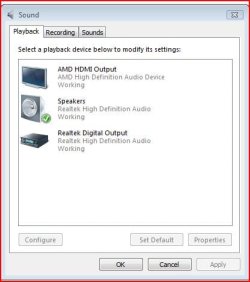
From the volume mixer, what does your playback device look like?
Is the Realtek device set as the default?
If not, you need to select it and set it as the default.
Capture.JPG
 

My Computer My Computer

Computer type
PC/Desktop
Computer Manufacturer/Model Number
Custom Build
OS
Windows 7 Home Premium 64 bit
CPU
Intel Core i7-4790
Motherboard
GA-Z87X-D3H
Memory
G.SKILL 8GB (2 x 4GB) DDR3 F3-10666CL9D-8GBNT
Graphics Card(s)
AMD Radeon R7 250
Sound Card
Realtek ALC892
Monitor(s) Displays
Samsung UN32EH5000, Dell 1703FPT
Screen Resolution
1920 x 1080, 1280 x 1024
Hard Drives
WD5003AZEX
WD10EZEX
Samsung HD103SJ
Samsung 128 GB 840 PRO
PSU
SeaSonic M12II SS-500GM
Case
Fractal Design Define R4
Cooling
Zalman CNPS9900ALED
Keyboard
Logitech K800
Mouse
Logitech M705
Internet Speed
16 Mbps
Antivirus
Avast
Browser
Firefox
Other Info
Bose Companion 2 Multimedia Speakers
I'm going to keep trying at different configurations and modes of downloading the various drivers out there. I too have spent many hours.... So an eternal usb sound card will provide sound? I was under the impression that they adapted through your existing sound card, like an extension, so if the don't work...... I'll do some more research on that. Thanks!

As far as I'm aware they don't have anything to do with your existing sound card. I've had this problem a couple of times, but its generally solved by just updating the drivers, have you tried updating them through the device manager?
 

My Computer My Computer

Computer Manufacturer/Model Number
Packard Bell ixtreme M3720
OS
Windows 7 x64
CPU
Intel Core 2 Quad Q8300 (2.5Ghz)
Memory
4GB DDR2
Graphics Card(s)
nvidia geforce 9500GT
Monitor(s) Displays
HP 2159v
Screen Resolution
1920 x 1080 & 1280 x 1024 (Dual Screen!)
PSU
Corsair 430W
Internet Speed
14Mbit
Back
Top