I am looking for a desktop App that does This:

DarkPhoenix

Banned
Local time
10:05 PM
Messages
141
Location
Down South
Hiya folks..

Well nothing has changed much about the desktop in about a hundred years. The desktop is great for shortcuts and folders used as containers for things, but it still gets cluttered. I have used tools like Stardock's Fences.. ( and love it) but it has a lot of glitches and still your desktop gets cluttered.

I want an app that does this:

Put a folder on your desktop for lets say shortcuts. Of course put shortcuts into it.. now.. instead of opening the folder, I want to either right click on it, or hover over it with the mouse would be better, to display all of its shortcuts contents.. and you can execute the shortcut of your choice right from there.. no need to open a folder up in a new window.

Does anyone know of an app that works like this?

Thanks!
 

My Computer My Computer

OS
Windows 7

My Computer My Computer

Computer type
PC/Desktop
Computer Manufacturer/Model Number
Self Built
OS
Win 10 Pro x64
CPU
Intel I5-2500K @3.3GHz
Motherboard
Asrock P67 Extreme4
Memory
16GB G.Skill Ripjaws X (4x4GB)
Graphics Card(s)
EVGA GeForce 750 Ti SC 2GB
Sound Card
ASUS Xonar DG 5.1 Channels 24-bit 96KHz PCI Interface Sound
Monitor(s) Displays
auria eq2367
Screen Resolution
1920 x 1080
Hard Drives
250GB Samsung 850 EVO SSD
1TB WD Blue
1TB Hitachi
PSU
SeaSonic X 650W 80 Plus Gold
Case
Corsair Obsidian 750D
Cooling
Corsair H60, Three 140mm case fans
Keyboard
Logitech Wireless Keyboard K520
Mouse
Logitech Wireless Mouse M310
Internet Speed
Wave Broadband ~ 100 dn 5 up
Antivirus
Windows Defender, Malwarebytes Premium
Browser
Edge, IE11, Chrome
Other Info
Laptop specs: HP g7-1365dx /
CPU: AMD A6-3420M APU with Radeon(tm) HD Graphics /
RAM: Crucial 8Gb (2x4Gb) /
SSD: Crucial M4-CT128M4SSD2 ATA Device/ FW 000F /
GFX: AMD Radeon HD 6520G /
OS: Windows 10 Pro x64
What about creating a new toolbar on your taskbar that links to the folder with all your shortcuts.
Or pin the folder to the taskbar.

Here's a tutorial that might help,

http://www.sevenforums.com/tutorials/9305-taskbar-pin-unpin-folder.html

Well that's not a bad idea.. but it won't work for me.. I already use the taskbar and quick launch for certain things Only.. This needs to be able to be done for folders on the desktop. no where else would work.

I have come across many apps that do things to explorer context menus.. but sadly.. nothing so far that does this one simple thing.

It would be nice, if every time you dropped a shortcut (or anything) into a folder it would show up in that folders right context menu. I think that should be a useful Windows function by default.. Why force you to actually open the folder when you don't have to.

This way, I would only need a few folders on the desktop with everything in sub categories. It would be neat and clean. Just like the Start Menu works.
 

My Computer My Computer

OS
Windows 7
What about creating a new toolbar on your taskbar that links to the folder with all your shortcuts.
Or pin the folder to the taskbar.

Here's a tutorial that might help,

http://www.sevenforums.com/tutorials/9305-taskbar-pin-unpin-folder.html

Well that's not a bad idea.. but it won't work for me.. I already use the taskbar and quick launch for certain things Only.. This needs to be able to be done for folders on the desktop. no where else would work.

I have come across many apps that do things to explorer context menus.. but sadly.. nothing so far that does this one simple thing.

It would be nice, if every time you dropped a shortcut into a folder it would show up in that folders right context menu. I think that should be a useful window function by default.. Why force you to actually open the folder when you don't have to.

This way, I would only need a few folders on the desktop with everything in sub categories. It would ne neat and clean.

Am I correct, that you want anything dropped on that folder should show up in right click context? If so look here. http://www.sevenforums.com/tutorials/418-context-menu-right-click-vs-shift-right-click.html?ltr=C

Ken
 

My Computer My Computer

Computer Manufacturer/Model Number
HP Pavillion dv-7 1005 Tx
OS
Win 8 Release candidate 8400
CPU
[email protected]
Memory
4 gigs
Graphics Card(s)
Nvidia 9600M
Sound Card
HD built-in
Monitor(s) Displays
17" Wxga
Screen Resolution
1440x900
Cooling
none
Internet Speed
45Mb down 5Mb up
What about creating a new toolbar on your taskbar that links to the folder with all your shortcuts.
Or pin the folder to the taskbar.

Here's a tutorial that might help,

http://www.sevenforums.com/tutorials/9305-taskbar-pin-unpin-folder.html

Well that's not a bad idea.. but it won't work for me.. I already use the taskbar and quick launch for certain things Only.. This needs to be able to be done for folders on the desktop. no where else would work.

I have come across many apps that do things to explorer context menus.. but sadly.. nothing so far that does this one simple thing.

It would be nice, if every time you dropped a shortcut (or anything) into a folder it would show up in that folders right context menu. I think that should be a useful Windows function by default.. Why force you to actually open the folder when you don't have to.

This way, I would only need a few folders on the desktop with everything in sub categories. It would be neat and clean. Just like the Start Menu works.


I guess I misunderstood what you were asking, Yes that would be a nice option to have.
 

My Computer My Computer

Computer type
PC/Desktop
Computer Manufacturer/Model Number
Self Built
OS
Win 10 Pro x64
CPU
Intel I5-2500K @3.3GHz
Motherboard
Asrock P67 Extreme4
Memory
16GB G.Skill Ripjaws X (4x4GB)
Graphics Card(s)
EVGA GeForce 750 Ti SC 2GB
Sound Card
ASUS Xonar DG 5.1 Channels 24-bit 96KHz PCI Interface Sound
Monitor(s) Displays
auria eq2367
Screen Resolution
1920 x 1080
Hard Drives
250GB Samsung 850 EVO SSD
1TB WD Blue
1TB Hitachi
PSU
SeaSonic X 650W 80 Plus Gold
Case
Corsair Obsidian 750D
Cooling
Corsair H60, Three 140mm case fans
Keyboard
Logitech Wireless Keyboard K520
Mouse
Logitech Wireless Mouse M310
Internet Speed
Wave Broadband ~ 100 dn 5 up
Antivirus
Windows Defender, Malwarebytes Premium
Browser
Edge, IE11, Chrome
Other Info
Laptop specs: HP g7-1365dx /
CPU: AMD A6-3420M APU with Radeon(tm) HD Graphics /
RAM: Crucial 8Gb (2x4Gb) /
SSD: Crucial M4-CT128M4SSD2 ATA Device/ FW 000F /
GFX: AMD Radeon HD 6520G /
OS: Windows 10 Pro x64
Am I correct, that you want anything dropped on that folder should show up in right click context? If so look here. http://www.sevenforums.com/tutorials/418-context-menu-right-click-vs-shift-right-click.html?ltr=C

Ken


I have looked at that link.. and shift right clicked on the folder in question, but I do not see how that will solve my problem of: " if every time you dropped a shortcut (or anything) into a folder it would show up in that folders right context menu."

Perhaps I am just not understanding something here about this but I don't see it working like that.
 

My Computer My Computer

OS
Windows 7
DarkPhoenix I have taken a bit different approach to this problem.. that just sort of evolved. What I did was put a folder on the desktop called Apps.. in the folder I have folders for categories of programs.. internet, programming, editors, system tools, utilities, video/media etc..

At first I put that as a toolbar as is often suggested. But I found that it's annoying to have to track along with the mouse until you get to what you want. What I ended up doing was dragging the folder from the desktop to my Documents folder to hide it. Then I dragged each subfolder onto RocketDock and set a custom icon that showed the category to avoid the need for text. One click on the category and I have all the apps.

Also to reduce space on my TaskBar and QuickLaunch I use 7stacks.. but the RocketDock categories have really cleaned things up. I have RocketDock on the desktop and that's all. Not a single icon. When I install an app I let it put an icon on the desktop, then drag it into the category folder. Desktop nice and clean. I don't have to worry about Auto Arrange messing me up ever again!!

Now if I could only get the RocketDock guys to put in a setting so I could choose the order of icons when switching from horizontal layout to vertical and vice versa, it would be (nearly) perfect.

edit: here's a screen shot. The icons spanned by the arrows are the program categories:

Clip.png


smiley-computer001.gif
 

My Computer My Computer

Computer Manufacturer/Model Number
HP Media Center
OS
Windows 7 32 bit
CPU
AMD 5200+ dual core
Memory
2 GB
Graphics Card(s)
NVidia GeForce 6150SE 128 MB
Monitor(s) Displays
CRT
Screen Resolution
1280x1024
Hard Drives
500 GB Sata internal :

SIIG USB 3.0 docking stations w/WD Caviar Black 6 Gb/s drives
Keyboard
PS/2
Mouse
PS/2 Wheel Mouse
Other Info
SIIG USB 3.0 PCIexpress card.
DarkPhoenix I have taken a bit different approach to this problem.. that just sort of evolved. What I did was put a folder on the desktop called Apps.. in the folder I have folders for categories of programs.. internet, programming, editors, system tools, utilities, video/media etc..

That's a nice way to solve the problem. I have used RocketDock in the past and I did like it.

I could not however use it now..I already have Stardock Fences running and do not need the extra graphics on my screen.

You see, I have several projects running at once, that I use different techniques to organize.

I am learning to program with MS Visual Studio, so I use Stardock Fences to store and organize all my apps and folders for that only.. All my normal Internet and windows day to day needs I use quick launch for.. Like a browser, email, windows explorer, a shortcut to the Program Features app, ( Add Remove Programs LOL Why did they ever change the name!)...Then the 'clean' side of my desktop is taken up with my portable apps projects and enhanced apps and games projects (I make both of those). I have yet another section for my 3D games I make with Unity 3D and yet another section for my Open Sim local server and tools ( It's like Second life).. So I have very little space and resources left for RocketDock. LOL A right click context menu would help me more than anything else.
 

My Computer My Computer

OS
Windows 7
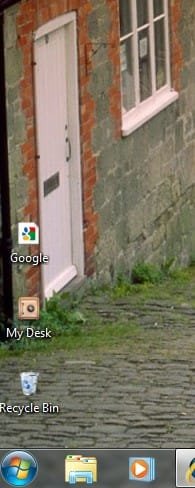
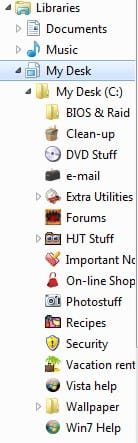
I have done about the same thing MilesAhead has done. I have one folder called "my desk" on the desktop. I've changed it to look like a 'safe' instead of a folder.
Many folders are inside that one folder (all have icons of their own). From the left hand side, I can access what I want. See the two pics...
 

Attachments

  • my desk.jpg
    my desk.jpg
    19 KB · Views: 9
  • 2010-01-31_134507.jpg
    2010-01-31_134507.jpg
    14 KB · Views: 9

My Computer My Computer

Computer type
PC/Desktop
Computer Manufacturer/Model Number
Bruce ... somewhere in his 40's
OS
Windows 7 Ultimate 32bit SP1
CPU
Intel(R) Core(TM)2 Quad CPU @ 2.40GHz, 2400 MHz
Motherboard
INTEL/D975XBX2
Memory
4 GB
Graphics Card(s)
ATI Radeon HD 2600 Pro
Monitor(s) Displays
Samsung SyncMaster 914v
Screen Resolution
1280 x 1024
Hard Drives
2/500GB each ... ST3500630AS ATA Device.
One is not connected
PSU
Rocketfish 700 W
Case
G.Skill Gigabyte Chassis
Keyboard
Standard PS/2 Keyboard
Mouse
Microsoft PS/2 Mouse
Internet Speed
DSL
Antivirus
Avira Internet Security
Browser
IE 11
Other Info
ATI HDMI Audio
That does complicate it alright. Maybe you should create additional user accounts? Like iProgrammer for programming etc.. ?

Then just log off or do rapid user switch.
 

My Computer My Computer

Computer Manufacturer/Model Number
HP Media Center
OS
Windows 7 32 bit
CPU
AMD 5200+ dual core
Memory
2 GB
Graphics Card(s)
NVidia GeForce 6150SE 128 MB
Monitor(s) Displays
CRT
Screen Resolution
1280x1024
Hard Drives
500 GB Sata internal :

SIIG USB 3.0 docking stations w/WD Caviar Black 6 Gb/s drives
Keyboard
PS/2
Mouse
PS/2 Wheel Mouse
Other Info
SIIG USB 3.0 PCIexpress card.
This is just one more approach this issue. On my desktop, I have six folders for shortcuts, but one folder will work fine. Right click on the taskbar and select Toolbars --> Desktop. Now the Desktop can be expanded to see all the shortcuts to applications.

This keeps the desktop uncluttered and works great for me.
 

My Computer My Computer

OS
Windows 7 Pro
CPU
Intel(R) Pentium(R) Duel CPU E2200 2.20 Ghz
Motherboard
GA-G41M-ES2L
Memory
4 gb 2.96 Usable
Graphics Card(s)
Onboard
Sound Card
Onboard
Hard Drives
2 - 1TB WD Sata Drives
Back
Top