HELP! Epson Scanner for CX4600 does not work on Windows 7 x86-7057

mutex

New member
Local time
10:41 PM
Messages
1
It works well on 7000, but yesterday I upgraded to 7057, it seems does not work though I reinstalled it many times. And my webcam (Logitech E3500) driver has some problems too but I fixed it just now.
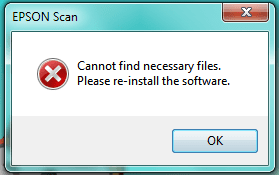
problem.png
Here's the problem details:
Problem signature:
Problem Event Name: APPCRASH
Application Name: escndv.exe
Application Version: 3.0.0.1
Application Timestamp: 440b9451
Fault Module Name: StackHash_f9ac
Fault Module Version: 0.0.0.0
Fault Module Timestamp: 00000000
Exception Code: c0000005
Exception Offset: 00000000
OS Version: 6.1.7057.2.0.0.256.1
Locale ID: 2052
Additional Information 1: f9ac
Additional Information 2: f9ac85ad1856d941cbe9106603c69278
Additional Information 3: 385f
Additional Information 4: 385fb89702a464fefca2eca306f312e9
Read our privacy statement online:
http://go.microsoft.com/fwlink/?linkid=104288&clcid=0x0409
If the online privacy statement is not available, please read our privacy statement offline:
C:\Windows\system32\en-US\erofflps.txt

Could anybody help me solve this problem?
 

My Computer My Computer

At a glance

Windows 7
OS
Windows 7
I have the exact same problem with my Epson Perfection 4990 Photo. Any solutions would be appreciated. Silver
 

My Computer My Computer

At a glance

Windows 7 Ultimate 64 BitIntel Core I7 286012 GBNvidia 560M
Computer Manufacturer/Model Number
MSI 782
OS
Windows 7 Ultimate 64 Bit
CPU
Intel Core I7 2860
Motherboard
Intel 67
Memory
12 GB
Graphics Card(s)
Nvidia 560M
Sound Card
Realtek HD
Monitor(s) Displays
Dell 2405
Screen Resolution
1920x1600
Hard Drives
2 120 Gb OCZ Vertex MaxOPS Raid 0, 1 256 Gb Crucial 300, 1 2000 Gb WD eSata.
Keyboard
Logitech
Mouse
MS Wireless Optical
Internet Speed
Cable
Hi guys
For the moment you'll either have to Dual boot (or do as I prefer --use an XP Virtual machine).

There *might* be a driver for this later - most manufacturers seem to be playing a "waiting game" on this to see if Microsoft improves the "Vista" or XP compatability but don't bet on it.

There isn't much money in it for hardware manufacturers to develop new drivers for older cheaper hardware when they want you to buy a new one (it's called "The Market Economy").

I've some problems with Canon flatbed and film scanners which I KNOW will never have VISTA / W7 drivers - but the hardware works 100% OK. I just fire up a VM.

On even a small 4GB laptop you can easily run a few VM's concurrently -- running a scanner application on a VM almost consumes ZERO resources on your host system.

Cheers
jimbo
 

My Computer My Computer

At a glance

Linux CENTOS 7 / various Windows OS'es and se...Intel i7 Intel i58GB, 16GBOn Motherboard
Computer type
PC/Desktop
Computer Manufacturer/Model Number
Custom built, several laptops HP/ASUS
OS
Linux CENTOS 7 / various Windows OS'es and servers
CPU
Intel i7 Intel i5
Memory
8GB, 16GB
Graphics Card(s)
On Motherboard
Sound Card
Realtek HD audio
Monitor(s) Displays
Apple Cinema display, Samsung LCD
Screen Resolution
1920 X 1080
Hard Drives
4 X 1TB SATA
Mouse
Toshiba wireless laser
Internet Speed
> 20MB up
It works well on 7000, but yesterday I upgraded to 7057, it seems does not work though I reinstalled it many times. And my webcam (Logitech E3500) driver has some problems too but I fixed it just now.

View attachment 5775
Here's the problem details:


Could anybody help me solve this problem?

Microsoft Update Catalog

Search for CX4600. Theres a Windows 7 driver there. The error you provided indicates that you are not running the hardware installation as administrator: c0000005 means access denied. Get the file from the catalog and use device manager to install it.
 

My Computer My Computer

At a glance

El Capitan / Windows 10i7-4980HQ16GBIris 5200
Computer type
Laptop
Computer Manufacturer/Model Number
Apple
OS
El Capitan / Windows 10
CPU
i7-4980HQ
Memory
16GB
Graphics Card(s)
Iris 5200
Anyone get this resolved. I am having the same issue with my Epson 4490 Photo. I can scan with it but Epson's Scan utility will not run and I loose all the advanced functions of the scanner using the Windows 7 Scan interface. I was unable to get to the Microsoft update catalog because I don't have IE installed. I will install it if there is a fix there?
 

My Computer My Computer

At a glance

Windows 7
OS
Windows 7
I have an Epson V300. The drivers were fine but the Epson Scan Utility would not work. I downloaded VueScan and prefer it to the Epson Scan Utility. Works good for me! :D
 

My Computer My Computer

At a glance

Windows7 x64 7600 16385Intel I7 9206GB DDR3ATI Radeon HD4350
Computer Manufacturer/Model Number
Dell / Studio xps
OS
Windows7 x64 7600 16385
CPU
Intel I7 920
Motherboard
Dell
Memory
6GB DDR3
Graphics Card(s)
ATI Radeon HD4350
Sound Card
Integrated 7.1 channel
Hard Drives
Hitachi HDT721064SLA360 (596 GB)
Keyboard
Logitech EX110
Mouse
Logitech LX8
Anyone get this resolved. I am having the same issue with my Epson 4490 Photo. I can scan with it but Epson's Scan utility will not run and I loose all the advanced functions of the scanner using the Windows 7 Scan interface. I was unable to get to the Microsoft update catalog because I don't have IE installed. I will install it if there is a fix there?

How do you not have IE installed? Did you remove it using OptionalFeatures.exe or did you ruin your Windows 7 installation with vLite?

Either way, get IE and then get the driver I talked about. Make sure Windows Fax and Scan are installed in OptionalFeatures.exe (it's under Print and Document Services) then start scanners control panel, select your scanner and there you can enable your scanner hardware buttons.
 

My Computer My Computer

At a glance

El Capitan / Windows 10i7-4980HQ16GBIris 5200
Computer type
Laptop
Computer Manufacturer/Model Number
Apple
OS
El Capitan / Windows 10
CPU
i7-4980HQ
Memory
16GB
Graphics Card(s)
Iris 5200
I have an Epson V300. The drivers were fine but the Epson Scan Utility would not work. I downloaded VueScan and prefer it to the Epson Scan Utility. Works good for me! :D

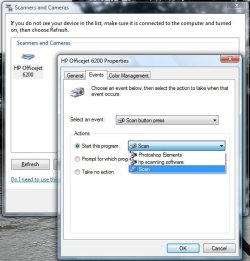
What's wrong with the Windows applications that are built in? You don't need any scan utilities in 7! Even the scanner's hardware buttons work to scan in most cases:
2.jpg
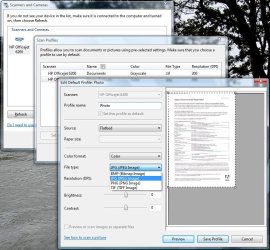
and scanner profiles are supported too...
1.jpg
 

My Computer My Computer

At a glance

El Capitan / Windows 10i7-4980HQ16GBIris 5200
Computer type
Laptop
Computer Manufacturer/Model Number
Apple
OS
El Capitan / Windows 10
CPU
i7-4980HQ
Memory
16GB
Graphics Card(s)
Iris 5200
How do you not have IE installed? Did you remove it using OptionalFeatures.exe or did you ruin your Windows 7 installation with vLite?

Either way, get IE and then get the driver I talked about. Make sure Windows Fax and Scan are installed in OptionalFeatures.exe (it's under Print and Document Services) then start scanners control panel, select your scanner and there you can enable your scanner hardware buttons.

The scanner and drivers are fine and run as does the Windows 7 Scan Utility which is lacking in functionality and is only good for scanning documents and photographs. It is the Epson Scan Utility that will not run. This utility is needed to scan film and negatives etc which is what the scanner was purchased for.
 
Last edited:

My Computer My Computer

At a glance

Windows 7
OS
Windows 7
What's wrong with the Windows applications that are built in? You don't need any scan utilities in 7! Even the scanner's hardware buttons work to scan in most cases:

It is not near good enough for high end film scanning. The scanner is capable of high resolution film scanning using Digital Ice technology etc., none of which is available in the Windows 7 Scan utility. No good for photographers. The Epson scan utility worked fine in build 7000.
 

My Computer My Computer

At a glance

Windows 7
OS
Windows 7
Anyone get this resolved. I am having the same issue with my Epson 4490 Photo. I can scan with it but Epson's Scan utility will not run and I loose all the advanced functions of the scanner using the Windows 7 Scan interface. I was unable to get to the Microsoft update catalog because I don't have IE installed. I will install it if there is a fix there?

Yes, I installed it in a stripped down VmWare Windows XP image and installed it there. It works just fine. I assume that you could do the same with any of the other Virtual Machine software programs.

Silver
 

My Computer My Computer

At a glance

Windows 7 Ultimate 64 BitIntel Core I7 286012 GBNvidia 560M
Computer Manufacturer/Model Number
MSI 782
OS
Windows 7 Ultimate 64 Bit
CPU
Intel Core I7 2860
Motherboard
Intel 67
Memory
12 GB
Graphics Card(s)
Nvidia 560M
Sound Card
Realtek HD
Monitor(s) Displays
Dell 2405
Screen Resolution
1920x1600
Hard Drives
2 120 Gb OCZ Vertex MaxOPS Raid 0, 1 256 Gb Crucial 300, 1 2000 Gb WD eSata.
Keyboard
Logitech
Mouse
MS Wireless Optical
Internet Speed
Cable
Scanner will not work Epson RX700

I too am having the proble that my scanner will not work under windows 7 build 7057 in either the 32 or 64 bit versions. I works fine in the Vista 64 bit OS, but tells me that I have to re-install the software in both of the Win 7 versions. If someone finds an update or a Twain Driver that will work please share the wealth.....:cry:
 

My Computer My Computer

At a glance

Windows 7 64 bit
OS
Windows 7 64 bit
I too am having the proble that my scanner will not work under windows 7 build 7057 in either the 32 or 64 bit versions. I works fine in the Vista 64 bit OS, but tells me that I have to re-install the software in both of the Win 7 versions. If someone finds an update or a Twain Driver that will work please share the wealth.....:cry:

As long as you don't need some special, esoteric feature of the proprietary scanning software that was not designed for Windows 7, why not try the software that was -- WIA. Turn the scanner/printer on, open scanners and cameras control panel and see if it shows up. You can then scan using Windows Fax and Scan: open start, type fax, press enter.

There's no 7 driver for the RX series in the catalog yet but see the driver package in 7 isn't enough to make it show up in the scanners and cameras control panel.

BTW, TWAIN died long ago -- WIA has been the Microsoft blessed Image Acquisition API since Windows Me 7 years ago. So now it's gone from a Technology Without An Interesting Name to a Technology Without An Inherent Need. ;)
 
Last edited:

My Computer My Computer

At a glance

El Capitan / Windows 10i7-4980HQ16GBIris 5200
Computer type
Laptop
Computer Manufacturer/Model Number
Apple
OS
El Capitan / Windows 10
CPU
i7-4980HQ
Memory
16GB
Graphics Card(s)
Iris 5200
Anyone know if this conflict has been resolved in build 7068? I saw where the dual screen bug was fixed. I have it downloading but am several hours from having it down and installed.
 

My Computer My Computer

At a glance

Windows 7
OS
Windows 7
I am happy to report that this issue has been resolved in build 7068. All is as it should be and working fine. I don't know if it makes any difference because I did not try it an other way but I right clicked on the installation file and ran as administrator.
 

My Computer My Computer

At a glance

Windows 7
OS
Windows 7
I am happy to report that this issue has been resolved in build 7068. All is as it should be and working fine. I don't know if it makes any difference because I did not try it an other way but I right clicked on the installation file and ran as administrator.

It did not work for me in 7068. Same error as 7057. Strange.
 

My Computer My Computer

At a glance

Windows 7 Ultimate 64 BitIntel Core I7 286012 GBNvidia 560M
Computer Manufacturer/Model Number
MSI 782
OS
Windows 7 Ultimate 64 Bit
CPU
Intel Core I7 2860
Motherboard
Intel 67
Memory
12 GB
Graphics Card(s)
Nvidia 560M
Sound Card
Realtek HD
Monitor(s) Displays
Dell 2405
Screen Resolution
1920x1600
Hard Drives
2 120 Gb OCZ Vertex MaxOPS Raid 0, 1 256 Gb Crucial 300, 1 2000 Gb WD eSata.
Keyboard
Logitech
Mouse
MS Wireless Optical
Internet Speed
Cable
Mine works now, too

I have an old Epson 2480 scanner (with an automatic photo feeder, which is why I hang on to it!) that was having the same issue. 7068 seems to have fixed whatever the problem was.
 

My Computer My Computer

At a glance

Windows Vista and 7 dual boot
OS
Windows Vista and 7 dual boot
Suggest You Try 7068 build.
 

My Computer My Computer

At a glance

Vista
OS
Vista
It did not work for me in 7068. Same error as 7057. Strange.

Silver, did you get this running? Try uninstalling everything and unplugging the scanner from your computer. Reinstall the Epson scan utility / driver package, upon completion plug scanner back into your computer. It should reinstall the hardware using the proper drivers and you should be good to go. This should reinstate all of the functions of your scanner. The Windows 7 scanner interface should work but when you need higher level function the Epson Scanner utility will run as well.
 

My Computer My Computer

At a glance

Windows 7
OS
Windows 7
I simply opened my old Vista folder and went to Windows directory, copied the Twain_32.dll file and pasted it into the Windows Window directory. Solved that problem for me.
 

My Computer My Computer

At a glance

Win 7
OS
Win 7
Back
Top