
New W7 Pro installation won't start ?

trinaz

New member
Member
VIP
Local time
5:43 PM
Messages
477
Location
Phoenix
Posted previously to crashes/degugging group...but didn't get too far...
http://www.sevenforums.com/crashes-debugging/60355-win-7-pro-32bit-wont-start-reboot.html

Is there a way to start a W7 system to the C: prompt ? Neither W7 regular start up...or any of the Safe Mode startups will work ? All safe mode starts end at same place with same system file loading and the "...please wait"...except the "advanced repair" which does not solve problem ?

Thanks, Tim
 

My Computer My Computer

Computer type
PC/Desktop
Computer Manufacturer/Model Number
Self built
OS
Windows 7 Pro 64bit SP1
CPU
AMD FX-6100 Six-Core Processor
Motherboard
M5A78L-M LX PLUS
Memory
2ea Corsair-1333MHz-PC3-10666-240-pin-CMX4GX3M1A1333C9
Graphics Card(s)
NVIDIA GeForce GT 630 - 1023MB (EVGA)
Sound Card
OnBoard Via High Def Audio
Monitor(s) Displays
Samsung 204B main - ASUS VS228 secondary
Screen Resolution
1920x1080 main - 1920x1080 secondary
Hard Drives
Samsung SSD 840 128GB Win7 Pro 64bit - Western Digital WDC 465GB - Seagate 640GB Sata B/U - Maxtor 500GB Sata B/U - Maxtor 200GB Sata
PSU
Antec 650 watt
Cooling
Multiple case fans
Keyboard
MS USB dual Wireless Keyboard - IntelliType Pro
Mouse
MS USB dual Wireless Mouse - IntelliPoint
Internet Speed
Cox Cable
Antivirus
Bitdefender IS 2014
Browser
FireFox Primary - IE 11
Other Info
Hauppaguge Win TV HVR-1250 (Model 22xxx, Hybrid ATSC/QAM)
Samsung HD103SI USB 1TB Desktop Drive - Backup & Disk Image storage
It sounds like something corrupted your install. Since you cannot run a repair install unless you can get into Windows, I would try some things.

You might try removing the secondary display.

Boot to the Win 7 DVD and go back to the repair section-command prompt.
Type slmgr -rearm just in case it is related to an expired evaluation period. I am not sure this command will run this way, but if not post back. I also do not know if this will mess with your activation.

Next try some of the following, although most of these should have been done during the startup repair operations.

Hit enter after each, but type:
SFC /scannow <--will take some time
then
bootrec /fixmbr
then
bootrec /fixboot

If normal boot still not possible, you might also try:
bootrec /rebuildbcd

And I don't really think it will help, but maybe go into the bios and change the OS from Plug and Play to no. Change back later.

Have you changed the drives or drive order in the bios, if you have 2 drives?

There are some third party partitioning software you might download and burn so you can boot to one of those and check the drive and its condition. GParted and Partition Wizard seem to be used quite a bit.
 

My Computer My Computer

Computer Manufacturer/Model Number
Homebuilt
OS
Windows 7 x64
CPU
i7-2600K
Motherboard
Asus P8Z77-v Pro
Memory
8 G
Graphics Card(s)
GTX 480
Sound Card
Onboard
Monitor(s) Displays
LG W2753V
Screen Resolution
1920x1080
Hard Drives
Crucial M4 128 G SSD
Thanks...tried all the Command Prompt files...but nothing changed...then it dawned on me that the problem pretty much must be with the boot.ini or whatever...the prompts you gave me reported Windows I think as the "X" drive...and the scans run before as suggested in Crashes/Debugging via DVD boot/repair reported the Windows disk as I think N: drive ?

So...I opened the box and disconnected everything except the C: drive...no DVD's (2) and no data drives (2 Sata non-system drives)...and PRESTO...Windows & booted up normally !!

Now...there's still and issue...added DVD drives one by one and rebooted...no problem...added one Sata drive...rebooted...no problem...but when I added the last Sata Drive ( Sata 3 I believe) then I got the frozen Windows logo screen as before...

Closed down and disconnected last Drive (Sata 3) and Windows again boots normally.

Not sure why the problem seems to be with Sata 3...but will post back if I figure it out...

Thanks for the help...

Tim
 

My Computer My Computer

Computer type
PC/Desktop
Computer Manufacturer/Model Number
Self built
OS
Windows 7 Pro 64bit SP1
CPU
AMD FX-6100 Six-Core Processor
Motherboard
M5A78L-M LX PLUS
Memory
2ea Corsair-1333MHz-PC3-10666-240-pin-CMX4GX3M1A1333C9
Graphics Card(s)
NVIDIA GeForce GT 630 - 1023MB (EVGA)
Sound Card
OnBoard Via High Def Audio
Monitor(s) Displays
Samsung 204B main - ASUS VS228 secondary
Screen Resolution
1920x1080 main - 1920x1080 secondary
Hard Drives
Samsung SSD 840 128GB Win7 Pro 64bit - Western Digital WDC 465GB - Seagate 640GB Sata B/U - Maxtor 500GB Sata B/U - Maxtor 200GB Sata
PSU
Antec 650 watt
Cooling
Multiple case fans
Keyboard
MS USB dual Wireless Keyboard - IntelliType Pro
Mouse
MS USB dual Wireless Mouse - IntelliPoint
Internet Speed
Cox Cable
Antivirus
Bitdefender IS 2014
Browser
FireFox Primary - IE 11
Other Info
Hauppaguge Win TV HVR-1250 (Model 22xxx, Hybrid ATSC/QAM)
Samsung HD103SI USB 1TB Desktop Drive - Backup & Disk Image storage
Does your motherboard have 2 SATA controllers, one for the first 4 and one for the last 2?

Is another driver needed for the second controller, and do you have it turned on in the bios?

To test, you might take the 3rd SATA drive and connect it to one of the other cables to see it it is the drive, or the SATA controller.

On my system, the last 2 SATAs are used for eSATA.
 

My Computer My Computer

Computer Manufacturer/Model Number
Homebuilt
OS
Windows 7 x64
CPU
i7-2600K
Motherboard
Asus P8Z77-v Pro
Memory
8 G
Graphics Card(s)
GTX 480
Sound Card
Onboard
Monitor(s) Displays
LG W2753V
Screen Resolution
1920x1080
Hard Drives
Crucial M4 128 G SSD
We know now that either the drive or the SATA port is giving you trouble. The latter is unlikely, so try moving the drive to another channel.
 

My Computer My Computer

Computer Manufacturer/Model Number
Custom
OS
Windows 7 Professional x64
CPU
Intel i7 2600K OC'd @ 4620 MHz
Motherboard
Asus P8Z68-V Pro
Memory
16GB GSkill Sniper 2133 Mhz (4x4GB)
Graphics Card(s)
EVGA GeForce GTX 480 SuperClocked+
Sound Card
Realtek High Definition Audio
Monitor(s) Displays
2x Acer S273HLbmii 27"
Screen Resolution
2 x 1920x1080
Hard Drives
64GB Crucial M4 SSD

Storage: Hitachi 1TB 5400RPM, Samsung 1.5TB 5400RPM
PSU
Corsair HW Series 750w (modular)
Case
Cooler Master HAF 932 Advanced Blue Edition
Cooling
CM Hyper 212+ CPU cooler, 3x 230mm + 1x 140mm case fans
Keyboard
Logitech MK320 (wireless)
Mouse
Logitech MK320 (wireless)
Internet Speed
30 Mb/s : 2 Mb/s
Thanks guys...going to have to look this up...brand new MB...but I recall that there are 2 'sets' of Sata connectors....I think 1-4 and 5-8...might be 5-6 ? but I will double check...

Already thought about switching cables/connectors...but this system was working fine for about a week before problems started up...will go thru the MB manual and repost...

Do have Speccy...will run and post...my Win7 group system specs are not the problem computer...will run Speccy on that system and post back...

Tim
 

My Computer My Computer

Computer type
PC/Desktop
Computer Manufacturer/Model Number
Self built
OS
Windows 7 Pro 64bit SP1
CPU
AMD FX-6100 Six-Core Processor
Motherboard
M5A78L-M LX PLUS
Memory
2ea Corsair-1333MHz-PC3-10666-240-pin-CMX4GX3M1A1333C9
Graphics Card(s)
NVIDIA GeForce GT 630 - 1023MB (EVGA)
Sound Card
OnBoard Via High Def Audio
Monitor(s) Displays
Samsung 204B main - ASUS VS228 secondary
Screen Resolution
1920x1080 main - 1920x1080 secondary
Hard Drives
Samsung SSD 840 128GB Win7 Pro 64bit - Western Digital WDC 465GB - Seagate 640GB Sata B/U - Maxtor 500GB Sata B/U - Maxtor 200GB Sata
PSU
Antec 650 watt
Cooling
Multiple case fans
Keyboard
MS USB dual Wireless Keyboard - IntelliType Pro
Mouse
MS USB dual Wireless Mouse - IntelliPoint
Internet Speed
Cox Cable
Antivirus
Bitdefender IS 2014
Browser
FireFox Primary - IE 11
Other Info
Hauppaguge Win TV HVR-1250 (Model 22xxx, Hybrid ATSC/QAM)
Samsung HD103SI USB 1TB Desktop Drive - Backup & Disk Image storage
Sounds like SATA3 somehow got marked active and might contain a System MBR that's derailing the boot. Happens a lot here.

You can check this by booting free Partition Wizard bootable CD with all drives plugged, rightclick on any data drive marked active on SATA3 to Modify>Set to Inactive.

Now restart Win7 and post back a screenshot of your full Disk Mgmt Drive map, using snipping tool in Start Menu, attaching file with paper clip in Reply box.
 
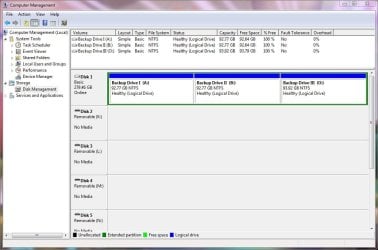
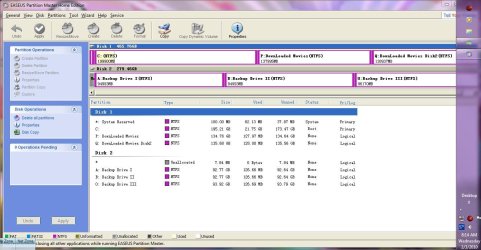
OK...downloaded iso...before I start tho I want to post one more item...Windows Disk Manager does not now show the C:\ drive...(main Win 7 installation)...only the 1st data storage drive and the DVDs ?

Both Seagate(Acronis)Disk Wizard and Easeus Partition Master show the C:\ and System Reserve partition for W7.

None of any of the three above is/are marked "active" ? 3 screen shots attached

Should I proceed with Windows Partition Wizard bootable CD ?

Tim
 

Attachments

  • Win DM.JPG
    Win DM.JPG
    87.2 KB · Views: 30
  • Seagate(Acronis).JPG
    Seagate(Acronis).JPG
    53.6 KB · Views: 25
  • Easeus.JPG
    Easeus.JPG
    118.4 KB · Views: 34

My Computer My Computer

Computer type
PC/Desktop
Computer Manufacturer/Model Number
Self built
OS
Windows 7 Pro 64bit SP1
CPU
AMD FX-6100 Six-Core Processor
Motherboard
M5A78L-M LX PLUS
Memory
2ea Corsair-1333MHz-PC3-10666-240-pin-CMX4GX3M1A1333C9
Graphics Card(s)
NVIDIA GeForce GT 630 - 1023MB (EVGA)
Sound Card
OnBoard Via High Def Audio
Monitor(s) Displays
Samsung 204B main - ASUS VS228 secondary
Screen Resolution
1920x1080 main - 1920x1080 secondary
Hard Drives
Samsung SSD 840 128GB Win7 Pro 64bit - Western Digital WDC 465GB - Seagate 640GB Sata B/U - Maxtor 500GB Sata B/U - Maxtor 200GB Sata
PSU
Antec 650 watt
Cooling
Multiple case fans
Keyboard
MS USB dual Wireless Keyboard - IntelliType Pro
Mouse
MS USB dual Wireless Mouse - IntelliPoint
Internet Speed
Cox Cable
Antivirus
Bitdefender IS 2014
Browser
FireFox Primary - IE 11
Other Info
Hauppaguge Win TV HVR-1250 (Model 22xxx, Hybrid ATSC/QAM)
Samsung HD103SI USB 1TB Desktop Drive - Backup & Disk Image storage
OK..decided just opening bootable CD was no real problem...opened by booting to DVD...the troubled drive did show up...but as the #2 drive...not #3...

The troubled drive ..#2..was NOT marked as active...the only thing I noticed was that the first partition was marked as "Primary"...where as the other data drive (real #3) was "Logical" ? ( did not change anything )

The only operation I ran was to label the C:\ Volume as the Main Win7 Drive...the label was empty (although before this all started...it did have a similar label indication it was the main Win 7 Installation)

Now the weird part...rebooted and removed DVD as main boot group and set to HDD's...Windows 7 started up normally as if nothing at all had happened...appears to be running well with no new issues or problems...all three drives are accessible...BUT...the C:\ drive still does not show up in Windows Disk Manager....but does again in Easeus and Seagate .
 

Attachments

  • Win7 fixed.JPG
    Win7 fixed.JPG
    122.4 KB · Views: 26

My Computer My Computer

Computer type
PC/Desktop
Computer Manufacturer/Model Number
Self built
OS
Windows 7 Pro 64bit SP1
CPU
AMD FX-6100 Six-Core Processor
Motherboard
M5A78L-M LX PLUS
Memory
2ea Corsair-1333MHz-PC3-10666-240-pin-CMX4GX3M1A1333C9
Graphics Card(s)
NVIDIA GeForce GT 630 - 1023MB (EVGA)
Sound Card
OnBoard Via High Def Audio
Monitor(s) Displays
Samsung 204B main - ASUS VS228 secondary
Screen Resolution
1920x1080 main - 1920x1080 secondary
Hard Drives
Samsung SSD 840 128GB Win7 Pro 64bit - Western Digital WDC 465GB - Seagate 640GB Sata B/U - Maxtor 500GB Sata B/U - Maxtor 200GB Sata
PSU
Antec 650 watt
Cooling
Multiple case fans
Keyboard
MS USB dual Wireless Keyboard - IntelliType Pro
Mouse
MS USB dual Wireless Mouse - IntelliPoint
Internet Speed
Cox Cable
Antivirus
Bitdefender IS 2014
Browser
FireFox Primary - IE 11
Other Info
Hauppaguge Win TV HVR-1250 (Model 22xxx, Hybrid ATSC/QAM)
Samsung HD103SI USB 1TB Desktop Drive - Backup & Disk Image storage
Windows boots normally with only 2 SATA drives, but will not boot with 3...

Since both the extra hard drives are the same size, does it make any difference which one is connected to the same SATA cables (i.e. if the drive that seems to work is connected to SATA 4, do both drives work if connected to SATA 4) or does the bad drive keep Win 7 from booting if the other drive is not connected?

The Disk Management picture you show only shows one drive. Where is the second or third drive? Is that what you mean by it won't show up?

What are all the Removable disks? Are there any more disks below what is on the picture, for instance, I do not see a DVD.
 

My Computer My Computer

Computer Manufacturer/Model Number
Homebuilt
OS
Windows 7 x64
CPU
i7-2600K
Motherboard
Asus P8Z77-v Pro
Memory
8 G
Graphics Card(s)
GTX 480
Sound Card
Onboard
Monitor(s) Displays
LG W2753V
Screen Resolution
1920x1080
Hard Drives
Crucial M4 128 G SSD
Ok...let me clarify...at this point all Sata drives (3) are connected and W7 is now booting normal from the C:\ drive as before the issue started. But...all I did was start "Bootable CD" (with all 3 Satas connected) any the only operation I ran was to name the C: volume label that was empty (which was previously named ) and exited.

With the 3 drives still attached I immediately tried the reboot via HHD in bios and presto...W7 booted normally with all three Sata drives in "Computer" and accessible.

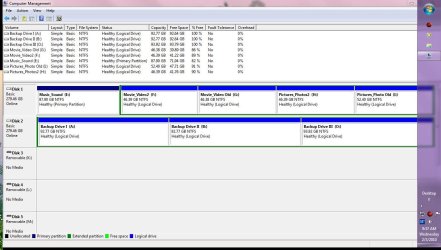
But...W7 Disk Manager still does not show the C: drive. Sata 2 & 3 are there..but not Sata 1 = main C:/ drive with W7 installation ?

The removable K-L-M-etc...are usb ports...not disks.

The 2 DVD's are shown...but the system is running on a 32" LCD TV/monitor...so I can't get the who DM screen in one shot.

I will post back with 2 shots top/bottom...in a little while.

Main issue now is why isn't the C:/ drive, Disk 0, showing up in DM...does it matter...?

Shows in both Seagate Disk Wizard, Easeus, and also did in Windows "Bootable CD" when it was running ?

Thanks...
 

My Computer My Computer

Computer type
PC/Desktop
Computer Manufacturer/Model Number
Self built
OS
Windows 7 Pro 64bit SP1
CPU
AMD FX-6100 Six-Core Processor
Motherboard
M5A78L-M LX PLUS
Memory
2ea Corsair-1333MHz-PC3-10666-240-pin-CMX4GX3M1A1333C9
Graphics Card(s)
NVIDIA GeForce GT 630 - 1023MB (EVGA)
Sound Card
OnBoard Via High Def Audio
Monitor(s) Displays
Samsung 204B main - ASUS VS228 secondary
Screen Resolution
1920x1080 main - 1920x1080 secondary
Hard Drives
Samsung SSD 840 128GB Win7 Pro 64bit - Western Digital WDC 465GB - Seagate 640GB Sata B/U - Maxtor 500GB Sata B/U - Maxtor 200GB Sata
PSU
Antec 650 watt
Cooling
Multiple case fans
Keyboard
MS USB dual Wireless Keyboard - IntelliType Pro
Mouse
MS USB dual Wireless Mouse - IntelliPoint
Internet Speed
Cox Cable
Antivirus
Bitdefender IS 2014
Browser
FireFox Primary - IE 11
Other Info
Hauppaguge Win TV HVR-1250 (Model 22xxx, Hybrid ATSC/QAM)
Samsung HD103SI USB 1TB Desktop Drive - Backup & Disk Image storage
The removable K-L-M-etc...are usb ports...not disks.
I suppose I am a little dense, but usb "ports" do not show up in disk Management. Are these card readers or something along those lines? Can you unplug something?

It does seem a little strange the primary drive would not show up in disk management. I can't remember right now, but you do have it first in the drive order in the bios? Which probably means it should show up as the hard drive in the boot priority.
 

My Computer My Computer

Computer Manufacturer/Model Number
Homebuilt
OS
Windows 7 x64
CPU
i7-2600K
Motherboard
Asus P8Z77-v Pro
Memory
8 G
Graphics Card(s)
GTX 480
Sound Card
Onboard
Monitor(s) Displays
LG W2753V
Screen Resolution
1920x1080
Hard Drives
Crucial M4 128 G SSD
Is the Windows 7 drive showing up in BIOS correctly?

Have you conifrmed you have the latest BIOS version?

If it is not showing in Disk Mgmt then there is a major malfuction requiring a Repair Install to sort it out.
 
Yes...all 3 drives show up in Bios as follows:

1st channel device 0 Maxtor 7H500F0 ( newer drive with Win 7 installation )
1st channel device 1 WDC xxxxxxxxxxxx
2nd channel device 0 WDC xxxxxxxxxxxx
2nd channel device 1 none

also show up in Computer, Device Manager and Windows Explorer

Will check on Bios update later today...have all day seminar and meetings to follow.. Thanks for all the help...will post back probably tomorrow with update/results


Tim
 

My Computer My Computer

Computer type
PC/Desktop
Computer Manufacturer/Model Number
Self built
OS
Windows 7 Pro 64bit SP1
CPU
AMD FX-6100 Six-Core Processor
Motherboard
M5A78L-M LX PLUS
Memory
2ea Corsair-1333MHz-PC3-10666-240-pin-CMX4GX3M1A1333C9
Graphics Card(s)
NVIDIA GeForce GT 630 - 1023MB (EVGA)
Sound Card
OnBoard Via High Def Audio
Monitor(s) Displays
Samsung 204B main - ASUS VS228 secondary
Screen Resolution
1920x1080 main - 1920x1080 secondary
Hard Drives
Samsung SSD 840 128GB Win7 Pro 64bit - Western Digital WDC 465GB - Seagate 640GB Sata B/U - Maxtor 500GB Sata B/U - Maxtor 200GB Sata
PSU
Antec 650 watt
Cooling
Multiple case fans
Keyboard
MS USB dual Wireless Keyboard - IntelliType Pro
Mouse
MS USB dual Wireless Mouse - IntelliPoint
Internet Speed
Cox Cable
Antivirus
Bitdefender IS 2014
Browser
FireFox Primary - IE 11
Other Info
Hauppaguge Win TV HVR-1250 (Model 22xxx, Hybrid ATSC/QAM)
Samsung HD103SI USB 1TB Desktop Drive - Backup & Disk Image storage
Back
Top