maximum capacity of my laptop

suraj

New member
Local time
3:14 PM
Messages
4
well i have hp pavillion dv6314tx..and it came with 160 gb harddisk...1 gb ram..and vista home premium...now i upgraded it to windows 7 ultimate...
but now i m plannin to upgrade my harddrive to 360 gb or 500 gb and my ram to 4 gb...
but hp ppl r sayin that my laptop cant take more than 200 gb harddrive and 2 gb of ram...
then i installed 3 gb ram(2+1) ..and its detected and showin in my system..
can anyone help me and let me know that can i change my harddrive also..coz once i buy harddrive and install in my laptop..and even if it doesnt work..i wont be able to return it to the vendor...
so pls help..
 

My Computer My Computer

At a glance

window 7 ultimateIntel core 2 duo ,T 5300 @ 1.73Ghz3 gbnvidia geforce go 7400
Computer Manufacturer/Model Number
Hp Pavillion/dv 6314 tx
OS
window 7 ultimate
CPU
Intel core 2 duo ,T 5300 @ 1.73Ghz
Motherboard
intel 945 gm
Memory
3 gb
Graphics Card(s)
nvidia geforce go 7400
Sound Card
conexant
Hard Drives
160 gb Hitachi
Weird seems kinda unfeasible that their would be a limitation on how much capacity your hard drive can have. Have you tried contacting HP? I just read an atricale on a HP M8200n that switched betwen a 500gb and a 1.5 T. Seems it would be OK to me. Hopefully you'll get some HP members with a more definitive answers. Fabe
 

My Computer My Computer

At a glance

Windows 7 ultimate 64 bit / XP Home sp3intel Core 2 Duo E8400 3.0ghz8 gigs 1066 OCZ Fata1tyEVGA GTX 580 Call of Duty Black Ops Edition
Computer Manufacturer/Model Number
Self Built
OS
Windows 7 ultimate 64 bit / XP Home sp3
CPU
intel Core 2 Duo E8400 3.0ghz
Motherboard
Asus P5ND bios 1401
Memory
8 gigs 1066 OCZ Fata1ty
Graphics Card(s)
EVGA GTX 580 Call of Duty Black Ops Edition
Sound Card
Creative Soundblaster Audigy 2zs
Monitor(s) Displays
Asus 24in LCD's 2MS X2
Screen Resolution
1920x1080p @60Hz
Hard Drives
WD Caviar 500 Black/ WD Caviar 200 Blue
PSU
OCZ 700W GameXtreme
Case
NZXT Apollo
Cooling
Corsair H50 CPU/120mm x3 /60mm x2 /Corsair Dominator Ram
Keyboard
Logitech Bluetooth Wireless MX5000
Mouse
Logitech Bluetooth Wireless MX1000
Internet Speed
Download 19.83 Upload 0.97
Other Info
Logitech Z2300 Speakers/ Bose Noise Cancelling Headphones/Avermedia PCI-e Hybrid TV Bravo/Epson NX415 all in one/ 4 Port Powered USB Hub/ LG 10x Bluray Burner /TSST Corp DVDRW External
You should be fine. I found that most things that come out of a HP Tech's mouth is false. One Tech told me by installing Windows 7 RC, I voided my warranty.

Another before that said by installing Intel's graphic drivers (and not HP's version, which are generally outdated), I voided my warranty.

I would go ahead and purchase a new Hard drive, if it doesn't work then just return it. :)
 

My Computer My Computer

At a glance

Windows 7 Ultimate, OS X 10.7, Ubuntu 11.04Intel E6750 @ 3.80GHz2x2GB & 2x1GB (6GB) OCZ Reaper 1066MHz @ 1080MHzEVGA nVidia GTX 260 896mb (216 Core) FTW Edition
Computer Manufacturer/Model Number
Custom | Whitebox
OS
Windows 7 Ultimate, OS X 10.7, Ubuntu 11.04
CPU
Intel E6750 @ 3.80GHz
Motherboard
Gigabyte GA-EP45-UD3L (Revision 1.1)
Memory
2x2GB & 2x1GB (6GB) OCZ Reaper 1066MHz @ 1080MHz
Graphics Card(s)
EVGA nVidia GTX 260 896mb (216 Core) FTW Edition
Sound Card
Realtek ALC888
Monitor(s) Displays
21" VIZIO TV
Screen Resolution
1680x1050 @ 60Hz
Hard Drives
Western Digital WD6401AALS - 640GB
Hitachi HDP725016GLA380 - 160GB
PSU
Corsair 750W
Case
NZXT Nemesis Elite
Cooling
Thermaltake SpinQ
Keyboard
Logitech Wireless S520
Mouse
Logitech Wireless S520 - Microsoft Wireless Arc Mouse
Internet Speed
Download: 20mbps, Upload: 3mbps
Hi there
I changed a measily 100 GB 2.5 inch laptop HDD to a 500GB one -- no probs whatsoever - just slots straight in.

This was an OLD laptop running XP. Laptop around 6 years old too. Installed W7 on it - even though its only a 1GB laptop. Runs 100% fine.

The only criterion is can you easily access the HDD -- laptops by their nature don't always have a lot of space but most of them usually make the HDD acessible.

You might have to remove the DVD first -- usually fairly simple.

When removing the HDD be careful NOT to bend the pins. Use one of those small watch makers screwdrivers or a plastic knitting needle with the tip filed into a small screwdriver slot.

If the HDD is totally inacessible then have it done professionally.

Your "Techie" is giving you B/S if he says the laptop can't support a HDD bigger than 200 GB.

Cheers
jimbo
 

My Computer My Computer

At a glance

Linux CENTOS 7 / various Windows OS'es and se...Intel i7 Intel i58GB, 16GBOn Motherboard
Computer type
PC/Desktop
Computer Manufacturer/Model Number
Custom built, several laptops HP/ASUS
OS
Linux CENTOS 7 / various Windows OS'es and servers
CPU
Intel i7 Intel i5
Memory
8GB, 16GB
Graphics Card(s)
On Motherboard
Sound Card
Realtek HD audio
Monitor(s) Displays
Apple Cinema display, Samsung LCD
Screen Resolution
1920 X 1080
Hard Drives
4 X 1TB SATA
Mouse
Toshiba wireless laser
Internet Speed
> 20MB up
The size in GB's won't be an issue, but the size of the drive itself might me. I tried to put a 300gb drive in my brothers laptop, but it was too tall so the cover wouldn't go back on. So you need to get a drive that matches the same dimensions as the one you're going to replace.
 

My Computer My Computer

At a glance

Windows 7 Ultimate x64 ®™Intel Core 2 Duo (2.2 GHz)2x 2GB Corsair (667 MHz)NVIDIA 8600M GS (256MB)
Computer Manufacturer/Model Number
Sony Vaio FZ21Z
OS
Windows 7 Ultimate x64 ®™
CPU
Intel Core 2 Duo (2.2 GHz)
Motherboard
Sony (Intel Chipset)
Memory
2x 2GB Corsair (667 MHz)
Graphics Card(s)
NVIDIA 8600M GS (256MB)
Sound Card
Sigmatel
Monitor(s) Displays
15.4" TFT X-Black
Screen Resolution
1280x800
Hard Drives
Western Digital 300GB Scorpio Black (7200rpm)
Mouse
Logitech Anywhere MX
Internet Speed
Sky 5MB
Hi there.
most of the HDD's for todays laptops are usually of a standard size (SATA) with a small set of connecting pins.

The older PATA ones have an IDE interface (special for older laptops) and are often thicker and longer.

A new laptop won't have ANY problem with the new HDD's provided you "can get at the old one" to remove it.

If it won't fit then you are REALLY unlucky -- remember these days people try and minimize component costs so these things really are HIGHLY STANDARDIZED.

There isn't normally "any cover" to put on either - the old disc slides out and just insert the new one.

Cheers
jimbo
 

My Computer My Computer

At a glance

Linux CENTOS 7 / various Windows OS'es and se...Intel i7 Intel i58GB, 16GBOn Motherboard
Computer type
PC/Desktop
Computer Manufacturer/Model Number
Custom built, several laptops HP/ASUS
OS
Linux CENTOS 7 / various Windows OS'es and servers
CPU
Intel i7 Intel i5
Memory
8GB, 16GB
Graphics Card(s)
On Motherboard
Sound Card
Realtek HD audio
Monitor(s) Displays
Apple Cinema display, Samsung LCD
Screen Resolution
1920 X 1080
Hard Drives
4 X 1TB SATA
Mouse
Toshiba wireless laser
Internet Speed
> 20MB up
thanx to all of u..well i will try to install a new harddrive and see that if it helps me...
well the harddrive which i m using now is perfectly in working condition..but just its 160 gb..and its full..
so i thought of upgrading it...
but yes vendors here will not take it back if its not working for my laptop...they can replace if iits faulty..but ont refund my money..
and yes how abt installing 4 gb ram..?? its already having 3 gb ram...i want to add more
 

My Computer My Computer

At a glance

window 7 ultimateIntel core 2 duo ,T 5300 @ 1.73Ghz3 gbnvidia geforce go 7400
Computer Manufacturer/Model Number
Hp Pavillion/dv 6314 tx
OS
window 7 ultimate
CPU
Intel core 2 duo ,T 5300 @ 1.73Ghz
Motherboard
intel 945 gm
Memory
3 gb
Graphics Card(s)
nvidia geforce go 7400
Sound Card
conexant
Hard Drives
160 gb Hitachi
Hi there.
most of the HDD's for todays laptops are usually of a standard size (SATA) with a small set of connecting pins.
I've got a sata drive that won't fit my brothers H.P because of the height of the drive.

There isn't normally "any cover" to put on either
My HD is accessed by removing the cover on the bottom of my laptop case, otherwise it would be exposed.
 

My Computer My Computer

At a glance

Windows 7 Ultimate x64 ®™Intel Core 2 Duo (2.2 GHz)2x 2GB Corsair (667 MHz)NVIDIA 8600M GS (256MB)
Computer Manufacturer/Model Number
Sony Vaio FZ21Z
OS
Windows 7 Ultimate x64 ®™
CPU
Intel Core 2 Duo (2.2 GHz)
Motherboard
Sony (Intel Chipset)
Memory
2x 2GB Corsair (667 MHz)
Graphics Card(s)
NVIDIA 8600M GS (256MB)
Sound Card
Sigmatel
Monitor(s) Displays
15.4" TFT X-Black
Screen Resolution
1280x800
Hard Drives
Western Digital 300GB Scorpio Black (7200rpm)
Mouse
Logitech Anywhere MX
Internet Speed
Sky 5MB
That machine will handle a maximum of 4GB ram and there are compatible HDDs up to 640 GB available for it.
 
Hi there.
most of the HDD's for todays laptops are usually of a standard size (SATA) with a small set of connecting pins.
I've got a sata drive that won't fit my brothers H.P because of the height of the drive.

There isn't normally "any cover" to put on either
My HD is accessed by removing the cover on the bottom of my laptop case, otherwise it would be exposed.


Hi there
probably my English -- what I meant that the DISK itself probaly won't have any extra cover -- the laptop might have a special enclosure housing but not normally.

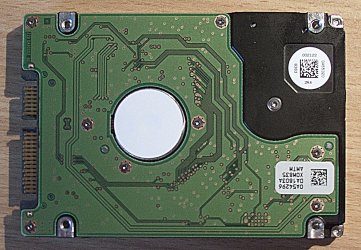
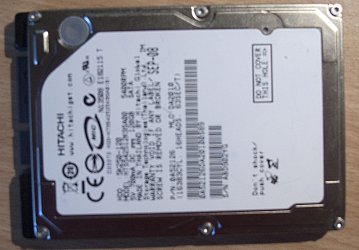
Here's a pic of a standard 2.5 inch Laptop disk which should fit most laptops.

Cheers
jimbo
 

Attachments

  • disc1.jpg
    disc1.jpg
    364.8 KB · Views: 15
  • disc2.jpg
    disc2.jpg
    464.3 KB · Views: 34

My Computer My Computer

At a glance

Linux CENTOS 7 / various Windows OS'es and se...Intel i7 Intel i58GB, 16GBOn Motherboard
Computer type
PC/Desktop
Computer Manufacturer/Model Number
Custom built, several laptops HP/ASUS
OS
Linux CENTOS 7 / various Windows OS'es and servers
CPU
Intel i7 Intel i5
Memory
8GB, 16GB
Graphics Card(s)
On Motherboard
Sound Card
Realtek HD audio
Monitor(s) Displays
Apple Cinema display, Samsung LCD
Screen Resolution
1920 X 1080
Hard Drives
4 X 1TB SATA
Mouse
Toshiba wireless laser
Internet Speed
> 20MB up
The point I was making was that there are different thicknesses, but thinking on, it's the original HD out of my FZ that wouldn't fit in two other laptops because it's a few mm too thick.
 

My Computer My Computer

At a glance

Windows 7 Ultimate x64 ®™Intel Core 2 Duo (2.2 GHz)2x 2GB Corsair (667 MHz)NVIDIA 8600M GS (256MB)
Computer Manufacturer/Model Number
Sony Vaio FZ21Z
OS
Windows 7 Ultimate x64 ®™
CPU
Intel Core 2 Duo (2.2 GHz)
Motherboard
Sony (Intel Chipset)
Memory
2x 2GB Corsair (667 MHz)
Graphics Card(s)
NVIDIA 8600M GS (256MB)
Sound Card
Sigmatel
Monitor(s) Displays
15.4" TFT X-Black
Screen Resolution
1280x800
Hard Drives
Western Digital 300GB Scorpio Black (7200rpm)
Mouse
Logitech Anywhere MX
Internet Speed
Sky 5MB
Regarding the drive thickness. The standard I think is 9.5 mm but it can be as thin as 7 mm or as thick as 15. I knew there were different thicknesses but I wasn't sure what the exact standard was.

FTR, my Dell for work has a 9.5mm thick drive in it (I think), my HP Pavilion laptop for home has a 9.5mm thick drive as well.
 

My Computer My Computer

At a glance

Windows 7 Home Premium x64Phenom II X4 955 BE8 GB OCZ BE 1667EVGA GeForce GTX470 SC
Computer Manufacturer/Model Number
Home built
OS
Windows 7 Home Premium x64
CPU
Phenom II X4 955 BE
Motherboard
Asus Sabertooth 990FX
Memory
8 GB OCZ BE 1667
Graphics Card(s)
EVGA GeForce GTX470 SC
Monitor(s) Displays
BenQ 19"
Screen Resolution
1280x1024
Hard Drives
256 GB OCZ Vertex 3 SSD
2x WD 1 TB
1x WD 2 TB
PSU
Thermaltake 850W
Case
Coolermaster Cosmos 1000
Cooling
Air
Keyboard
Logitech
Mouse
Cyborg R.A.T 7
Internet Speed
Standard RR
To all you morons who think 8GB is enough memory, 64-bit architecture effectively increases the memory ceiling to 2^64 addresses, equivalent to approximately 17.2 billion gigabytes, 16.3 million terabyte, or 16 exabytes of RAM and microsoft will eventually find a way to use it all.

That's all mathematics. The largest RAM currently supported in Ultimate is 196GB. But there is no PC that has a mobo to fit the bill. And with the current Windows architecture it will be hard to even make full use of 4GBs (for bread and butter applications - different for games or CAD).
 

My Computer My Computer

At a glance

Vista, Windows7, Mint Mate, Zorin, Windows 8from 1.6GHz Duo to i7
Computer Manufacturer/Model Number
HP, Dell, Gateway, Toshiba - 4 laptops and 2 desktops
OS
Vista, Windows7, Mint Mate, Zorin, Windows 8
CPU
from 1.6GHz Duo to i7
Monitor(s) Displays
2x HP w2207
Hard Drives
5x HDD, 7x SSD, 12x Externals
Keyboard
with trackball - no mices
Mouse
Trackball mice
Internet Speed
DSL 6000
The size in GB's won't be an issue, but the size of the drive itself might me. I tried to put a 300gb drive in my brothers laptop, but it was too tall so the cover wouldn't go back on. So you need to get a drive that matches the same dimensions as the one you're going to replace.

Just out of curiosity, what drive was it?

I have a 300GB Velociraptor, in a 3.5" adaptor. The drive itself is 2.5", but thicker than a standard notebook drive.
 

My Computer My Computer

At a glance

Windows 7 Pro X64 SP1Intel Core I7-3930k16 GB Gskill DDR3-2133eVGA GTX680
Computer Manufacturer/Model Number
homegrown
OS
Windows 7 Pro X64 SP1
CPU
Intel Core I7-3930k
Motherboard
Asus P9X79 Pro
Memory
16 GB Gskill DDR3-2133
Graphics Card(s)
eVGA GTX680
Sound Card
Creative X-Fi Titanium
Monitor(s) Displays
As PA246Q
Screen Resolution
1920 X 1200
Hard Drives
Corsair Force GT, 120 GB
WDC 1.5TB Caviar Black
PSU
PCP&C Silencer 750 Crossfire
Case
Silverstone FT02
Cooling
Noctua NH-D14
Keyboard
cheap Logitech USB
Mouse
Microsoft Intellimouse Explorer (old optical) USB
Internet Speed
6Mb cable
Other Info
Pioneer BDR-205
Samsung SH-203B
Monsoon 5.1 speakers
Back
Top