Show Us Your WEI

Status
Not open for further replies.
Hello grantarneson, welcome to Seven Forums; looks good!
 

My Computer

Computer Manufacturer/Model Number
* BFK Customs *
OS
W 7 64-bit Ultimate
CPU
Intel Q9550 Yorkfield
Motherboard
ASUS P5Q Pro
Memory
8GB Dominator 8500C5D
Graphics Card(s)
ATI : XFX 5870
Sound Card
Realtek HD Audio 7-1
Monitor(s) Displays
1x 47" LCD HDMI & 3x 26" LCD HDMI
Screen Resolution
1920x1080P & 1920x1200
Hard Drives
1x 80GB Intel X25-M G2 SSD : 1x 500GB & 1x 640GB WD Caviar Black(s)
PSU
Corsair 620HX
Case
Cooler Master RC-690
Cooling
Tuniq Tower 120, 2x 140mm and 3x 120mm case fans
Keyboard
Microsoft 500
Mouse
Razer Diamondback 3G
Internet Speed
14 Mb/s
Other Info
1x Koutech 3Gb/s SATA HDD Hot Swap Rack
Mine has gone up a bit :)
 

Attachments

  • Clipboard01.jpg
    Clipboard01.jpg
    22.2 KB · Views: 18

My Computer

Computer type
PC/Desktop
Computer Manufacturer/Model Number
Self Built
OS
Windows 7 Home Premium (64 bit)
CPU
Intel I5 2500K 3.3Ghz Stock
Motherboard
Asus P8H 61-M LE USB 3
Memory
8Gig Kingston DDRIII HyperX Blue 1333 Mhz
Graphics Card(s)
AMD Sapphire 7870 2GB
Sound Card
Creative Fatality Pro
Monitor(s) Displays
27" BENQ LED
Screen Resolution
1920X1080
Hard Drives
1 x OCZ Agility 3 120GB SSD
1 x Seagate 250GB
1 x Western Digital 1000GB
1 x HP 500GB
PSU
700W Coolermaster Stealth Pro etc
Case
Coolermaster Scout
Cooling
Some fans
Keyboard
Some Logitech type.
Mouse
Logitech MX518
Internet Speed
Wireless 8mb
Other Info
Canon Scanner
Epson Printer
Nikon DSLR 3000
Wacom Tablet
mine is:

Processor - 3.1
RAM - 5.1
Graphics - 3.5
G.Graphics-3.3
P Hard disk-5.5

I just magically found out my pentium isn't dual core like Tesco said, @$^"JD*$&$^("HHD&&$£&^£($^&
 

My Computer

Computer Manufacturer/Model Number
Toshiba Satellite T130 13K. 13.3"
OS
Windows 7 Home Premium 64bit, 6.1 build (7600)
CPU
Intel Pentium U2700 1.3Ghz, ~1.3Ghz
Memory
3GB DDR3
Graphics Card(s)
Mobile Intel 4series express chipset
Monitor(s) Displays
LCD HD
Screen Resolution
1366 x 768
Hard Drives
250GB, 2.5" SATA (5400 RPM)
C:\ 116GB
D:\ 116GB
Internet Speed
802.11 b/g/n
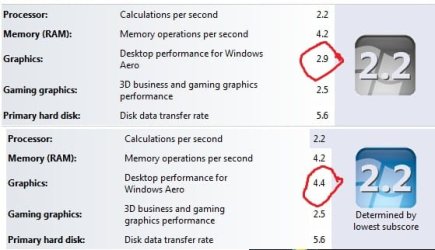
As it turns out, Intel released new drivers for the GMA 500. They still do not support OpenGL 2.0 or DirectX 10, but it is a noticeable improvement.
Top is the old WEI, bottom is the new.
And yes, I know it doesn't change my WEI score.
 

Attachments

  • WEI.jpg
    WEI.jpg
    26.9 KB · Views: 12

My Computer

Computer type
PC/Desktop
Computer Manufacturer/Model Number
Apple 17" iMac MA199LL (Early 2006)
OS
Windows 8 Pro (32-bit)
CPU
1.83GHz Intel Core Duo
Memory
2GB 667MHz DDR2 SDRAM (PC2-5300) (upgrade)
Graphics Card(s)
ATI Radeon X1600 with 128MB GDDR3 memory
Monitor(s) Displays
17-inch TFT active-matrix LCD, millions of colors
Screen Resolution
1440 x 900
Hard Drives
Hitachi 320GB HDT721032SLA360 7200RPM SATA II (upgrade)
Keyboard
Microsoft Wired Keyboard 600
Mouse
Microsoft Basic Optical Mouse v2.0
Internet Speed
4 Mbps
Antivirus
Microsoft Security Essentials
Browser
Google Chrome
Other Info
WEI:
Base Score: 3.9 Processor: 4.4 Memory 4.7
Graphics: 3.9 Gaming Graphics: 4.1 Primary HD: 5.9
...The WEI of the SSD of the first PC is 7.7 in contrast to 7.8 of the SSD of the second PC...
I want SSD... :cry: Dangit.


However, I have a slight problem now... Actually, it started before this. Has anybody here come across a message when running the WEI test stating "The Windows Experience Index for your system could not be computed"? Mine runs through all the tests, right to the end, and then after testing primary HDD access speed it dies.

On the other hand, AHCI works perfectly on my setup, drivers installed fine and my startup time dropped from 68s to 65s (according to the 'Restart Time' VB script that I found in this forum). But I can't re-run my WEI to check that... Just found a thread over at MSDN with a few suggestions, so I'll have to try that and see. But just out of curiosity, and without trying to hijack this thread, has anybody else come across this..?
 

My Computer

Computer type
PC/Desktop
OS
Win 10 x64 Pro x64 / Ubuntu 15.10 x64
CPU
Intel i7-4960X
Motherboard
Asus Rampage IV Black Edition
Memory
4x8GB Corsair Dominator Platinum @2400MHz 10-12-12-31
Graphics Card(s)
2x MSI GTX780Ti 3GB (SLI)
Sound Card
Onboard SupremeFX (Cirrus Logic CS4398)
Monitor(s) Displays
3x LG Cinema 27" IPS LED (27MP65)
Screen Resolution
[1920x1080]x3
Hard Drives
Crucial M500 120GB, Crucial M500 480GB, Toshiba DT01ACA200 2TB
PSU
CoolerMaster V1000
Case
Corsair Obsidian 750D
Cooling
ThermalTake Water 3.0 Extreme, 4xSP120, 3xAF120
Keyboard
Moshi Luna
Mouse
Logitech G700s / Roccat Tyon
Internet Speed
4Mb uncapped ADSL (Afrihost)
Antivirus
MS Security Essentials
Browser
Chrome... Duh. (:
Here's mine:
 

Attachments

  • WEI.JPG
    WEI.JPG
    25.8 KB · Views: 13

My Computer

Computer Manufacturer/Model Number
Custom Build
OS
W7 RTM Ultimate x64
CPU
Intel Q8400 @ 2.66GHZ
Motherboard
Gigabyte GA-EG45M-UD2H
Memory
4GB DDR2-800
Graphics Card(s)
Gainward GTS 450 GLH 1GB Edition
Sound Card
Integrated 8 Channel
Monitor(s) Displays
AOC 23.6 Inch Widescreen LCD
Screen Resolution
1920x1080
Hard Drives
Seagate 500GB Internal
Western Digital 1TB Internal

Hitachi 1TB External
PSU
Apevia Java Power 500W
Case
Cooler Master HAF 922 Black
Cooling
Stock Intel CPU Fan
Keyboard
HP SK-2960 Multimedia Keyboard
Mouse
Logitech M350 Wireless Gaming Mouse
Internet Speed
1.5MB
Everyone having an intel ssd and windows 7 should enable AHCI option for SATA controller.
The WEI for the hard driver was 7.3 and went to 7.8 after enabling AHCI.

I too have an Intel G2 80 gig SSD. What is the proper way to enable AHCI?
 

My Computer

Computer Manufacturer/Model Number
Whitebox
OS
Windows 7 Professional x64
CPU
Core i7 860
Motherboard
Gigabyte GA-P55-UD3R
Memory
4 x 2GB G.Skill DDR3 1600
Graphics Card(s)
Sapphire Radeon HD 5770
Sound Card
Integrated
Hard Drives
Intel SSD G2 80GB, Seagate 1TB 7,200 rpm
PSU
Corsair 750TX 750W
Case
CM Scout
Cooling
Arctic Cooling Freezer 7 Pro rev. 2
Last edited by a moderator:

My Computer

Computer type
PC/Desktop
OS
Win 10 x64 Pro x64 / Ubuntu 15.10 x64
CPU
Intel i7-4960X
Motherboard
Asus Rampage IV Black Edition
Memory
4x8GB Corsair Dominator Platinum @2400MHz 10-12-12-31
Graphics Card(s)
2x MSI GTX780Ti 3GB (SLI)
Sound Card
Onboard SupremeFX (Cirrus Logic CS4398)
Monitor(s) Displays
3x LG Cinema 27" IPS LED (27MP65)
Screen Resolution
[1920x1080]x3
Hard Drives
Crucial M500 120GB, Crucial M500 480GB, Toshiba DT01ACA200 2TB
PSU
CoolerMaster V1000
Case
Corsair Obsidian 750D
Cooling
ThermalTake Water 3.0 Extreme, 4xSP120, 3xAF120
Keyboard
Moshi Luna
Mouse
Logitech G700s / Roccat Tyon
Internet Speed
4Mb uncapped ADSL (Afrihost)
Antivirus
MS Security Essentials
Browser
Chrome... Duh. (:

Attachments

  • WEI II.png
    WEI II.png
    84.4 KB · Views: 30
Last edited by a moderator:

My Computer

Computer Manufacturer/Model Number
Whitebox
OS
Windows 7 Professional x64
CPU
Core i7 860
Motherboard
Gigabyte GA-P55-UD3R
Memory
4 x 2GB G.Skill DDR3 1600
Graphics Card(s)
Sapphire Radeon HD 5770
Sound Card
Integrated
Hard Drives
Intel SSD G2 80GB, Seagate 1TB 7,200 rpm
PSU
Corsair 750TX 750W
Case
CM Scout
Cooling
Arctic Cooling Freezer 7 Pro rev. 2
I too have an Intel G2 80 gig SSD. What is the proper way to enable AHCI?
Hi Restrada, I used this guide to enable it, worked like a dream.

Quick question. Now that AHCI is enable, the "safely remove hardware & enject media" icon is permanent on my right hand taskbar. Are you encountering the same thing? Just wondering if this was normal.
 

Attachments

  • Untitled.png
    Untitled.png
    11.3 KB · Views: 9
  • Untitled1.png
    Untitled1.png
    11.3 KB · Views: 10
Last edited by a moderator:

My Computer

Computer Manufacturer/Model Number
Whitebox
OS
Windows 7 Professional x64
CPU
Core i7 860
Motherboard
Gigabyte GA-P55-UD3R
Memory
4 x 2GB G.Skill DDR3 1600
Graphics Card(s)
Sapphire Radeon HD 5770
Sound Card
Integrated
Hard Drives
Intel SSD G2 80GB, Seagate 1TB 7,200 rpm
PSU
Corsair 750TX 750W
Case
CM Scout
Cooling
Arctic Cooling Freezer 7 Pro rev. 2
Quick question. Now that AHCI is enable, the "safely remove hardware & enject media" icon is permanent on my right hand taskbar. Are you encountering the same thing? Just wondering if this was normal.
Well.... According to this thread on the Microsoft Answers forum, it's normal. :sarc: I have it on my computer as well now, I didn't think much of it though. I know there is a way to hide certain drives from the 'Safely Remove' list, but if I remember correctly, it requires altering information in the registry..

Edit: Wikipedia has a much better description of why AHCI mode shows up SATA drives in that list (link here).
 
Last edited:

My Computer

Computer type
PC/Desktop
OS
Win 10 x64 Pro x64 / Ubuntu 15.10 x64
CPU
Intel i7-4960X
Motherboard
Asus Rampage IV Black Edition
Memory
4x8GB Corsair Dominator Platinum @2400MHz 10-12-12-31
Graphics Card(s)
2x MSI GTX780Ti 3GB (SLI)
Sound Card
Onboard SupremeFX (Cirrus Logic CS4398)
Monitor(s) Displays
3x LG Cinema 27" IPS LED (27MP65)
Screen Resolution
[1920x1080]x3
Hard Drives
Crucial M500 120GB, Crucial M500 480GB, Toshiba DT01ACA200 2TB
PSU
CoolerMaster V1000
Case
Corsair Obsidian 750D
Cooling
ThermalTake Water 3.0 Extreme, 4xSP120, 3xAF120
Keyboard
Moshi Luna
Mouse
Logitech G700s / Roccat Tyon
Internet Speed
4Mb uncapped ADSL (Afrihost)
Antivirus
MS Security Essentials
Browser
Chrome... Duh. (:
Quick question. Now that AHCI is enable, the "safely remove hardware & enject media" icon is permanent on my right hand taskbar. Are you encountering the same thing? Just wondering if this was normal.
Well.... According to this thread on the Microsoft Answers forum, it's normal. :sarc: I have it on my computer as well now, I didn't think much of it though. I know there is a way to hide certain drives from the 'Safely Remove' list, but if I remember correctly, it requires altering information in the registry..

Edit: Wikipedia has a much better description of why AHCI mode shows up SATA drives in that list (link here).

Its perfecly normal since one of the features of AHCI is hot plug of the HD drives in case you want to plug in or out and e-sata HD without restarting your system. If you do not want to see the HDs in the "safely remove hardware & enject media" then you can install Intel® Matrix Storage Console and it will go away.!
 

My Computer

Computer Manufacturer/Model Number
Custom Build
OS
Windows 7 x64 Ultimate
CPU
i7 950
Motherboard
Asus P6T
Memory
Corsair 3x2GB Triple Channel Kit
Graphics Card(s)
ATI 5850
Sound Card
Mobo stock
Monitor(s) Displays
24'' Led LG W2486L
Screen Resolution
1920x1080
Hard Drives
OS: Intel SSD SA2M080G2GC (AHCI enabled)
Other: WDC WD6400AAKS-00A7B2
PSU
Corsair 850W
Case
Enermax
Cooling
Case/Cpu/Gpu Stock
Keyboard
MS Comfort Curve keyboard
Mouse
MS Optical Wheel
Internet Speed
24Mbps
POS graphics card is still holding me back...but only until this weekend. :p
 
Last edited:

My Computer

Computer Manufacturer/Model Number
Custom
OS
Windows 7 ultimate X64
CPU
Core i7 870 Lynnfield
Motherboard
MSI P55-GD55
Memory
4GB Corsair XMS 3 1600Mhz
Graphics Card(s)
GeForce 8800 GTS (for the time being)
Sound Card
Onboard 7.1 digital
Monitor(s) Displays
Dell 19"
Screen Resolution
1280x1024
Hard Drives
Barracuda 750Gb
PSU
Corsair TX 650w
Case
Thermaltake Armour Extreme Edition
Cooling
Corsair H50
Keyboard
Dell XPS slim
Mouse
Dell XPS mouse (only good product)
Internet Speed
100 Mbps +/-
Hi Restrada, I used this guide to enable it, worked like a dream.


Hello ZaLiTH.

I've been wanting to do this and I have now, thanks!

This is a 80GB X25M G2, it started at 7.5 but went to 7.4 after being used for a while, I enabled AHCI today and the score went to 7.7 ;)

SSD_AHCI_Enabled.JPG
 
Last edited by a moderator:

My Computer

Computer Manufacturer/Model Number
* BFK Customs *
OS
W 7 64-bit Ultimate
CPU
Intel Q9550 Yorkfield
Motherboard
ASUS P5Q Pro
Memory
8GB Dominator 8500C5D
Graphics Card(s)
ATI : XFX 5870
Sound Card
Realtek HD Audio 7-1
Monitor(s) Displays
1x 47" LCD HDMI & 3x 26" LCD HDMI
Screen Resolution
1920x1080P & 1920x1200
Hard Drives
1x 80GB Intel X25-M G2 SSD : 1x 500GB & 1x 640GB WD Caviar Black(s)
PSU
Corsair 620HX
Case
Cooler Master RC-690
Cooling
Tuniq Tower 120, 2x 140mm and 3x 120mm case fans
Keyboard
Microsoft 500
Mouse
Razer Diamondback 3G
Internet Speed
14 Mb/s
Other Info
1x Koutech 3Gb/s SATA HDD Hot Swap Rack
Does anyone have a perfect score? I've read this thread off and on, ain't gonna read all pages, sorry, too lazy.
 

My Computer

Computer Manufacturer/Model Number
Colonel Travis 5000
OS
Black Label 7 x64
CPU
AMD Phenom II X6 1055t
Motherboard
GA-890FXA-UD5
Memory
8GB Corsair XMS3
Graphics Card(s)
Radeon HD 6790
Sound Card
X-FI Titanium Fatal1ty Pro
Monitor(s) Displays
Acer AJ15
Screen Resolution
1600x900
Hard Drives
OCZ Agility 3 SSD 120GB |
Corsair Force GT SSD 120 GB |
Barracuda 7200 SATA 300GB |
WD Caviar Green SATA 500GB
PSU
OCZ ModXStream 700W
Cooling
50 billion case fans
Internet Speed
35Mbps/35Mbps
Does anyone have a perfect score? I've read this thread off and on, ain't gonna read all pages, sorry, too lazy.


I haven't seen one, A real one anyway. I've seen a couple that were close.
 

My Computer

Computer type
PC/Desktop
Computer Manufacturer/Model Number
Self Built
OS
Win 10 Pro x64
CPU
Intel I5-2500K @3.3GHz
Motherboard
Asrock P67 Extreme4
Memory
16GB G.Skill Ripjaws X (4x4GB)
Graphics Card(s)
EVGA GeForce 750 Ti SC 2GB
Sound Card
ASUS Xonar DG 5.1 Channels 24-bit 96KHz PCI Interface Sound
Monitor(s) Displays
auria eq2367
Screen Resolution
1920 x 1080
Hard Drives
250GB Samsung 850 EVO SSD
1TB WD Blue
1TB Hitachi
PSU
SeaSonic X 650W 80 Plus Gold
Case
Corsair Obsidian 750D
Cooling
Corsair H60, Three 140mm case fans
Keyboard
Logitech Wireless Keyboard K520
Mouse
Logitech Wireless Mouse M310
Internet Speed
Wave Broadband ~ 100 dn 5 up
Antivirus
Windows Defender, Malwarebytes Premium
Browser
Edge, IE11, Chrome
Other Info
Laptop specs: HP g7-1365dx /
CPU: AMD A6-3420M APU with Radeon(tm) HD Graphics /
RAM: Crucial 8Gb (2x4Gb) /
SSD: Crucial M4-CT128M4SSD2 ATA Device/ FW 000F /
GFX: AMD Radeon HD 6520G /
OS: Windows 10 Pro x64

My Computer

Computer Manufacturer/Model Number
* BFK Customs *
OS
W 7 64-bit Ultimate
CPU
Intel Q9550 Yorkfield
Motherboard
ASUS P5Q Pro
Memory
8GB Dominator 8500C5D
Graphics Card(s)
ATI : XFX 5870
Sound Card
Realtek HD Audio 7-1
Monitor(s) Displays
1x 47" LCD HDMI & 3x 26" LCD HDMI
Screen Resolution
1920x1080P & 1920x1200
Hard Drives
1x 80GB Intel X25-M G2 SSD : 1x 500GB & 1x 640GB WD Caviar Black(s)
PSU
Corsair 620HX
Case
Cooler Master RC-690
Cooling
Tuniq Tower 120, 2x 140mm and 3x 120mm case fans
Keyboard
Microsoft 500
Mouse
Razer Diamondback 3G
Internet Speed
14 Mb/s
Other Info
1x Koutech 3Gb/s SATA HDD Hot Swap Rack
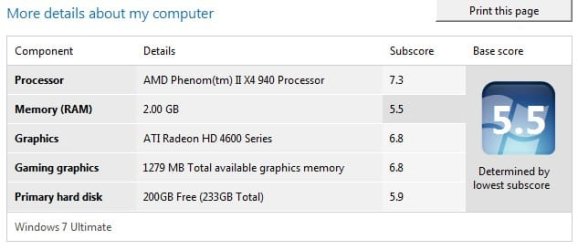
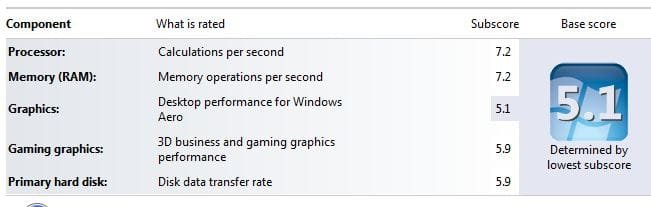
Here is mine,
 

Attachments

  • wei-q6600.jpg
    wei-q6600.jpg
    92.8 KB · Views: 47

My Computer

Computer Manufacturer/Model Number
HAL-9000
OS
Windows 7 Ultimate 64bit
CPU
Intel i7 3770K
Motherboard
Asus Sabertooth Z77
Memory
16GB DDR3 1333 Corsair XMS3
Graphics Card(s)
XFX HD6950 2GB EyeFinity
Sound Card
Logitech G35 & Sennheiser PC135 & VIA HD
Monitor(s) Displays
23" HP 2310e, 23" Samsung B2230, 21.5" Viewsonic
Screen Resolution
5760x1080
Hard Drives
16TB of Storage
128GB & 256GB Crucial M4 SSD's, 2X 1TB WD Black, 3x 2TB WD, 3x 2TB Samsung F4, 1.5TB Seagate, WD 500GB,
PSU
Antec True Power New 650watt
Case
Cooler Master HAF-932
Cooling
Corsair H60 Hydro Cooler, 3x 230mm Fans, 2x120mm Fan
Keyboard
Logitech G15 and G13
Mouse
Logitech G700 Gaming Mouse
Internet Speed
50/10 Mbit
Other Info
Speakers : Alesis M1 Active Mk2 Studio Monitors , APC RS 1200 UPS, HP 4500DN Color Laser, HP P1006 mono Laser, Kodak 8500 Dye-Sub, Epson 1280 inkjet, Epson Worforce 610 MFC
Will performing a clean install improve Aeros Score?

Weiwithq.jpg
 

My Computer

Computer Manufacturer/Model Number
Asus U80V Laptop
OS
Windows 7 Home Premium
CPU
Intel T6600 2.2 GHz
Motherboard
?
Memory
4 GB
Graphics Card(s)
ATI HD Radeon 4570 512MB
Sound Card
ATI HD SRS Premium Sound
Monitor(s) Displays
?
Screen Resolution
1366x768
Hard Drives
Seagate Momentus ST9320421AS 7200 Speed
PSU
?
Case
?
Cooling
?
Other Info
Backlit Keyboard AND Mouse Trackpad
(sorry for 2 posts couldn't figure out how to add specs in above post)

ASUS U80V Laptop
T6600 2.2Ghz
4 GB DDR2
512MB ATI Radeon 4570
7200 HDD
Windows 7 (Home Premium) - 64 Bit
 

My Computer

Computer Manufacturer/Model Number
Asus U80V Laptop
OS
Windows 7 Home Premium
CPU
Intel T6600 2.2 GHz
Motherboard
?
Memory
4 GB
Graphics Card(s)
ATI HD Radeon 4570 512MB
Sound Card
ATI HD SRS Premium Sound
Monitor(s) Displays
?
Screen Resolution
1366x768
Hard Drives
Seagate Momentus ST9320421AS 7200 Speed
PSU
?
Case
?
Cooling
?
Other Info
Backlit Keyboard AND Mouse Trackpad
Status
Not open for further replies.
Back
Top