What don't you like about Windows 7?

Status
Not open for further replies.
only thing i dont like is why wasnt vista like windows 7 ,,I feel like i payed for a update to fix vista .
If you get what i mean ,,thanks
 

My Computer My Computer

At a glance

windows 7 64 bit premiumq6600 2.4 overclocked to 3.2 ghz4 gb 800 mhz corsairgtx 480 mbfg o/c
Computer Manufacturer/Model Number
home build/gigabyte mobo
OS
windows 7 64 bit premium
CPU
q6600 2.4 overclocked to 3.2 ghz
Motherboard
gigabyte ga_73pvm.s2h rev 1.0
Memory
4 gb 800 mhz corsair
Graphics Card(s)
gtx 480 mbfg o/c
Sound Card
onboard realtek hd audio
Monitor(s) Displays
benq 24 inch (led)
Screen Resolution
1920x1080p
Hard Drives
barracuda 7200rpm 320gb
PSU
jeantech 900watts
Case
Novatech prowler midi tower v2 gaming case
Cooling
artic cooling 7 pro rev 2.0, 120mm front,rear and side
Keyboard
saitek eclipse 2
Mouse
mad catz mw2 laser mouse
Internet Speed
50mb virgin
Other Info
Adding a raptor hdd for gaming use only.
Bad:
- Wasted their time adding new crappy windows components like gadgets and collections
- Not enough customization options for removing their shitty new GUI elements

Still missing *yawn*:
- Pausing & queuing file copy/paste/move with explorer
- Good terminal to replace cmd (!!)
- Multiple desktops native support
 

My Computer My Computer

At a glance

Windows 7
OS
Windows 7
I have some difficulties to understand why Windows 7 Libraries meet so much fanatic hatred, argument normally being that the user feels he / she should be able to decide where to save his / hers files and not Windows.

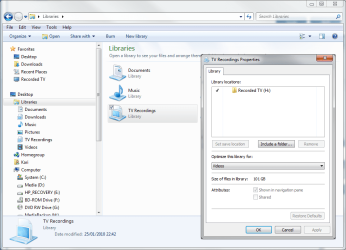
That's precisely what Libraries do, allowing user to save where ever he / she wants, only collecting shortcuts to those save locations to one place. It was me, not Windows, who decided to save my TV-recordings to H: (see the image), and then create a library to easily access those files.

So what if those Libraries icons and shortcuts take maybe a few kB's of HD space. Big deal, thinking what I get. I can add as many libraries as I want, assign any folder on my computer to that library and then find all my saved files, all save locations, in one place. I find it very practical.

Kari
 

Attachments

  • libs1.PNG
    libs1.PNG
    49.5 KB · Views: 12

My Computer My Computer

At a glance

Windows 10 Pro x64 EN-GB1.6 GHz Intel Core i7-720QM Processor6 GBATI Mobility Radeon HD 5850 Graphics
Computer type
Laptop
Computer Manufacturer/Model Number
HP ENVY 17-1150eg
OS
Windows 10 Pro x64 EN-GB
CPU
1.6 GHz Intel Core i7-720QM Processor
Memory
6 GB
Graphics Card(s)
ATI Mobility Radeon HD 5850 Graphics
Sound Card
Beats sound system with integrated subwoofer
Monitor(s) Displays
17" laptop display, 22" LED and 32" Full HD TV through HDMI
Screen Resolution
1600*900 (1), 1920*1080 (2&3)
Hard Drives
Internal: 2 x 500 GB SATA Hard Disk Drive 7200 rpm
External: 2TB for backups, 3TB USB3 network drive for media
Cooling
As Envy runs a bit warm, I have it on a Cooler Master pad
Keyboard
Logitech diNovo Media Desktop Laser (bluetooth)
Mouse
Logitech Performance Mouse MX
Internet Speed
50/10 Mbps VDSL
Antivirus
Windows Defender 4.3.9431.0
Browser
Maxthon 3.5.2., IE11
Bad:
- Wasted their time adding new crappy windows components like gadgets and collections
- Not enough customization options for removing their shitty new GUI elements

Still missing *yawn*:
- Pausing & queuing file copy/paste/move with explorer
- Good terminal to replace cmd (!!)
- Multiple desktops native support

Have you tried Microsoft Powershell? It is built into all Windows 7 versions.
 

My Computer My Computer

At a glance

Windows 7 build 7100 x86Intel Core 2 Duo 2.1GHz3GBIntel(TM) Graphics Media Accelerator X4500HD
Computer Manufacturer/Model Number
Dell Inspiron 1545
OS
Windows 7 build 7100 x86
CPU
Intel Core 2 Duo 2.1GHz
Motherboard
GM45 chipset
Memory
3GB
Graphics Card(s)
Intel(TM) Graphics Media Accelerator X4500HD
Sound Card
Realtek HD
Monitor(s) Displays
15.6" WLED 720p
Screen Resolution
1366x768
Hard Drives
320GB 5400rpm hard drive
Yes, I totally agree. But I blame Windows for that. :o

huh:huh: why would you blame Windows for that??? The sound card company's should be responsible for drivers that work for their sound cards not the other way around. Also the user should be accountable for learning how to make things work on his computor.

I totally agree with Bowtie. It is not Microsoft's responsibility.
But, if I press enter then the white space hurts my eyes! :cry:
 

My Computer My Computer

At a glance

8.1 x64i7 4510U8GB DDR3GeForce 820M
Computer type
Laptop
Computer Manufacturer/Model Number
Asus R510L
OS
8.1 x64
CPU
i7 4510U
Memory
8GB DDR3
Graphics Card(s)
GeForce 820M
Sound Card
Eastern Electric Supreme; Emotiva UMC-200; Astell&Kern AK240
Monitor(s) Displays
LG 42LH5000
Screen Resolution
1920x1080
Hard Drives
1TB internal; 45TB external
PSU
Li-ion
Keyboard
Logitech K800
Mouse
Logitech G400
Internet Speed
20Mbit/s up, 200Mbit/s down
Browser
IE 11
Exactly why pre-built PC's are very poor. Did you upgrade to 7 or clean install?

W7 came installed - there was no other software on the computer - zilch

I fail to see how a hard drive with only W7 renders the pre-build PC poor.

Thinking of doing a clean install on my old PC to compare - but then I'd lose XP...


bitraker
 

My Computer My Computer

At a glance

Win7 64Dell 2.8 Intel Dual CoreDell 8GNVideo 260
Computer Manufacturer/Model Number
Dell
OS
Win7 64
CPU
Dell 2.8 Intel Dual Core
Memory
Dell 8G
Graphics Card(s)
NVideo 260
Sound Card
Delta 2496
Monitor(s) Displays
3 flat panels
Hard Drives
many
Exactly why pre-built PC's are very poor. Did you upgrade to 7 or clean install?
W7 came installed - there was no other software on the computer - zilch

I fail to see how a hard drive with only W7 renders the pre-build PC poor.

Thinking of doing a clean install on my old PC to compare - but then I'd lose XP...


bitraker

Pre-built PC's come with bloatware and manfacturer's utilities. Have you uninstalled these if you don't need it?
 

My Computer My Computer

At a glance

Windows 7 Ultimate x86-64[email protected] 1066MHz FSB6GB DDR3 1066MHz9300M GS 256MB Dedicated (Speed) + Intel4500M...
Computer Manufacturer/Model Number
Sony Vaio Z46GDU
OS
Windows 7 Ultimate x86-64
CPU
[email protected] 1066MHz FSB
Motherboard
Sony branded
Memory
6GB DDR3 1066MHz
Graphics Card(s)
9300M GS 256MB Dedicated (Speed) + Intel4500MHD (Stamina)
Sound Card
Realtek HD Audio
Monitor(s) Displays
13.1' WXGA
Screen Resolution
1600x900
Hard Drives
320GB 7200RPM w/ 16MB cache
Internet Speed
1MB/s
I have some difficulties to understand why Windows 7 Libraries meet so much fanatic hatred, argument normally being that the user feels he / she should be able to decide where to save his / hers files and not Windows.

That's precisely what Libraries do, allowing user to save where ever he / she wants, only collecting shortcuts to those save locations to one place.
Why do you need the add these shortcuts under the Libraries header? Why can't you just add separately? Or make your own folders on the navigation bar? This is a pretty useless feature that isn't optional. It's one more line of text cluttering the screen, regardless of how many kB it takes (which I'm sure it takes quite a lot more). That's why people hate it.
 

My Computer My Computer

At a glance

Windows 7
OS
Windows 7
I have some difficulties to understand why Windows 7 Libraries meet so much fanatic hatred, argument normally being that the user feels he / she should be able to decide where to save his / hers files and not Windows.

That's precisely what Libraries do, allowing user to save where ever he / she wants, only collecting shortcuts to those save locations to one place.
Why do you need the add these shortcuts under the Libraries header? Why can't you just add separately? Or make your own folders on the navigation bar? This is a pretty useless feature that isn't optional. It's one more line of text cluttering the screen, regardless of how many kB it takes (which I'm sure it takes quite a lot more). That's why people hate it.

The thing with libraries is that once you create that link in the library, it is part of the library. So instead of setting up an application to look in multiple folders (say a music or photo program) you can just say 'look at pictures'. It will recognise pictures as one folder, and be able to access them instantly.

Libraries are extremely useful in a network sharing situation. Have some music stored locally and on the network? Add both locations to the 'music' library and then point your player at that library. No need to mess around with adding network folders in the player itself.
 

My Computer My Computer

At a glance

Windows 7 build 7100 x86Intel Core 2 Duo 2.1GHz3GBIntel(TM) Graphics Media Accelerator X4500HD
Computer Manufacturer/Model Number
Dell Inspiron 1545
OS
Windows 7 build 7100 x86
CPU
Intel Core 2 Duo 2.1GHz
Motherboard
GM45 chipset
Memory
3GB
Graphics Card(s)
Intel(TM) Graphics Media Accelerator X4500HD
Sound Card
Realtek HD
Monitor(s) Displays
15.6" WLED 720p
Screen Resolution
1366x768
Hard Drives
320GB 5400rpm hard drive
I have some difficulties to understand why Windows 7 Libraries meet so much fanatic hatred, argument normally being that the user feels he / she should be able to decide where to save his / hers files and not Windows.

That's precisely what Libraries do, allowing user to save where ever he / she wants, only collecting shortcuts to those save locations to one place.
Why do you need the add these shortcuts under the Libraries header? Why can't you just add separately? Or make your own folders on the navigation bar? This is a pretty useless feature that isn't optional. It's one more line of text cluttering the screen, regardless of how many kB it takes (which I'm sure it takes quite a lot more). That's why people hate it.

The thing with libraries is that once you create that link in the library, it is part of the library. So instead of setting up an application to look in multiple folders (say a music or photo program) you can just say 'look at pictures'. It will recognise pictures as one folder, and be able to access them instantly.

Libraries are extremely useful in a network sharing situation. Have some music stored locally and on the network? Add both locations to the 'music' library and then point your player at that library. No need to mess around with adding network folders in the player itself.

Oh, I agree wholeheartedly! Without the Libraries feature, it would be nearly impossible for me to manage close on 364,657 Pictures, Music, Video and Documents that are spread across 9 hard disks spanning just over 2TB. With Libraries, I have one Picture "folder". One "Music" folder. One "Programming" or "Downloads" folder.

I think the one hurdle that makes people not like Libraries, is that they are still stuck in the old "My Documents" metaphor, and do not realize that a single "Documents" library can include multiple locations.

I've grown so accustomed to utilizing Libraries combined with the Search features (first introduced in Vista), that the old Disk/Folder paradigm feels old and antiquated now...
 

My Computer My Computer

At a glance

Windows 7 Professional 32-bit SP1AMD A4/A63.00GB EDOVMware SVGA 3D
Computer type
PC/Desktop
Computer Manufacturer/Model Number
Virtual Machine
OS
Windows 7 Professional 32-bit SP1
CPU
AMD A4/A6
Motherboard
Intel Corporation 440BX Desktop Reference Platform
Memory
3.00GB EDO
Graphics Card(s)
VMware SVGA 3D
Sound Card
High Definition Audio Device
Monitor(s) Displays
Generic Non-PnP Monitor on VMware SVGA 3D
Screen Resolution
1440x900
Hard Drives
1 x 60GB VMware Virtual SATA Hard Drive ATA Device
Antivirus
Kaspersky Total Security
Libraries are extremely useful in a network sharing situation. Have some music stored locally and on the network? Add both locations to the 'music' library and then point your player at that library. No need to mess around with adding network folders in the player itself.

Oh, I agree wholeheartedly! Without the Libraries feature, it would be nearly impossible for me to manage close on 364,657 Pictures, Music, Video and Documents that are spread across 9 hard disks spanning just over 2TB. With Libraries, I have one Picture "folder". One "Music" folder. One "Programming" or "Downloads" folder.

+1

I thought I'm the only one who likes libraries
 

My Computer My Computer

At a glance

Windows 10 Pro x64 EN-GB1.6 GHz Intel Core i7-720QM Processor6 GBATI Mobility Radeon HD 5850 Graphics
Computer type
Laptop
Computer Manufacturer/Model Number
HP ENVY 17-1150eg
OS
Windows 10 Pro x64 EN-GB
CPU
1.6 GHz Intel Core i7-720QM Processor
Memory
6 GB
Graphics Card(s)
ATI Mobility Radeon HD 5850 Graphics
Sound Card
Beats sound system with integrated subwoofer
Monitor(s) Displays
17" laptop display, 22" LED and 32" Full HD TV through HDMI
Screen Resolution
1600*900 (1), 1920*1080 (2&3)
Hard Drives
Internal: 2 x 500 GB SATA Hard Disk Drive 7200 rpm
External: 2TB for backups, 3TB USB3 network drive for media
Cooling
As Envy runs a bit warm, I have it on a Cooler Master pad
Keyboard
Logitech diNovo Media Desktop Laser (bluetooth)
Mouse
Logitech Performance Mouse MX
Internet Speed
50/10 Mbps VDSL
Antivirus
Windows Defender 4.3.9431.0
Browser
Maxthon 3.5.2., IE11
Libraries are extremely useful in a network sharing situation.
Then why is my network transfer speed in Windows 7 so painfully slow that I have to copy my 1080p video from the networked drive over to my local drive in order to keep it from stuttering so badly? :shock:
 

My Computer My Computer

At a glance

8.1 x64i7 4510U8GB DDR3GeForce 820M
Computer type
Laptop
Computer Manufacturer/Model Number
Asus R510L
OS
8.1 x64
CPU
i7 4510U
Memory
8GB DDR3
Graphics Card(s)
GeForce 820M
Sound Card
Eastern Electric Supreme; Emotiva UMC-200; Astell&Kern AK240
Monitor(s) Displays
LG 42LH5000
Screen Resolution
1920x1080
Hard Drives
1TB internal; 45TB external
PSU
Li-ion
Keyboard
Logitech K800
Mouse
Logitech G400
Internet Speed
20Mbit/s up, 200Mbit/s down
Browser
IE 11
i draw comics as a hobby and previously drew them on Windows Vista Paint, now I have Windows 7 I see how horrible the new Paint is.
In the end I just when out and bought Adobe Photoshop and learned to use it.

i love the humor man
 

My Computer My Computer

At a glance

El Capitan / Windows 10i7-4980HQ16GBIris 5200
Computer type
Laptop
Computer Manufacturer/Model Number
Apple
OS
El Capitan / Windows 10
CPU
i7-4980HQ
Memory
16GB
Graphics Card(s)
Iris 5200
So, don't you lovers of Libraries with huge picture and music collections find that your C: backups become gigantic just by having other drives referred to in Libraries? Come to think of it, Windows Backup is rather lame, it doesn't seem to compress anything so I've gone over to Acronis True Image.
 

My Computer My Computer

At a glance

Windows 7
OS
Windows 7
Why do you need the add these shortcuts under the Libraries header? Why can't you just add separately? Or make your own folders on the navigation bar? This is a pretty useless feature that isn't optional. It's one more line of text cluttering the screen, regardless of how many kB it takes (which I'm sure it takes quite a lot more). That's why people hate it.

The thing with libraries is that once you create that link in the library, it is part of the library. So instead of setting up an application to look in multiple folders (say a music or photo program) you can just say 'look at pictures'. It will recognise pictures as one folder, and be able to access them instantly.

Libraries are extremely useful in a network sharing situation. Have some music stored locally and on the network? Add both locations to the 'music' library and then point your player at that library. No need to mess around with adding network folders in the player itself.

Oh, I agree wholeheartedly! Without the Libraries feature, it would be nearly impossible for me to manage close on 364,657 Pictures, Music, Video and Documents that are spread across 9 hard disks spanning just over 2TB. With Libraries, I have one Picture "folder". One "Music" folder. One "Programming" or "Downloads" folder.

I think the one hurdle that makes people not like Libraries, is that they are still stuck in the old "My Documents" metaphor, and do not realize that a single "Documents" library can include multiple locations.

I've grown so accustomed to utilizing Libraries combined with the Search features (first introduced in Vista), that the old Disk/Folder paradigm feels old and antiquated now...
I have 6 drives, and I just divide my stuff between them. I have foobar2000 monitor 2 drives totaling 1.5GB, rather than adding them to a library first. I have another drive for DVDs and I keep my general files and programming on a partition of my OS drive. I use 2 more drives for backing up my music and other important things. I have no need for libraries because I already have my computer organized fine using the folder structure, I just go Computer->Whatever drive I want->Subfolders.

The only place Windows Explorer has completely failed me has been in music folders where you need to view and arrange them by different criteria. Luckily foobar2000 exists and does the job perfectly, a lot better than Windows ever will I'm sure. I can mass write custom tags and sort my files based on any patterns and criteria I wish. I don't open my music directories any more in explorer, I can do absolutely everything from foobar and it's not a bloated app... what a glorious concept!

I like a few things about Windows 7, but I not where they add useless features. I don't like how they put libraries first everywhere, for me the Desktop should come first as that's the area where I'm actively working with temporary files and such. Libraries just seems to be a feature for lazy or stupid people who cannot figure out how to arrange their files in a tree, so they have a second tree to link branches of the first one!
 

My Computer My Computer

At a glance

Windows 7
OS
Windows 7
i draw comics as a hobby and previously drew them on Windows Vista Paint, now I have Windows 7 I see how horrible the new Paint is.
In the end I just when out and bought Adobe Photoshop and learned to use it.

i love the humor man
Yea wtf happened to paint? It was so nice and simple. Is there a way to install the old version where I know where the whole 12 features are? If I wanted photoshop complexity I'd open photoshop, not paint. ffs Microsoft.

The MS Office software interface is EXTREMELY CONFUSING too. I mean I know how to use most of it because it's still better than OOO, but it requires way too much googling to find out where something is.
 

My Computer My Computer

At a glance

Windows 7
OS
Windows 7
You could also try Gimp. Its not as fat as photoshop and its free! It also uses layers. Did I mention it was free?
 

My Computer My Computer

At a glance

Windows 7 (*upgrade*)Intel Dual Core 2.5ghz4GB 333mhzAti Mobile Radeon HD 3450 256mb
Computer Manufacturer/Model Number
Dell Studio 1535
OS
Windows 7 (*upgrade*)
CPU
Intel Dual Core 2.5ghz
Memory
4GB 333mhz
Graphics Card(s)
Ati Mobile Radeon HD 3450 256mb
Screen Resolution
1920x1200
Hard Drives
WD 320GB
Mouse
Logitech G5
Internet Speed
slow :(
Other Info
missing "Ctrl" key
You could also try Gimp. Its not as fat as photoshop and its free! It also uses layers. Did I mention it was free?

Thanks, I will give that a try.
 

My Computer My Computer

At a glance

Windows 7 Ultimate 32 bitIntel(R) Pentium(R) 4 CPU 3.00GHz2.50 GB RAMNVIDIA GeForce 7600 GS
Computer Manufacturer/Model Number
Home built
OS
Windows 7 Ultimate 32 bit
CPU
Intel(R) Pentium(R) 4 CPU 3.00GHz
Motherboard
ASUS P4P800-VM Motherboard Chipset: Intel 865G + ICH5
Memory
2.50 GB RAM
Graphics Card(s)
NVIDIA GeForce 7600 GS
Sound Card
SoundMax Integrated Digital Audio (Chip)
Monitor(s) Displays
ViewSonic VX 1962 wm
Screen Resolution
1680 X 1050
Hard Drives
Seagate Barracuda 7200.10 80 GB
ST380215A ATA Device 18.6 GB
Western Digital "My Book" external hard drive 750 GB
Cooling
Fan based
Keyboard
Microsoft Comfort Curve Keyboard 2000 v10 USB
Mouse
Logitec optic USB
Internet Speed
3.01 Mb/s download 0.64 Mb/s upload

My Computer My Computer

At a glance

Windows 7 X64 BitIntel(R) Core(TM)i7-4771 CPU @ 3.50GHCorsair 4x8 Vengeance (32GB)NVIDIA GeForce GTX780
Computer type
PC/Desktop
OS
Windows 7 X64 Bit
CPU
Intel(R) Core(TM)i7-4771 CPU @ 3.50GH
Motherboard
Asus Sabertooth Z87
Memory
Corsair 4x8 Vengeance (32GB)
Graphics Card(s)
NVIDIA GeForce GTX780
Monitor(s) Displays
LG
Screen Resolution
1920x1080
PSU
Corsair CX750
Case
Corsair 200 series
Cooling
H80i Liquid Cooler
Keyboard
Microsoft
Mouse
Microsoft
Internet Speed
good times-500-850 kbs bad times-50-100 kbs
I have some improvement suggestions - particularly to do with WIFI area.

1. The icon for WIFI connection on the desktop taskbar is pathetic and needs to be revamped/enlarged!
2. When I put mouse pointer over said icon why can't it give a bit more information, like access point and MORE IMPORTANT "firewalled"
3. I want to "ONE CLICK" and see i'm protected ie "FIREWALLED"
So, when I click my desktop shortcut icon "Network & Sharing Centre" - I want information that tells me at a glance that folders are/are not shared and whether the connections are "Firewalled" in "Active networks" area.
I don't want to keep clicking further into the system to be able to check these things everytime I want to know. They should be instantly available to see at all times in active networks area eg "no firewall" "Firewalled" etc

Please Fix the 2GB RAM 'limit' (so I can run with all 3GB) in WIN 7 on Socket A motherboards - it's pathetic!

Esp as you want millions of people still on XP era computers to upgrade to WIN 7 and M/soft marketing bullshit say's WIN 7 is far more "backward compatible" than Vista for 'older' pc's!

Thanks
 

My Computer My Computer

At a glance

WIN7 Ultimate 64bitAMD FX8150/Trinity A10-5700G-Skill 2400 x2 @ 1866 (both pc's)Sapphire (factory OC version) AMD 7770
Computer type
PC/Desktop
Computer Manufacturer/Model Number
D.I.Y.
OS
WIN7 Ultimate 64bit
CPU
AMD FX8150/Trinity A10-5700
Motherboard
Asus Sabertooth v.1 /Asus F2A85-M Pro
Memory
G-Skill 2400 x2 @ 1866 (both pc's)
Graphics Card(s)
Sapphire (factory OC version) AMD 7770
Sound Card
onboard
Monitor(s) Displays
T260 Samsung
Screen Resolution
1920x1080
Hard Drives
Western Digital Sata 2TB/1TB Caviar Blacks
Buffalo 1TB usb (excellent drive)
PSU
Be-Quiet 700W E-9/Be-Quiet 550W E-9(E-9 = built by FSP)
Case
Antec P183/Antec P180mini
Cooling
x2 Xigmatek SXHH7-U01 + C-Master R4-EXBB-20PK-R0 120mm Fans
Keyboard
Cherry
Mouse
MS Explorer 3.0
Other Info
LG Blu ray combo
Pioneer 207D/208 Blu ray burners
Status
Not open for further replies.
Back
Top