Cloned partition, Copy the Bootloader?

My Computer

Computer Manufacturer/Model Number
acer 5720z
OS
Xp, Vista, 7
CPU
intel Pentium Dual Core
Motherboard
Acer
Memory
2 gig
Graphics Card(s)
Intel 965 chipset
Sound Card
integrated
Monitor(s) Displays
Laptop Display
Screen Resolution
1280 x 800
Hard Drives
Western Digital 250 Gig
Case
Laptop
Cooling
fan
Keyboard
Laptop
Mouse
HP wireless
Internet Speed
depends
Did the drive letters change? The old D: or third partition shows "system"?

Also, since I do not see a "cloning option", what procedure did you use exactly. I will try to duplicate your steps if I can.
 

My Computer

Computer Manufacturer/Model Number
Homebuilt
OS
Windows 7 x64
CPU
i7-2600K
Motherboard
Asus P8Z77-v Pro
Memory
8 G
Graphics Card(s)
GTX 480
Sound Card
Onboard
Monitor(s) Displays
LG W2753V
Screen Resolution
1920x1080
Hard Drives
Crucial M4 128 G SSD
Did the drive letters change? The old D: or third partition shows "system"?

Also, since I do not see a "cloning option", what procedure did you use exactly. I will try to duplicate your steps if I can.


All the drive letters stay the same. It's when I look at Target path, everything says C:\ instead of D:\
All the same stuff on Drive C is on D. All programs, Windows, EVERYTHING!

The steps I did...

1 I unmounted Drive D in Windows Disk Management
2 I clicked "Drive-to-Drive"
3 Selected Drive C to clone
4 Selected Drive D as the destination
5 Clicked ok
6 After a popup window, it Starts to clone.

7 I then use BCDedit and create a Bootloader for drive D
8 I boot to drive D.
 

My Computer

Computer Manufacturer/Model Number
acer 5720z
OS
Xp, Vista, 7
CPU
intel Pentium Dual Core
Motherboard
Acer
Memory
2 gig
Graphics Card(s)
Intel 965 chipset
Sound Card
integrated
Monitor(s) Displays
Laptop Display
Screen Resolution
1280 x 800
Hard Drives
Western Digital 250 Gig
Case
Laptop
Cooling
fan
Keyboard
Laptop
Mouse
HP wireless
Internet Speed
depends
If you are relatively certain that Vista will install to a single partition you select using Recovery, then go ahead because as long as Win7 is not wiped out, you can add it into the MBR using EasyBCD 2.0 from Vista.

Vista may also configure the Dual Boot as it should.

Win7 is fully recoverable either way, even if you have to recover it's MBR to add Vista back from there.

http://www.sevenforums.com/tutorials/5166-dual-boot-installation-windows-7-vista.html

Personally, I would find a clean-copy Vista installer to unlock and clean reinstall Vista without the bloatware albatross.

 
If you are relatively certain that Vista will install to a single partition you select using Recovery, then go ahead because as long as Win7 is not wiped out, you can add it into the MBR using EasyBCD 2.0 from Vista.

Vista may also configure the Dual Boot as it should.

Win7 is fully recoverable either way, even if you have to recover it's MBR to add Vista back from there.

http://www.sevenforums.com/tutorials/5166-dual-boot-installation-windows-7-vista.html

Personally, I would find a clean-copy Vista installer to unlock and clean reinstall Vista without the bloatware albatross.


I know it will work, I Quad booted before. (XP, Vista, 7, Ubuntu) but my HD crashed and I lost everything... I was lucky to get XP working again... haha.

Its just the dumb thing where any change I make on one drive, happens to the other. I'm afraid if I install Vista on C, it'll delete my Windows 7 on the D. Or it might just copy vista to Drive D as well...
 

My Computer

Computer Manufacturer/Model Number
acer 5720z
OS
Xp, Vista, 7
CPU
intel Pentium Dual Core
Motherboard
Acer
Memory
2 gig
Graphics Card(s)
Intel 965 chipset
Sound Card
integrated
Monitor(s) Displays
Laptop Display
Screen Resolution
1280 x 800
Hard Drives
Western Digital 250 Gig
Case
Laptop
Cooling
fan
Keyboard
Laptop
Mouse
HP wireless
Internet Speed
depends
If the Recovery doesn't make it clear in the choices given up front that you can write it to a certain partition to exclude another, then I would assume it will overwrite the entire HD as per normal.

Some will ask you if you want to write Win7 only to a certain partition, but I would make sure it says that no other partition will be overwritten.

If it is unclear, read your Manual obtained from Support Downloads webpage for your computer model, Google for the answer, or call or chat up your Tech Support for the exact answer.
 
If the Recovery doesn't make it clear in the choices given up front that you can write it to a certain partition to exclude another, then I would assume it will overwrite the entire HD as per normal.

Some will ask you if you want to write Win7 only to a certain partition, but I would make sure it says that no other partition will be overwritten.

If it is unclear, read your Manual obtained from Support Downloads webpage for your computer model, Google for the answer, or call or chat up your Tech Support for the exact answer.


This is Blizzerd, I'm just on another account... Forgot what email I used for my Blizzerd account, so I can't access it.

Anyhow, I just went ahead and installed Windows Vista on the Drive C. Now Windows 7 Won't boot, it says that it can't verify the Signature for Winload.exe

Anyway to fix this?
 

My Computer

Computer Manufacturer/Model Number
Acer
OS
XP Vista 7
CPU
Intel (sucks)
Memory
2 gig
Graphics Card(s)
intel express 965 chipset (sucks)
If the Recovery doesn't make it clear in the choices given up front that you can write it to a certain partition to exclude another, then I would assume it will overwrite the entire HD as per normal.

Some will ask you if you want to write Win7 only to a certain partition, but I would make sure it says that no other partition will be overwritten.

If it is unclear, read your Manual obtained from Support Downloads webpage for your computer model, Google for the answer, or call or chat up your Tech Support for the exact answer.


This is Blizzerd, I'm just on another account... Forgot what email I used for my Blizzerd account, so I can't access it.

Anyhow, I just went ahead and installed Windows Vista on the Drive C. Now Windows 7 Won't boot, it says that it can't verify the Signature for Winload.exe

Anyway to fix this?


OK I FIXED IT, It can now boot. One problem, all the Target paths are for Drive C: and they need to be set for Drive D: How can I do this massive change for the WHOLE partition?
 

My Computer

Computer Manufacturer/Model Number
Acer
OS
XP Vista 7
CPU
Intel (sucks)
Memory
2 gig
Graphics Card(s)
intel express 965 chipset (sucks)
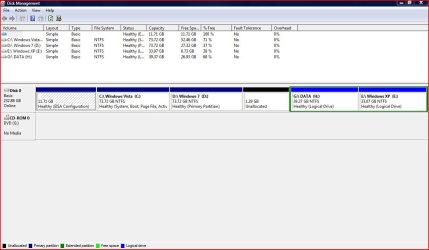
Please post back a screenshot of your full Disk management drive map, using Snipping Tool in Start Menu, attach file using paper clip in reply box.

Do you have a normally functioning dual boot menu?
 
Please post back a screenshot of your full Disk management drive map, using Snipping Tool in Start Menu, attach file using paper clip in reply box.

Do you have a normally functioning dual boot menu?

Yes, I do have a functioning dual boot menu, I should say Triple. I can boot to either XP, Vista, Or Seven. It all works, except with Windows 7, it doesn't work when I log in. I get a bunch of errors saying stuff like "File C:\Windows\(filename).(exe) Does not exist"

I know why it says this, and I'm not sure how to change it/fix it.

I need to change it where it looks for the files in Drive D, not C.
 

Attachments

  • Capture1.JPG
    Capture1.JPG
    117.3 KB · Views: 17

My Computer

Computer Manufacturer/Model Number
Acer
OS
XP Vista 7
CPU
Intel (sucks)
Memory
2 gig
Graphics Card(s)
intel express 965 chipset (sucks)
Unhide System and Hidden files in Control Panel>Folder Options>View tab to examine the contents of that hidden EISA partition which might be causing problems. It can be deleted to recover the HD space into Win7, after determining what functions it still provides, if any, which is doubful.

The rest looks ok.

At this point I would run sfc /scannow to see if any Win7 System files are corrupt, fixed or unfixable.

Then if probs persist I would run a http://www.sevenforums.com/tutorials/3413-repair-install.html?ltr=R which will not only reinstall the OS while saving all programs, files and settings, but also reconfigure correctly the multi-boot using the latest OS which is always best.
 
I think the problem is the partition was cloned....

Try doing a startup repair on the Win 7 partition. Set it active first. Of course, this will remove the boot menu until you set the Vista Partition back to active. I am not sure setting it to active is necessary, but it might help.

Will the Vista boot menu need to be reworked, possibly. the Win 7 entry may have to be redone.

Keep track of partition sizes so you will know which partition is which.
 

My Computer

Computer Manufacturer/Model Number
Homebuilt
OS
Windows 7 x64
CPU
i7-2600K
Motherboard
Asus P8Z77-v Pro
Memory
8 G
Graphics Card(s)
GTX 480
Sound Card
Onboard
Monitor(s) Displays
LG W2753V
Screen Resolution
1920x1080
Hard Drives
Crucial M4 128 G SSD
Back
Top