"Consider Replacing Your Battery"

After reading about this more and doing a bit of research, I've come to the conclusion that my battery really does have a problem and it's pretty normal if you leave the laptop plugged in all the time like I have done. Windows 7 is just highlighting the problem and not causing it.

I'm glad the feature is there because I will make more of an effort to treat my next battery better. It would also be useful if the percentage of degradation was shown with the warning message instead of having to generate a report to find out.

I also hope this will bring a lot of complains and manufactures of laptops will have to do better in future. Cleverer charging hardware that disconnects when the battery is full charged would make sense. Even a switch to disable the battery when it is not needed would be valuable.
 

My Computer

OS
OS: Lots
After reading about this more and doing a bit of research, I've come to the conclusion that my battery really does have a problem and it's pretty normal if you leave the laptop plugged in all the time like I have done. Windows 7 is just highlighting the problem and not causing it.

I'm glad the feature is there because I will make more of an effort to treat my next battery better. It would also be useful if the percentage of degradation was shown with the warning message instead of having to generate a report to find out.

I also hope this will bring a lot of complains and manufactures of laptops will have to do better in future. Cleverer charging hardware that disconnects when the battery is full charged would make sense. Even a switch to disable the battery when it is not needed would be valuable.

Have a look at BatteryCare as suggested earlier in this thread, It's free and includes this information - works as a replacement to the windows native apllication
 

My Computers

System One System Two

  • Computer type
    PC/Desktop
    Computer Manufacturer/Model Number
    ChillBlast - Custom to my design
    OS
    Windows 11 Pro x64 [Latest Release and Release Preview]
    CPU
    Ryzen 9 5950X, 3.8 - 5.2 MHz
    Motherboard
    Asus Prime X570-Pro
    Memory
    64GB [2 x 32GB] DDR4 3200MHz
    Graphics Card(s)
    4GB NVIDIA GEFORCE GTX 1650 Ti
    Sound Card
    On-board SPDIF to 5.1 System + HDMI [5.1 system]
    Monitor(s) Displays
    32" UHD 32 Bit HDR Monitor + 43" UHD 4K 32Bit HDR TV
    Screen Resolution
    2 x 3840 x 2160 @60Hz
    Hard Drives
    1TB M2 SSD OS, 500GB Fast Access SSD, 2 x 8TB Data + Various Externals from 1TB to 4TB, 10TB NAS
    PSU
    NZXT C750 80 PLUS Gold 750W Modular PSU
    Case
    Workstation Case [Matt Black]
    Cooling
    NZXT Kraken X63 280mm CPU Cooler +2x Quiet Case fans
    Keyboard
    Logitech Wireless MX Keys & K400 + others
    Mouse
    Logitech Wireless MX Master 3S
    Internet Speed
    920 MB Down 50 MB Up
    Antivirus
    BitDefender Total Security Pro
    Browser
    Chrome (always run latest Non-Beta)
    Other Info
    Also run ...
    Laptop - Quad 8GB - Windows 10 Pro x64
    Nexus 7 Android tablet x2
    Samsung 10.2" tablet
    Blackview TAB 8 4G Android Tablet c/w Keyboard
    Wacom Intuos Pro Medium Pen Pad
    Wacom Intuos Pro Small Pen Pad
    Wacom Expresskeys Remote
    Loopdeck+ Graphics Controller
    Shuttle Pro v2 Control
  • Computer type
    Laptop
    System Manufacturer/Model Number
    Dell XPS 17 10750H
    OS
    Windows 11 Pro x64 Latest RP
    CPU
    Intel I7 10750H 5.0GHz
    Motherboard
    Dell XPS
    Memory
    32GB [2x16GB] DDR4 2933 MHz
    Graphics Card(s)
    nVidia GTX1650Ti 4 GB GDDR6
    Sound Card
    Stock [Realtek] 4 Speaker
    Monitor(s) Displays
    17" IPS UHD+ Infinity Edge Touchscreen
    Screen Resolution
    3840 x 2400
    Hard Drives
    2TB M2 NVMe, 4TB External + various 500GB & 1TB External NVMe (also have access to spinner HDD from
    PSU
    Stock
    Case
    Stock XPS Aluminium & Carbon Fibre
    Cooling
    Stock - Active Fan Control
    Keyboard
    Backlit + Various Logitech
    Mouse
    Stock Track Pad + Logitech MX Trackball
    Internet Speed
    72 MB Down 18MB Up
    Browser
    Chrome
    Other Info
    Also run ...
    Laptop - Quad 8GB - Windows 10 Pro x64
    Nexus 7 Android tablet x2
    10.2" tablet
    Sony Z3 Android Smartphone
    Wacom Intuos Pro Medium Pen Pad
    Wacom Intuos Pro Small Pen Pad
    Wacom Expresskeys Remote
    Loopdeck+ Graphics Controller
    Shuttle Pro v2 Control Pad
    10TB NAS
Thanks. I looked over the BatteryCare web site and it seems that there is a lot of information there dispelling some of the myths that have presented in this thread.

Contrary to what I have been reading here, a full charge/discharge does not do anything to help a Lithium Ion battery, and leaving the cable plugged in is also fine. What the real problem is, is heat. My laptop does get very hot and I now think this is what has killed the battery.

To those who are thinking of trying the "fix" above, here is a quote from batterycare:

"Full battery discharges (until laptop power shutdown, 0%) should be avoided, because this stresses the battery a lot and can even damage it."
 

My Computer

OS
OS: Lots
Yeah laptop batteries work on discharge cycle lifetime. One full discharge and recharge counts as a cycle. So it is always best not to discharge fully.
Leaving your battery plugged in is not be bad for the battery in terms of overcharge (as there are circuits to prevent that).
But leaving it plugged in on some of the older laptops can cause the battery to heat up, which as you said is the killer (newer ones tend to be designed nicer in this regard, and keep the battery at room temp. Excepting HP- never forgetting my tx2000)
 

My Computer

Computer Manufacturer/Model Number
Dell Inspiron 1545
OS
Windows 7 build 7100 x86
CPU
Intel Core 2 Duo 2.1GHz
Motherboard
GM45 chipset
Memory
3GB
Graphics Card(s)
Intel(TM) Graphics Media Accelerator X4500HD
Sound Card
Realtek HD
Monitor(s) Displays
15.6" WLED 720p
Screen Resolution
1366x768
Hard Drives
320GB 5400rpm hard drive
Windows 7 ruined my new battery too. I have Toshiba Satelite L35 and recently changed by battery. I was on Vista before n after installing Windows 7 PRemium edition, it doesn't work even for 1 min without powersupply. I hope they do something about it
 

My Computer

Computer Manufacturer/Model Number
Toshiba
OS
Windows 7
Windows 7 ruined my new battery too. I have Toshiba Satelite L35 and recently changed by battery. I was on Vista before n after installing Windows 7 PRemium edition, it doesn't work even for 1 min without powersupply. I hope they do something about it

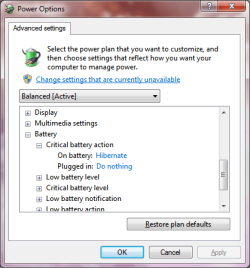
Your battery is not ruined. Change the Power settings not to shutdown/hibernate when the battery reaches critical levels.
 

Attachments

  • Untitled.png
    Untitled.png
    16.1 KB · Views: 57

My Computer

Computer type
PC/Desktop
Computer Manufacturer/Model Number
Alienware Aurora ALX R4
OS
Windows 10 Pro (x64)
CPU
Intel Core i7-3930K (3.2GHz - 4.5GHz)
Motherboard
Alienware Aurora-R4 x79
Memory
4x Samsung 4GB PC3-12800 DDR3 (16GB 1600MHz)
Graphics Card(s)
Nvidia Geforce GTX 690
Sound Card
SteelSeries Siberia Elite
Monitor(s) Displays
Dell UltraSharp U3011
Screen Resolution
2560x1600
Hard Drives
Samsung 850 Pro 256 GB, Seagate 1TB Desktop Hybrid HDD, 2x Western Digital 4TB Green HDD
PSU
875W Some Dell PSU <.<
Case
Alienware Aurora ALX
Cooling
Custom Liquid Cooling (EK CPU & GPU blocks) dual EK 480RAD
Keyboard
Logitech G710+ Mechanical
Mouse
Logitech G700s
Internet Speed
Verizon Fios (50 mbps average)
Other Info
Server: Intel NUC D54250WYK: i5-4250U, 16GB, 256 GB mSATA, Windows Server 2012 R2
Hi logicearth,

This is the setting I have currently. Problem is my battery reaches critical level within one min of disconnecting it from powersupply. Whats the point of having battery if your computer will hibernate anyway, its still a problem. Machine should work when it's on battery like it used to. Thanks for the help though :)
 

My Computer

Computer Manufacturer/Model Number
Toshiba
OS
Windows 7
Hi logicearth,

This is the setting I have currently. Problem is my battery reaches critical level within one min of disconnecting it from powersupply. Whats the point of having battery if your computer will hibernate anyway, its still a problem. Machine should work when it's on battery like it used to. Thanks for the help though :)

Because the hardware is telling Windows that battery is empty after one minute.
 

My Computer

Computer type
PC/Desktop
Computer Manufacturer/Model Number
Alienware Aurora ALX R4
OS
Windows 10 Pro (x64)
CPU
Intel Core i7-3930K (3.2GHz - 4.5GHz)
Motherboard
Alienware Aurora-R4 x79
Memory
4x Samsung 4GB PC3-12800 DDR3 (16GB 1600MHz)
Graphics Card(s)
Nvidia Geforce GTX 690
Sound Card
SteelSeries Siberia Elite
Monitor(s) Displays
Dell UltraSharp U3011
Screen Resolution
2560x1600
Hard Drives
Samsung 850 Pro 256 GB, Seagate 1TB Desktop Hybrid HDD, 2x Western Digital 4TB Green HDD
PSU
875W Some Dell PSU <.<
Case
Alienware Aurora ALX
Cooling
Custom Liquid Cooling (EK CPU & GPU blocks) dual EK 480RAD
Keyboard
Logitech G710+ Mechanical
Mouse
Logitech G700s
Internet Speed
Verizon Fios (50 mbps average)
Other Info
Server: Intel NUC D54250WYK: i5-4250U, 16GB, 256 GB mSATA, Windows Server 2012 R2
To the above comments on "battery running to 0% will hurt battery" it is either this or buy a new battery. Why not try to fix what Windows is doing rather than buy a brand new battery.

Basically, Windows is shutting down / hibernating / sleeping a PC when it THINKS the battery is at 1% or 3%. This is because it has a faulty read on the battery life. You have to use my previous hack to stop it from shutting off at 1%. Then when it drains to 0%, it will continue to drain for some time. When it finally crashes (and yes it Crashes, so be warned about the effects on your PC) it will tell the PC what the real battery wear is and real battery life is.

My PC went from being on battery life for 5 minutes or less to having nearly 2 hours of battery life on a 2 year old battery. Its simply Windows having a bad read on the battery and being unable to calibrate since it shuts down when it THINKS the battery is dying, not when the battery is dying in reality.

So try out my method before you buy a new battery, there is no warranty on the method, but why not give it a try, the worse you will get is to have to buy a new battery. ( I dont believe the 'you PC will die forever if you drain the battery all the way' argument. Really, you have never crashed a PC?)
 

My Computer

OS
Windows 7
( I dont believe the 'you PC will die forever if you drain the battery all the way' argument. Really, you have never crashed a PC?)

Funny you should say that, I recently learned that there was a very old mac portable that would fail to recharge if you drained it to 0% because the cells were wired in series.
 

My Computer

Computer Manufacturer/Model Number
Dell Inspiron 1545
OS
Windows 7 build 7100 x86
CPU
Intel Core 2 Duo 2.1GHz
Motherboard
GM45 chipset
Memory
3GB
Graphics Card(s)
Intel(TM) Graphics Media Accelerator X4500HD
Sound Card
Realtek HD
Monitor(s) Displays
15.6" WLED 720p
Screen Resolution
1366x768
Hard Drives
320GB 5400rpm hard drive

My Computer

Computer Manufacturer/Model Number
Toshiba Satellite S875D-S7239 laptop
OS
MS Windows 7 Ultimate SP1 64-bit
CPU
AMD A10-4600M
Motherboard
AMD Pumori (Socket FT1)
Memory
6.00 GB Dual-Channel DDR3 @ 798MHz (11-11-12-28)
Graphics Card(s)
AMD Radeon HD 7660G
Sound Card
High Definition Audio Device
Monitor(s) Displays
Generic PnP Monitor (1600x900@60Hz)
Screen Resolution
1600x900@60Hz
Hard Drives
SSD 119GB Corsair CSSD-V128GB2 ATA Device
Keyboard
Standard PS/2 Keyboard
Mouse
HP Wireless Optical Mobile Mouse Model FHA-3410
Internet Speed
What the local pub, local coffee shop offers.
Other Info
Optical Drive:MATSHITA BD-CMB UJ160B ATA Device


Also have an Asus ha1002xp netbook with Win 7 Ultimate installed.
Well, I have read through this entire thread, as well as several other forums and blogs on this issue including the article in the post above, and as of now I am not convinced that this is strictly a worn out battery issue. I have experienced issues similar to those described but as of yesterday I am having some very odd issues.

First, I am using an HP dv5t with the 12cell Li Ion battery. I recently upgraded a little over a month ago to Win 7 x64 from Vista x32. Everything was fine until about a week ago when I started to receive the red x and the consider replacing your battery message. I noticed that my battery life was shorter than it usually was but not quite as bad as others have described. I was now getting about 45min-1hr vs about 2hrs previously (which was already poor considering its the 12 cell battery). However, unlike what I have seen others describe, the red x and the message are not always there. When plugged in it is always present, but when I unplug it and run on just the battery the msg and the red x disappear after a little while (not sure exactly how long but not all that long after) and do not appear again until I plug it back in. Also, previously when I would reach critical battery level the monitor would shut off and go into sleep mode. Now the computer just shuts off completely, sometimes before reaching critical battery level without even warning of low battery level.
Now here is where it gets weird. Yesterday while charging I took out the battery before it had finished charging (around 69-70%). When I reinstalled the battery, it would say that it was charging but would not increase in %. I unplugged the power cable and plugged in back in and it started to increase again but would not reach 100% (Stopped around 86%). I unplugged it, drained it down, and then charged it up again and it reached 100%, but now continue to see it plateau at around 70-80%. I have to unplug it and plug it back in for it to reach 100%. In addition, once charged and running on battery it does not seem to reflect the actual remaining power. I ran it for half an hour just now and it said it was at 71%. 2 min later the computer completely shut off. I immediately turned it back on and plugged it in and it said it was at 44%. Obviously the 71% was not right, but the 44% cant be right either because there would be no reason for it to unexpectedly shut off with 44% remaining. I have run the powercfg several times at different battery levels, different power plans, and both on battery and plugged in. Before I started experiencing these more recent weird problems but after red x appeared, it was reading a design capacity of 56610, last full charge of 17050 (30%). Now it reads the same design capacity, last full charge of 18470 (32%), but instead of recognizing the battery chemistry as LION it is saying that it is NiMH. How is that possible? How can a battery that is just worn down be the only issue here? How would that result in the powercfg report erroneously claim I am using a NiMH battery now for no apparent reason?

Oh and btw, I started typing this post as soon as I turned the computer when it was at "44%". It's now already claiming that its back up to 96% in 15min or so it took to write this up
 

My Computer

OS
Windows 7 x64
I'll bet a dollar to a donut that if you're Win7 is showing you that your battery has a problem and you replace the battery that Win7 will no longer indicate a battery problem.

If after the replacement you still have the same problem, then by all means contact Microsoft. I guarantee you that they want to hear from you. As of today, all cases which they have investigated were due to defective batteries or defective hardware which was truly not charging the batteries or was actually discharging the batteries.
 

My Computer

Computer Manufacturer/Model Number
Toshiba Satellite S875D-S7239 laptop
OS
MS Windows 7 Ultimate SP1 64-bit
CPU
AMD A10-4600M
Motherboard
AMD Pumori (Socket FT1)
Memory
6.00 GB Dual-Channel DDR3 @ 798MHz (11-11-12-28)
Graphics Card(s)
AMD Radeon HD 7660G
Sound Card
High Definition Audio Device
Monitor(s) Displays
Generic PnP Monitor (1600x900@60Hz)
Screen Resolution
1600x900@60Hz
Hard Drives
SSD 119GB Corsair CSSD-V128GB2 ATA Device
Keyboard
Standard PS/2 Keyboard
Mouse
HP Wireless Optical Mobile Mouse Model FHA-3410
Internet Speed
What the local pub, local coffee shop offers.
Other Info
Optical Drive:MATSHITA BD-CMB UJ160B ATA Device


Also have an Asus ha1002xp netbook with Win 7 Ultimate installed.
I stumbled upon this thread trying to find how to calibrate my new battery. The manufacturer suggested calibrating it before using, but their instructions seem to be for XP. I recieved this laptop used, and have no idea of the battery's history. It ran XP originally, and I have been running W7 beta, and build 7100 since repairing the MB power jack. The battery life has slowly degraded until I could just get past booting, and loging in, before it would power down. Figuring the battery was due for replacement, I got a new one. I never actually did recieve the "consider replacing" notice, BTW.

Before calibrating the new one, I decided to try to get a little more life from the original, maybe use as a spare if anything. What's weird, is even before I tried recalibrating, it started showing signs of life. The first time, it took almost an hour of very light-idle use, to drain IIRC. I have run it through two charge/drain cycles, and it seems to be holding almost a 2 hour charge, watching a DVD, on the optical drive. I can't get a powercgf report from my lappy. It is a Compaq v2410, and has VERY poor support from HP/Compaq. (Go figure huh?)

I am now in the process of calibrating the new battery. Once that is done, I will try to see what the approximate difference in runtime is between the two. The bottom line for me, is that a) The manufacturer recommended this process on my new Li-Ion battery, and b) My other battery was only good for paperweight as far as I knew. Recalibration is worth a shot, in that case. There's alot of information, and mis-information on this topic. I suggest you do a little research, and try a bit of troubleshooting, before making snap descisions. Read through this entire thread, and the links. It helped me alot.

It seems the battery problems are most common with people who have SWITCHED OS's, from either Vista-W7, or XP-W7. IIRC, every problem I read about in this thread was on an upgrade.
 

My Computer

OS
windows 7
... The manufacturer suggested calibrating it before using ...

What steps did they tell you to follow to calibrate it. Would be interesting to know.

Thanks.
 

My Computer

Computer Manufacturer/Model Number
Asus P8H67-M EVO
OS
Windows 7 Professional 64 bit
CPU
Intel Core i5-2500K
Motherboard
Asus
Memory
8 GB
Graphics Card(s)
Intel HD Graphics 3000
Sound Card
Realtek
Monitor(s) Displays
17" Dell (x2)
Screen Resolution
1280 x 1024
Hard Drives
Intel 510 SSD 120 GB
Western Digital 1 TB
It seems the battery problems are most common with people who have SWITCHED OS's, from either Vista-W7, or XP-W7. IIRC, every problem I read about in this thread was on an upgrade.

Well seeing as the two previous Operating Systems did not report when the battery was close to dying, I can see the confusion. Further more, if Windows is giving a false reading it is because the hardware is failing to provide correct information. Windows merely reports what the hardware tells it.
 

My Computer

Computer type
PC/Desktop
Computer Manufacturer/Model Number
Alienware Aurora ALX R4
OS
Windows 10 Pro (x64)
CPU
Intel Core i7-3930K (3.2GHz - 4.5GHz)
Motherboard
Alienware Aurora-R4 x79
Memory
4x Samsung 4GB PC3-12800 DDR3 (16GB 1600MHz)
Graphics Card(s)
Nvidia Geforce GTX 690
Sound Card
SteelSeries Siberia Elite
Monitor(s) Displays
Dell UltraSharp U3011
Screen Resolution
2560x1600
Hard Drives
Samsung 850 Pro 256 GB, Seagate 1TB Desktop Hybrid HDD, 2x Western Digital 4TB Green HDD
PSU
875W Some Dell PSU <.<
Case
Alienware Aurora ALX
Cooling
Custom Liquid Cooling (EK CPU & GPU blocks) dual EK 480RAD
Keyboard
Logitech G710+ Mechanical
Mouse
Logitech G700s
Internet Speed
Verizon Fios (50 mbps average)
Other Info
Server: Intel NUC D54250WYK: i5-4250U, 16GB, 256 GB mSATA, Windows Server 2012 R2
I should clarify...
I believe my problems were caused by improper driver(s) for my laptop's motherboard manufacturer, and not WIndows. I have had numerous problems with driver support from HP/Compaq. My laptop is only about 2-3 years old. It has a 64-bit processor, and widesceen format. It is running W7 64-bit on only 1 gig ram (2 gigs recommended minimum, by WIndows) pretty well, aside from some driver issues, and sluggish performance when taxed. But appearently, if I want to run Windows 7, I should just go out and buy a new HP or Compaq laptop, as HP/COmpaq have decided my system is not worth supporting.
Luckily there are other consumers, professionals, and hobbiests, that find solutions, even when the manufacturers either can't, or can't be bothered. MS did a terrific job with the pre-release of W7, to help manufacturers slove these issues before release (poor drivers are probably the main reason Vista was such a failure) and though I am no MS fanboy, I don't think this is flaw in W7, as much as it is the hardware manufacturers.
 

My Computer

OS
windows 7
... The manufacturer suggested calibrating it before using ...

What steps did they tell you to follow to calibrate it. Would be interesting to know.

Thanks.

It basically describes doing a full charge/discharge of the battery. You need to disable any WIndows setting that will power-down, sleep, hibernate your lappy, to allow it to continue to discharge PAST the warning point. It differs from what snlu178 wrote around page 1-2 on calibrating the battery only in the settings used to achieve this.
It also recommends charging batteries to only 60-80% when they are to be unused for an extended amount of time (around a month). Interstingly, this is the ammount of charge the battery held when I recieve it. Nice to see they follow their own advice eh? :)
I will definately be looking into more info on batteries, as there seems to be alot of myths, and facts to be learned, and knowing the difference might save me some money. Turns out my old battery was in pretty good shape. I don't mind having bought a second, as now I have a spare, but if I had known, I would've upgraded my memory first.
 

My Computer

OS
windows 7
Well I am following the instructions I found for my laptop how to calibrate it. I know its way off cause battery care which I have had installed for some time now told me Sat. that I had 12% wear after 6 months not bad. today its at 63% wear. That's a bad reading from something. I tried a full discharge but windows still shutdown. HP recommends a complete drain so I follow instructions here to make windows allow that. I am fully charging and will see what the charge level is compared to what I am told it will be. Then a will do the complete discharge and see the reading again and see if anything changes.

I find this very odd to jump so fast. There has been no updates done or major system changes so I don't see it as windows 7. I wonder if it's just a very large bad batch of batteries.
 

My Computer

Computer Manufacturer/Model Number
Alienware M17x R3
OS
Windows 7 Ultimate x64
CPU
Intel Core i7 2670QM 2.2GHz 3.3GHz Turbo Mode
Memory
12GB Dual Channel DDR3 at 1333MHz
Graphics Card(s)
2GB GDDR5 AMD Radeon 6990M
Sound Card
Audio Powered by Klipsch
Monitor(s) Displays
17.3-inch WideFHD 1920 x 1080 60Hz WLED
Screen Resolution
1920x1080
Hard Drives
120GB SSD slot 1
1TB HDD slot 2
Case
alienware laptop case
Cooling
Dual heatsink and fans
Keyboard
Alienware multi color keyboard
Mouse
logitech G300 gaming mouse
Other Info
Intel® Centrino Advanced-N 6230 2x2 agn+ Bluetooth

finally got it!!!
well the first charge didn't change anything, battery care is telling me I had 24 mins left now its 47 min. a little odd since I have not done anything different in the last 2 minutes this changed. Doing a full discharge now to see what happens. HP's Battery Check says the battery is fine so will see what happens in 42 min.

If the battery truly is shot then I am getting a 12 cell over the 6 HP offers. I like the little lift it will give the back end plus the time should go from 2.5 hours to I hope about 5 which would be great for all the movie watching me and the wife do. Plus I have found new batteries for 1/2 the price HP offers.
 

My Computer

Computer Manufacturer/Model Number
Alienware M17x R3
OS
Windows 7 Ultimate x64
CPU
Intel Core i7 2670QM 2.2GHz 3.3GHz Turbo Mode
Memory
12GB Dual Channel DDR3 at 1333MHz
Graphics Card(s)
2GB GDDR5 AMD Radeon 6990M
Sound Card
Audio Powered by Klipsch
Monitor(s) Displays
17.3-inch WideFHD 1920 x 1080 60Hz WLED
Screen Resolution
1920x1080
Hard Drives
120GB SSD slot 1
1TB HDD slot 2
Case
alienware laptop case
Cooling
Dual heatsink and fans
Keyboard
Alienware multi color keyboard
Mouse
logitech G300 gaming mouse
Other Info
Intel® Centrino Advanced-N 6230 2x2 agn+ Bluetooth

finally got it!!!
Back
Top