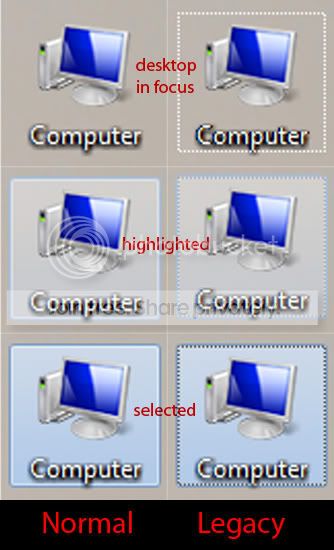
Solved Dotted Box around Desktop Icons

I'm confused a bit. If my desktop is the default window, when I leave my pointer on a desktop item, it highlights it, and always has if memory serves me correctly.

So is this really a "bug", or has it always been the case that desktop items will become highlighted if you leave the pointer over them?
 

My Computer My Computer

At a glance

Windows 7 Ultimate x64 ®™Intel Core 2 Duo (2.2 GHz)2x 2GB Corsair (667 MHz)NVIDIA 8600M GS (256MB)
Computer Manufacturer/Model Number
Sony Vaio FZ21Z
OS
Windows 7 Ultimate x64 ®™
CPU
Intel Core 2 Duo (2.2 GHz)
Motherboard
Sony (Intel Chipset)
Memory
2x 2GB Corsair (667 MHz)
Graphics Card(s)
NVIDIA 8600M GS (256MB)
Sound Card
Sigmatel
Monitor(s) Displays
15.4" TFT X-Black
Screen Resolution
1280x800
Hard Drives
Western Digital 300GB Scorpio Black (7200rpm)
Mouse
Logitech Anywhere MX
Internet Speed
Sky 5MB
I'm confused a bit. If my desktop is the default window, when I leave my pointer on a desktop item, it highlights it, and always has if memory serves me correctly.

So is this really a "bug", or has it always been the case that desktop items will become highlighted if you leave the pointer over them?

FZ21Z

Yes, when you single click an icon windows highlights it just like the thumbnail you have provided; but the highlight in your thumbnail is different than the highlight in PassTheJelly's post. The highlighted icon you have provided goes away when you deselect it by clicking a clear spot on your desktop. If you go to PassTheJell's post you will clearly see a white focus box around the icon. This focus box remains around the last icon you click on (select) even after you deselect it by clicking a clear spot on your desktop.
 

My Computer My Computer

At a glance

Windows 7 Professional x64Intel Core 2 Duo P7350 2GHz (1066MHz FSB, 3MB...4GB DDR2Nvidia GeForce 9300M GS with 512MB
Computer Manufacturer/Model Number
HP dv3510nr
OS
Windows 7 Professional x64
CPU
Intel Core 2 Duo P7350 2GHz (1066MHz FSB, 3MB Cache)
Memory
4GB DDR2
Graphics Card(s)
Nvidia GeForce 9300M GS with 512MB
Sound Card
IDT High Definition Audio
Monitor(s) Displays
13.3" WXGA High-Definition HP LED BrightView Widescreen
Screen Resolution
1280 x 800
Hard Drives
320GB 5400RPM SATA
View attachment 34459

This little dotted outline has just started appearing around desktop icons. I can control it with the arrow keys and use it to select icons that way.

What I can't seem to do is switch it off. Clicking off the desktop makes it disappear, but as soon as I click back on the desktop it returns. It wasn't doing this until just recently and I don't know what i did to enable this function - or how to turn it off.

I have no use for it and it looks a bit naff. How do I get rid of it?

-Stone

Try COMPUTER|PROPERTIES|ADVANCED SYSTEM SETTINGS|ADVANCED|PERFORMANCE

Turn off: Use drop shadows for icon labels on the desktop

- Worked for me.
 
Last edited:

My Computer My Computer

At a glance

vista, windows 7AMD Phenom 9850Kingston ddr2 2x2gbNvidia Gforce 8600gt
OS
vista, windows 7
CPU
AMD Phenom 9850
Motherboard
ASUS M3N-HT Deluxe
Memory
Kingston ddr2 2x2gb
Graphics Card(s)
Nvidia Gforce 8600gt
Sound Card
M-audio Audiophile USB
Monitor(s) Displays
BenQ 22"
Screen Resolution
1680x1050
Hard Drives
2x750gb samsung
1x350gb ^^
Case
Antech Coolmaster
Keyboard
Microsoft Sidewinder x4
Mouse
Logitech Mx620 / Oscar X7 gaming mouse.
Internet Speed
10mb fiber
dotted lines around desktop icons

think i found the cure , click start, then right click " computer " click properties then click " Advanced system settings, then where it says "performance" click "settings" then where the long list of ticked items are, scroll down to the 2nd to last item and untick "use drop shadows for icon labels on desktop" then click apply, then you must reboot pc for it to work. Worked a treat for me, hope its of help :D
 

My Computer My Computer

At a glance

windows 7
OS
windows 7
I have "use drop shadows for icon labels desktop" ticked and anytime the white box appears around an icon (which is rare, I might add), I just right click blank area on desktop and click Refresh and the box ALWAYS vanishes after a refresh. I just thought it was a focus glitch/bug.
 

My Computer My Computer

At a glance

Windows 7x64 Home Prem Svce Pack 1, Build 760...Intel Premium Dual Core, 2.7GHz8 GB DDR3-1333 Mhz SSDRAM (2DIMMS)Intel Graphics Media Accelerator HD 1000 (GT1)
Computer Manufacturer/Model Number
HP Pavillion p62120t desktop
OS
Windows 7x64 Home Prem Svce Pack 1, Build 7601.win7sp1Ver 3.0install)
CPU
Intel Premium Dual Core, 2.7GHz
Motherboard
Pegatron 2AC2 2.0
Memory
8 GB DDR3-1333 Mhz SSDRAM (2DIMMS)
Graphics Card(s)
Intel Graphics Media Accelerator HD 1000 (GT1)
Sound Card
Integrated Realtek HD Audio - PCIe GBE Family Controller
Monitor(s) Displays
HP 2311 Series Wide 23" LED
Hard Drives
500 GB Seagate SATA HDD
Keyboard
USB HP Multimedia keyboard
Mouse
USB HP Optical Mouse
Other Info
Canon MX 360 AIO printe; FX 13.0.1; AdBlock+ ; serial interface HP DVD-RAM GH80N; firmware version RF03
if you unticked "use drop shadows for icon labels desktop" then reboot your pc , you wont have to keep clickin refresh:geek: i
 

My Computer My Computer

At a glance

windows 7
OS
windows 7
Uncheck drop shadows does not work.

Refresh desktop does not work. Oh yes, it clears the dotted line but when you click the desktop again the dotted line shows back up.

Rebooting turns the dotted line off (even if you don't change any settings) but if you use the keyboard at any time while the focus is on the desktop the dotted line shows back up.

No, I have not found a way to permanently turn off the dotted line.
 

My Computer My Computer

At a glance

XP SP3 32bit, Vista HP 64bit, Seven Pro 64bitQ6600 G0 @ 3.2GHz4Gb OCZnVidia GTX275 896Mb
OS
XP SP3 32bit, Vista HP 64bit, Seven Pro 64bit
CPU
Q6600 G0 @ 3.2GHz
Motherboard
GA-P965-DS3
Memory
4Gb OCZ
Graphics Card(s)
nVidia GTX275 896Mb
Sound Card
X-Fi Fatal1ty Platinum
Monitor(s) Displays
Acer H243H
Screen Resolution
1920x1080
Hard Drives
Samsung 1Tb SATA2
MAXTOR 1Tb SATA2
MAXTOR 500Gb SATA2
MAXTOR 300Gb SATA2
PSU
Antec 650 Trio
Cooling
Zalman 9700
Keyboard
G15,G13
Mouse
MX518
Internet Speed
330Kbps down
The only surefire way to turn off the the dotted focus box is to restore your system to an earlier date before the focus box appeared. That is what I did and I haven't had the problem since.
 

My Computer My Computer

At a glance

Windows 7 Professional x64Intel Core 2 Duo P7350 2GHz (1066MHz FSB, 3MB...4GB DDR2Nvidia GeForce 9300M GS with 512MB
Computer Manufacturer/Model Number
HP dv3510nr
OS
Windows 7 Professional x64
CPU
Intel Core 2 Duo P7350 2GHz (1066MHz FSB, 3MB Cache)
Memory
4GB DDR2
Graphics Card(s)
Nvidia GeForce 9300M GS with 512MB
Sound Card
IDT High Definition Audio
Monitor(s) Displays
13.3" WXGA High-Definition HP LED BrightView Widescreen
Screen Resolution
1280 x 800
Hard Drives
320GB 5400RPM SATA
I just got this yesterday for the first time, and it was right after I changed my desktop background to a different picture. Refresh didn't work, so I changed my background image to something different, used ccleaners' cleaner tab, and it cleared it for me. Might try rebuilding the icon cache after it happens.
 

My Computer My Computer

At a glance

Windows 7 Ultimate x64 SP1Core i7 920 (D0) @ 4Ghz, *26c idle *65c full ...12GB DDR3 Corsair Dominator -CMD12GX3M6A1600C...Zotac Geforce GTX 770
Computer type
PC/Desktop
Computer Manufacturer/Model Number
Airbot 2.0
OS
Windows 7 Ultimate x64 SP1
CPU
Core i7 920 (D0) @ 4Ghz, *26c idle *65c full load on air
Motherboard
Asus P6X58D Premium - Sata 6Gb/s - USB 3.0
Memory
12GB DDR3 Corsair Dominator -CMD12GX3M6A1600C8 at 1600MHz
Graphics Card(s)
Zotac Geforce GTX 770
Sound Card
ASUS Xonar D2X
Monitor(s) Displays
1 LG 24" Flatron W2453V-PF 1 Samsung 24" P2450H both 2ms RT
Screen Resolution
1920x1080@60hz
Hard Drives
1 Samsung 250GB 840 Evo SSD
1 OCZ Vertex2 180GB SSD
1 TB Samsung Spinpoint F1 7200RPM 32MB cache
2 500GB WD Caviar Blacks 7200RPM 32MB cache (WD5001AALS)

Pioneer DVD Burner DVR-S18M
PSU
Corsair HX1000W
Case
Cooler Master HAF 932
Cooling
Case Fans *3 230mm, *1 140mm/CPU - *Tuniq Tower 120 Extreme
Keyboard
Logitech Wireless MK700
Mouse
Logitech Wireless MK700
Internet Speed
DL 15 Mbps UL 0.98 Mbps
Antivirus
None
Browser
Firefox Nightly
Other Info
Processor-7.7 *RAM- 7.9 *Graphics-7.9 *Gaming Graphics- 7.9 *SSD- 7.8 W.E.I final score= 7.7
*Phone- LG Nexus 5
Remove all the icons from the desktop , all they do is use up memory. Put what you use on the task bar.
 

My Computer My Computer

At a glance

Windows 7 Ultimate 64BitC2D E82008GB PNY PC2-6400BFG 9600GT x 2
Computer Manufacturer/Model Number
Myself
OS
Windows 7 Ultimate 64Bit
CPU
C2D E8200
Motherboard
XFX 750i
Memory
8GB PNY PC2-6400
Graphics Card(s)
BFG 9600GT x 2
Sound Card
Stock XFX Optical
Monitor(s) Displays
Gateway 22" HD Display
Hard Drives
C: 1 TB G: 500 GB H: 500 GB
PSU
Ultra LSP 550 Pro Lifetime Series
Case
Xion2
Cooling
ThermalTake
I just got this yesterday for the first time, and it was right after I changed my desktop background to a different picture. Refresh didn't work, so I changed my background image to something different, used ccleaners' cleaner tab, and it cleared it for me. Might try rebuilding the icon cache after it happens.

I have experienced this also, then it seemed like it had something to do with
the fact that the wallpaper was a .PNG
 

My Computer My Computer

At a glance

vista, windows 7AMD Phenom 9850Kingston ddr2 2x2gbNvidia Gforce 8600gt
OS
vista, windows 7
CPU
AMD Phenom 9850
Motherboard
ASUS M3N-HT Deluxe
Memory
Kingston ddr2 2x2gb
Graphics Card(s)
Nvidia Gforce 8600gt
Sound Card
M-audio Audiophile USB
Monitor(s) Displays
BenQ 22"
Screen Resolution
1680x1050
Hard Drives
2x750gb samsung
1x350gb ^^
Case
Antech Coolmaster
Keyboard
Microsoft Sidewinder x4
Mouse
Logitech Mx620 / Oscar X7 gaming mouse.
Internet Speed
10mb fiber
I don't think the wallpaper has anything to do with the problem. I've only ever used the standard Windows supplied "theme" wallpapers.

Something very odd just happened to my hardware. I did the rebuild icon cache thing and restarted Windows. When restarting, my BIOS was reset to default settings!?!? This has only rarely happened and usually only after a rather hard Windows crash. So I don't know why it happened this time.

This resetting BIOS is a real problem because my computer won't run well at all if the default settings are used. The CPU and memory speeds are all wrong and I loose 2 of my harddisks among other problems.

I happen to have a Gigabyte P965-DS3 motherboard which is known to have odd habits, one of which is to shut down at restart time for no good reason and to occasionally reset the BIOS. Gigabyte says this shutdown behavior is normal but the BIOS should not be automatically reset unless some undesirable condition is detected.

I suppose the question is whether deleting the icon cache is somehow flagged by Windows as some kind fatal error and then somehow telling the BIOS to reset.

This was probably a one time event, I will post in one of the hardware threads if I continue to have problems. I just thought I would make note of the problem here since it might be related.
 

My Computer My Computer

At a glance

XP SP3 32bit, Vista HP 64bit, Seven Pro 64bitQ6600 G0 @ 3.2GHz4Gb OCZnVidia GTX275 896Mb
OS
XP SP3 32bit, Vista HP 64bit, Seven Pro 64bit
CPU
Q6600 G0 @ 3.2GHz
Motherboard
GA-P965-DS3
Memory
4Gb OCZ
Graphics Card(s)
nVidia GTX275 896Mb
Sound Card
X-Fi Fatal1ty Platinum
Monitor(s) Displays
Acer H243H
Screen Resolution
1920x1080
Hard Drives
Samsung 1Tb SATA2
MAXTOR 1Tb SATA2
MAXTOR 500Gb SATA2
MAXTOR 300Gb SATA2
PSU
Antec 650 Trio
Cooling
Zalman 9700
Keyboard
G15,G13
Mouse
MX518
Internet Speed
330Kbps down
Possibly Really Solved

OK, so I think I stumbled upon an actual solution that makes the dotted selection box go away and stay away, and not re-appear when you click back on the desktop.

What happened was that I inadvertedley pressed some keys (numbers and letters) which activated the 'selecting items on the desktop' function. It showed both the new shiny highlight-box over the icon and the dotted box. When I clicked on the desktop with the mouse to cancel it - the highlight box disappeared but the dotted box (the problem we're all bitching about) remained.

I tired pressing escape, to quit the function (logically this would work) but it remained. I selected the icon again (you can do this by clicking on it, using the arrow keys to move to another icon and then back to it or by using the key that selected the icon in the first place: it needs highlighting AND dotted-boxing) and then I pressed enter and the application associated with the icon opened (in this case it was an image file). I closed the app and clicked on the desktop, the icon flashed (!) as the highlight box appeared over it and disappeared and the dotted box went with it!

I clicked on the desktop to confirm it was gone and it stayed gone!

I tired out somethign else: I hit the keyboard key that started 'navigate with keyboard' - highlighting and dotted-boxing the icon. Instead of opening the app, I pressed ALT+ESC and the thing disappeared. I clicked on the desktop and it stayed gone.

It also worked with CTR+ESC, (which opened the start menu) but also made the dotted box disappear.

To recap: the dotted box appears and STAYS when you hit a key that starts navigate with keyboard. It will not go away, just with clicking the desktop with the mouse (which would be logical) but the keyboard navigation session WILL end when you: open the app associated with the selected icon; press ALT+ESC; press CTR+ESC (opening Start menu).

Then it stays away.

Hope that helps.

Please confirm if this works for you and we can kill this silly counter-intuitive glitch forever.
 
Last edited:

My Computer My Computer

At a glance

Windows 7 pro (64-bit)Intel Core 2 Quad Q66003GB8600 GTS
Computer Manufacturer/Model Number
Dell XPS 420
OS
Windows 7 pro (64-bit)
CPU
Intel Core 2 Quad Q6600
Memory
3GB
Graphics Card(s)
8600 GTS
its a bug. i believe its left over legacy crap.

icon.jpg


if you want it to go back to normal you can
- log off and log back in.
- kill explorer.exe and restart it.
- restart comp.

how to recreate the problem.
-open a window
-hit "show desktop"
-active 3d flip
- "show desktop" from 3d flip
- bam, ugly dotted lines.

:cry: think thats quirky?

Try going to "Uninstall or change a program" from "My Computer"
Then open "Uninstall or change a program" from the "Control Panel"
Compare the two.

notice something wrong with one of the windows?
Thats right an useless "Show preview panel" from the "My Computer" shortcut.

its mindblowing. "MS Windows, expect the unexpected." not in a good way. :shock:

ug.jpg
 

My Computer My Computer

At a glance

win7
OS
win7
da13371ama described the problem exactly.

I never noticed the dotted line until I read this thread. Actually I tried to see if I just didn't notice it before. So I minimized everything and well no dotted lines. Just the translucent blue rectangle.

However when someone mentioned clicked the Aero Peek corner, I clicked it a few times and viola the dots appeared.
 

My Computer My Computer

At a glance

Windows 7 UltimateIntel C2D SP94002GB DDR3Integrated =(
Computer Manufacturer/Model Number
Dell E4300
OS
Windows 7 Ultimate
CPU
Intel C2D SP9400
Motherboard
Intel GS45
Memory
2GB DDR3
Graphics Card(s)
Integrated =(
Sound Card
Integrated =(
Monitor(s) Displays
Matte LCD
Screen Resolution
1280x800
Hard Drives
Intel X25-M Gen 2 SSD
WD Caviar Black
Mouse
MX 518, V470 - Logitech
No

It's not a problem, it's the way Windows is designed.

However, IMHO, it is totally redundant when used with the Aero 7 theme (was my whole point). It is purely for keyboard navigation (using the keyboard arrow keys) - that's when it will appear, when you press any key on the keyboard - pressing a letter will switch through the icons with the same starting letter in their name, using cursor keys will navigate.

The Aero box is for mouse positioning. You'll see you can actually have an Aero box around one icon and a dotted border around another icon, which in my opinion (once again) is counter intuitive and bloody dangerous to say the least (which item gets deleted if you press delete for example?)

If you press a key on the keyboard, you can get rid of the dotted border by pressing Tab or Ctrl-Escape.

If you can't then go into control panel, ease of access center, click make the keyboard easier to use and untick "Underline keyboard shortcuts and access keys".

It sounds wrong (and it is, because pressing Alt will still show your underlined shortcuts) but now the dotted box will act normally and disappear when it should!

I think it's totally wrong Microsoft. It should BE GONE. Once again, I say look to the Mac for a decent interface scheme (preferably try copying it).
 

My Computer My Computer

At a glance

Windows 7
OS
Windows 7
Running MS Media Center (not just Media Player) seems to turn the dotted line back on without doing anything that has to do with the desktop/keyboard focus.

Ctrl-Esc, Alt-Esc and Tab does NOT fix the problem, it just changes the desktop focus. Clicking on the desktop again turns the dotted line back on.

I think the only sure solution is log-off/log-on, kill explorer or reboot. Only these will completely restart the desktop.
 

My Computer My Computer

At a glance

XP SP3 32bit, Vista HP 64bit, Seven Pro 64bitQ6600 G0 @ 3.2GHz4Gb OCZnVidia GTX275 896Mb
OS
XP SP3 32bit, Vista HP 64bit, Seven Pro 64bit
CPU
Q6600 G0 @ 3.2GHz
Motherboard
GA-P965-DS3
Memory
4Gb OCZ
Graphics Card(s)
nVidia GTX275 896Mb
Sound Card
X-Fi Fatal1ty Platinum
Monitor(s) Displays
Acer H243H
Screen Resolution
1920x1080
Hard Drives
Samsung 1Tb SATA2
MAXTOR 1Tb SATA2
MAXTOR 500Gb SATA2
MAXTOR 300Gb SATA2
PSU
Antec 650 Trio
Cooling
Zalman 9700
Keyboard
G15,G13
Mouse
MX518
Internet Speed
330Kbps down
this thing probably isnt a bug.

it seems that any kind of keyboard command for the desktop;
Windows key, arrows keys, Window key + Tab, Window key + g, etc
will bring up the dotted line.

I dont see how these dotted lines are useful at all, they are just plain ugly.
There already a aero theme focus box, no point of having the dotted line box overlay it...

it only shows up on desktop icons and nowhere else, leads me to believe that its probably left over legacy crap.

A way to get rid of it once and for all

How to Remove the Annoying Focus Rectangle in Windows? - Tweaking with Vishal

run one of the .exe thats right for your windows
then restart.

no more dotted lines. ;)
 

My Computer My Computer

At a glance

win7
OS
win7
Back
Top