Solved Dotted Box around Desktop Icons

stone

New member
Local time
12:59 PM
Messages
7
screen-crop.png

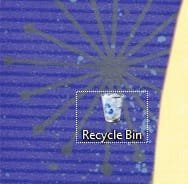
This little dotted outline has just started appearing around desktop icons. I can control it with the arrow keys and use it to select icons that way.

What I can't seem to do is switch it off. Clicking off the desktop makes it disappear, but as soon as I click back on the desktop it returns. It wasn't doing this until just recently and I don't know what i did to enable this function - or how to turn it off.

I have no use for it and it looks a bit naff. How do I get rid of it?

-Stone
 

My Computer My Computer

Computer Manufacturer/Model Number
Dell XPS 420
OS
Windows 7 pro (64-bit)
CPU
Intel Core 2 Quad Q6600
Memory
3GB
Graphics Card(s)
8600 GTS
It's a normal feature of Windows 7 that you probably just never noticed before. It tells you which is the icon that is selected and would be activated if you didn't have a mouse or touchpad to navigate and click with or just didn't want to use them. Seems kind of innocuous and useful to me. I don't think it can be turned off (well maybe with editing the registry) but I don't think it would be a good idea.
 

My Computer My Computer

Computer Manufacturer/Model Number
HP DV8t quad
OS
Windows 7 Ultimate x64 (Retail)
CPU
i7-Q 720
Motherboard
Motherboard Chipset Intel Ibex Peak-M PM55, Intel Lynnfield
Memory
6 GB
Graphics Card(s)
nVidia GeForce GT 230M (1GB)
Sound Card
IDT High Definition Audio CODEC
Monitor(s) Displays
18.4 inch HP Infinity FHD (Samsung 184HT03-001)
Screen Resolution
1920 x 1080
Hard Drives
Hitachi 500GB 7200 rpm (x2)
Seagate FreeAgent 1.5 TB External USB (x2)
Thermaltake BlacX eSATA/USB 2.0 3.5/2.5 HD dock
Cooling
Zalman NC-2000 notebook cooling pad
Keyboard
laptop
Mouse
Logitech VX Revolution
Other Info
Backup Unit: Lenovo T61p
Have you tried the Show Desktop Button in the Corner.. Click that..

Hope that Helps..
 

Attachments

  • Capture.JPG
    Capture.JPG
    9.4 KB · Views: 5,479

My Computer My Computer

Computer Manufacturer/Model Number
HP Pavilion dv5 Notebook PC
OS
Windows Seven x64
CPU
2.2 GHz Dual Core
Motherboard
Quanta 3600
Memory
4GB
Graphics Card(s)
ATI Mobility RADEON HD 3470
Sound Card
ATI
Monitor(s) Displays
Laptop
Hard Drives
ATA Hitachi HTS543215 (5400RPM)
Case
Laptop
Cooling
Fan
Internet Speed
Basic DSL 1.5 up and Down
Harpua - I didn't not notice it before: it wasn't there before! As for it indicating which icon would be selected if I didn't have a mouse or touchpad ... well, yes ... that's its function, but it's redundant - I have a mouse! And it wasn't there before.

Ryan 2320 - the show desktop button does not turn it off.

Does everyone else with Windows 7 have this box around one of their icons? Is there anyone who DOESN'T??
 

My Computer My Computer

Computer Manufacturer/Model Number
Dell XPS 420
OS
Windows 7 pro (64-bit)
CPU
Intel Core 2 Quad Q6600
Memory
3GB
Graphics Card(s)
8600 GTS

My Computer My Computer

Computer Manufacturer/Model Number
Custom
OS
Windows 7 build 7600 64 bit
CPU
Phenom II X4 955 retail 3.2GHz
Motherboard
ASRock M3A790GXH/USB3 ATX AMD AMD3
Memory
4x GeiL 2GB Value PC3-10660 CL9 DC DDR3-1333, CL 9-9-9-28
Graphics Card(s)
PowerColor Radeon HD5850 PCS+ 1024MB, 256-bit GDDR5
Sound Card
Built in
Hard Drives
G.Skill Phoenix Pro 120GB SATA2 SSD Sandforce SF-120
Samsung Spinpoint 500GB SATA2 7200RPM
PSU
Tacens Radix III Smart 520W
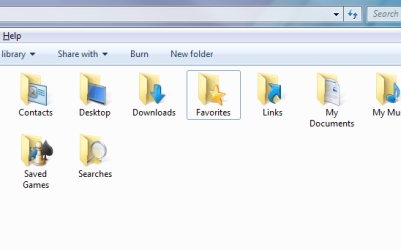
Hakon - I don't accept that there's no way to turn this off. It's definitely something that's been turned on - a function. It appears in other places where it didn't before too:

user-screen.png

It doesn't have the dots, but it's the same thing here, around the favourites folder. It's like 'select/navigate with keyboard' has been ticked somewhere.

Surely not everyone is having this issue, and therefore it's an option that can be switched off. It was off!!!
 

My Computer My Computer

Computer Manufacturer/Model Number
Dell XPS 420
OS
Windows 7 pro (64-bit)
CPU
Intel Core 2 Quad Q6600
Memory
3GB
Graphics Card(s)
8600 GTS
It's always been there, I know because I used it constantly. You've never noticed it.

Hit tab and it'll move to focus to the desktop to "nothing" to system tray, then to the show desktop button.

That's the "focus" square, it's been in play since at least windows 2000.

So you're answer is "tab" but the focus is gonna be elsewhere.

In explorer tab moves you from left pane -> right pane -> menu bar.
 

My Computer My Computer

OS
7264x64/7260x86
Just to test I really wasn't going mad I restored my computer from a previous system image I made the other day (trying out the new win7 function). I remembered that this box thing wasn't happening when I made the backup.

Sure enough, in the restored version I'm running now, it's no longer happening on the desktop. I can click on the desktop and no outline appears around any icon.

Something is definitely going on. I will stay vigilant and try to notice what happens before it turns on again (if it ever does) and post any solution I find here. (Hakon - don't lose hope! :D )

- Stone

(if anyone else figures it out in the mean-time, please let us know!)

EDIT: just to be clear copernicus - I'd click on a desktop icon, it would highlight (translucent box effect around the icon) and then I would click on the desktop and the dotted line would remain where the highlight once was, around the icon.

Now, ater the restore, I click on the icon and it is highlighted. I click onto the desktop and the highlight disappears (as before) but NO dotted line remains arounf the previously selected icon.

If it's 'always been there' how do you explain the difference? Hmmm? ;)
 
Last edited:

My Computer My Computer

Computer Manufacturer/Model Number
Dell XPS 420
OS
Windows 7 pro (64-bit)
CPU
Intel Core 2 Quad Q6600
Memory
3GB
Graphics Card(s)
8600 GTS

My Computer My Computer

Computer type
PC/Desktop
Computer Manufacturer/Model Number
Systems by SmartEyeball
OS
8 Pro x64
CPU
i7 3770K 4.6GHz
Motherboard
ASUS P8Z77 WS
Memory
16GB G.Skill Trident X 2666mhz
Graphics Card(s)
x2 EVGA 780 Ti Superclocked SLI
Sound Card
SB X-FI Surround 5.1 PRO USB / ATH-AD900 Headphones
Monitor(s) Displays
x3 Dell U2410 / 58" Samsung
Screen Resolution
5760*1200/ 1920*1200
Hard Drives
2x Intel 520 240GB (RAID 0) * 2x WD Caviar Blacks 2TB (RAID 0) * 2TB WD Caviar Black * Sony Optirac DVD
PSU
Silverstone Strider Evolution 1200W
Case
Thermaltake Level 10 GT Snow Edition
Cooling
Noctua NH-D14
Keyboard
Topre Realforce // Ducky Shine MX Black // Filco Ninja TKL
Mouse
Thermaltake Theron (Highly Recommended) + Razer Imperator
Antivirus
MSE
Browser
IE, FF, WaterFox
Other Info
GT Extreme V2 Sim Racing Cockpit + 40" LCD and K/B Mouse stand ▼
Fanatec CSR Elite Wheel + Clubsport V1 Pedals + CSR shifter/7G-H ▼Saitek X52 Pro ▼ TrackIR 5 Pro
Buttkicker v2 Seat Rumbler with Dedicated 5.1 and Sub Woofer attached to frame ▼
=
Bloody Big Grin
No. This may work for you. Right click the desktop. View - Change the size of the icons to another one of the three options and apply. Now you can change back again and the rectangle may be gone.
 

My Computer My Computer

Computer Manufacturer/Model Number
Three desktops and one laptop with good specs..
OS
Vista and now 7 in 32 and 64 bit.
Well, i really don't like that border. :mad:
It does in fact only appear sometimes, and thats what pisses me off.
Has someone bothered checking the registry for this? I'm gonna have a look later today
 

My Computer My Computer

Computer Manufacturer/Model Number
Custom
OS
Windows 7 build 7600 64 bit
CPU
Phenom II X4 955 retail 3.2GHz
Motherboard
ASRock M3A790GXH/USB3 ATX AMD AMD3
Memory
4x GeiL 2GB Value PC3-10660 CL9 DC DDR3-1333, CL 9-9-9-28
Graphics Card(s)
PowerColor Radeon HD5850 PCS+ 1024MB, 256-bit GDDR5
Sound Card
Built in
Hard Drives
G.Skill Phoenix Pro 120GB SATA2 SSD Sandforce SF-120
Samsung Spinpoint 500GB SATA2 7200RPM
PSU
Tacens Radix III Smart 520W
Just to test I really wasn't going mad I restored my computer from a previous system image I made the other day (trying out the new win7 function). I remembered that this box thing wasn't happening when I made the backup.

Sure enough, in the restored version I'm running now, it's no longer happening on the desktop. I can click on the desktop and no outline appears around any icon.

Something is definitely going on. I will stay vigilant and try to notice what happens before it turns on again (if it ever does) and post any solution I find here. (Hakon - don't lose hope! :D )

- Stone

(if anyone else figures it out in the mean-time, please let us know!)

EDIT: just to be clear copernicus - I'd click on a desktop icon, it would highlight (translucent box effect around the icon) and then I would click on the desktop and the dotted line would remain where the highlight once was, around the icon.

Now, ater the restore, I click on the icon and it is highlighted. I click onto the desktop and the highlight disappears (as before) but NO dotted line remains arounf the previously selected icon.

If it's 'always been there' how do you explain the difference? Hmmm? ;)

Just hit refresh on the desktop, that square will go away. It shows up when you start navigating the desktop with the keyboard.
 

My Computer My Computer

OS
7264x64/7260x86
Just hit refresh on the desktop, that square will go away. It shows up when you start navigating the desktop with the keyboard.
If navigating the desktop with the keyboard switches it on, then what I'm after is a means to turn it off again. Hitting refresh doesn't do this, except briefly, since the box returns once more when the desktop is clicked on with the mouse - which i think you'll agree is definitely not keyboard navigation!

There may be a way to turn this function on - but the off button seems to be elusive or at the whim of some inattentive/malaevolent pixie hiding in the code somewhere. That can't be right.

Where's the bloody off switch?
 

My Computer My Computer

Computer Manufacturer/Model Number
Dell XPS 420
OS
Windows 7 pro (64-bit)
CPU
Intel Core 2 Quad Q6600
Memory
3GB
Graphics Card(s)
8600 GTS
Weird. It get's rid of it for me.
 

My Computer My Computer

OS
7264x64/7260x86
View attachment 34459

This little dotted outline has just started appearing around desktop icons. I can control it with the arrow keys and use it to select icons that way.

What I can't seem to do is switch it off. Clicking off the desktop makes it disappear, but as soon as I click back on the desktop it returns. It wasn't doing this until just recently and I don't know what i did to enable this function - or how to turn it off.

I have no use for it and it looks a bit naff. How do I get rid of it?

-Stone
Mine doesn't do that.


I think it is called Universal Focus Rectangle.
 

Attachments

  • snip.jpg
    snip.jpg
    9.8 KB · Views: 2,978

My Computer My Computer

Computer type
PC/Desktop
Computer Manufacturer/Model Number
Gateway GM5470E Desktop Computer
OS
Windows 7 32bit
CPU
AMD Athlon™ 64 X2 dual core 4000+ processor
Motherboard
ECS MCP61P-AM motherboard(micro_atx)
Memory
2048 MB DDR2, 667 MHz, (PC2-5300)
Graphics Card(s)
Pny NVIDIA GeForce gt610 1024mb ddr3
Sound Card
on-board integrated
Monitor(s) Displays
Vizio 24 inch 1920x1080 hd Tv
Screen Resolution
1920x1080
Hard Drives
Intel 3500 series 120gb
PSU
Corsair 430
Keyboard
Gateway wireless
Mouse
Gateway wireless
Internet Speed
2.2 .868
Browser
Seamonkey
Well inexplicably it re-appeared after a day or two. I had to restart because of some updates and it wasn't there on reboot.

There has to be a better way to get rid of it than restarting your computer though. Clearly some people are saying it goes away on refresh or re-sizing their icons, some people it disappears for by itself and some people it's never going away for.

It's a damn arbitrary function, whatever the case. Also a (minor) annoyance. Until someone finds a sure-fire way to switch it off that works for everyone (without rebooting) I guess it'll remain that way.

Thanks everyone.
 

My Computer My Computer

Computer Manufacturer/Model Number
Dell XPS 420
OS
Windows 7 pro (64-bit)
CPU
Intel Core 2 Quad Q6600
Memory
3GB
Graphics Card(s)
8600 GTS
Updates?

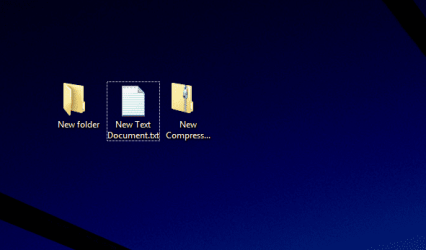
Hiya, I'm just wondering if there's been any updates that never got posted. Anyone find a fix for this?? I just installed Windows 7 today and I noticed the 'thing' appear around my desktop icons. It really cheapens the look of W7 so I wish I could make it disappear.
I did two things right before it started doing that...I adjusted the icon size on the desktop, and I was also playing around with the onscreen keyboard/writing tablet, right before I noticed the 'thing' but I'm not sure that's what caused it.
Please let me know! Thanks!
Untitled.jpg
 

My Computer My Computer

OS
Windows 7
This is a Windows 7 bug it's more frequent in 64 bit that 32 bit it appears some time after being logged in, this selection box is redundant. In Vista this dotted box appeared in explorer Windows but not in desktop now the bug has been moved to desktop. But you have to remember that this is a Microsoft OS don't hope them to fix it (i.e.: the luna silver style in Windows XP, inactive close buttons were shown as pressed and the startmenu button had a shown alpha channel pixel, a pink dot). Another bug like this is the corner of the weather gadget when the day is sunny it shows as diagonal instead of round. That's one of the main differences between Apple and MS (each has it's pros and it's cons).
 
Last edited:

My Computer My Computer

OS
Windows 7 64-bit
Hiya, I'm just wondering if there's been any updates that never got posted. Anyone find a fix for this?? I just installed Windows 7 today and I noticed the 'thing' appear around my desktop icons. It really cheapens the look of W7 so I wish I could make it disappear.
I did two things right before it started doing that...I adjusted the icon size on the desktop, and I was also playing around with the onscreen keyboard/writing tablet, right before I noticed the 'thing' but I'm not sure that's what caused it.
Please let me know! Thanks!
View attachment 42041

The focus box appears when the desktop's icon size is adjusted. I noticed it appeared after adjusting the desktop's icon size by clicking on a clear spot on the desktop and then holding the control key while scrolling the mouse scroll wheel. This increases and decreases the size of the desktop icons. After reading another post explaining this and actually doing it, the box appeared and I have not been able to turn it off.

I found this post after searching for some way to turn it off and thought it might help us all find a solution if I posted how I actually activated it.

For now, the only solution I see is to turn off all desktop icons. Right click a clear spot on the desktop, click view, then uncheck "show desktop icons." I have the recycle bin and all the program icons I use either on the quick launch bar or on the taskbar and have turned off all desktop icons.

Sorry, I couldn't be much help; but hopefully someone else will come along and explain how to turn the stupid focus box off.
 

My Computer My Computer

Computer Manufacturer/Model Number
HP dv3510nr
OS
Windows 7 Professional x64
CPU
Intel Core 2 Duo P7350 2GHz (1066MHz FSB, 3MB Cache)
Memory
4GB DDR2
Graphics Card(s)
Nvidia GeForce 9300M GS with 512MB
Sound Card
IDT High Definition Audio
Monitor(s) Displays
13.3" WXGA High-Definition HP LED BrightView Widescreen
Screen Resolution
1280 x 800
Hard Drives
320GB 5400RPM SATA
Does everyone else with Windows 7 have this box around one of their icons?

Yes and No. Yes in that sometimes it will appear if triggered by some action, such as right click, select all. No in that most of the time it's normal with the translucent selection around it.
 

My Computer My Computer

Computer Manufacturer/Model Number
Averatec 6130HS-20
OS
Windows 7 Professional 32-bit (6.1, Build 7600)
CPU
Intel(R) Pentium(R) 4 3.00 GHz HT
Memory
2.0 GB
Graphics Card(s)
ATI Mobility Radeon 9600 64MB
Sound Card
Realtek AC'97 Audio
Screen Resolution
1280 x 800
Hard Drives
Seagate 96023A 60GB 7200RPM -
Seagate FreeAgentDesktop 250GB
Cooling
20 Inch Box Fan
Mouse
Targus PAWM10 Wireless Optical Laptop Mouse
Back
Top