NVIDIA Driver - Convert from Desktop to Mobile (Laptop)

Hey, I'm a bit confused as to what you are asking in step 6. I found my hardware ID's:

PCI\VEN_8086&DEV_27A2&SUBSYS_81E6104D&REV_03
PCI\VEN_8086&DEV_27A2&SUBSYS_81E6104D
PCI\VEN_8086&DEV_27A2&CC_030000
PCI\VEN_8086&DEV_27A2&CC_0300

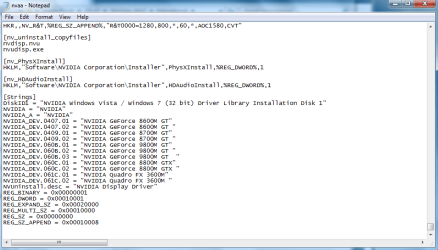
Not sure what to do after this. This is what I have in the String section of the .inf file:


[Strings]
; Non-Localizable Strings
REG_SZ = 0x00000000
REG_MULTI_SZ = 0x00010000
REG_EXPAND_SZ = 0x00020000
REG_BINARY = 0x00000001
REG_DWORD = 0x00010001
REG_SZ_APPEND = 0x00010008

; Localizable Strings
NVIDIA = "NVIDIA"
NVIDIA_G84.DEV_0407.1 = "NVIDIA GeForce 8600M GT"
NVIDIA_G84.DEV_0407.2 = "NVIDIA GeForce 8600M GT "
NVIDIA_G84.DEV_0409.1 = "NVIDIA GeForce 8700M GT"
NVIDIA_G84.DEV_0409.2 = "NVIDIA GeForce 8700M GT "
NVIDIA_G92.DEV_060C.1 = "NVIDIA GeForce 8800M GTX"
NVIDIA_G92.DEV_060C.2 = "NVIDIA GeForce 8800M GTX "
NVIDIA_G92.DEV_060B.1 = "NVIDIA GeForce 9800M GT"
NVIDIA_G92.DEV_060B.2 = "NVIDIA GeForce 9800M GT "
NVUninstall.desc = "NVIDIA Display Driver"
DiskID1 = "NVIDIA Windows Vista Driver Library Installation Disk 1"
NVSVC.name = "NVIDIA Display Driver Service"
NVSVC.desc = "Provides system and desktop level support to the NVIDIA display driver"

Thank you.
Hello Marko8, and welcome to Windows Seven Forums! Torrentg is unavailable, and even though I am not the video driver Guru he is, I will try to help out.

The objective is to take a "desktop" video driver and alter it so it will work for a mobile device, ie laptop. The list shown above is the Nvidia video cards supported by this driver package. We need to know what Nvidia hardware your laptop is using. The first step would be for you to fill in your computer specs in your user "control panel" of the forum so we can nail down what is in your mobile device.

When I Googled your device ID: PCI\VEN_8086&DEV_27A2&SUBSYS_81E6104D&REV_03

I get a Sony Viao with a GeForce Go 7400 or 7700?

DriverPacks.net Forum / Let's do the HDA-Thingy!

GeForce Go 7400 disappeared from device manager

http://www.sevenforums.com/graphic-cards/36593-nvidia-driver-convert-desktop-mobile-laptop-3.html

If so, you are trying to mod drivers for 8000. The tutorial instructions say get the driver closest to your card so I would think you need to be moding drivers for the 7000 Nvidia chipset?

Please verify this information before we proceed.

Cheers!
Robert
 

My Computer My Computer

At a glance

...
OS
...
It is a NVIDIA GeForce Go 7400.
 
Last edited:

My Computer My Computer

At a glance

Windows 7 32-bitNVIDIA GeForce Go 7400
Computer Manufacturer/Model Number
Sony Vaio VGN-SZ420N
OS
Windows 7 32-bit
Graphics Card(s)
NVIDIA GeForce Go 7400
Sound Card
High Definition Audio Device
Monitor(s) Displays
Generic PnP Monitor
Screen Resolution
1280x800
Keyboard
Standard PS/2 Keyboard
Mouse
Microsoft USB Compact Optical Mouse (IntelliPoint)
Ok I filled in what I could for computer specs.
 

My Computer My Computer

At a glance

Windows 7 32-bitNVIDIA GeForce Go 7400
Computer Manufacturer/Model Number
Sony Vaio VGN-SZ420N
OS
Windows 7 32-bit
Graphics Card(s)
NVIDIA GeForce Go 7400
Sound Card
High Definition Audio Device
Monitor(s) Displays
Generic PnP Monitor
Screen Resolution
1280x800
Keyboard
Standard PS/2 Keyboard
Mouse
Microsoft USB Compact Optical Mouse (IntelliPoint)
Ok I filled in what I could for computer specs.
Excellent!

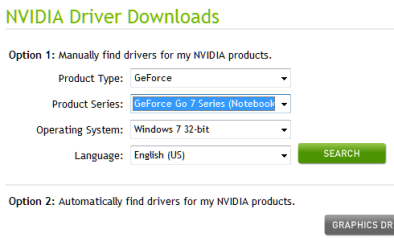
Now, step one is to download the latest Nvidia driver pack for the 7000 series cards.

Then when you get to step

6) In the .inf, scroll to the bottom [Strings] section. Again, look for most similar desktop model. Change the beginning part to match what you found in last step 5. For example:

NVIDIA_DEV.0421.01 = "NVIDIA GeForce 7400 GT"

and you have 7400M GT, change it to

NVIDIA_DEV.0426.01 = "NVIDIA GeForce 7400M GT"

OR what ever you find closest to work with.

Then continue to adapt the steps of the tutorial to your 7400 Nvidia chip and let us know how it goes?

Cheers!
Robert
 

My Computer My Computer

At a glance

...
OS
...
Ok it seems I'm getting slightly closer. In Device Manager under Display Adapters, it shows NVIDIA GeForce Go 7400 however, under details I get: "This device is not working properly because Windows cannot load the drivers required for this device. (Code 31)".
Now when i try running the installation, this time it actually goes through instead of giving me an error but, the installation never completes and asks me to try at a later time. Now once again I have hit a dead end and I'm not sure what to do.
 

My Computer My Computer

At a glance

Windows 7 32-bitNVIDIA GeForce Go 7400
Computer Manufacturer/Model Number
Sony Vaio VGN-SZ420N
OS
Windows 7 32-bit
Graphics Card(s)
NVIDIA GeForce Go 7400
Sound Card
High Definition Audio Device
Monitor(s) Displays
Generic PnP Monitor
Screen Resolution
1280x800
Keyboard
Standard PS/2 Keyboard
Mouse
Microsoft USB Compact Optical Mouse (IntelliPoint)
Ok it seems I'm getting slightly closer. In Device Manager under Display Adapters, it shows NVIDIA GeForce Go 7400 however, under details I get: "This device is not working properly because Windows cannot load the drivers required for this device. (Code 31)".
Now when i try running the installation, this time it actually goes through instead of giving me an error but, the installation never completes and asks me to try at a later time. Now once again I have hit a dead end and I'm not sure what to do.
The driver package is for a desktop computer, not a laptop, so it is not likely it will install. However, since the INF file as been modified to work with a mobile device, we should be able to manually install it.

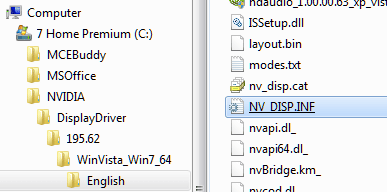
You should have your Nvidia driver package in a folder on your C drive:

nv_install_01.png

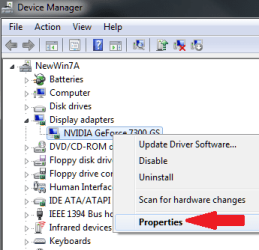
Open Device Manager (type it in the search box, for example)
Select the Properties for the Nvidia device:

nv_install_02.png

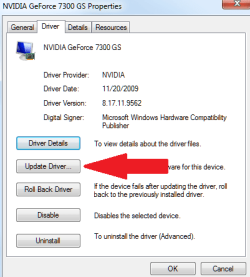
Select to "Update Driver":

nv_install_03.png

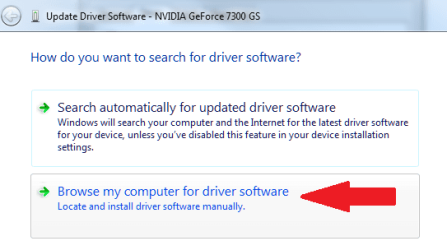
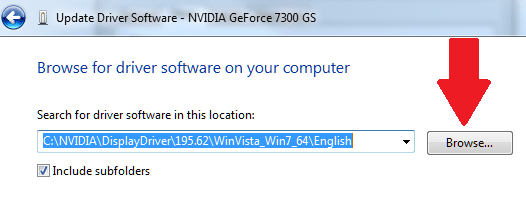
Select to "Browse":

nv_install_04.png

and browse to the C drive, the Nvidia folder with the INF you modified:

nv_install_05.png

This should install the modified driver for your laptop.

If there is a problem, open the INF file and post the changes you made so we can analyze it.

Cheers!
Robert
 

My Computer My Computer

At a glance

...
OS
...
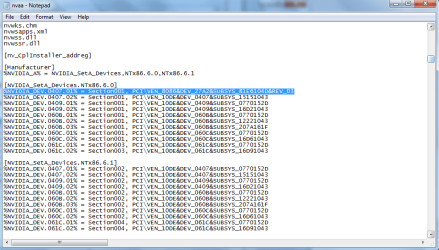
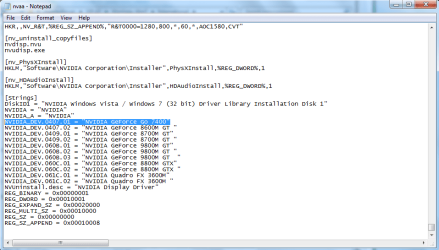
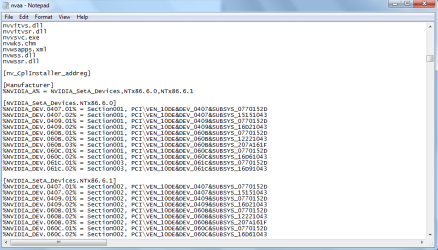
Here are the .inf original files and changes:

As well as my hardware IDs:
PCI\VEN_8086&DEV_27A2&SUBSYS_81E6104D&REV_03
PCI\VEN_8086&DEV_27A2&SUBSYS_81E6104D
PCI\VEN_8086&DEV_27A2&CC_030000
PCI\VEN_8086&DEV_27A2&CC_0300
 

Attachments

  • inf2.png
    inf2.png
    23.5 KB · Views: 57
  • inf.png
    inf.png
    24.9 KB · Views: 57
  • Oinf2.png
    Oinf2.png
    18.9 KB · Views: 46
  • Oinf.png
    Oinf.png
    23.1 KB · Views: 63

My Computer My Computer

At a glance

Windows 7 32-bitNVIDIA GeForce Go 7400
Computer Manufacturer/Model Number
Sony Vaio VGN-SZ420N
OS
Windows 7 32-bit
Graphics Card(s)
NVIDIA GeForce Go 7400
Sound Card
High Definition Audio Device
Monitor(s) Displays
Generic PnP Monitor
Screen Resolution
1280x800
Keyboard
Standard PS/2 Keyboard
Mouse
Microsoft USB Compact Optical Mouse (IntelliPoint)
Marko8, did you try the GeForce Go 7000 Notebook drivers from Nvidia?

nv_install_06.png

Are you using the 32 bit Windows 7 or the 64 bit?
 

My Computer My Computer

At a glance

...
OS
...
I've tried the NVIDIA driver that your taking about but I haven't tried modifying it manually. I have been modifying the driver that my computer downloaded automatically for me. I guess I can give the other one a try. But was what i sent you correct? Did I modify the .inf files properly? And I am using 32bit.
 

My Computer My Computer

At a glance

Windows 7 32-bitNVIDIA GeForce Go 7400
Computer Manufacturer/Model Number
Sony Vaio VGN-SZ420N
OS
Windows 7 32-bit
Graphics Card(s)
NVIDIA GeForce Go 7400
Sound Card
High Definition Audio Device
Monitor(s) Displays
Generic PnP Monitor
Screen Resolution
1280x800
Keyboard
Standard PS/2 Keyboard
Mouse
Microsoft USB Compact Optical Mouse (IntelliPoint)
I've tried the NVIDIA driver that your taking about but I haven't tried modifying it manually. I have been modifying the driver that my computer downloaded automatically for me. I guess I can give the other one a try. But was what i sent you correct? Did I modify the .inf files properly? And I am using 32bit.
Well ... I will have to take some time to check it out, but I do not think drivers for the 8000 series will work for a GeForce Go 7400?

The driver package available from Nvidia for the GeForce Go 7000 is already modded for a mobile device. Please, what did not work for you. Did you try to install the INF manually for your 7400? Or did the Installer fail?

I will have to do some research and get back with you tomorrow.

Cheers!
Robert
 

My Computer My Computer

At a glance

...
OS
...
I've tried both. I attempted installing the INF manually but it seems I did something wrong. As for the installer, I have tried that several times. Firstly, without modifying the INF, the installer would not even open up and would give me an error. Then, when I actually modified the INF, my computer downloaded the "NVIDIA Control Panel" and the "NVIDIA PhysX" (They do not open up though.). So then I ran the installer once again and to my surprise, there was no error. However, in the end, the installer failed and proposed that I should try again at a later time.
Thank you for putting time and effort into this. If all fails, I guess I can always reformat and reinstall Windows 7 again?
 

My Computer My Computer

At a glance

Windows 7 32-bitNVIDIA GeForce Go 7400
Computer Manufacturer/Model Number
Sony Vaio VGN-SZ420N
OS
Windows 7 32-bit
Graphics Card(s)
NVIDIA GeForce Go 7400
Sound Card
High Definition Audio Device
Monitor(s) Displays
Generic PnP Monitor
Screen Resolution
1280x800
Keyboard
Standard PS/2 Keyboard
Mouse
Microsoft USB Compact Optical Mouse (IntelliPoint)
I've tried both. I attempted installing the INF manually but it seems I did something wrong. As for the installer, I have tried that several times. Firstly, without modifying the INF, the installer would not even open up and would give me an error. Then, when I actually modified the INF, my computer downloaded the "NVIDIA Control Panel" and the "NVIDIA PhysX" (They do not open up though.). So then I ran the installer once again and to my surprise, there was no error. However, in the end, the installer failed and proposed that I should try again at a later time.
Thank you for putting time and effort into this. If all fails, I guess I can always reformat and reinstall Windows 7 again?
Before you do that ... (!) ... uninstall all video drivers and use a driver cleaner, then try install the driver you want again.

First try this: You need driver 179.48. Find and open nvam.inf. Near the top of the file, add the line like I have here:
Code:
%NVIDIA_G73M.DEV_0398.1% = nv_G7x,       PCI\VEN_10DE&DEV_0398&SUBSYS_12321043
%NVIDIA_G73M.DEV_0398.2% = nv_G7x,       PCI\VEN_10DE&DEV_0398&SUBSYS_13221043
%NVIDIA_G73M.DEV_0398.3% = nv_G7x,       PCI\VEN_10DE&DEV_0398&SUBSYS_14401043
%NVIDIA_G73.DEV_039B.1%  = nv_G7x,       PCI\VEN_10DE&DEV_039B&SUBSYS_14481043

%NVIDIA_G74.DEV_01D8.1% = nv_NV3x_G7x, PCI\VEN_10DE&DEV_01D8&SUBSYS_81E6104D

%NVIDIA_G84.DEV_0405.1%  = nv_G8x_Adp,   PCI\VEN_10DE&DEV_0405&SUBSYS_15D21043
%NVIDIA_G84.DEV_0405.2%  = nv_G8x_Adp,   PCI\VEN_10DE&DEV_0405&SUBSYS_16341043
%NVIDIA_G84.DEV_0407.1%  = nv_G8x,       PCI\VEN_10DE&DEV_0407&SUBSYS_16181043
%NVIDIA_G84.DEV_0407.2%  = nv_G8x_1,     PCI\VEN_10DE&DEV_0407&SUBSYS_3D7B17AA
%NVIDIA_G84.DEV_0407.4%  = nv_G8x_V1S,   PCI\VEN_10DE&DEV_0407&SUBSYS_15881043
The 81E6104D is from your id.

Then at the bottom of the file add a line like this:
Code:
NVIDIA_G72.DEV_01D8.1  = "NVIDIA GeForce Go 7400"
NVIDIA_G72.DEV_01D8.2  = "NVIDIA GeForce Go 7400 "
NVIDIA_G72.DEV_01D8.3  = "NVIDIA GeForce Go 7400  "
NVIDIA_G73.DEV_0397.1  = "NVIDIA GeForce Go 7700"
NVIDIA_G73M.DEV_0398.1 = "NVIDIA GeForce Go 7600"
NVIDIA_G73M.DEV_0398.2 = "NVIDIA GeForce Go 7600 "
NVIDIA_G73M.DEV_0398.3 = "NVIDIA GeForce Go 7600  "
NVIDIA_G73.DEV_039B.1  = "NVIDIA GeForce Go 7900 SE"

NVIDIA_G74.DEV_01D8.1  = "NVIDIA GeForce Go 7400"

NVIDIA_G84.DEV_0405.1  = "NVIDIA GeForce 9500M GS"
NVIDIA_G84.DEV_0405.2  = "NVIDIA GeForce 9500M GS "
NVIDIA_G84.DEV_0407.1  = "NVIDIA GeForce 8600M GT"
NVIDIA_G84.DEV_0407.2  = "NVIDIA GeForce 8600M GT "
Run the installer from setup.exe, and let us know how it goes?

Here are some other links I found while researching:

http://www.sevenforums.com/graphic-cards/9087-nvidia-geforce-go-7400-not-recognized.html

HOW TO: Modify and install Nvidia drivers for mobile graphics chipsets in Windows 7 when all else fails @ The Experience Blog

NVIDIA MobilityModder - HardwareHeaven.com

Cheers!
Robert
 

My Computer My Computer

At a glance

...
OS
...
Was out all day, did not have a chance to try it yet. I will soon and post my results.

Thank You!!
 

My Computer My Computer

At a glance

Windows 7 32-bitNVIDIA GeForce Go 7400
Computer Manufacturer/Model Number
Sony Vaio VGN-SZ420N
OS
Windows 7 32-bit
Graphics Card(s)
NVIDIA GeForce Go 7400
Sound Card
High Definition Audio Device
Monitor(s) Displays
Generic PnP Monitor
Screen Resolution
1280x800
Keyboard
Standard PS/2 Keyboard
Mouse
Microsoft USB Compact Optical Mouse (IntelliPoint)
Ok. This has to be it. I think my main problem is the stamina/speed switch on my vaio laptop. The green light is on stamina although I have it switched to speed. So I have been operating on the stamina mode which I found out, uses the Intel graphics while the Speed mode uses NVIDIA graphics. I am currently trying to find a fix for this. I will keep posting updates.

*I tried what you suggested and although it all makes sense, it just will not work.
 
Last edited:

My Computer My Computer

At a glance

Windows 7 32-bitNVIDIA GeForce Go 7400
Computer Manufacturer/Model Number
Sony Vaio VGN-SZ420N
OS
Windows 7 32-bit
Graphics Card(s)
NVIDIA GeForce Go 7400
Sound Card
High Definition Audio Device
Monitor(s) Displays
Generic PnP Monitor
Screen Resolution
1280x800
Keyboard
Standard PS/2 Keyboard
Mouse
Microsoft USB Compact Optical Mouse (IntelliPoint)
I seem to have no luck on my side. I can't get this to work and I'm at the point of giving up. Thanks a lot for your time and effort! I really appreciate it. =)
 

My Computer My Computer

At a glance

Windows 7 32-bitNVIDIA GeForce Go 7400
Computer Manufacturer/Model Number
Sony Vaio VGN-SZ420N
OS
Windows 7 32-bit
Graphics Card(s)
NVIDIA GeForce Go 7400
Sound Card
High Definition Audio Device
Monitor(s) Displays
Generic PnP Monitor
Screen Resolution
1280x800
Keyboard
Standard PS/2 Keyboard
Mouse
Microsoft USB Compact Optical Mouse (IntelliPoint)
I seem to have no luck on my side. I can't get this to work and I'm at the point of giving up. Thanks a lot for your time and effort! I really appreciate it. =)
Sorry to hear that. Is it the "stamina/speed switch" holding you up?
 

My Computer My Computer

At a glance

...
OS
...
Yes. It will not operate on speed.
 

My Computer My Computer

At a glance

Windows 7 32-bitNVIDIA GeForce Go 7400
Computer Manufacturer/Model Number
Sony Vaio VGN-SZ420N
OS
Windows 7 32-bit
Graphics Card(s)
NVIDIA GeForce Go 7400
Sound Card
High Definition Audio Device
Monitor(s) Displays
Generic PnP Monitor
Screen Resolution
1280x800
Keyboard
Standard PS/2 Keyboard
Mouse
Microsoft USB Compact Optical Mouse (IntelliPoint)
Yes. It will not operate on speed.
That would seem to be a BIOS issue. Perhaps reflashing the BIOS would help here. Maybe flash the previous BIOS release and see if the switch will work, then flash the most current file?
 

My Computer My Computer

At a glance

...
OS
...
Hello guys! Is this also solution for me? I have VAIO VGN-FE11M and anytime I play some video in windows 7 professional here is a blue screen. My graphic card is NVIDIA GEFORCE GO 7400 and I dont know what to do... I tried to lower the hardware acceleration but there is really bad graphic than. Can you help me somehow? Thanks for your time
 

My Computer My Computer

At a glance

windows 7
OS
windows 7
Hi--

I was so glad to see how many people were successful in fixing this nVidia thing! I hope someone (torrentg?) is monitoring this thread still...

So I have a Sony VAIO VGN-SZ240 (nVidia GeForce Go 7400) notebook, recently updated it to Windows 7, and I can't get the screen res above 1024 x 768 (looking for something like 1280 x 800 but I forget).

I've tried multiple things, but nothing is working. When I found this thread, I ran Driver Cleaner Pro 1.5, and downloaded the recommended driver from nVidia 179.48 Beta (even though it says it isn't supported for Sony VAIO's).

However, the NVIDIA folder does not have the nv_disp.inf file inside, so I'm not sure what to do...

Any help would be appreciated!

*edit* Got it taken care of, never mind! http://esupport.sony.com/US/perl/swu-list.pl?mdl=VGNSZ240&SelectOS=27#div_pos_107 Change your model to the correct on. that's mine. then download the Video results! I think the nVIDIA® GeForce® Go Graphics Controller Driver Update worked for me. Hope this helps someone else!
 
Last edited:

My Computer My Computer

At a glance

Windows 7
OS
Windows 7
Back
Top