
Need some help/advice with my HD 5770

GhostRaider

New member
Member
Local time
3:50 PM
Messages
27
OK my problem is one I think is already being discussed on another thread in that when I use my HDMI cables on my main monitor and subsequent additional hookup which is my tv I get black bars above, below, and to the sides of my windows screen.

I am pretty sure this is the problem as discussed in another thread here:

Those black bands are part of the aspect ratio of true 16:9, they are always there. Even in HD broadcasts from your cable or satellite provider they are there. If your old card filled up your plasma screen, then it converted it to 4:3 aspect ratio or a setting was change.

The solution that was given was this:

In Catalyst control Center:

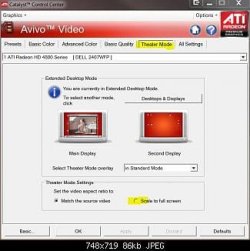
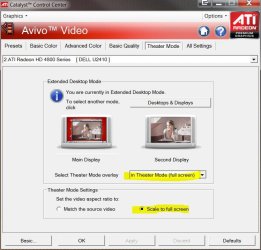
Avivo Video > Theater Mode > select Scale to full screen

The problem I am having is that unlike the pic below I do not have a tab for "Theater Mode". I have all the other tabs except for that one. Can someone here please help me out on this so I can eliminate those black bars.

Side note..when I use my DVI everything works correctly it is only when I use my HDMI cables that this happens. Now while I can use my DVI I would prefer to use my HDMI cables especially since I bought a 35ft cable to run to my TV that i can't use right now becuase of this problem.

If you need my specs i have given detailed ones to help in anyway possible. Again any help would be appreciated.
 

Attachments
  • 55476d1266721896t-ati-hd-5770-hell-earth-avivo.jpg
    55476d1266721896t-ati-hd-5770-hell-earth-avivo.jpg
    17.8 KB · Views: 157
Last edited:

My Computer My Computer

At a glance

Windows 7 Ultimate (32-bit)DualCore Pentium D 940 Presler (64bit)4GB DDR2 800MHz PC 6400, 4GB via RamBoostXFX Radeon HD 5770 (Juniper XT) 1GB: (ATI Cat...
Computer Manufacturer/Model Number
Home Build
OS
Windows 7 Ultimate (32-bit)
CPU
DualCore Pentium D 940 Presler (64bit)
Motherboard
Biostar G31-M7 TE
Memory
4GB DDR2 800MHz PC 6400, 4GB via RamBoost
Graphics Card(s)
XFX Radeon HD 5770 (Juniper XT) 1GB: (ATI Catalyst 10.4)
Sound Card
Creative Audigy SE (SB0570) Sound Card PCI
Monitor(s) Displays
22" Gateway FHD2102 Class 1080p HD Plus LCD Monitor
Screen Resolution
Gateway Monitor 1920x1080 and Toshiba 40RV525U Tv 1920x1080
Hard Drives
(Primary) Seagate 500GB 7200RPM 32MB Buffer Serial ATA II

(Secondary) Maxtor 500GB 7200RPM 16MB Buffer IDE (Converted to Serial ATA)
PSU
LOGISYS PS550AC 550Watts ATX12V Power Supply
Case
MidTower: Thermaltake M9 VI1000BWS
Cooling
Zalman CNPS9700
Keyboard
Logitech LX7 Cordless Optical Mouse
Mouse
Logitech Cordless Desktop EX 100
Other Info
Additional cooloing: 2 Icages(intakes), 2 - 12cm side panel fans(intakes), 1 - Rear Panel 12cm fan(outtake)......

Computer is also connected to a Toshiba 40RV525U 40-Inch 1080p LCD HDTV so that I can watch movies off of my hard drive and dvd player.
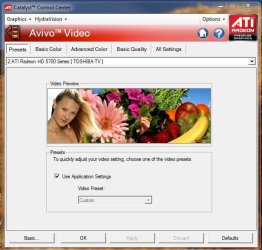
Oh as some additional info when I follow those instructions up above this is what I am looking at in the end:
 

Attachments

  • CCC.jpg
    CCC.jpg
    52.2 KB · Views: 351

My Computer My Computer

At a glance

Windows 7 Ultimate (32-bit)DualCore Pentium D 940 Presler (64bit)4GB DDR2 800MHz PC 6400, 4GB via RamBoostXFX Radeon HD 5770 (Juniper XT) 1GB: (ATI Cat...
Computer Manufacturer/Model Number
Home Build
OS
Windows 7 Ultimate (32-bit)
CPU
DualCore Pentium D 940 Presler (64bit)
Motherboard
Biostar G31-M7 TE
Memory
4GB DDR2 800MHz PC 6400, 4GB via RamBoost
Graphics Card(s)
XFX Radeon HD 5770 (Juniper XT) 1GB: (ATI Catalyst 10.4)
Sound Card
Creative Audigy SE (SB0570) Sound Card PCI
Monitor(s) Displays
22" Gateway FHD2102 Class 1080p HD Plus LCD Monitor
Screen Resolution
Gateway Monitor 1920x1080 and Toshiba 40RV525U Tv 1920x1080
Hard Drives
(Primary) Seagate 500GB 7200RPM 32MB Buffer Serial ATA II

(Secondary) Maxtor 500GB 7200RPM 16MB Buffer IDE (Converted to Serial ATA)
PSU
LOGISYS PS550AC 550Watts ATX12V Power Supply
Case
MidTower: Thermaltake M9 VI1000BWS
Cooling
Zalman CNPS9700
Keyboard
Logitech LX7 Cordless Optical Mouse
Mouse
Logitech Cordless Desktop EX 100
Other Info
Additional cooloing: 2 Icages(intakes), 2 - 12cm side panel fans(intakes), 1 - Rear Panel 12cm fan(outtake)......

Computer is also connected to a Toshiba 40RV525U 40-Inch 1080p LCD HDTV so that I can watch movies off of my hard drive and dvd player.

My Computer My Computer

At a glance

Windows 7 Ultimate x86-64[email protected] 1066MHz FSB6GB DDR3 1066MHz9300M GS 256MB Dedicated (Speed) + Intel4500M...
Computer Manufacturer/Model Number
Sony Vaio Z46GDU
OS
Windows 7 Ultimate x86-64
CPU
[email protected] 1066MHz FSB
Motherboard
Sony branded
Memory
6GB DDR3 1066MHz
Graphics Card(s)
9300M GS 256MB Dedicated (Speed) + Intel4500MHD (Stamina)
Sound Card
Realtek HD Audio
Monitor(s) Displays
13.1' WXGA
Screen Resolution
1600x900
Hard Drives
320GB 7200RPM w/ 16MB cache
Internet Speed
1MB/s

That is the post I was referencing in my OP.

The advice you listed next was :

Connect only your 52" plasma via HDMI, then find an option in your tv to autotune or set it to its native resolution. Then, connect your other screen. Also, look for the desktop options and ensure your TV is listed/supported.
What do I do if I am not looking for a fix for my Tv at the moment. First things first I am trying to get my monitor squared away and it is a FHD2102 Gateway Monitor 1080p monitor which is the only thing connected to my computer right now.

My monitor won't let me autotune as that option is deactivated and I don't have the slightest clue as to what to look for in my desktop options or where to look to see if my monitor is supported which I have to think it is because when I use the DVI cable everything works perfectly.

Side note even when my monitor is connected by only DVI Cable and even though it works like it should and elimintates the black bars unlike what it does with the HDMI cables I still can't get that option that is missing from the CCC.
 

My Computer My Computer

At a glance

Windows 7 Ultimate (32-bit)DualCore Pentium D 940 Presler (64bit)4GB DDR2 800MHz PC 6400, 4GB via RamBoostXFX Radeon HD 5770 (Juniper XT) 1GB: (ATI Cat...
Computer Manufacturer/Model Number
Home Build
OS
Windows 7 Ultimate (32-bit)
CPU
DualCore Pentium D 940 Presler (64bit)
Motherboard
Biostar G31-M7 TE
Memory
4GB DDR2 800MHz PC 6400, 4GB via RamBoost
Graphics Card(s)
XFX Radeon HD 5770 (Juniper XT) 1GB: (ATI Catalyst 10.4)
Sound Card
Creative Audigy SE (SB0570) Sound Card PCI
Monitor(s) Displays
22" Gateway FHD2102 Class 1080p HD Plus LCD Monitor
Screen Resolution
Gateway Monitor 1920x1080 and Toshiba 40RV525U Tv 1920x1080
Hard Drives
(Primary) Seagate 500GB 7200RPM 32MB Buffer Serial ATA II

(Secondary) Maxtor 500GB 7200RPM 16MB Buffer IDE (Converted to Serial ATA)
PSU
LOGISYS PS550AC 550Watts ATX12V Power Supply
Case
MidTower: Thermaltake M9 VI1000BWS
Cooling
Zalman CNPS9700
Keyboard
Logitech LX7 Cordless Optical Mouse
Mouse
Logitech Cordless Desktop EX 100
Other Info
Additional cooloing: 2 Icages(intakes), 2 - 12cm side panel fans(intakes), 1 - Rear Panel 12cm fan(outtake)......

Computer is also connected to a Toshiba 40RV525U 40-Inch 1080p LCD HDTV so that I can watch movies off of my hard drive and dvd player.
I still can't get that option that is missing from the CCC.

An oversight on my behalf, sorry.

You need dual screens connected for Theater Mode option to be enabled.
 

My Computer My Computer

At a glance

8 Pro x64i7 3770K 4.6GHz16GB G.Skill Trident X 2666mhzx2 EVGA 780 Ti Superclocked SLI
Computer type
PC/Desktop
Computer Manufacturer/Model Number
Systems by SmartEyeball
OS
8 Pro x64
CPU
i7 3770K 4.6GHz
Motherboard
ASUS P8Z77 WS
Memory
16GB G.Skill Trident X 2666mhz
Graphics Card(s)
x2 EVGA 780 Ti Superclocked SLI
Sound Card
SB X-FI Surround 5.1 PRO USB / ATH-AD900 Headphones
Monitor(s) Displays
x3 Dell U2410 / 58" Samsung
Screen Resolution
5760*1200/ 1920*1200
Hard Drives
2x Intel 520 240GB (RAID 0) * 2x WD Caviar Blacks 2TB (RAID 0) * 2TB WD Caviar Black * Sony Optirac DVD
PSU
Silverstone Strider Evolution 1200W
Case
Thermaltake Level 10 GT Snow Edition
Cooling
Noctua NH-D14
Keyboard
Topre Realforce // Ducky Shine MX Black // Filco Ninja TKL
Mouse
Thermaltake Theron (Highly Recommended) + Razer Imperator
Antivirus
MSE
Browser
IE, FF, WaterFox
Other Info
GT Extreme V2 Sim Racing Cockpit + 40" LCD and K/B Mouse stand ▼
Fanatec CSR Elite Wheel + Clubsport V1 Pedals + CSR shifter/7G-H ▼Saitek X52 Pro ▼ TrackIR 5 Pro
Buttkicker v2 Seat Rumbler with Dedicated 5.1 and Sub Woofer attached to frame ▼
=
Bloody Big Grin
OK my problem is one I think is already being discussed on another thread in that when I use my HDMI cables on my main monitor and subsequent additional hookup which is my tv I get black bars above, below, and to the sides of my windows screen.

I am pretty sure this is the problem as discussed in another thread here:

Those black bands are part of the aspect ratio of true 16:9, they are always there. Even in HD broadcasts from your cable or satellite provider they are there. If your old card filled up your plasma screen, then it converted it to 4:3 aspect ratio or a setting was change.

The solution that was given was this:

In Catalyst control Center:

Avivo Video > Theater Mode > select Scale to full screen

The problem I am having is that unlike the pic below I do not have a tab for "Theater Mode". I have all the other tabs except for that one. Can someone here please help me out on this so I can eliminate those black bars.

Side note..when I use my DVI everything works correctly it is only when I use my HDMI cables that this happens. Now while I can use my DVI I would prefer to use my HDMO cables especially since I bought a 35ft cable to run to my TV that i can't use right now becuase of this problem.

If you need my specs i have given detailed ones to help in anyway possible. Again any help would be appreciated.

Make sure the resolution output (from your video card) is the same as the TV native resolution.
 

My Computer My Computer

At a glance

Windows 7 Ultimate 64BitC2D E82008GB PNY PC2-6400BFG 9600GT x 2
Computer Manufacturer/Model Number
Myself
OS
Windows 7 Ultimate 64Bit
CPU
C2D E8200
Motherboard
XFX 750i
Memory
8GB PNY PC2-6400
Graphics Card(s)
BFG 9600GT x 2
Sound Card
Stock XFX Optical
Monitor(s) Displays
Gateway 22" HD Display
Hard Drives
C: 1 TB G: 500 GB H: 500 GB
PSU
Ultra LSP 550 Pro Lifetime Series
Case
Xion2
Cooling
ThermalTake
I still can't get that option that is missing from the CCC.

An oversight on my behalf, sorry.

You need dual screens connected for Theater Mode option to be enabled.

Ok tried several different configs with cables (dual screens) to try to get the option to pop up:

HDMIs connected to both monitor and TV = no go.

DVI connected to monitor and my DVI/HDMI cable to Tv = no go

DVI connected to monitor and HDMI to Tv = no go

HDMI connected to monitor and HDMI/DVI cable connected to Tv = no go

No luck in getting that option to show up on my CCC on all tries.

Now I am assuming (dual screens) means having both monitor/Tv connected at the same time....could it also be possible they just forgot this option for the HD 5770 as far as the CCC is concerned???
 

My Computer My Computer

At a glance

Windows 7 Ultimate (32-bit)DualCore Pentium D 940 Presler (64bit)4GB DDR2 800MHz PC 6400, 4GB via RamBoostXFX Radeon HD 5770 (Juniper XT) 1GB: (ATI Cat...
Computer Manufacturer/Model Number
Home Build
OS
Windows 7 Ultimate (32-bit)
CPU
DualCore Pentium D 940 Presler (64bit)
Motherboard
Biostar G31-M7 TE
Memory
4GB DDR2 800MHz PC 6400, 4GB via RamBoost
Graphics Card(s)
XFX Radeon HD 5770 (Juniper XT) 1GB: (ATI Catalyst 10.4)
Sound Card
Creative Audigy SE (SB0570) Sound Card PCI
Monitor(s) Displays
22" Gateway FHD2102 Class 1080p HD Plus LCD Monitor
Screen Resolution
Gateway Monitor 1920x1080 and Toshiba 40RV525U Tv 1920x1080
Hard Drives
(Primary) Seagate 500GB 7200RPM 32MB Buffer Serial ATA II

(Secondary) Maxtor 500GB 7200RPM 16MB Buffer IDE (Converted to Serial ATA)
PSU
LOGISYS PS550AC 550Watts ATX12V Power Supply
Case
MidTower: Thermaltake M9 VI1000BWS
Cooling
Zalman CNPS9700
Keyboard
Logitech LX7 Cordless Optical Mouse
Mouse
Logitech Cordless Desktop EX 100
Other Info
Additional cooloing: 2 Icages(intakes), 2 - 12cm side panel fans(intakes), 1 - Rear Panel 12cm fan(outtake)......

Computer is also connected to a Toshiba 40RV525U 40-Inch 1080p LCD HDTV so that I can watch movies off of my hard drive and dvd player.
Make sure the resolution output (from your video card) is the same as the TV native resolution.

I am sorry but I don't know how to do that. Not very tech savy and am relying heavily on the instructions from you all who are much more advanced than me.

As for best guess at what you asking my video card is set to 1920x1080 and 60hz.

I have gone through my TV menu and can't find anything remotely resembeling that. There is an option for Auto Aspect Ratio and it is turned on right now. That is about all. Only other thing I can tell you is the TV is a Toshiba 40RV525U Tv 1920x1080 (1080p). When I do a google search on it though the info I get back is that the native resolution is 1920x1080. So they do indeed appear to match that is if I have identified the correct info.

With that said it is getting a little late in the morning and I am really tired so I will check back into this thread later today after I get some sleep.
 

My Computer My Computer

At a glance

Windows 7 Ultimate (32-bit)DualCore Pentium D 940 Presler (64bit)4GB DDR2 800MHz PC 6400, 4GB via RamBoostXFX Radeon HD 5770 (Juniper XT) 1GB: (ATI Cat...
Computer Manufacturer/Model Number
Home Build
OS
Windows 7 Ultimate (32-bit)
CPU
DualCore Pentium D 940 Presler (64bit)
Motherboard
Biostar G31-M7 TE
Memory
4GB DDR2 800MHz PC 6400, 4GB via RamBoost
Graphics Card(s)
XFX Radeon HD 5770 (Juniper XT) 1GB: (ATI Catalyst 10.4)
Sound Card
Creative Audigy SE (SB0570) Sound Card PCI
Monitor(s) Displays
22" Gateway FHD2102 Class 1080p HD Plus LCD Monitor
Screen Resolution
Gateway Monitor 1920x1080 and Toshiba 40RV525U Tv 1920x1080
Hard Drives
(Primary) Seagate 500GB 7200RPM 32MB Buffer Serial ATA II

(Secondary) Maxtor 500GB 7200RPM 16MB Buffer IDE (Converted to Serial ATA)
PSU
LOGISYS PS550AC 550Watts ATX12V Power Supply
Case
MidTower: Thermaltake M9 VI1000BWS
Cooling
Zalman CNPS9700
Keyboard
Logitech LX7 Cordless Optical Mouse
Mouse
Logitech Cordless Desktop EX 100
Other Info
Additional cooloing: 2 Icages(intakes), 2 - 12cm side panel fans(intakes), 1 - Rear Panel 12cm fan(outtake)......

Computer is also connected to a Toshiba 40RV525U 40-Inch 1080p LCD HDTV so that I can watch movies off of my hard drive and dvd player.
No luck in getting that option to show up on my CCC on all tries.

Now I am assuming (dual screens) means having both monitor/Tv connected at the same time

Correct.

With both your monitor and TV connected at the same time, do you see an image on both screens at the same time?

If so, do they both have the start menu on each of them? (Cloned Mode)

If that is the case, you will have set them what is called "Extended mode"


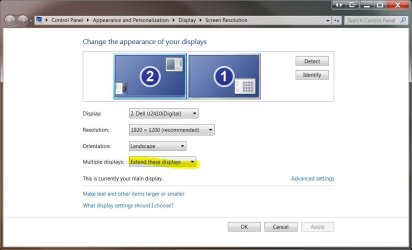
In the start menu search bar type "resolution" and select 'Adjust Screen Resolution'

On this Window, under 'Multiple Displays' select 'Extend these Displays' (If only one screen is detected, click on the 'detect' button to show both screens.)

Screen resolution.JPG

This will allow you to independently configure each screen. Make sure you make your PC monitor is the 'Main display', or the one with the taskbar. This will make your TV the 'secondary display'.

Both screens should be set to 1920x1080 @ 60hz as this is the 'native resolution' for both screens. (Simply put, the Native resolution is the optimal resolution for any given display)


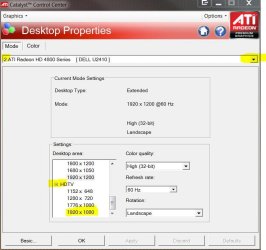
Next, Open Catalyst Control Center and go to Desktop Properties and select the secondary display (TV) from the drop down arrow at the the top right of the CCC window. Then scroll down and expand the HDTV and select the 1920x1080 resolution.

CCC Desktop properties.JPG

Apply and OK it.

Hopefully Avivo Video > Theater Mode will show up. If it doesn't, you may need to simply re-install the CAT 10.2 drivers again with both displays connected during installation.

Once you have Avivo TM available:

Select the Theater Mode overlay > in Theater Mode (Full Screen) and tick the Scale to full screen.

CCC theater Mode.JPG


Note that I am not connecting via HDMI, only DVI so I can't guarantee it will solve your problem. There may be further options in CCC that only become available when HDMI is connected, or it may be a HDMI limitation.


Let us know if it works or not.

***

After a quick play with theater mode, in Windows Media Center and Windows Media Player, I have the normal 4:3 / 16:9 borders depending on the source material (live TV, *.avi files etc)

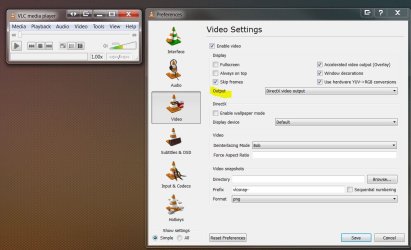
But if I use VLC player and have the video output set to use 'DirectX video output', it will fill the entire screen regardless of source file aspect ratio - i.e 4:3 source will use the entire screen without borders

But it temporarily disables Aero, and shows two instances - one screen full screen, the other with 'normal aspect ratios' and the controls. Side effect of it being an overlay, I guess.

VLC directX out.JPG


Not the most elegant of solutions, but it works.


could it also be possible they just forgot this option for the HD 5770 as far as the CCC is concerned???

Unlikely, as the same driver and Catalyst Control Center is used for a wide range of cards.
 

My Computer My Computer

At a glance

8 Pro x64i7 3770K 4.6GHz16GB G.Skill Trident X 2666mhzx2 EVGA 780 Ti Superclocked SLI
Computer type
PC/Desktop
Computer Manufacturer/Model Number
Systems by SmartEyeball
OS
8 Pro x64
CPU
i7 3770K 4.6GHz
Motherboard
ASUS P8Z77 WS
Memory
16GB G.Skill Trident X 2666mhz
Graphics Card(s)
x2 EVGA 780 Ti Superclocked SLI
Sound Card
SB X-FI Surround 5.1 PRO USB / ATH-AD900 Headphones
Monitor(s) Displays
x3 Dell U2410 / 58" Samsung
Screen Resolution
5760*1200/ 1920*1200
Hard Drives
2x Intel 520 240GB (RAID 0) * 2x WD Caviar Blacks 2TB (RAID 0) * 2TB WD Caviar Black * Sony Optirac DVD
PSU
Silverstone Strider Evolution 1200W
Case
Thermaltake Level 10 GT Snow Edition
Cooling
Noctua NH-D14
Keyboard
Topre Realforce // Ducky Shine MX Black // Filco Ninja TKL
Mouse
Thermaltake Theron (Highly Recommended) + Razer Imperator
Antivirus
MSE
Browser
IE, FF, WaterFox
Other Info
GT Extreme V2 Sim Racing Cockpit + 40" LCD and K/B Mouse stand ▼
Fanatec CSR Elite Wheel + Clubsport V1 Pedals + CSR shifter/7G-H ▼Saitek X52 Pro ▼ TrackIR 5 Pro
Buttkicker v2 Seat Rumbler with Dedicated 5.1 and Sub Woofer attached to frame ▼
=
Bloody Big Grin
Ok I am back now and have done what you posted so with that said lets get started... Also I went ahead and blew away my original drivers and put in a fresh install of 10.2 as you recommended.

Correct.

With both your monitor and TV connected at the same time, do you see an image on both screens at the same time?

If so, do they both have the start menu on each of them? (Cloned Mode)

If that is the case, you will have set them what is called "Extended mode"

They both have images and "Extended Mode" is what I always use now as I perfer it over cloned mode as it allows me to do more things.


In the start menu search bar type "resolution" and select 'Adjust Screen Resolution'

On this Window, under 'Multiple Displays' select 'Extend these Displays' (If only one screen is detected, click on the 'detect' button to show both screens.)

View attachment 55566

This will allow you to independently configure each screen. Make sure you make your PC monitor is the 'Main display', or the one with the taskbar. This will make your TV the 'secondary display'.

Both screens should be set to 1920x1080 @ 60hz as this is the 'native resolution' for both screens. (Simply put, the Native resolution is the optimal resolution for any given display)

It is on extended

Done...the only thing I had to change was setting it to extended from cloned (it's apparent default). As for everything else both were already set to 1920x1080 and matched.


Next, Open Catalyst Control Center and go to Desktop Properties and select the secondary display (TV) from the drop down arrow at the the top right of the CCC window. Then scroll down and expand the HDTV and select the 1920x1080 resolution.

View attachment 55577

Apply and OK it.

Hopefully Avivo Video > Theater Mode will show up. If it doesn't, you may need to simply re-install the CAT 10.2 drivers again with both displays connected during installation.

Went to Desktop Properties and both the Monitor and the Tv were already set to 1920/1080 60Hz by default. With that said I went to look for the Theater Mode in the other Avivo Video and still no luck. As for a fresh install as I mentioned when I started this post I started with a fresh install of 10.2.

I have done this now with fresh installs of 10.2 and followed you instructions accordingly for both of these configs.

DVI to Monitor and DVI/HDMI cable to Tv

and

HDMI to Monitor and HDMI to TV

In both cases it was a no go as far as getting that Theater tab to show itself in the Avivo Video section of the CCC.
 

My Computer My Computer

At a glance

Windows 7 Ultimate (32-bit)DualCore Pentium D 940 Presler (64bit)4GB DDR2 800MHz PC 6400, 4GB via RamBoostXFX Radeon HD 5770 (Juniper XT) 1GB: (ATI Cat...
Computer Manufacturer/Model Number
Home Build
OS
Windows 7 Ultimate (32-bit)
CPU
DualCore Pentium D 940 Presler (64bit)
Motherboard
Biostar G31-M7 TE
Memory
4GB DDR2 800MHz PC 6400, 4GB via RamBoost
Graphics Card(s)
XFX Radeon HD 5770 (Juniper XT) 1GB: (ATI Catalyst 10.4)
Sound Card
Creative Audigy SE (SB0570) Sound Card PCI
Monitor(s) Displays
22" Gateway FHD2102 Class 1080p HD Plus LCD Monitor
Screen Resolution
Gateway Monitor 1920x1080 and Toshiba 40RV525U Tv 1920x1080
Hard Drives
(Primary) Seagate 500GB 7200RPM 32MB Buffer Serial ATA II

(Secondary) Maxtor 500GB 7200RPM 16MB Buffer IDE (Converted to Serial ATA)
PSU
LOGISYS PS550AC 550Watts ATX12V Power Supply
Case
MidTower: Thermaltake M9 VI1000BWS
Cooling
Zalman CNPS9700
Keyboard
Logitech LX7 Cordless Optical Mouse
Mouse
Logitech Cordless Desktop EX 100
Other Info
Additional cooloing: 2 Icages(intakes), 2 - 12cm side panel fans(intakes), 1 - Rear Panel 12cm fan(outtake)......

Computer is also connected to a Toshiba 40RV525U 40-Inch 1080p LCD HDTV so that I can watch movies off of my hard drive and dvd player.
Connect one monitor via D-Sub, the other via HDMI, that card may not support HDMI + DVI at the same time. We'll take it from there.
 

My Computer My Computer

At a glance

Windows 7 Ultimate x86-64[email protected] 1066MHz FSB6GB DDR3 1066MHz9300M GS 256MB Dedicated (Speed) + Intel4500M...
Computer Manufacturer/Model Number
Sony Vaio Z46GDU
OS
Windows 7 Ultimate x86-64
CPU
[email protected] 1066MHz FSB
Motherboard
Sony branded
Memory
6GB DDR3 1066MHz
Graphics Card(s)
9300M GS 256MB Dedicated (Speed) + Intel4500MHD (Stamina)
Sound Card
Realtek HD Audio
Monitor(s) Displays
13.1' WXGA
Screen Resolution
1600x900
Hard Drives
320GB 7200RPM w/ 16MB cache
Internet Speed
1MB/s
Connect one monitor via D-Sub, the other via HDMI, that card may not support HDMI + DVI at the same time. We'll take it from there.

Unfortunaltey I don't have and d-sub adapter as the card is dual dvi. This is the exact card made by XFX that I have if you need it's specs:

Graphic Cards - ATI Radeon HD 5000 - ATI Radeon? HD 5770

The only adapaters and cables that i have at my disposal right now are as follows:

1 - 6ft HDMI cable
1 - 35ft HDMI cable (for the Tv)
1 - 6ft DVI cable
1 - 35 ft DVI to HDMI cable (for the tv)
2 - DVI to HDMI adapters
 

My Computer My Computer

At a glance

Windows 7 Ultimate (32-bit)DualCore Pentium D 940 Presler (64bit)4GB DDR2 800MHz PC 6400, 4GB via RamBoostXFX Radeon HD 5770 (Juniper XT) 1GB: (ATI Cat...
Computer Manufacturer/Model Number
Home Build
OS
Windows 7 Ultimate (32-bit)
CPU
DualCore Pentium D 940 Presler (64bit)
Motherboard
Biostar G31-M7 TE
Memory
4GB DDR2 800MHz PC 6400, 4GB via RamBoost
Graphics Card(s)
XFX Radeon HD 5770 (Juniper XT) 1GB: (ATI Catalyst 10.4)
Sound Card
Creative Audigy SE (SB0570) Sound Card PCI
Monitor(s) Displays
22" Gateway FHD2102 Class 1080p HD Plus LCD Monitor
Screen Resolution
Gateway Monitor 1920x1080 and Toshiba 40RV525U Tv 1920x1080
Hard Drives
(Primary) Seagate 500GB 7200RPM 32MB Buffer Serial ATA II

(Secondary) Maxtor 500GB 7200RPM 16MB Buffer IDE (Converted to Serial ATA)
PSU
LOGISYS PS550AC 550Watts ATX12V Power Supply
Case
MidTower: Thermaltake M9 VI1000BWS
Cooling
Zalman CNPS9700
Keyboard
Logitech LX7 Cordless Optical Mouse
Mouse
Logitech Cordless Desktop EX 100
Other Info
Additional cooloing: 2 Icages(intakes), 2 - 12cm side panel fans(intakes), 1 - Rear Panel 12cm fan(outtake)......

Computer is also connected to a Toshiba 40RV525U 40-Inch 1080p LCD HDTV so that I can watch movies off of my hard drive and dvd player.
My Computer My Computer

At a glance

8 Pro x64i7 3770K 4.6GHz16GB G.Skill Trident X 2666mhzx2 EVGA 780 Ti Superclocked SLI
Computer type
PC/Desktop
Computer Manufacturer/Model Number
Systems by SmartEyeball
OS
8 Pro x64
CPU
i7 3770K 4.6GHz
Motherboard
ASUS P8Z77 WS
Memory
16GB G.Skill Trident X 2666mhz
Graphics Card(s)
x2 EVGA 780 Ti Superclocked SLI
Sound Card
SB X-FI Surround 5.1 PRO USB / ATH-AD900 Headphones
Monitor(s) Displays
x3 Dell U2410 / 58" Samsung
Screen Resolution
5760*1200/ 1920*1200
Hard Drives
2x Intel 520 240GB (RAID 0) * 2x WD Caviar Blacks 2TB (RAID 0) * 2TB WD Caviar Black * Sony Optirac DVD
PSU
Silverstone Strider Evolution 1200W
Case
Thermaltake Level 10 GT Snow Edition
Cooling
Noctua NH-D14
Keyboard
Topre Realforce // Ducky Shine MX Black // Filco Ninja TKL
Mouse
Thermaltake Theron (Highly Recommended) + Razer Imperator
Antivirus
MSE
Browser
IE, FF, WaterFox
Other Info
GT Extreme V2 Sim Racing Cockpit + 40" LCD and K/B Mouse stand ▼
Fanatec CSR Elite Wheel + Clubsport V1 Pedals + CSR shifter/7G-H ▼Saitek X52 Pro ▼ TrackIR 5 Pro
Buttkicker v2 Seat Rumbler with Dedicated 5.1 and Sub Woofer attached to frame ▼
=
Bloody Big Grin
OK my problem is one I think is already being discussed on another thread in that when I use my HDMI cables on my main monitor and subsequent additional hookup which is my tv I get black bars above, below, and to the sides of my windows screen.

I am pretty sure this is the problem as discussed in another thread here:

Those black bands are part of the aspect ratio of true 16:9, they are always there. Even in HD broadcasts from your cable or satellite provider they are there. If your old card filled up your plasma screen, then it converted it to 4:3 aspect ratio or a setting was change.

The solution that was given was this:

In Catalyst control Center:

Avivo Video > Theater Mode > select Scale to full screen

The problem I am having is that unlike the pic below I do not have a tab for "Theater Mode". I have all the other tabs except for that one. Can someone here please help me out on this so I can eliminate those black bars.

Side note..when I use my DVI everything works correctly it is only when I use my HDMI cables that this happens. Now while I can use my DVI I would prefer to use my HDMI cables especially since I bought a 35ft cable to run to my TV that i can't use right now becuase of this problem.

If you need my specs i have given detailed ones to help in anyway possible. Again any help would be appreciated.

Try this, it worked for me.

Open CCC. Click on "Graphics" in the upper left hand corner. Click on "Desktops & Displays".

In the lower left hand corner you'll see a small picture of a monitor. Right click on that and select "Configure".

On the new screen that comes up choose the tab labeled "Scaling Options".

Oh my, for some reason the default setting uses Underscan!

Ok, set that "0%" by dragging the slider all the way to the right.

Hit "Apply" then "OK".

This worked for me using the 10.2 cat's and a Sony HDTV using a HDMI cable and an ATI HD 5770. Resolution is at 1920 x 1080.

It took me some time to find this setting. Lol, I was going a little nutso looking at other settings.

I hope this works for you.

capture_07032010_104818.jpg
 

My Computer My Computer

At a glance

Windows 7
OS
Windows 7
With your post above Babel17 we have a solution finally!!!

Threw every configuration of cables and adpaters I had at it and got the correct results every single time. Both monitor and Tv are both running at 1080p.

Thankyou Babel17!!!!!
 

My Computer My Computer

At a glance

Windows 7 Ultimate (32-bit)DualCore Pentium D 940 Presler (64bit)4GB DDR2 800MHz PC 6400, 4GB via RamBoostXFX Radeon HD 5770 (Juniper XT) 1GB: (ATI Cat...
Computer Manufacturer/Model Number
Home Build
OS
Windows 7 Ultimate (32-bit)
CPU
DualCore Pentium D 940 Presler (64bit)
Motherboard
Biostar G31-M7 TE
Memory
4GB DDR2 800MHz PC 6400, 4GB via RamBoost
Graphics Card(s)
XFX Radeon HD 5770 (Juniper XT) 1GB: (ATI Catalyst 10.4)
Sound Card
Creative Audigy SE (SB0570) Sound Card PCI
Monitor(s) Displays
22" Gateway FHD2102 Class 1080p HD Plus LCD Monitor
Screen Resolution
Gateway Monitor 1920x1080 and Toshiba 40RV525U Tv 1920x1080
Hard Drives
(Primary) Seagate 500GB 7200RPM 32MB Buffer Serial ATA II

(Secondary) Maxtor 500GB 7200RPM 16MB Buffer IDE (Converted to Serial ATA)
PSU
LOGISYS PS550AC 550Watts ATX12V Power Supply
Case
MidTower: Thermaltake M9 VI1000BWS
Cooling
Zalman CNPS9700
Keyboard
Logitech LX7 Cordless Optical Mouse
Mouse
Logitech Cordless Desktop EX 100
Other Info
Additional cooloing: 2 Icages(intakes), 2 - 12cm side panel fans(intakes), 1 - Rear Panel 12cm fan(outtake)......

Computer is also connected to a Toshiba 40RV525U 40-Inch 1080p LCD HDTV so that I can watch movies off of my hard drive and dvd player.
Thank you very much for the kind words. Knowing I was able to help someone has made my day! :D

And thanks for posting that this setting did the trick. With luck, other users with the identical issue will find this thread and have reason to try the fix.

edit: spelling
 

My Computer My Computer

At a glance

Windows 7
OS
Windows 7
It took me some time to find this setting. Lol, I was going a little nutso looking at other settings.

lol, and I wasted a large amount of personal time and effort looking for a HDMI only option... :rolleyes:


Good work :)
 

My Computer My Computer

At a glance

8 Pro x64i7 3770K 4.6GHz16GB G.Skill Trident X 2666mhzx2 EVGA 780 Ti Superclocked SLI
Computer type
PC/Desktop
Computer Manufacturer/Model Number
Systems by SmartEyeball
OS
8 Pro x64
CPU
i7 3770K 4.6GHz
Motherboard
ASUS P8Z77 WS
Memory
16GB G.Skill Trident X 2666mhz
Graphics Card(s)
x2 EVGA 780 Ti Superclocked SLI
Sound Card
SB X-FI Surround 5.1 PRO USB / ATH-AD900 Headphones
Monitor(s) Displays
x3 Dell U2410 / 58" Samsung
Screen Resolution
5760*1200/ 1920*1200
Hard Drives
2x Intel 520 240GB (RAID 0) * 2x WD Caviar Blacks 2TB (RAID 0) * 2TB WD Caviar Black * Sony Optirac DVD
PSU
Silverstone Strider Evolution 1200W
Case
Thermaltake Level 10 GT Snow Edition
Cooling
Noctua NH-D14
Keyboard
Topre Realforce // Ducky Shine MX Black // Filco Ninja TKL
Mouse
Thermaltake Theron (Highly Recommended) + Razer Imperator
Antivirus
MSE
Browser
IE, FF, WaterFox
Other Info
GT Extreme V2 Sim Racing Cockpit + 40" LCD and K/B Mouse stand ▼
Fanatec CSR Elite Wheel + Clubsport V1 Pedals + CSR shifter/7G-H ▼Saitek X52 Pro ▼ TrackIR 5 Pro
Buttkicker v2 Seat Rumbler with Dedicated 5.1 and Sub Woofer attached to frame ▼
=
Bloody Big Grin
Back
Top