- Local time
- 9:09 AM
- Messages
- 27
OK my problem is one I think is already being discussed on another thread in that when I use my HDMI cables on my main monitor and subsequent additional hookup which is my tv I get black bars above, below, and to the sides of my windows screen.
I am pretty sure this is the problem as discussed in another thread here:
The solution that was given was this:
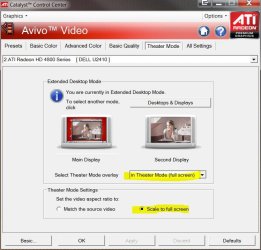
In Catalyst control Center:
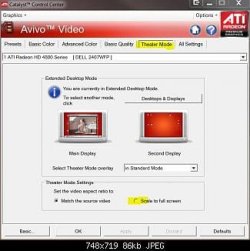
Avivo Video > Theater Mode > select Scale to full screen
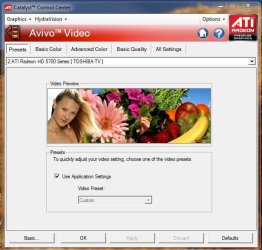
The problem I am having is that unlike the pic below I do not have a tab for "Theater Mode". I have all the other tabs except for that one. Can someone here please help me out on this so I can eliminate those black bars.
Side note..when I use my DVI everything works correctly it is only when I use my HDMI cables that this happens. Now while I can use my DVI I would prefer to use my HDMI cables especially since I bought a 35ft cable to run to my TV that i can't use right now becuase of this problem.
If you need my specs i have given detailed ones to help in anyway possible. Again any help would be appreciated.
I am pretty sure this is the problem as discussed in another thread here:
Those black bands are part of the aspect ratio of true 16:9, they are always there. Even in HD broadcasts from your cable or satellite provider they are there. If your old card filled up your plasma screen, then it converted it to 4:3 aspect ratio or a setting was change.
The solution that was given was this:
In Catalyst control Center:
Avivo Video > Theater Mode > select Scale to full screen
The problem I am having is that unlike the pic below I do not have a tab for "Theater Mode". I have all the other tabs except for that one. Can someone here please help me out on this so I can eliminate those black bars.
Side note..when I use my DVI everything works correctly it is only when I use my HDMI cables that this happens. Now while I can use my DVI I would prefer to use my HDMI cables especially since I bought a 35ft cable to run to my TV that i can't use right now becuase of this problem.
If you need my specs i have given detailed ones to help in anyway possible. Again any help would be appreciated.
Attachments
Last edited:
My Computer
At a glance
Windows 7 Ultimate (32-bit)DualCore Pentium D 940 Presler (64bit)4GB DDR2 800MHz PC 6400, 4GB via RamBoostXFX Radeon HD 5770 (Juniper XT) 1GB: (ATI Cat...
- Computer Manufacturer/Model Number
- Home Build
- OS
- Windows 7 Ultimate (32-bit)
- CPU
- DualCore Pentium D 940 Presler (64bit)
- Motherboard
- Biostar G31-M7 TE
- Memory
- 4GB DDR2 800MHz PC 6400, 4GB via RamBoost
- Graphics Card(s)
- XFX Radeon HD 5770 (Juniper XT) 1GB: (ATI Catalyst 10.4)
- Sound Card
- Creative Audigy SE (SB0570) Sound Card PCI
- Monitor(s) Displays
- 22" Gateway FHD2102 Class 1080p HD Plus LCD Monitor
- Screen Resolution
- Gateway Monitor 1920x1080 and Toshiba 40RV525U Tv 1920x1080
- Hard Drives
- (Primary) Seagate 500GB 7200RPM 32MB Buffer Serial ATA II
(Secondary) Maxtor 500GB 7200RPM 16MB Buffer IDE (Converted to Serial ATA)
- PSU
- LOGISYS PS550AC 550Watts ATX12V Power Supply
- Case
- MidTower: Thermaltake M9 VI1000BWS
- Cooling
- Zalman CNPS9700
- Keyboard
- Logitech LX7 Cordless Optical Mouse
- Mouse
- Logitech Cordless Desktop EX 100
- Other Info
- Additional cooloing: 2 Icages(intakes), 2 - 12cm side panel fans(intakes), 1 - Rear Panel 12cm fan(outtake)......
Computer is also connected to a Toshiba 40RV525U 40-Inch 1080p LCD HDTV so that I can watch movies off of my hard drive and dvd player.