notebook connect to TV (s-video)

divi

New member
Local time
5:59 AM
Messages
4
Hello, I have a problem. I connected my notebook MSI - EX600X with S-video out to TV through SCART (http://img.tomshardware.com/us/2005/11/23/pc_interfaces_101/scart2.jpg). But I can´t see any contact with it.

In "change the appearance of your displays" in my Windows 7, in "Display:" I don´t have any possibility to connect notebook through S-video there, just VGA possibility. I don´t understand. I switched my TV on video mode, but nothing...

Thanks for some help....
 

My Computer My Computer

OS
w 7
Combination Fn+F5 doesn´t work. It just make my display brighter, i guess it will be some kind of Brightness. I forgot to write it to my first post....
 

My Computer My Computer

OS
w 7
Hi there
sorry if I'm being "obtuse" here but often the simplest solution is the correct one.

1) S-Video Out to SCART on TV -- is the SCART wired correctly.

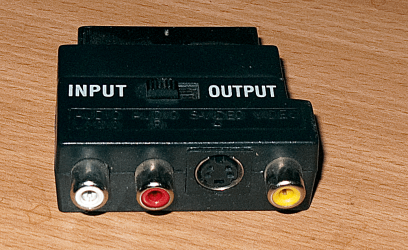
I'd use a Composite (with s-video out) adapter with a switch on it -- pic enclosed so you can check input / output.

2) On the TV you might need to set the SCART input to S-VIDEO - usually there's a setup in the TV for AV1 / AV2 / AV3 settings - you can switch from "Component" to RGB etc etc. You need to check that the TV settings are OK.

3) S-Video OUT on a laptop is usually when playing Video (DVD) / other video multi-media. Sometimes Macrovision or other DRM crud inhibits TV output for copyright reasons.

4) to use the TV as an external / additional MONITOR then you need to have a VGA type connector (or maybe a DVI one) - usually the VGA connector is used for standard PC monitor connections.


Cheers
jimbo


enc pic of the SCART / s-video / composite adapter.
 

Attachments

  • scart.png
    scart.png
    483.8 KB · Views: 145

My Computer My Computer

Computer type
PC/Desktop
Computer Manufacturer/Model Number
Custom built, several laptops HP/ASUS
OS
Linux CENTOS 7 / various Windows OS'es and servers
CPU
Intel i7 Intel i5
Memory
8GB, 16GB
Graphics Card(s)
On Motherboard
Sound Card
Realtek HD audio
Monitor(s) Displays
Apple Cinema display, Samsung LCD
Screen Resolution
1920 X 1080
Hard Drives
4 X 1TB SATA
Mouse
Toshiba wireless laser
Internet Speed
> 20MB up
1) S-Video Out to SCART on TV is good.
2) on TV a tried AV modes...nothing
3) i can´t see anything on TV the less so some videos....just black screen, like i would not connect SCART there
4) and for what is some VGA connector? I have S-video connector and i´d like to choose S-video possibility as a "Display" - like here - http://i155.photobucket.com/albums/s288/x3tsniper/Video_Selections.png
 

My Computer My Computer

OS
w 7
Hi.

It would help if you filled you System Specs in, and are your graphics drivers up to date?
 

My Computer My Computer

Computer Manufacturer/Model Number
Sony Vaio FZ21Z
OS
Windows 7 Ultimate x64 ®™
CPU
Intel Core 2 Duo (2.2 GHz)
Motherboard
Sony (Intel Chipset)
Memory
2x 2GB Corsair (667 MHz)
Graphics Card(s)
NVIDIA 8600M GS (256MB)
Sound Card
Sigmatel
Monitor(s) Displays
15.4" TFT X-Black
Screen Resolution
1280x800
Hard Drives
Western Digital 300GB Scorpio Black (7200rpm)
Mouse
Logitech Anywhere MX
Internet Speed
Sky 5MB
Graph driver - 20.11.2009

Internet Explorer: 8.0.7600.16385
Memory (RAM): 2048 MB
CPU Info: Intel(R) Core(TM)2 Duo CPU T5450 @ 1.66GHz
CPU Speed: 1661,2 MHz
Display Adapters: NVIDIA GeForce 8400M G | NVIDIA GeForce 8400M G | RDPDD Chained DD | RDP Encoder Mirror Driver | RDP Reflector Display Driver
Monitors: 1
Screen Resolution: 1280 X 800 - 32 bit
Network: Network Present
Network Adapters: Realtek RTL8168B/8111B Family PCI-E Gigabit Ethernet NIC (NDIS 6.20) | Intel(R) Wireless WiFi Link 4965AGN
CD / DVD Drives: D: HL-DT-STDVDRAM GSA-T20N | F: KZAZG CD27GLY
COM Ports: NOT Present
LPT Ports: NOT Present
Mouse: 5 Button Wheel Mouse Present
Hard Disks: C: 298,1GB | E: 298,1GB
Hard Disks - Free: C: 168,5GB | E: 53,7GB
USB Controllers: 7 host controllers.
Firewire (1394): Not Detected
PCMCIA (Laptops): Not Installed
Manufacturer: American Megatrends Inc.
Product Make: MSI Notebook EX600
AC Power Status: OnLine
BIOS Info:
Time Zone: Střední Evropa (běžný čas)
Battery: High
Motherboard: MICRO-STAR INT'L CO.,LTD MS-1636X
Modem: Not detected
 

My Computer My Computer

OS
w 7
Display Adapters: NVIDIA GeForce 8400M G
Sorry, I meant could you fill this page in - System Specs, but now we've established you've got an MXI EX600 with an 8400M, lets get it updated.

Have you run this MSI Tool? I'm not saying it will fix the issue, but may provide a few updates for your system. As the date of the driver for your graphics is 2009, then you have an older driver on there, and would update that to see if it helps.
 

My Computer My Computer

Computer Manufacturer/Model Number
Sony Vaio FZ21Z
OS
Windows 7 Ultimate x64 ®™
CPU
Intel Core 2 Duo (2.2 GHz)
Motherboard
Sony (Intel Chipset)
Memory
2x 2GB Corsair (667 MHz)
Graphics Card(s)
NVIDIA 8600M GS (256MB)
Sound Card
Sigmatel
Monitor(s) Displays
15.4" TFT X-Black
Screen Resolution
1280x800
Hard Drives
Western Digital 300GB Scorpio Black (7200rpm)
Mouse
Logitech Anywhere MX
Internet Speed
Sky 5MB
Back
Top