Vista x64 On One HDD /7 On Another Help?

2therock

New member
Member
VIP
Local time
4:27 PM
Messages
97
Location
N. GA
I am running Vista64 and want to add a new HDD and install 7 on it and be able to choose at boot the one I want to run.

I presume you cannot swap while running one to the other without a boot?

any direction or links to said would be great!

Thanks.
 

My Computer My Computer

At a glance

Win 10 Pro 64xIntel-Core-i7-3770K16 GB DDR3
Computer type
PC/Desktop
Computer Manufacturer/Model Number
Home Build By Yours Truly
OS
Win 10 Pro 64x
CPU
Intel-Core-i7-3770K
Motherboard
GIGABYTE GA-Z77-UD5H
Memory
16 GB DDR3
Mouse
Logitech VX Revolution
I am running Vista64 and want to add a new HDD and install 7 on it and be able to choose at boot the one I want to run.

I presume you cannot swap while running one to the other without a boot?

any direction or links to said would be great!

Thanks.

You would have to reboot. There are many tutorials here on dual booting, in the tutorial section. Have fun

Ken
 

My Computer My Computer

At a glance

Win 8 Release candidate 8400[email protected]4 gigsNvidia 9600M
Computer Manufacturer/Model Number
HP Pavillion dv-7 1005 Tx
OS
Win 8 Release candidate 8400
CPU
[email protected]
Memory
4 gigs
Graphics Card(s)
Nvidia 9600M
Sound Card
HD built-in
Monitor(s) Displays
17" Wxga
Screen Resolution
1440x900
Cooling
none
Internet Speed
45Mb down 5Mb up
If you are interested, you could set up a virtual machine, but I think for your purposes you will want to set up a dual boot.
 

My Computer My Computer

At a glance

Windows 7 Professional x64Intel i7 2600K OC'd @ 4620 MHz16GB GSkill Sniper 2133 Mhz (4x4GB)EVGA GeForce GTX 480 SuperClocked+
Computer Manufacturer/Model Number
Custom
OS
Windows 7 Professional x64
CPU
Intel i7 2600K OC'd @ 4620 MHz
Motherboard
Asus P8Z68-V Pro
Memory
16GB GSkill Sniper 2133 Mhz (4x4GB)
Graphics Card(s)
EVGA GeForce GTX 480 SuperClocked+
Sound Card
Realtek High Definition Audio
Monitor(s) Displays
2x Acer S273HLbmii 27"
Screen Resolution
2 x 1920x1080
Hard Drives
64GB Crucial M4 SSD

Storage: Hitachi 1TB 5400RPM, Samsung 1.5TB 5400RPM
PSU
Corsair HW Series 750w (modular)
Case
Cooler Master HAF 932 Advanced Blue Edition
Cooling
CM Hyper 212+ CPU cooler, 3x 230mm + 1x 140mm case fans
Keyboard
Logitech MK320 (wireless)
Mouse
Logitech MK320 (wireless)
Internet Speed
30 Mb/s : 2 Mb/s
Thanks, I'll look for the tutorials.

I am running Vista x64 currently and am going to need to run a risky Beta on 7.
I want it totally separate so if it prooves to be fatal or a total loss I can just pull the drive and continue.

I said I'll look but any pointers for, or links to this particular type application would be met most gratefully.

Thanks
 

My Computer My Computer

At a glance

Win 10 Pro 64xIntel-Core-i7-3770K16 GB DDR3
Computer type
PC/Desktop
Computer Manufacturer/Model Number
Home Build By Yours Truly
OS
Win 10 Pro 64x
CPU
Intel-Core-i7-3770K
Motherboard
GIGABYTE GA-Z77-UD5H
Memory
16 GB DDR3
Mouse
Logitech VX Revolution
I am running Vista x64. I am about to install a brand new HDD and want to install 7 on it.

Vista will still be my main stay OS.

The reason for this is I am about to run a high risk beta program on 7 and want it on a separate HDD in case of it being super unstable or just too problematic.

I read how to make the default OS to start. What if there is an unattended restart/boot, Will the choices window time out and go to the chosen default?

If the beta proves to be a total loos can I just unplug the drive or simply format it without a chain reaction?

Can a bad program on the Windows 7 HDD migrate problems to the Vistax64 HDD?

What would you do with a new HDD first. Would you let the 7 install do the formatting preparation thing?


Thanks
 

My Computer My Computer

At a glance

Win 10 Pro 64xIntel-Core-i7-3770K16 GB DDR3
Computer type
PC/Desktop
Computer Manufacturer/Model Number
Home Build By Yours Truly
OS
Win 10 Pro 64x
CPU
Intel-Core-i7-3770K
Motherboard
GIGABYTE GA-Z77-UD5H
Memory
16 GB DDR3
Mouse
Logitech VX Revolution
If you don't want 7, you can remove the drive and run a Startup Repair on Vista.
 

My Computer My Computer

At a glance

Windows 7 Professional x64Intel i7 2600K OC'd @ 4620 MHz16GB GSkill Sniper 2133 Mhz (4x4GB)EVGA GeForce GTX 480 SuperClocked+
Computer Manufacturer/Model Number
Custom
OS
Windows 7 Professional x64
CPU
Intel i7 2600K OC'd @ 4620 MHz
Motherboard
Asus P8Z68-V Pro
Memory
16GB GSkill Sniper 2133 Mhz (4x4GB)
Graphics Card(s)
EVGA GeForce GTX 480 SuperClocked+
Sound Card
Realtek High Definition Audio
Monitor(s) Displays
2x Acer S273HLbmii 27"
Screen Resolution
2 x 1920x1080
Hard Drives
64GB Crucial M4 SSD

Storage: Hitachi 1TB 5400RPM, Samsung 1.5TB 5400RPM
PSU
Corsair HW Series 750w (modular)
Case
Cooler Master HAF 932 Advanced Blue Edition
Cooling
CM Hyper 212+ CPU cooler, 3x 230mm + 1x 140mm case fans
Keyboard
Logitech MK320 (wireless)
Mouse
Logitech MK320 (wireless)
Internet Speed
30 Mb/s : 2 Mb/s
If you set the Win 7 drive as primary in the bios, it will not see the Vista installation. So each drive will be independent. You could, of course, disconnect the Vista drive. Then you could just change them in the bios to boot, or with an F12 key, if you have that option, to select one or the other.

I you want to dual boot, it can be set up later very easily. Post back after you decide.

If you are going to run a risky program, you can image Win 7 after you activate, then install the risky beta.
 

My Computer My Computer

At a glance

Windows 7 x64i7-2600K8 GGTX 480
Computer Manufacturer/Model Number
Homebuilt
OS
Windows 7 x64
CPU
i7-2600K
Motherboard
Asus P8Z77-v Pro
Memory
8 G
Graphics Card(s)
GTX 480
Sound Card
Onboard
Monitor(s) Displays
LG W2753V
Screen Resolution
1920x1080
Hard Drives
Crucial M4 128 G SSD
If you set the Win 7 drive as primary in the bios, it will not see the Vista installation. So each drive will be independent. You could, of course, disconnect the Vista drive. Then you could just change them in the bios to boot, or with an F12 key, if you have that option, to select one or the other.

I you want to dual boot, it can be set up later very easily. Post back after you decide.

If you are going to run a risky program, you can image Win 7 after you activate, then install the risky beta.

Thank you,

Here is what I have in mind after reading up. You (please) tell me.

I run Vista x64 very nicely on my home build system, Rock solid. I am very curious about 7 but my Vista is not broke if you know what I mean.

I have a job coming up to run a new beta on windows 7. I will have an OEM Windows 7 Pro copy.

I want to run 7 and the beta, all alone on a brand-new HDD, a WD 640GB AALS single drive.
My current Vistax64 system runs on the exact same make and model HDD but in RAID1.
Being new to dual booting I want to make sure if the beta gets nasty it will not effect my Vistax64 system.

If I read correctly, it looks like...

  1. I install the new HDD.
  2. Boot to the win 7 CD/DVD.
  3. Choose to create/delete or what-ever in order run on a single partition on the NEW HDD. A new HDD should not need any partition work correct? The installation will format and allocate the HDD correct??
  4. Now when I boot the default system will be 7 because it was installed last but have time at boot to choose 7 or Vista, or do an F12 and choose, Correct?
  5. Now I need to read up on how to make the Vista64 the default Booting OS in the event the boot is unattended. You got link?
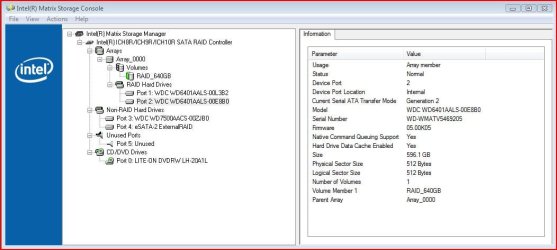
I have included a pic of my port setup so you guys may look ahead for me for optimization.


  • Ports 1 & 2 are my Vista x64 OS dual RAID1 drives.
  • Port 3 is a stand alone 750GB storage drive.
  • Port 4 is an external eSATA box with a dual 750GB drives on it's own RAID1 controller. It's just a single eSATA cable from the box to the board.
  • Port 5 will get my new HDD for Windows 7.
  • Port 0 is my DVD/CD


(Months Down The Road) Here is where I want my cake and eat it too. When the beta is done and I decide I love 7 now and want to migrate all my stuff to it. I will want to run it as a RAID1 array. I guess I can Pull all HDD's, put the 7 on the main port. Format one of the original Vistax64 HDD's and ...........?

Thanks For All You Do!
 

Attachments

  • raiderror3.jpg
    raiderror3.jpg
    65.5 KB · Views: 9
Last edited:

My Computer My Computer

At a glance

Win 10 Pro 64xIntel-Core-i7-3770K16 GB DDR3
Computer type
PC/Desktop
Computer Manufacturer/Model Number
Home Build By Yours Truly
OS
Win 10 Pro 64x
CPU
Intel-Core-i7-3770K
Motherboard
GIGABYTE GA-Z77-UD5H
Memory
16 GB DDR3
Mouse
Logitech VX Revolution
Bump Up! How about it guys? Will putting the new HDD on port 5 be OK?

Does it sound like I'm going to do good?

Should I install the drive and do the allocation thing with a full format then install 7?

Thanks.
 
Last edited:

My Computer My Computer

At a glance

Win 10 Pro 64xIntel-Core-i7-3770K16 GB DDR3
Computer type
PC/Desktop
Computer Manufacturer/Model Number
Home Build By Yours Truly
OS
Win 10 Pro 64x
CPU
Intel-Core-i7-3770K
Motherboard
GIGABYTE GA-Z77-UD5H
Memory
16 GB DDR3
Mouse
Logitech VX Revolution
That sounds fine. You do know that the Windows 7 betas have expired, right?

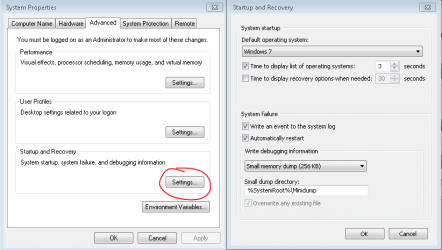
To set Vista as the default OS, see here:
Capture.PNG
 

My Computer My Computer

At a glance

Windows 7 Professional x64Intel i7 2600K OC'd @ 4620 MHz16GB GSkill Sniper 2133 Mhz (4x4GB)EVGA GeForce GTX 480 SuperClocked+
Computer Manufacturer/Model Number
Custom
OS
Windows 7 Professional x64
CPU
Intel i7 2600K OC'd @ 4620 MHz
Motherboard
Asus P8Z68-V Pro
Memory
16GB GSkill Sniper 2133 Mhz (4x4GB)
Graphics Card(s)
EVGA GeForce GTX 480 SuperClocked+
Sound Card
Realtek High Definition Audio
Monitor(s) Displays
2x Acer S273HLbmii 27"
Screen Resolution
2 x 1920x1080
Hard Drives
64GB Crucial M4 SSD

Storage: Hitachi 1TB 5400RPM, Samsung 1.5TB 5400RPM
PSU
Corsair HW Series 750w (modular)
Case
Cooler Master HAF 932 Advanced Blue Edition
Cooling
CM Hyper 212+ CPU cooler, 3x 230mm + 1x 140mm case fans
Keyboard
Logitech MK320 (wireless)
Mouse
Logitech MK320 (wireless)
Internet Speed
30 Mb/s : 2 Mb/s
Thanks,

The Beta I am speaking of is not Windows 7. I cannot disclose what the Beta is.

I'm going to buy a Win7 copy. I am torn between the OEM and Retail, Pro and Ultimate versions.
I have a Gigabyte UD3P motherboard I will most likely use for years to come. I'm just not clear of what or how an OEM copy will limit me.
With dual booting a Vista HP OEM (current) and a Win 7 OEM on the same Mobo, how will it act. I see myself migrating it all to 7 one day.

I also need to know if Bit-Locker is on the Pro version also. I see resellers claiming it is, and Microsoft's site showing it on Ultimate only.

Oh! Would you allocate and full format before beginning Win 7 install?

Thanks
 

My Computer My Computer

At a glance

Win 10 Pro 64xIntel-Core-i7-3770K16 GB DDR3
Computer type
PC/Desktop
Computer Manufacturer/Model Number
Home Build By Yours Truly
OS
Win 10 Pro 64x
CPU
Intel-Core-i7-3770K
Motherboard
GIGABYTE GA-Z77-UD5H
Memory
16 GB DDR3
Mouse
Logitech VX Revolution
Bitlocker is on Ultimate only. I am running Pro and can testify first-hand I do not have it.

Hate to break it to you, but it would not be legal for you to install the OEM version, unless you are planning on selling it to someone else. This is a new rule in 7, changed from Vista.

If you have a previous qualifying OS (XP, Vista), you can use the Upgrade version. If not, you will need to buy the Full retail version.

Unless you have a need to, I would not format. That just wastes time. Tell it where to install; if it doesn't work, try formatting the partition.
 

My Computer My Computer

At a glance

Windows 7 Professional x64Intel i7 2600K OC'd @ 4620 MHz16GB GSkill Sniper 2133 Mhz (4x4GB)EVGA GeForce GTX 480 SuperClocked+
Computer Manufacturer/Model Number
Custom
OS
Windows 7 Professional x64
CPU
Intel i7 2600K OC'd @ 4620 MHz
Motherboard
Asus P8Z68-V Pro
Memory
16GB GSkill Sniper 2133 Mhz (4x4GB)
Graphics Card(s)
EVGA GeForce GTX 480 SuperClocked+
Sound Card
Realtek High Definition Audio
Monitor(s) Displays
2x Acer S273HLbmii 27"
Screen Resolution
2 x 1920x1080
Hard Drives
64GB Crucial M4 SSD

Storage: Hitachi 1TB 5400RPM, Samsung 1.5TB 5400RPM
PSU
Corsair HW Series 750w (modular)
Case
Cooler Master HAF 932 Advanced Blue Edition
Cooling
CM Hyper 212+ CPU cooler, 3x 230mm + 1x 140mm case fans
Keyboard
Logitech MK320 (wireless)
Mouse
Logitech MK320 (wireless)
Internet Speed
30 Mb/s : 2 Mb/s
Hate to break it to you, but it would not be legal for you to install the OEM version, unless you are planning on selling it to someone else. This is a new rule in 7, changed from Vista.
Thats why I'm here I guess. Good thing too. Thanks

If you have a previous qualifying OS (XP, Vista), you can use the Upgrade version. If not, you will need to buy the Full retail version.
Just to clarify....... Can I use a Win 7 upgrade copy to install it on another HDD than the Current Vista and still run the Vista and dual boot between the two?
 

My Computer My Computer

At a glance

Win 10 Pro 64xIntel-Core-i7-3770K16 GB DDR3
Computer type
PC/Desktop
Computer Manufacturer/Model Number
Home Build By Yours Truly
OS
Win 10 Pro 64x
CPU
Intel-Core-i7-3770K
Motherboard
GIGABYTE GA-Z77-UD5H
Memory
16 GB DDR3
Mouse
Logitech VX Revolution

My Computer My Computer

At a glance

Windows 7 Professional x64Intel i7 2600K OC'd @ 4620 MHz16GB GSkill Sniper 2133 Mhz (4x4GB)EVGA GeForce GTX 480 SuperClocked+
Computer Manufacturer/Model Number
Custom
OS
Windows 7 Professional x64
CPU
Intel i7 2600K OC'd @ 4620 MHz
Motherboard
Asus P8Z68-V Pro
Memory
16GB GSkill Sniper 2133 Mhz (4x4GB)
Graphics Card(s)
EVGA GeForce GTX 480 SuperClocked+
Sound Card
Realtek High Definition Audio
Monitor(s) Displays
2x Acer S273HLbmii 27"
Screen Resolution
2 x 1920x1080
Hard Drives
64GB Crucial M4 SSD

Storage: Hitachi 1TB 5400RPM, Samsung 1.5TB 5400RPM
PSU
Corsair HW Series 750w (modular)
Case
Cooler Master HAF 932 Advanced Blue Edition
Cooling
CM Hyper 212+ CPU cooler, 3x 230mm + 1x 140mm case fans
Keyboard
Logitech MK320 (wireless)
Mouse
Logitech MK320 (wireless)
Internet Speed
30 Mb/s : 2 Mb/s

My Computer My Computer

At a glance

Win 10 Pro 64xIntel-Core-i7-3770K16 GB DDR3
Computer type
PC/Desktop
Computer Manufacturer/Model Number
Home Build By Yours Truly
OS
Win 10 Pro 64x
CPU
Intel-Core-i7-3770K
Motherboard
GIGABYTE GA-Z77-UD5H
Memory
16 GB DDR3
Mouse
Logitech VX Revolution
Back
Top