Any way to make thumbnail previews on Windows 7 bigger?

thenext8seconds

New member
Member
Local time
8:20 AM
Messages
46
I just got a new monitor with a much larger resolution (1920 X 1080), and the only thing is that the thumbnail previews seem too small. I knew you could change the size of them with something called AveThumbnail (I guess it's called Ave's ThumbnailSizer now), but can anyone tell me the best way to do it with Windows 7 is? :geek: Thanks. (running build 7057)
 

My Computer My Computer

At a glance

Windows 7, of course.
OS
Windows 7, of course.
I know I've seen some option for that somewheres, I cant' remember where though. :o
 

My Computer My Computer

At a glance

Windows 7 Ultimate x64 SP1Core i7 920 (D0) @ 4Ghz, *26c idle *65c full ...12GB DDR3 Corsair Dominator -CMD12GX3M6A1600C...Zotac Geforce GTX 770
Computer type
PC/Desktop
Computer Manufacturer/Model Number
Airbot 2.0
OS
Windows 7 Ultimate x64 SP1
CPU
Core i7 920 (D0) @ 4Ghz, *26c idle *65c full load on air
Motherboard
Asus P6X58D Premium - Sata 6Gb/s - USB 3.0
Memory
12GB DDR3 Corsair Dominator -CMD12GX3M6A1600C8 at 1600MHz
Graphics Card(s)
Zotac Geforce GTX 770
Sound Card
ASUS Xonar D2X
Monitor(s) Displays
1 LG 24" Flatron W2453V-PF 1 Samsung 24" P2450H both 2ms RT
Screen Resolution
1920x1080@60hz
Hard Drives
1 Samsung 250GB 840 Evo SSD
1 OCZ Vertex2 180GB SSD
1 TB Samsung Spinpoint F1 7200RPM 32MB cache
2 500GB WD Caviar Blacks 7200RPM 32MB cache (WD5001AALS)

Pioneer DVD Burner DVR-S18M
PSU
Corsair HX1000W
Case
Cooler Master HAF 932
Cooling
Case Fans *3 230mm, *1 140mm/CPU - *Tuniq Tower 120 Extreme
Keyboard
Logitech Wireless MK700
Mouse
Logitech Wireless MK700
Internet Speed
DL 15 Mbps UL 0.98 Mbps
Antivirus
None
Browser
Firefox Nightly
Other Info
Processor-7.7 *RAM- 7.9 *Graphics-7.9 *Gaming Graphics- 7.9 *SSD- 7.8 W.E.I final score= 7.7
*Phone- LG Nexus 5
Yeah and by the way, I just tried that application worked for Vista, and that definitely don't get along with 7 the same way. :(
 

My Computer My Computer

At a glance

Windows 7, of course.
OS
Windows 7, of course.
Maybe not so much an option, but rather some registry entry you can modify. :huh: I don't remember where I saw it in there though, I'm pretty sure I did.
 

My Computer My Computer

At a glance

Windows 7 Ultimate x64 SP1Core i7 920 (D0) @ 4Ghz, *26c idle *65c full ...12GB DDR3 Corsair Dominator -CMD12GX3M6A1600C...Zotac Geforce GTX 770
Computer type
PC/Desktop
Computer Manufacturer/Model Number
Airbot 2.0
OS
Windows 7 Ultimate x64 SP1
CPU
Core i7 920 (D0) @ 4Ghz, *26c idle *65c full load on air
Motherboard
Asus P6X58D Premium - Sata 6Gb/s - USB 3.0
Memory
12GB DDR3 Corsair Dominator -CMD12GX3M6A1600C8 at 1600MHz
Graphics Card(s)
Zotac Geforce GTX 770
Sound Card
ASUS Xonar D2X
Monitor(s) Displays
1 LG 24" Flatron W2453V-PF 1 Samsung 24" P2450H both 2ms RT
Screen Resolution
1920x1080@60hz
Hard Drives
1 Samsung 250GB 840 Evo SSD
1 OCZ Vertex2 180GB SSD
1 TB Samsung Spinpoint F1 7200RPM 32MB cache
2 500GB WD Caviar Blacks 7200RPM 32MB cache (WD5001AALS)

Pioneer DVD Burner DVR-S18M
PSU
Corsair HX1000W
Case
Cooler Master HAF 932
Cooling
Case Fans *3 230mm, *1 140mm/CPU - *Tuniq Tower 120 Extreme
Keyboard
Logitech Wireless MK700
Mouse
Logitech Wireless MK700
Internet Speed
DL 15 Mbps UL 0.98 Mbps
Antivirus
None
Browser
Firefox Nightly
Other Info
Processor-7.7 *RAM- 7.9 *Graphics-7.9 *Gaming Graphics- 7.9 *SSD- 7.8 W.E.I final score= 7.7
*Phone- LG Nexus 5
I just got a new monitor with a much larger resolution (1920 X 1080), and the only thing is that the thumbnail previews seem too small. I knew you could change the size of them with something called AveThumbnail (I guess it's called Ave's ThumbnailSizer now), but can anyone tell me the best way to do it with Windows 7 is? :geek: Thanks. (running build 7057)

Thumbnails where? Explorer? That should track icon size right? If you're talking about album art in WMP you're stuck with 200x200.
 

My Computer My Computer

At a glance

El Capitan / Windows 10i7-4980HQ16GBIris 5200
Computer type
Laptop
Computer Manufacturer/Model Number
Apple
OS
El Capitan / Windows 10
CPU
i7-4980HQ
Memory
16GB
Graphics Card(s)
Iris 5200
Thumbnails where? Explorer? That should track icon size right? If you're talking about album art in WMP you're stuck with 200x200.

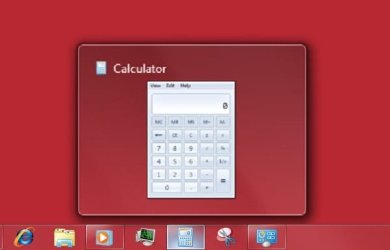
The thumbnails that pop up when you hover over a pinned item on the taskbar that has a window open

And yes I noticed you're stuck with 200 X 200 for album art in WMP, which is dumb especially if your album art is larger than that, say 500 X 500. Hopefully they change that in the final version of Windows 7
 

My Computer My Computer

At a glance

Windows 7, of course.
OS
Windows 7, of course.
The thumbnails that pop up when you hover over a pinned item on the taskbar that has a window open

And yes I noticed you're stuck with 200 X 200 for album art in WMP, which is dumb especially if your album art is larger than that, say 500 X 500. Hopefully they change that in the final version of Windows 7

WMP won't change as it's a copyright issue. As for taskbar preview:

Open regedit and navigate to HKEY_CURRENT_USER\Software\Microsoft\Windows\CurrentVersion\Explorer

Now in RHS pane, create a new DWORD value called thumbnailsize. Rt click on it and choose Modify. Select decimal option. Enter the desired value data in Pixels to change its size.

The default value is 96 pxls. It can be changed to a value between 32 and 256. To enable the default value agin, simply delete the thumbnailsize value name. Restart.
 

My Computer My Computer

At a glance

El Capitan / Windows 10i7-4980HQ16GBIris 5200
Computer type
Laptop
Computer Manufacturer/Model Number
Apple
OS
El Capitan / Windows 10
CPU
i7-4980HQ
Memory
16GB
Graphics Card(s)
Iris 5200
WMP won't change as it's a copyright issue. As for taskbar preview:

Open regedit and navigate to HKEY_CURRENT_USER\Software\Microsoft\Windows\CurrentVersion\Explorer

Now in RHS pane, create a new DWORD value called thumbnailsize. Rt click on it and choose Modify. Select decimal option. Enter the desired value data in Pixels to change its size.

The default value is 96 pxls. It can be changed to a value between 32 and 256. To enable the default value agin, simply delete the thumbnailsize value name. Restart.


That doesn't work, I already tried it.

And it should be ThumbnailSize, not Thumbnailsize..but it still has no effect anyways.
 

My Computer My Computer

At a glance

Windows 7 Ultimate x64 SP1Core i7 920 (D0) @ 4Ghz, *26c idle *65c full ...12GB DDR3 Corsair Dominator -CMD12GX3M6A1600C...Zotac Geforce GTX 770
Computer type
PC/Desktop
Computer Manufacturer/Model Number
Airbot 2.0
OS
Windows 7 Ultimate x64 SP1
CPU
Core i7 920 (D0) @ 4Ghz, *26c idle *65c full load on air
Motherboard
Asus P6X58D Premium - Sata 6Gb/s - USB 3.0
Memory
12GB DDR3 Corsair Dominator -CMD12GX3M6A1600C8 at 1600MHz
Graphics Card(s)
Zotac Geforce GTX 770
Sound Card
ASUS Xonar D2X
Monitor(s) Displays
1 LG 24" Flatron W2453V-PF 1 Samsung 24" P2450H both 2ms RT
Screen Resolution
1920x1080@60hz
Hard Drives
1 Samsung 250GB 840 Evo SSD
1 OCZ Vertex2 180GB SSD
1 TB Samsung Spinpoint F1 7200RPM 32MB cache
2 500GB WD Caviar Blacks 7200RPM 32MB cache (WD5001AALS)

Pioneer DVD Burner DVR-S18M
PSU
Corsair HX1000W
Case
Cooler Master HAF 932
Cooling
Case Fans *3 230mm, *1 140mm/CPU - *Tuniq Tower 120 Extreme
Keyboard
Logitech Wireless MK700
Mouse
Logitech Wireless MK700
Internet Speed
DL 15 Mbps UL 0.98 Mbps
Antivirus
None
Browser
Firefox Nightly
Other Info
Processor-7.7 *RAM- 7.9 *Graphics-7.9 *Gaming Graphics- 7.9 *SSD- 7.8 W.E.I final score= 7.7
*Phone- LG Nexus 5
That doesn't work, I already tried it.

And it should be ThumbnailSize, not Thumbnailsize..but it still has no effect anyways.

Hmm. What'd I do to make mine bigger I wonder.
doggydig.gif

Looking...
 

My Computer My Computer

At a glance

El Capitan / Windows 10i7-4980HQ16GBIris 5200
Computer type
Laptop
Computer Manufacturer/Model Number
Apple
OS
El Capitan / Windows 10
CPU
i7-4980HQ
Memory
16GB
Graphics Card(s)
Iris 5200
I don't know...if it works for you that's great but it doesn't work for me. I've tried different variations. The only difference between you and I seems to be I'm running 64 bit 7068 and you're using 7057 32 bit. :huh:
 

My Computer My Computer

At a glance

Windows 7 Ultimate x64 SP1Core i7 920 (D0) @ 4Ghz, *26c idle *65c full ...12GB DDR3 Corsair Dominator -CMD12GX3M6A1600C...Zotac Geforce GTX 770
Computer type
PC/Desktop
Computer Manufacturer/Model Number
Airbot 2.0
OS
Windows 7 Ultimate x64 SP1
CPU
Core i7 920 (D0) @ 4Ghz, *26c idle *65c full load on air
Motherboard
Asus P6X58D Premium - Sata 6Gb/s - USB 3.0
Memory
12GB DDR3 Corsair Dominator -CMD12GX3M6A1600C8 at 1600MHz
Graphics Card(s)
Zotac Geforce GTX 770
Sound Card
ASUS Xonar D2X
Monitor(s) Displays
1 LG 24" Flatron W2453V-PF 1 Samsung 24" P2450H both 2ms RT
Screen Resolution
1920x1080@60hz
Hard Drives
1 Samsung 250GB 840 Evo SSD
1 OCZ Vertex2 180GB SSD
1 TB Samsung Spinpoint F1 7200RPM 32MB cache
2 500GB WD Caviar Blacks 7200RPM 32MB cache (WD5001AALS)

Pioneer DVD Burner DVR-S18M
PSU
Corsair HX1000W
Case
Cooler Master HAF 932
Cooling
Case Fans *3 230mm, *1 140mm/CPU - *Tuniq Tower 120 Extreme
Keyboard
Logitech Wireless MK700
Mouse
Logitech Wireless MK700
Internet Speed
DL 15 Mbps UL 0.98 Mbps
Antivirus
None
Browser
Firefox Nightly
Other Info
Processor-7.7 *RAM- 7.9 *Graphics-7.9 *Gaming Graphics- 7.9 *SSD- 7.8 W.E.I final score= 7.7
*Phone- LG Nexus 5
I don't know...if it works for you that's great but it doesn't work for me. I've tried different variations. The only difference between you and I seems to be I'm running 64 bit 7068 and you're using 7057 32 bit. :huh:

Nah, it's not that setting anyway. I removed it and it stayed the same. Oh, and thanks for reminding me to update my system spec -- I'm on 7068 32-bit...
 

My Computer My Computer

At a glance

El Capitan / Windows 10i7-4980HQ16GBIris 5200
Computer type
Laptop
Computer Manufacturer/Model Number
Apple
OS
El Capitan / Windows 10
CPU
i7-4980HQ
Memory
16GB
Graphics Card(s)
Iris 5200
Yeah, maybe it worked in Vista, but it seems not in 7. No problem. ;)
 

My Computer My Computer

At a glance

Windows 7 Ultimate x64 SP1Core i7 920 (D0) @ 4Ghz, *26c idle *65c full ...12GB DDR3 Corsair Dominator -CMD12GX3M6A1600C...Zotac Geforce GTX 770
Computer type
PC/Desktop
Computer Manufacturer/Model Number
Airbot 2.0
OS
Windows 7 Ultimate x64 SP1
CPU
Core i7 920 (D0) @ 4Ghz, *26c idle *65c full load on air
Motherboard
Asus P6X58D Premium - Sata 6Gb/s - USB 3.0
Memory
12GB DDR3 Corsair Dominator -CMD12GX3M6A1600C8 at 1600MHz
Graphics Card(s)
Zotac Geforce GTX 770
Sound Card
ASUS Xonar D2X
Monitor(s) Displays
1 LG 24" Flatron W2453V-PF 1 Samsung 24" P2450H both 2ms RT
Screen Resolution
1920x1080@60hz
Hard Drives
1 Samsung 250GB 840 Evo SSD
1 OCZ Vertex2 180GB SSD
1 TB Samsung Spinpoint F1 7200RPM 32MB cache
2 500GB WD Caviar Blacks 7200RPM 32MB cache (WD5001AALS)

Pioneer DVD Burner DVR-S18M
PSU
Corsair HX1000W
Case
Cooler Master HAF 932
Cooling
Case Fans *3 230mm, *1 140mm/CPU - *Tuniq Tower 120 Extreme
Keyboard
Logitech Wireless MK700
Mouse
Logitech Wireless MK700
Internet Speed
DL 15 Mbps UL 0.98 Mbps
Antivirus
None
Browser
Firefox Nightly
Other Info
Processor-7.7 *RAM- 7.9 *Graphics-7.9 *Gaming Graphics- 7.9 *SSD- 7.8 W.E.I final score= 7.7
*Phone- LG Nexus 5
Yeah, maybe it worked in Vista, but it seems not in 7. No problem. ;)

Um. Yes -- my larger previews seem to have something to do with my some of my experiments with modifying visual styles --

Smaller window frames:
Capture.JPG

Bigger preview:
preview.jpg

None of it works completely yet so I've not published anything.
 

My Computer My Computer

At a glance

El Capitan / Windows 10i7-4980HQ16GBIris 5200
Computer type
Laptop
Computer Manufacturer/Model Number
Apple
OS
El Capitan / Windows 10
CPU
i7-4980HQ
Memory
16GB
Graphics Card(s)
Iris 5200
Um. Yes -- my larger previews seem to have something to do with my some of my experiments with modifying visual styles --

Smaller window frames:
View attachment 7151

Bigger preview:
View attachment 7152

None of it works completely yet so I've not published anything.

Yeah but that's not really making the size of the actual thumbnail preview of the windows itself much bigger.. That doesn't really accomplish much compared to what I need anyway
 

My Computer My Computer

At a glance

Windows 7, of course.
OS
Windows 7, of course.
It's easy. Click on the body of folder where you want to increase thumbnail preview size (so no files are selected). Hold down control and alt and then scroll with your scroll button on your mouse. This will allow you to enlarge and reduce thumbnail previews with more control than using the "medium" "large" or "extra large" options. :)
 

My Computer My Computer

At a glance

home edition
OS
home edition

My Computer My Computer

At a glance

Vista 64 bit and 32 bit (SP2)Intel(R) Core(TM)2 Duo Processor T9400 (2.53 GHz4GB DDR2 System Memory (2 Dimm)512 MB NVIDIA GeForce 9600M GT
Computer Manufacturer/Model Number
HP Pavillion dv5t (generation 1)
OS
Vista 64 bit and 32 bit (SP2)
CPU
Intel(R) Core(TM)2 Duo Processor T9400 (2.53 GHz
Memory
4GB DDR2 System Memory (2 Dimm)
Graphics Card(s)
512 MB NVIDIA GeForce 9600M GT
Monitor(s) Displays
15.4" diagonal WSXGA+ High-Definition HP BrightView Widescre
Screen Resolution
1680 x 1050
Hard Drives
320GB 5400RPM SATA Hard Drive with HP ProtectSmart Hard Drive Protection
Keyboard
Built-in HP
Mouse
Built in - Synaptics TouchPad V6.5 on PS/2 Port
Internet Speed
Max
Other Info
~ Intel Next-Gen Wireless-N Mini-card w/Bluetooth ~ Blu-Ray ROM DVD+/-R/RW ~ Integ. HDTV Hybrid Tuner ~ 12 Cell Battery ~ MS Office (Home Premium) 2007 ~
Not referring to TASKBAR thumbnails but EXPLORER thumbnails.
 

My Computer My Computer

At a glance

Windows 7 Ultimate x64Intel Core i5 4690K16GB DDR3 PC3-12800 (800 MHz)nVidia GeForce GTX 750 Ti 2GB GDDR5
Computer type
PC/Desktop
Computer Manufacturer/Model Number
custom build
OS
Windows 7 Ultimate x64
CPU
Intel Core i5 4690K
Motherboard
MSI Z97 MPOWER MAX AC (MS-7888)
Memory
16GB DDR3 PC3-12800 (800 MHz)
Graphics Card(s)
nVidia GeForce GTX 750 Ti 2GB GDDR5
Back
Top