Most Windows 7 PCs max out memory.

my system works well dont forget the ready boost we can use too:)
 

My Computer

Computer Manufacturer/Model Number
packard bell IXTREME M5722
OS
Operating System : Windows 7 Home Premium Edition 6.01.7600 SP1 (x64)
CPU
Processor : Intel Core 2 Quad Q8300 @ 2500 MHz
Motherboard
Mainboard : Packard Bell (Acer EG43M )
Memory
Physical Memory :8GB Corsair4x 2GB 800MHz C5 DDR2
Graphics Card(s)
Video Card : XFX 6700 AMD
Monitor(s) Displays
Maestro 234DL - BenQ V2220 - BenQ VW2420H
Screen Resolution
Current Display :1920x1080p pixels at 60 Hz in HD LED
Hard Drives
Hard Disks : WDC (1000 GB)
Drive C: (Hard Disk) : 428 GB available on 491 GB
Drive D: (Hard Disk) : 426 GB available on 492 GB
SAMSUNG spinpoint HD103SJ 1000.2 GB
(X 2) KINGSTON SSD NOW V 30GB
PSU
XFX ProSeries 550W PSU
Case
PACKARD BELL IXTREME
Cooling
System Blower Current: 150mA Air Flow16CFM ;Akasa 90mm rear
Keyboard
Gigabyte Aivia K8100
Mouse
TRUST-Wireless Laser Mouse - Carbon edition MI-7770C
Internet Speed
TP-LINK > TL-WN951N / AV500 Gigabit Powerline Adapters
Browser
chrome dev
Other Info
EXTRA COOLING>(FAN CONTROLLER) PC Bay Cooler 3 x 40mm fans; Akasa AK-HD-BL Blue hard drive cooler 2 x 40 mm fan 4500 rpm 29.7 dBA
Bios> American Megatrends Inc.
Version : P01-A1
Date : 08/31/2009
heres another article rebuffing these claims, ill post the relevant bit but include the link if your interested in reading the full article

Even on a system with only 1 GB of RAM, I found it difficult to exhaust all physical memory. At one point I had 13 browser tabs open, including one playing a long Flash video clip); at the same time I had opened a 1000-page PDF file in Acrobat Reader and a 30-page graphically intense document in Word 2010, plus Outlook 2010 downloading mail from my Exchange account, a few open Explorer windows, and a handful of background utilities running. And, of course, three memory monitoring tools. Even with that workload, I still had roughly 10% of physical RAM available.

full article: Windows 7 memory usage: What's the best way to measure? | Ed Bott’s Microsoft Report | ZDNet.com
 

My Computer

Computer type
PC/Desktop
Computer Manufacturer/Model Number
Medion Erazer (note to self: insert model number) - with custom additions
OS
Windows 10 Pro x64
CPU
Intel Core i5 7400 @ 3.00GHz
Motherboard
OEM supllied with PC
Memory
8GB 2133Mhz DDR4 (OEM supplied)
Graphics Card(s)
Gygabyte Windforce GTX 1050Ti (Factory Overclocked)
Sound Card
Realtek
Monitor(s) Displays
Acer Al1980 + HKC
Screen Resolution
1360*768(HKC) / 1280*1024(Acer)
Hard Drives
1TB Toshiba
1TB WD Caviar Green
120GB Samsung Evo 840
PSU
OEM supplied (no power rating on case)
Case
OEM Supplied
Cooling
Stock
Keyboard
Logitech Wireless
Mouse
Logitect Wireless
Internet Speed
40Mb/s Down 10Mb/s Up
Antivirus
Defender
Browser
Firefox
A very good read. Thanks for the link.
 

My Computer

Computer Manufacturer/Model Number
Home built
OS
Windows 7 Ultimate 32 bit
CPU
Intel(R) Pentium(R) 4 CPU 3.00GHz
Motherboard
ASUS P4P800-VM Motherboard Chipset: Intel 865G + ICH5
Memory
2.50 GB RAM
Graphics Card(s)
NVIDIA GeForce 7600 GS
Sound Card
SoundMax Integrated Digital Audio (Chip)
Monitor(s) Displays
ViewSonic VX 1962 wm
Screen Resolution
1680 X 1050
Hard Drives
Seagate Barracuda 7200.10 80 GB
ST380215A ATA Device 18.6 GB
Western Digital "My Book" external hard drive 750 GB
Cooling
Fan based
Keyboard
Microsoft Comfort Curve Keyboard 2000 v10 USB
Mouse
Logitec optic USB
Internet Speed
3.01 Mb/s download 0.64 Mb/s upload
heres another article rebuffing these claims, ill post the relevant bit but include the link if your interested in reading the full article

Even on a system with only 1 GB of RAM, I found it difficult to exhaust all physical memory. At one point I had 13 browser tabs open, including one playing a long Flash video clip); at the same time I had opened a 1000-page PDF file in Acrobat Reader and a 30-page graphically intense document in Word 2010, plus Outlook 2010 downloading mail from my Exchange account, a few open Explorer windows, and a handful of background utilities running. And, of course, three memory monitoring tools. Even with that workload, I still had roughly 10% of physical RAM available.

full article: Windows 7 memory usage: What's the best way to measure? | Ed Bott’s Microsoft Report | ZDNet.com

well doh.

In that scenario he may have been using 90% of ram but I expect he was also using 1 gig of swap memory. What was he expecting?

You cant correctly judge memory usage in such a low ram machine.

On my laptop which came with 1 gig of ram, it only runs a few apps, typically 1 browser window using 1-2 tabs, irc chat and some explorer and notepad windows. It was swapping just with that usage. Now its upgraded to 3 gig of ram it runs great and usage is usually about 30-50% depending on uptime (since memory leaks exist in various apps). So if I upgraded to 2 gig the laptop probably would have been fine also. But 1 gig wasnt enough and thats very light usage.

On my desktop on bootup I am using already 700-800meg ram. Would be foolish to think I could then load a dozen IE tabs, acrobat, word and outlook only using an extra 100meg of ram, that is insane. IE for a start is quite memory hungry, I have adove flash, adobe pdf, sun java addons, no toolbars. With them each tab uses around 40 meg of memory to load google's home page. It goes much higher when a proper website is loaded. Outlook uses about 150meg of ram, I got 2 copies of word running using 100meg each for 2 page documents.

The reason he is seeing lower ram usage is.

(a) windows will manage low ram situations by swapping to disk, so data is moved from real ram to a swapfile. Bingo less ram used.
(b) windows will cache less data, so sure less ram is used but also things run slower.

at the moment I am using 3.48 gig of ram 58% of my 6 gig of ram.
 

My Computer

Computer type
PC/Desktop
Computer Manufacturer/Model Number
home built
OS
windows 8.1 Pro x64
CPU
intel i5 4670k @ 4.3ghz
Motherboard
asus z87-plus
Memory
16 gig ram ddr3 @ 1600 corsair vengeance
Graphics Card(s)
evga 970 GTX 4 GIG FTW ACX 2.0
Sound Card
asus xonar D2X
Monitor(s) Displays
benq gw2765ht
Screen Resolution
2560x1440
Hard Drives
Samsung 850 pro SSD 512gig - boot device wooosh
WD black cavalier 640gig WD6401AALS
Seagate 500gig ST3500630AS
WD 2TB Green WDC20EARS
2 x WD Red 3TB WD30EFRX
Samsung 750gig HD753LG - on asmedia controller
PSU
coolermaster silent pro 600watt modular
Case
fractal define R4
Cooling
artic freezer i30, 3 case fans
Keyboard
microsoft business ps2 keyboard
Mouse
microsoft optical black mouse
Internet Speed
80/20 FTTC SkyBB
Antivirus
Nod32 AV v8, HitmanProAlert, SRP, System Hardening
Browser
Chrome x64
Other Info
Intel controller is in AHCI mode currently using IaSTOR 12.8.0.1016 drivers
ah but if you actually read the article, he goes on to say that it memory manages better on ALL machines,

To help cut through the confusion, I’ve taken a careful look at memory usage on a handful of Windows 7 systems here, with installed RAM ranging from 1 GB to 10 GB.
i just included the 1GB bit to show that even on a machine with 1GB of RAM it works (and does anyone actually buy a new pc with only 1GB of ram? do they even sell them anymore? excluding netbooks ofc)
 

My Computer

Computer type
PC/Desktop
Computer Manufacturer/Model Number
Medion Erazer (note to self: insert model number) - with custom additions
OS
Windows 10 Pro x64
CPU
Intel Core i5 7400 @ 3.00GHz
Motherboard
OEM supllied with PC
Memory
8GB 2133Mhz DDR4 (OEM supplied)
Graphics Card(s)
Gygabyte Windforce GTX 1050Ti (Factory Overclocked)
Sound Card
Realtek
Monitor(s) Displays
Acer Al1980 + HKC
Screen Resolution
1360*768(HKC) / 1280*1024(Acer)
Hard Drives
1TB Toshiba
1TB WD Caviar Green
120GB Samsung Evo 840
PSU
OEM supplied (no power rating on case)
Case
OEM Supplied
Cooling
Stock
Keyboard
Logitech Wireless
Mouse
Logitect Wireless
Internet Speed
40Mb/s Down 10Mb/s Up
Antivirus
Defender
Browser
Firefox
ah but if you actually read the article, he goes on to say that it memory manages better on ALL machines,

To help cut through the confusion, I’ve taken a careful look at memory usage on a handful of Windows 7 systems here, with installed RAM ranging from 1 GB to 10 GB.
i just included the 1GB bit to show that even on a machine with 1GB of RAM it works (and does anyone actually buy a new pc with only 1GB of ram? do they even sell them anymore? excluding netbooks ofc)

Works? Barely Works well? Never.
 

My Computer

Computer Manufacturer/Model Number
Sony Vaio Z46GDU
OS
Windows 7 Ultimate x86-64
CPU
[email protected] 1066MHz FSB
Motherboard
Sony branded
Memory
6GB DDR3 1066MHz
Graphics Card(s)
9300M GS 256MB Dedicated (Speed) + Intel4500MHD (Stamina)
Sound Card
Realtek HD Audio
Monitor(s) Displays
13.1' WXGA
Screen Resolution
1600x900
Hard Drives
320GB 7200RPM w/ 16MB cache
Internet Speed
1MB/s
More FUD...

Editor's note: The person quoted in this story as "Craig Barth" is actually Randall C. Kennedy, an InfoWorld contributor. Kennedy, who presented himself as the CTO of Devil Mountain Software, no longer works at InfoWorld. Given that he disguised his identity to Computerworld and a number of other publications, the credibility of Kennedy's statements is called into question. Rather than simply remove stories in which he is quoted, we have left them online so readers can weigh his data and conclusions for themselves.
 

My Computer

OS
Windows 7 Home Premium x64
CPU
Intel Core 2 Quad Q9450 @ 3.2GHz
Motherboard
Asus P5Q PRO Turbo
Memory
4GB DDR2-800
Graphics Card(s)
MSI Radeon HD 5850
Sound Card
Creative Labs Audigy2 ZS
Monitor(s) Displays
Samsung 225BW
Hard Drives
(2) 1TB Samsung F1, (2) 1.5TB Samsung F2, 1TB Samsung F2, 2TB Samsung F3
PSU
Corsair HX650
Case
Antec Nine Hundred
stupid question time... (its not off topic as im checking facts for a post on this) but where can i find out how much paging memory is being used? resource manager and task manager only seem to show physical memory
 

My Computer

Computer type
PC/Desktop
Computer Manufacturer/Model Number
Medion Erazer (note to self: insert model number) - with custom additions
OS
Windows 10 Pro x64
CPU
Intel Core i5 7400 @ 3.00GHz
Motherboard
OEM supllied with PC
Memory
8GB 2133Mhz DDR4 (OEM supplied)
Graphics Card(s)
Gygabyte Windforce GTX 1050Ti (Factory Overclocked)
Sound Card
Realtek
Monitor(s) Displays
Acer Al1980 + HKC
Screen Resolution
1360*768(HKC) / 1280*1024(Acer)
Hard Drives
1TB Toshiba
1TB WD Caviar Green
120GB Samsung Evo 840
PSU
OEM supplied (no power rating on case)
Case
OEM Supplied
Cooling
Stock
Keyboard
Logitech Wireless
Mouse
Logitect Wireless
Internet Speed
40Mb/s Down 10Mb/s Up
Antivirus
Defender
Browser
Firefox

My Computers

System One System Two

  • Computer type
    PC/Desktop
    Computer Manufacturer/Model Number
    ChillBlast - Custom to my design
    OS
    Windows 11 Pro x64 [Latest Release and Release Preview]
    CPU
    Ryzen 9 5950X, 3.8 - 5.2 MHz
    Motherboard
    Asus Prime X570-Pro
    Memory
    64GB [2 x 32GB] DDR4 3200MHz
    Graphics Card(s)
    4GB NVIDIA GEFORCE GTX 1650 Ti
    Sound Card
    On-board SPDIF to 5.1 System + HDMI [5.1 system]
    Monitor(s) Displays
    32" UHD 32 Bit HDR Monitor + 43" UHD 4K 32Bit HDR TV
    Screen Resolution
    2 x 3840 x 2160 @60Hz
    Hard Drives
    1TB M2 SSD OS, 500GB Fast Access SSD, 2 x 8TB Data + Various Externals from 1TB to 4TB, 10TB NAS
    PSU
    NZXT C750 80 PLUS Gold 750W Modular PSU
    Case
    Workstation Case [Matt Black]
    Cooling
    NZXT Kraken X63 280mm CPU Cooler +2x Quiet Case fans
    Keyboard
    Logitech Wireless MX Keys & K400 + others
    Mouse
    Logitech Wireless MX Master 3S
    Internet Speed
    920 MB Down 50 MB Up
    Antivirus
    BitDefender Total Security Pro
    Browser
    Chrome (always run latest Non-Beta)
    Other Info
    Also run ...
    Laptop - Quad 8GB - Windows 10 Pro x64
    Nexus 7 Android tablet x2
    Samsung 10.2" tablet
    Blackview TAB 8 4G Android Tablet c/w Keyboard
    Wacom Intuos Pro Medium Pen Pad
    Wacom Intuos Pro Small Pen Pad
    Wacom Expresskeys Remote
    Loopdeck+ Graphics Controller
    Shuttle Pro v2 Control
  • Computer type
    Laptop
    System Manufacturer/Model Number
    Dell XPS 17 10750H
    OS
    Windows 11 Pro x64 Latest RP
    CPU
    Intel I7 10750H 5.0GHz
    Motherboard
    Dell XPS
    Memory
    32GB [2x16GB] DDR4 2933 MHz
    Graphics Card(s)
    nVidia GTX1650Ti 4 GB GDDR6
    Sound Card
    Stock [Realtek] 4 Speaker
    Monitor(s) Displays
    17" IPS UHD+ Infinity Edge Touchscreen
    Screen Resolution
    3840 x 2400
    Hard Drives
    2TB M2 NVMe, 4TB External + various 500GB & 1TB External NVMe (also have access to spinner HDD from
    PSU
    Stock
    Case
    Stock XPS Aluminium & Carbon Fibre
    Cooling
    Stock - Active Fan Control
    Keyboard
    Backlit + Various Logitech
    Mouse
    Stock Track Pad + Logitech MX Trackball
    Internet Speed
    72 MB Down 18MB Up
    Browser
    Chrome
    Other Info
    Also run ...
    Laptop - Quad 8GB - Windows 10 Pro x64
    Nexus 7 Android tablet x2
    10.2" tablet
    Sony Z3 Android Smartphone
    Wacom Intuos Pro Medium Pen Pad
    Wacom Intuos Pro Small Pen Pad
    Wacom Expresskeys Remote
    Loopdeck+ Graphics Controller
    Shuttle Pro v2 Control Pad
    10TB NAS
thanks barman, turns out Task manager was showing what i needed just wasnt looking in the right place, i like sys internals though, so cheers,

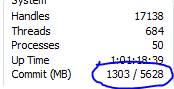
anyway, back to the point in hand, attached is a picture of my memory commit with Firefox, Media player playing mp3's and an office document open (that to me is light usage....)

as you can see my commit is 1303... now if i had a 1GB machine, i read that as RAM full (or pretty close to) and paging file of 1.5GB (at 1.5x size of ram) at about 25%? bearing in mind this pc has been on constantly for 26 hours.... so im failing to see how 1GB of ram wouldnt be ok for light usage.... (although admittedly if you wanted to do something beyond what im doing with it 1GB isnt enough)
 

Attachments

  • Capture.PNG
    Capture.PNG
    3.5 KB · Views: 97

My Computer

Computer type
PC/Desktop
Computer Manufacturer/Model Number
Medion Erazer (note to self: insert model number) - with custom additions
OS
Windows 10 Pro x64
CPU
Intel Core i5 7400 @ 3.00GHz
Motherboard
OEM supllied with PC
Memory
8GB 2133Mhz DDR4 (OEM supplied)
Graphics Card(s)
Gygabyte Windforce GTX 1050Ti (Factory Overclocked)
Sound Card
Realtek
Monitor(s) Displays
Acer Al1980 + HKC
Screen Resolution
1360*768(HKC) / 1280*1024(Acer)
Hard Drives
1TB Toshiba
1TB WD Caviar Green
120GB Samsung Evo 840
PSU
OEM supplied (no power rating on case)
Case
OEM Supplied
Cooling
Stock
Keyboard
Logitech Wireless
Mouse
Logitect Wireless
Internet Speed
40Mb/s Down 10Mb/s Up
Antivirus
Defender
Browser
Firefox
guys try and work this out as I wondered how my pc is using 4.2gig of ram.

All my apps ram utilisations adds up to 2.2 gig.
My file cache is just 134 meg (thought was way bigger since windows reports 2 gig cached).
This is 2.3-4 gig used.

Task manager reports 4.2 gig physical ram used, 4.6 gig commit (400 meg swapped). The breakdown of ram usage is
total 6143
cached 2021
available 2058
free 28

seems cached is misleading and is ram put on standby for cache use and is actually available to apps.
 

My Computer

Computer type
PC/Desktop
Computer Manufacturer/Model Number
home built
OS
windows 8.1 Pro x64
CPU
intel i5 4670k @ 4.3ghz
Motherboard
asus z87-plus
Memory
16 gig ram ddr3 @ 1600 corsair vengeance
Graphics Card(s)
evga 970 GTX 4 GIG FTW ACX 2.0
Sound Card
asus xonar D2X
Monitor(s) Displays
benq gw2765ht
Screen Resolution
2560x1440
Hard Drives
Samsung 850 pro SSD 512gig - boot device wooosh
WD black cavalier 640gig WD6401AALS
Seagate 500gig ST3500630AS
WD 2TB Green WDC20EARS
2 x WD Red 3TB WD30EFRX
Samsung 750gig HD753LG - on asmedia controller
PSU
coolermaster silent pro 600watt modular
Case
fractal define R4
Cooling
artic freezer i30, 3 case fans
Keyboard
microsoft business ps2 keyboard
Mouse
microsoft optical black mouse
Internet Speed
80/20 FTTC SkyBB
Antivirus
Nod32 AV v8, HitmanProAlert, SRP, System Hardening
Browser
Chrome x64
Other Info
Intel controller is in AHCI mode currently using IaSTOR 12.8.0.1016 drivers
yes it is, what your seeing is the effects of "superfetch" it caches what isnt in use (as epty ram is useless ram) but if an app needs it it will just write it over the top, you should pay attention to whats "available" not free, having said that, if your apps are only 2.2Gig, then i reckon your OS is using about a gig more ram than it should (based on my own figures, mine eventually settles down to about 1.1 in use including AV)
 

My Computer

Computer type
PC/Desktop
Computer Manufacturer/Model Number
Medion Erazer (note to self: insert model number) - with custom additions
OS
Windows 10 Pro x64
CPU
Intel Core i5 7400 @ 3.00GHz
Motherboard
OEM supllied with PC
Memory
8GB 2133Mhz DDR4 (OEM supplied)
Graphics Card(s)
Gygabyte Windforce GTX 1050Ti (Factory Overclocked)
Sound Card
Realtek
Monitor(s) Displays
Acer Al1980 + HKC
Screen Resolution
1360*768(HKC) / 1280*1024(Acer)
Hard Drives
1TB Toshiba
1TB WD Caviar Green
120GB Samsung Evo 840
PSU
OEM supplied (no power rating on case)
Case
OEM Supplied
Cooling
Stock
Keyboard
Logitech Wireless
Mouse
Logitect Wireless
Internet Speed
40Mb/s Down 10Mb/s Up
Antivirus
Defender
Browser
Firefox
Hmm I agree with severdsolo, Mine is usually 1.4g. 2.2 is alittle high.

Edit: mine has little running at startup. Your programs that are set up might be fine, just more resources used.
 

My Computer

Computer type
Laptop
Computer Manufacturer/Model Number
ASUS G60-RBBX05
OS
Win7 Home Premium 64x
CPU
Intel Core 2 Duo P7450 / 2.13 GHz (2.29 with Extreme Turbo)
Memory
4 GB PC-6400 Hyundai (2X2) at 800Mhz
Graphics Card(s)
NVIDIA GeForce GTX 260M 1GB DDR3 VRAM
Monitor(s) Displays
16" LED Backlit
Screen Resolution
1366 x 768 on laptop 1600x1050 max res on 22" external mon
Hard Drives
OCZ Agility 3 60GB SSD / 320 GB - Serial ATA-150 - 7200 rpm
PSU
6-cell Lithium ion { lasts 1.5 hours }
Case
ASUS G60 Laptop
Keyboard
Chicklet type back-lit (white light) keyboard
Mouse
Logitech G9 Laser Mouse 3200dpi and 1000 reports per minute
Internet Speed
Comcast 8.60mb/s up - 3.11mb/s down
Antivirus
MSE
Browser
Firefox
Other Info
General mid-budget gaming Comp. Low batterylife - High FrameRates - currently overheating problems :(

2nd Rig: Case: Rosewill BLACKHAWK Gaming ATX Mid Tower Computer Case

Mobo: GIGABYTE GA-990FXA-UD3
CPU: AMD FX-6200 Zambezi 3.8GHz (4.1GHz Turbo)
Heatsink: COOLER MASTER V8 CPU Cooler
RAM: Patriot Viper 3 8GB (2 x 4GB) 240-Pin DDR3 SDRAM 1866 (PC3 15000)
GPU: SAPPHIRE Radeon HD 6850 1GB 2
well here is my info from task manager.

and I just closed opera and firefox so was a gig higher usage before this.

3.57gig physical ram used. 4.38gig commit

1st column is name of process, 2nd column is working set delta, 3rd column is private working set, 4th column is commit size.

I am providing all these as I am not sure exactly shows the real ram usage. All figures in kbytes.

iexplore.exe 203,916 150,336 189,000
iexplore.exe 170,204 128,492 157,304
iexplore.exe 163,112 121,328 151,916
iexplore.exe 158,340 126,960 160,280
outlook.exe 158,008 71,172 84,068
explorer.exe 137,704 59,716 106,716
acrord32.exe 124,956 87,124 118,880
winword.exe 107,608 31,548 43,452
securecrt.exe 90,952 70,532 74,908
mmc.exe 78,988 48,300 78,592
securecrt.exe 78,224 52,692 59,608
ekrn.exe 56,124 47,968 49,432
iexplore.exe 47,640 14,000 20,072
svchost.exe 45,788 23,696 31,536
consolcu.exe 42,732 28,020 33,212
nvcplui.exe 41,124 13,756 16,440
excel.exe 40,052 7,144 16,964
iexplore.exe 39,616 9,680 11,888
iexplore.exe 38,576 9,124 10,436
iexplore.exe 38,324 9,624 13,592
mirc.exe 37,936 8,364 11,944
csrss.exe 37,916 9,372 10,140
iexplore.exe 36,564 9,292 10,644
iexplore.exe 36,248 7,764 9,360
iexplore.exe 35,988 8,472 9,912
securecrt.exe 33,396 9,532 13,888
notepad.exe 30,364 8,368 11,816
notepad.exe 29,704 7,600 10,928
wlcomm.exe 29,264 14,040 20,712
notepad.exe 28,996 8,500 12,592
svchost.exe 28,888 16,840 22,620
mmc.exe 26,756 4,144 9,044
iexplore.exe 25,520 6,980 9,828
ctxfispi.exe 24,676 14,256 19,956
egui.exe 24,660 5,508 8,036
svchost.exe 24,628 14,464 22,080
taskmgr.exe 20,404 5,028 6,488
keepass.exe 19,492 5,480 6,492
svchost.exe 18,268 8,624 10,908
msnmsgr.exe 17,880 13,360 82,408
svchost.exe 17,172 6,404 8,496
lwemon.exe 15,182 4,004 5,164
taskhost.exe 15516 2788 8296
svchost.exe 15404 7876 10856
volpanu.exe 15156 6776 11628
svchost.exe 14324 5668 6864
notepad.exe 14020 1272 1520
lsass.exe 12560 4900 5540
spoolsv.exe 12020 4920 6984
svchost.exe 11660 7068 7620
notepad.exe 11444 1124 1384
flashutil10d.exe 11096 3324 3620
notepad.exe 10768 1168 1424
notepad.exe 10632 1124 1376
notepad.exe 10624 1248 1500
notepad.exe 10112 1124 1380
alwaysontop.exe 9340 1224 2632
svchost.exe 9144 3500 4456
ctxfihlp.exe 8888 2284 2788
services.exe 8828 4664 5272
jusched.exe 8316 2272 2628
dllhost.exe 7992 2528 3176
rundll32.exe 7580 2140 2688
winlogon.exe 7332 2304 2876
conhost.exe 7192 1444 1872
splwow64.exe 7124 2728 3248
rundll32.exe 6384 1868 2156
system 6032 72 120
lsm.exe 5804 2124 3064
activator.exe 5568 1104 1344
7 taskbar tweaker x64.exe 5556 1268 1508
dumetersvc.exe 5536 3256 7716
svchost.exe 5104 1396 1808
psxss.exe 5024 2072 2688
notiman.exe 4952 1044 1248
csrss.exe 4672 1824 3216
dumeter.exe 4420 1220 7420
ctaudsvc.exe 4152 1016 1308
wininit.exe 4076 1136 1480
nvvsvc.exe 3480 1124 1272
cmd.exe 2864 928 2240
ielowutil.exe 1484 652 1365
smss.exe 1072 380 456
system idle process 24 24 0

few notes

1 - ordered by working set delta
2 - stopped typing , inside numbers as was slowing down too much
3 - notepad.exe is metapad I replaced the basic one and yes am running multiple instances.
4 - is a 64bit system and most of these processes are 32bit

anyone adding these up will notice none of the 3 columns come anywhere near close to the reported total usage so I am curious if I have a memory leak somewhere, perhaps in a driver.

 

My Computer

Computer type
PC/Desktop
Computer Manufacturer/Model Number
home built
OS
windows 8.1 Pro x64
CPU
intel i5 4670k @ 4.3ghz
Motherboard
asus z87-plus
Memory
16 gig ram ddr3 @ 1600 corsair vengeance
Graphics Card(s)
evga 970 GTX 4 GIG FTW ACX 2.0
Sound Card
asus xonar D2X
Monitor(s) Displays
benq gw2765ht
Screen Resolution
2560x1440
Hard Drives
Samsung 850 pro SSD 512gig - boot device wooosh
WD black cavalier 640gig WD6401AALS
Seagate 500gig ST3500630AS
WD 2TB Green WDC20EARS
2 x WD Red 3TB WD30EFRX
Samsung 750gig HD753LG - on asmedia controller
PSU
coolermaster silent pro 600watt modular
Case
fractal define R4
Cooling
artic freezer i30, 3 case fans
Keyboard
microsoft business ps2 keyboard
Mouse
microsoft optical black mouse
Internet Speed
80/20 FTTC SkyBB
Antivirus
Nod32 AV v8, HitmanProAlert, SRP, System Hardening
Browser
Chrome x64
Other Info
Intel controller is in AHCI mode currently using IaSTOR 12.8.0.1016 drivers
well here is my info from task manager.

and I just closed opera and firefox so was a gig higher usage before this.

3.57gig physical ram used. 4.38gig commit

1st column is name of process, 2nd column is working set delta, 3rd column is private working set, 4th column is commit size.

I am providing all these as I am not sure exactly shows the real ram usage. All figures in kbytes.

iexplore.exe 203,916 150,336 189,000
iexplore.exe 170,204 128,492 157,304
iexplore.exe 163,112 121,328 151,916
iexplore.exe 158,340 126,960 160,280
outlook.exe 158,008 71,172 84,068
explorer.exe 137,704 59,716 106,716
acrord32.exe 124,956 87,124 118,880
winword.exe 107,608 31,548 43,452
securecrt.exe 90,952 70,532 74,908
mmc.exe 78,988 48,300 78,592
securecrt.exe 78,224 52,692 59,608
ekrn.exe 56,124 47,968 49,432
iexplore.exe 47,640 14,000 20,072
svchost.exe 45,788 23,696 31,536
consolcu.exe 42,732 28,020 33,212
nvcplui.exe 41,124 13,756 16,440
excel.exe 40,052 7,144 16,964
iexplore.exe 39,616 9,680 11,888
iexplore.exe 38,576 9,124 10,436
iexplore.exe 38,324 9,624 13,592
mirc.exe 37,936 8,364 11,944
csrss.exe 37,916 9,372 10,140
iexplore.exe 36,564 9,292 10,644
iexplore.exe 36,248 7,764 9,360
iexplore.exe 35,988 8,472 9,912
securecrt.exe 33,396 9,532 13,888
notepad.exe 30,364 8,368 11,816
notepad.exe 29,704 7,600 10,928
wlcomm.exe 29,264 14,040 20,712
notepad.exe 28,996 8,500 12,592
svchost.exe 28,888 16,840 22,620
mmc.exe 26,756 4,144 9,044
iexplore.exe 25,520 6,980 9,828
ctxfispi.exe 24,676 14,256 19,956
egui.exe 24,660 5,508 8,036
svchost.exe 24,628 14,464 22,080
taskmgr.exe 20,404 5,028 6,488
keepass.exe 19,492 5,480 6,492
svchost.exe 18,268 8,624 10,908
msnmsgr.exe 17,880 13,360 82,408
svchost.exe 17,172 6,404 8,496
lwemon.exe 15,182 4,004 5,164
taskhost.exe 15516 2788 8296
svchost.exe 15404 7876 10856
volpanu.exe 15156 6776 11628
svchost.exe 14324 5668 6864
notepad.exe 14020 1272 1520
lsass.exe 12560 4900 5540
spoolsv.exe 12020 4920 6984
svchost.exe 11660 7068 7620
notepad.exe 11444 1124 1384
flashutil10d.exe 11096 3324 3620
notepad.exe 10768 1168 1424
notepad.exe 10632 1124 1376
notepad.exe 10624 1248 1500
notepad.exe 10112 1124 1380
alwaysontop.exe 9340 1224 2632
svchost.exe 9144 3500 4456
ctxfihlp.exe 8888 2284 2788
services.exe 8828 4664 5272
jusched.exe 8316 2272 2628
dllhost.exe 7992 2528 3176
rundll32.exe 7580 2140 2688
winlogon.exe 7332 2304 2876
conhost.exe 7192 1444 1872
splwow64.exe 7124 2728 3248
rundll32.exe 6384 1868 2156
system 6032 72 120
lsm.exe 5804 2124 3064
activator.exe 5568 1104 1344
7 taskbar tweaker x64.exe 5556 1268 1508
dumetersvc.exe 5536 3256 7716
svchost.exe 5104 1396 1808
psxss.exe 5024 2072 2688
notiman.exe 4952 1044 1248
csrss.exe 4672 1824 3216
dumeter.exe 4420 1220 7420
ctaudsvc.exe 4152 1016 1308
wininit.exe 4076 1136 1480
nvvsvc.exe 3480 1124 1272
cmd.exe 2864 928 2240
ielowutil.exe 1484 652 1365
smss.exe 1072 380 456
system idle process 24 24 0

few notes

1 - ordered by working set delta
2 - stopped typing , inside numbers as was slowing down too much
3 - notepad.exe is metapad I replaced the basic one and yes am running multiple instances.
4 - is a 64bit system and most of these processes are 32bit

anyone adding these up will notice none of the 3 columns come anywhere near close to the reported total usage so I am curious if I have a memory leak somewhere, perhaps in a driver.

Most of what you have running are applications and not processes running in Windows by default. You have numerous Internet Explorer windows/tabs open, Adobe Acrobat, Word, Outlook, Notepad, Excel, mIRC...

You are doing that to the computer itself. :rolleyes:
 

My Computer

OS
Windows 7 Home Premium x64
CPU
Intel Core 2 Quad Q9450 @ 3.2GHz
Motherboard
Asus P5Q PRO Turbo
Memory
4GB DDR2-800
Graphics Card(s)
MSI Radeon HD 5850
Sound Card
Creative Labs Audigy2 ZS
Monitor(s) Displays
Samsung 225BW
Hard Drives
(2) 1TB Samsung F1, (2) 1.5TB Samsung F2, 1TB Samsung F2, 2TB Samsung F3
PSU
Corsair HX650
Case
Antec Nine Hundred
I know they my applications. I listed it so people can see or maybe not see why high ram is utilised. Since we have people claiming its hard to use high amounts of ram.

However do you have an answer as to why I am using around 4 gig of ram?

add the total up for all the apps.
then add the 134meg for file cache.
then there is unaccounted memory, is there a 2nd cache for something else?
 

My Computer

Computer type
PC/Desktop
Computer Manufacturer/Model Number
home built
OS
windows 8.1 Pro x64
CPU
intel i5 4670k @ 4.3ghz
Motherboard
asus z87-plus
Memory
16 gig ram ddr3 @ 1600 corsair vengeance
Graphics Card(s)
evga 970 GTX 4 GIG FTW ACX 2.0
Sound Card
asus xonar D2X
Monitor(s) Displays
benq gw2765ht
Screen Resolution
2560x1440
Hard Drives
Samsung 850 pro SSD 512gig - boot device wooosh
WD black cavalier 640gig WD6401AALS
Seagate 500gig ST3500630AS
WD 2TB Green WDC20EARS
2 x WD Red 3TB WD30EFRX
Samsung 750gig HD753LG - on asmedia controller
PSU
coolermaster silent pro 600watt modular
Case
fractal define R4
Cooling
artic freezer i30, 3 case fans
Keyboard
microsoft business ps2 keyboard
Mouse
microsoft optical black mouse
Internet Speed
80/20 FTTC SkyBB
Antivirus
Nod32 AV v8, HitmanProAlert, SRP, System Hardening
Browser
Chrome x64
Other Info
Intel controller is in AHCI mode currently using IaSTOR 12.8.0.1016 drivers
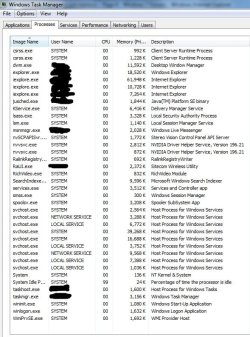
can any one see any problems with what i have running some of them i have no idea what there doing lol
 

Attachments

  • Untitled.jpg
    Untitled.jpg
    216.9 KB · Views: 30

My Computer

Computer Manufacturer/Model Number
Home Build
OS
Windows 7 Ultimate 64bit
CPU
intel core i5 2500k sandybridge
Motherboard
MSI p67a GD53 (B3)
Memory
8GB Corsair Vengeance DDR3
Graphics Card(s)
MSI 560 GTX-ti OC
Monitor(s) Displays
Samsung Sync Master P2050
Screen Resolution
1600-900
Hard Drives
2 x 500GB Samsung HD502HJ
PSU
Coolmaster 900w UCP
Keyboard
Logitech G15 Gaming Keyboard
Mouse
Logitech G9 Gaming Mouse
I know they my applications. I listed it so people can see or maybe not see why high ram is utilised. Since we have people claiming its hard to use high amounts of ram.

However do you have an answer as to why I am using around 4 gig of ram?

add the total up for all the apps.
then add the 134meg for file cache.
then there is unaccounted memory, is there a 2nd cache for something else?

Are you serious? Look at a giant chunk of your top processes...

iexplore.exe 203,916 150,336 189,000
iexplore.exe 170,204 128,492 157,304
iexplore.exe 163,112 121,328 151,916
iexplore.exe 158,340 126,960 160,280
outlook.exe 158,008 71,172 84,068
explorer.exe 137,704 59,716 106,716
acrord32.exe 124,956 87,124 118,880
winword.exe 107,608 31,548 43,452
securecrt.exe 90,952 70,532 74,908
mmc.exe 78,988 48,300 78,592
securecrt.exe 78,224 52,692 59,608
ekrn.exe 56,124 47,968 49,432
iexplore.exe 47,640 14,000 20,072
svchost.exe 45,788 23,696 31,536
consolcu.exe 42,732 28,020 33,212
nvcplui.exe 41,124 13,756 16,440
excel.exe 40,052 7,144 16,964
iexplore.exe 39,616 9,680 11,888
iexplore.exe 38,576 9,124 10,436
iexplore.exe 38,324 9,624 13,592
mirc.exe 37,936 8,364 11,944

The running processes from applications YOU are running or programs you installed and have background processes are eating up 1.6GB RAM right there! Not sure why you have a Microsoft Management Console (mmc.exe) open either.
 

My Computer

OS
Windows 7 Home Premium x64
CPU
Intel Core 2 Quad Q9450 @ 3.2GHz
Motherboard
Asus P5Q PRO Turbo
Memory
4GB DDR2-800
Graphics Card(s)
MSI Radeon HD 5850
Sound Card
Creative Labs Audigy2 ZS
Monitor(s) Displays
Samsung 225BW
Hard Drives
(2) 1TB Samsung F1, (2) 1.5TB Samsung F2, 1TB Samsung F2, 2TB Samsung F3
PSU
Corsair HX650
Case
Antec Nine Hundred
of course I am serious, thats 1.6gig but the rest add up to barely another few hundred meg.

if you going to try and give me a maths lesson try adding the entire list together.

You seem to have a problem with me running apps? arent I allowed to run mmc and applications on my machine?
 

My Computer

Computer type
PC/Desktop
Computer Manufacturer/Model Number
home built
OS
windows 8.1 Pro x64
CPU
intel i5 4670k @ 4.3ghz
Motherboard
asus z87-plus
Memory
16 gig ram ddr3 @ 1600 corsair vengeance
Graphics Card(s)
evga 970 GTX 4 GIG FTW ACX 2.0
Sound Card
asus xonar D2X
Monitor(s) Displays
benq gw2765ht
Screen Resolution
2560x1440
Hard Drives
Samsung 850 pro SSD 512gig - boot device wooosh
WD black cavalier 640gig WD6401AALS
Seagate 500gig ST3500630AS
WD 2TB Green WDC20EARS
2 x WD Red 3TB WD30EFRX
Samsung 750gig HD753LG - on asmedia controller
PSU
coolermaster silent pro 600watt modular
Case
fractal define R4
Cooling
artic freezer i30, 3 case fans
Keyboard
microsoft business ps2 keyboard
Mouse
microsoft optical black mouse
Internet Speed
80/20 FTTC SkyBB
Antivirus
Nod32 AV v8, HitmanProAlert, SRP, System Hardening
Browser
Chrome x64
Other Info
Intel controller is in AHCI mode currently using IaSTOR 12.8.0.1016 drivers
of course I am serious, thats 1.6gig but the rest add up to barely another few hundred meg.

if you going to try and give me a maths lesson try adding the entire list together.

You seem to have a problem with me running apps? arent I allowed to run mmc and applications on my machine?

Little hint here Chrysalis, Your only showing and counting the Private Working Set column and it doesnt show the full allocation used by that process. It might be an idea to enable Memory - Working Set and Memory - Commit Size columns before you start having a go at others ;)
 
Back
Top