
In the command prompt, type netsh interface tcp show global and press
Enter, the current TCP Global Parameters should appear. My 7068 x86
fails to do so , why?

The Vista in the same destop got no such problem (sorry, my Vista is the
Traditional Chinese version):
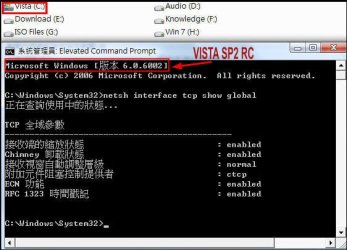
Need your help, and thanks in advanced.
Enter, the current TCP Global Parameters should appear. My 7068 x86
fails to do so , why?
The Vista in the same destop got no such problem (sorry, my Vista is the
Traditional Chinese version):
Need your help, and thanks in advanced.
My Computer
At a glance
Server 2008 R2 SP1, Win7 x64 Pro SP1Intel Core 2 Duo E6700 @3.3GHzTranscend DDRII 800 4GB (2 x 2GB )GeForce 7950GX2
- OS
- Server 2008 R2 SP1, Win7 x64 Pro SP1
- CPU
- Intel Core 2 Duo E6700 @3.3GHz
- Motherboard
- ASUS P5W DH DELUXE
- Memory
- Transcend DDRII 800 4GB (2 x 2GB )
- Graphics Card(s)
- GeForce 7950GX2
- Sound Card
- Realtek ALC882M Integrated on board
- Monitor(s) Displays
- ACER AL2723 27" LCD
- Screen Resolution
- 1920x1200
- Hard Drives
- WD 6401 AALS 640G x 1
Seagate 160 GB (Barracuda 7200.7) x 2
- PSU
- Zippy PSL-6720P(G1)720W
- Case
- Thermaltake Kandalf VA9000SWA
- Cooling
- Zalman CNPS9500
- Keyboard
- Standard
- Mouse
- Standard
- Internet Speed
- 10M, Cable
- Other Info
- Above is one of my desktops.


