Zooming in Movie Maker

HLaB

New member
Local time
9:16 AM
Messages
5
For some reason the zoom tools are disabled in my version of Windows Live Movie Maker (14.0), unfortunately none of the help files tell me why?

It might just be that my video camera doesn't record enough pixels (or whatever they are called) but I'd like to know.
 

My Computer My Computer

At a glance

Windows 7
OS
Windows 7
Welcome to sevenforums! There might be some file types that do not support this feature in windows live movie maker. Can you post your file type and a screenshot if possible? Use the sniping tool in windows 7
 

My Computer My Computer

At a glance

Windows 7 Home Premium
Computer Manufacturer/Model Number
Dell Studio XPS 8000
OS
Windows 7 Home Premium
Cheers for the reply,

This time I've been trying to zoom into a Win Media Video File, I've tried mp4's also in the past no luck.

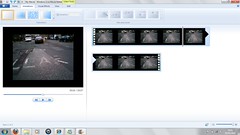
Hopefully the pic has worked, I'm trying to zoom into the top right of this video but the 'pan & zoom' tools are greyed out.

4413525146_f67c33e3e8_m.jpg
 

My Computer My Computer

At a glance

Windows 7
OS
Windows 7
Hi HLaB
According to MS Quote: Unfortunately, for Windows Live Movie Maker, this feature is not available
It appears they (MS) didn't have time to incorporate this feature. perhaps they are too busy thinking about buying "Twitter".:)
Full explanation in this thread:
Live Movie Maker 'Pan and Zoom' of video
I use a couple of Video Editors that have this feature but it is one of the more difficult featrures to use successfully, I find anyway
 

My Computer My Computer

At a glance

Microsoft Windows 7 Home Premium 64-bit 7601 ...Intel(R) Core(TM) i7-3770 CPU @ 3.40GHz8.00 GBIntel(R) HD Graphics 4000
Computer type
PC/Desktop
OS
Microsoft Windows 7 Home Premium 64-bit 7601 Multiprocessor Free Service Pack 1
CPU
Intel(R) Core(TM) i7-3770 CPU @ 3.40GHz
Motherboard
ASUSTeK COMPUTER INC. P8H77-M
Memory
8.00 GB
Graphics Card(s)
Intel(R) HD Graphics 4000
Sound Card
On Board
Monitor(s) Displays
Dell 24"
Screen Resolution
1920 x 1080
Hard Drives
(1) INTEL SSDSC2CT180A3 ATA Device (2) ST500DM002-1BD142 ATA Device (3) WDC WD3200AAKS-75L9A0 ATA Device (4) Generic- Compact Flash USB Device (5) Generic- MS/MS-Pro USB Device (6) Generic- SD/MMC USB Device (7) Generic- SM/xD-Picture USB
PSU
500w Corsair
Case
Cooler Master
Cooling
3 Fans
Keyboard
Logitech MK300
Mouse
Logitech WOM
Internet Speed
75Mb
Antivirus
Norton 360
Browser
Firefox, Opera, IE
Hi HLaB
According to MS Quote: Unfortunately, for Windows Live Movie Maker, this feature is not available
It appears they (MS) didn't have time to incorporate this feature. perhaps they are too busy thinking about buying "Twitter".:)
Full explanation in this thread:
Live Movie Maker 'Pan and Zoom' of video
I use a couple of Video Editors that have this feature but it is one of the more difficult featrures to use successfully, I find anyway
Thanks mitchel65, that's cleared that up, MS get your finger out.

Can you reccomend any good free editing software that has the feature?
 

My Computer My Computer

At a glance

Windows 7
OS
Windows 7
Can't think of a freebie video editor that will do the job you want though there may well be one out there. Suggest you Google it and download a couple and have a look. Video Editing is one of the most demanding things you can do on a PC both from the processing power that you need and the big learning curve. So not something to enter into lightly. If you care to post your camcorder details , make and model number I will have a look at what level of editor would make best use of your original clips. No point in going for a Rolls Royce editor if you are getting your clips from a mobile phone for instance! Not that there is anything wrong with that;)
 

My Computer My Computer

At a glance

Microsoft Windows 7 Home Premium 64-bit 7601 ...Intel(R) Core(TM) i7-3770 CPU @ 3.40GHz8.00 GBIntel(R) HD Graphics 4000
Computer type
PC/Desktop
OS
Microsoft Windows 7 Home Premium 64-bit 7601 Multiprocessor Free Service Pack 1
CPU
Intel(R) Core(TM) i7-3770 CPU @ 3.40GHz
Motherboard
ASUSTeK COMPUTER INC. P8H77-M
Memory
8.00 GB
Graphics Card(s)
Intel(R) HD Graphics 4000
Sound Card
On Board
Monitor(s) Displays
Dell 24"
Screen Resolution
1920 x 1080
Hard Drives
(1) INTEL SSDSC2CT180A3 ATA Device (2) ST500DM002-1BD142 ATA Device (3) WDC WD3200AAKS-75L9A0 ATA Device (4) Generic- Compact Flash USB Device (5) Generic- MS/MS-Pro USB Device (6) Generic- SD/MMC USB Device (7) Generic- SM/xD-Picture USB
PSU
500w Corsair
Case
Cooler Master
Cooling
3 Fans
Keyboard
Logitech MK300
Mouse
Logitech WOM
Internet Speed
75Mb
Antivirus
Norton 360
Browser
Firefox, Opera, IE
How about the old WMM. Is has "ease out" and "ease in" in the effects. Here is how to install it in Windows7. In case you do not have a copy, you can download mine from here. It is a bit of a pain because they make you wait for 30 seconds, but it works.
 

My Computer My Computer

At a glance

Vista, Windows7, Mint Mate, Zorin, Windows 8from 1.6GHz Duo to i7
Computer Manufacturer/Model Number
HP, Dell, Gateway, Toshiba - 4 laptops and 2 desktops
OS
Vista, Windows7, Mint Mate, Zorin, Windows 8
CPU
from 1.6GHz Duo to i7
Monitor(s) Displays
2x HP w2207
Hard Drives
5x HDD, 7x SSD, 12x Externals
Keyboard
with trackball - no mices
Mouse
Trackball mice
Internet Speed
DSL 6000
Can't think of a freebie video editor that will do the job you want though there may well be one out there. Suggest you Google it and download a couple and have a look. Video Editing is one of the most demanding things you can do on a PC both from the processing power that you need and the big learning curve. So not something to enter into lightly. If you care to post your camcorder details , make and model number I will have a look at what level of editor would make best use of your original clips. No point in going for a Rolls Royce editor if you are getting your clips from a mobile phone for instance! Not that there is anything wrong with that;)
Your probably right, you cant make a silk purse out of a pigs ear and I think I have a pigs ear ;) an Oregon Scientific ATC 5K, it specs arent great:

  • Full-function, hands-free, digital recording
  • Video capture at 640 x 480 VGA resolution at 30 frames per second
  • Waterproof up to 10 feet and shock-resistant for extreme conditions
  • Mounting grips and straps of different length are included.
  • Mounts easily on helmets, handlebars, and other sports equipment
  • Use as a webcam when connected to a PC and as a viewfinder when connected with TV/PMP
  • 53 degree capture field of view
  • 1.5 inch color LCD screen
  • Capture digital still photos
  • Remote control included, activate the camera when mounted on you helmet
  • USB and RCA cables included for easy playback on PC or TV (NTSC)
  • SD card expansion up to 4GB – onboard memory is 32MB Compatible with operation system WIN2000/XP/Vista and Apple Mac X 10.3/10.4
  • Operates with 2 AA batteries, not included Dimensions: 4.5L x 2.0 D x 3.0 H (in.)
I managed to find the old 2.6 WMM it works, I've also downloaded a few others but haven't tested them yet.
 
Last edited:

My Computer My Computer

At a glance

Windows 7
OS
Windows 7
I managed to find the old 2.6 WMM it works, I've also downloaded a few others but haven't tested them yet
The one I linked is the old Vista WMM that you can tweak in as per the instructions. Works well too. The 2.6 is really, really old.
 

My Computer My Computer

At a glance

Vista, Windows7, Mint Mate, Zorin, Windows 8from 1.6GHz Duo to i7
Computer Manufacturer/Model Number
HP, Dell, Gateway, Toshiba - 4 laptops and 2 desktops
OS
Vista, Windows7, Mint Mate, Zorin, Windows 8
CPU
from 1.6GHz Duo to i7
Monitor(s) Displays
2x HP w2207
Hard Drives
5x HDD, 7x SSD, 12x Externals
Keyboard
with trackball - no mices
Mouse
Trackball mice
Internet Speed
DSL 6000
How about the old WMM. Is has "ease out" and "ease in" in the effects. Here is how to install it in Windows7. In case you do not have a copy, you can download mine from here. It is a bit of a pain because they make you wait for 30 seconds, but it works.
Hi WHS Have tried the link to download, waited the 30 secs but got this message:
Your download slot has expired. Please try again
Is there something I have missed?
 

My Computer My Computer

At a glance

Microsoft Windows 7 Home Premium 64-bit 7601 ...Intel(R) Core(TM) i7-3770 CPU @ 3.40GHz8.00 GBIntel(R) HD Graphics 4000
Computer type
PC/Desktop
OS
Microsoft Windows 7 Home Premium 64-bit 7601 Multiprocessor Free Service Pack 1
CPU
Intel(R) Core(TM) i7-3770 CPU @ 3.40GHz
Motherboard
ASUSTeK COMPUTER INC. P8H77-M
Memory
8.00 GB
Graphics Card(s)
Intel(R) HD Graphics 4000
Sound Card
On Board
Monitor(s) Displays
Dell 24"
Screen Resolution
1920 x 1080
Hard Drives
(1) INTEL SSDSC2CT180A3 ATA Device (2) ST500DM002-1BD142 ATA Device (3) WDC WD3200AAKS-75L9A0 ATA Device (4) Generic- Compact Flash USB Device (5) Generic- MS/MS-Pro USB Device (6) Generic- SD/MMC USB Device (7) Generic- SM/xD-Picture USB
PSU
500w Corsair
Case
Cooler Master
Cooling
3 Fans
Keyboard
Logitech MK300
Mouse
Logitech WOM
Internet Speed
75Mb
Antivirus
Norton 360
Browser
Firefox, Opera, IE
Hi HLaB
Thanks for all the info. When you said:
It might just be that my video camera doesn't record enough pixels (or whatever they are called) but I'd like to know.
It made me think that perhaps you may not be aware of what happens when you use a zoom tool on video editing. You said you wanted to zoom into the top right of your clip. Roughly speaking the pixel rating defines the quality of the video clip. Modern high definition camcorders will normally record at 1920 x 1080 px so you can see that if you show your video clip on a TV the pixels you have available need to be stretched to fit the screen hence the definition will not be so good. If you then zoom to a section of the clip that is, lets say half the width of the original and half the height (to maintain the aspect ration, another very important point in video work) you will effectively reduce the total pixels by a quarter. This means to show on a screen those fewer pixels have got to be stretched even further,so reducing the quality even more. This is called "Non-square pixel rendering".
What I'm trying to say is that IMHO I do not think it worth while for you to purchase a video editing program that is capable of Zoom and Panning when the final result will likely be disappointing. If you really think you would like to get into video editing a little more seriously then you can always download a commercial program like Corel Video Studio x3 on a trial basis and use the pan and zoom filter in that. You can download on the TBYB (Try before you buy)here:
Video Editing Software ? Corel VideoStudio Pro X3
This gives you 30 days to try it.

I would recommend downloading the version offered by WHS if you can get the download to work. If not try this link:
Download Windows_Movie_Maker_6.0_x6.exe
 

My Computer My Computer

At a glance

Microsoft Windows 7 Home Premium 64-bit 7601 ...Intel(R) Core(TM) i7-3770 CPU @ 3.40GHz8.00 GBIntel(R) HD Graphics 4000
Computer type
PC/Desktop
OS
Microsoft Windows 7 Home Premium 64-bit 7601 Multiprocessor Free Service Pack 1
CPU
Intel(R) Core(TM) i7-3770 CPU @ 3.40GHz
Motherboard
ASUSTeK COMPUTER INC. P8H77-M
Memory
8.00 GB
Graphics Card(s)
Intel(R) HD Graphics 4000
Sound Card
On Board
Monitor(s) Displays
Dell 24"
Screen Resolution
1920 x 1080
Hard Drives
(1) INTEL SSDSC2CT180A3 ATA Device (2) ST500DM002-1BD142 ATA Device (3) WDC WD3200AAKS-75L9A0 ATA Device (4) Generic- Compact Flash USB Device (5) Generic- MS/MS-Pro USB Device (6) Generic- SD/MMC USB Device (7) Generic- SM/xD-Picture USB
PSU
500w Corsair
Case
Cooler Master
Cooling
3 Fans
Keyboard
Logitech MK300
Mouse
Logitech WOM
Internet Speed
75Mb
Antivirus
Norton 360
Browser
Firefox, Opera, IE
Yeah, this upload site is a pain in the neck. I used it only for this one occasion because for some unknown reason, Skydrive had refused to upload the folder. But I will try my luck again with Skydrive. Check in later to see whether I was successful.
 

My Computer My Computer

At a glance

Vista, Windows7, Mint Mate, Zorin, Windows 8from 1.6GHz Duo to i7
Computer Manufacturer/Model Number
HP, Dell, Gateway, Toshiba - 4 laptops and 2 desktops
OS
Vista, Windows7, Mint Mate, Zorin, Windows 8
CPU
from 1.6GHz Duo to i7
Monitor(s) Displays
2x HP w2207
Hard Drives
5x HDD, 7x SSD, 12x Externals
Keyboard
with trackball - no mices
Mouse
Trackball mice
Internet Speed
DSL 6000
Skydrive continues to refuse the folder. Sorry.
 

My Computer My Computer

At a glance

Vista, Windows7, Mint Mate, Zorin, Windows 8from 1.6GHz Duo to i7
Computer Manufacturer/Model Number
HP, Dell, Gateway, Toshiba - 4 laptops and 2 desktops
OS
Vista, Windows7, Mint Mate, Zorin, Windows 8
CPU
from 1.6GHz Duo to i7
Monitor(s) Displays
2x HP w2207
Hard Drives
5x HDD, 7x SSD, 12x Externals
Keyboard
with trackball - no mices
Mouse
Trackball mice
Internet Speed
DSL 6000
What I'm trying to say is that IMHO I do not think it worth while for you to purchase a video editing program that is capable of Zoom and Panning when the final result will likely be disappointing.
I tend to agree with you, when I saw so called tool in WLMM I just wanted to test out and see to what degree things pixelated and I don't think I'd buy any software until I had a better cam, thanks again
 

My Computer My Computer

At a glance

Windows 7
OS
Windows 7
Back
Top