
created a new user but docs still saved in old user

manhunter2826

New member
Guru
Gold Member
VIP
Local time
4:16 AM
Messages
1,957
Folks, I need your help again. Perhaps it's a trivial problem but I'd like to get it sorted.

I have a new laptop, I created a user on installation, let's say Test1 (as W7 runs through the installation wizard etc). I then decided that I was unhappy with that user name, so I then created a new user, let's say Test2. No problems there at all. But when I now create a new folder, say, on the desktop the location still points to
C:\users\Test1\desktop not Test2. How can I go about remedying this?

Can I just point out that I am more than happy to delete and create new profiles/users etc to remedy this issue as this is a new laptop without hardly any documents created. Hope this makes sense. As always, thanks for your help.
 

My Computer My Computer

At a glance

Windows XP - Now Windows 7 Home Premium (64-b...
OS
Windows XP - Now Windows 7 Home Premium (64-bit).
Under users folder, can you find both the user directories or only one?
 

My Computer My Computer

At a glance

Lioni54GBIntel
Computer Manufacturer/Model Number
MacBook Pro
OS
Lion
CPU
i5
Memory
4GB
Graphics Card(s)
Intel
Screen Resolution
1200x800
Hard Drives
Seagate FreeAgent GO 250GB Ext. HDD
Under users folder, can you find both the user directories or only one?

Dreams, thanks, no under c:\users\test2 is not there but test1 is and it has a padlock beside it. Anyway I can resolve this? I don't mind creating another user such as Test3.
 

My Computer My Computer

At a glance

Windows XP - Now Windows 7 Home Premium (64-b...
OS
Windows XP - Now Windows 7 Home Premium (64-bit).
I have just created another new user and that still is not showing in c:\users. Any ideas folks? :o
 

My Computer My Computer

At a glance

Windows XP - Now Windows 7 Home Premium (64-b...
OS
Windows XP - Now Windows 7 Home Premium (64-bit).
If you are unhappy with your username, then just change it. Why to make a new user for that ?

Are you creating the new folders or files as logged on as Test 2 ? Under C:\users, there should be two files if there is only one user, Test1 (padlocked, as it is an admin account) and Public. Is the public folder present there ?

Log on as Test 2, ( user, or admin ?), create some data in it, restart and then again log on as test2 and check that if the Test2 user is there in C:\Users or not.
 

My Computer My Computer

At a glance

Microsoft Windows 10 Pro Insider Preview 64-bitIntel(R) Core(TM) i3-4130 CPU @ 3.40GHzCorsair Vengence 4GB x2 (8.00GB Dual-Channel ...2047MB GeForce GTS 450 (ZOTAC International)
Computer type
PC/Desktop
Computer Manufacturer/Model Number
Self Assembled
OS
Microsoft Windows 10 Pro Insider Preview 64-bit
CPU
Intel(R) Core(TM) i3-4130 CPU @ 3.40GHz
Motherboard
Gigabyte Technology Co., Ltd. B85M-D3H
Memory
Corsair Vengence 4GB x2 (8.00GB Dual-Channel DDR3 @ 798MHz)
Graphics Card(s)
2047MB GeForce GTS 450 (ZOTAC International)
Sound Card
Onboard (Realtek High Definition Audio)
Monitor(s) Displays
LG Flatron E2040T
Screen Resolution
1600x900
Hard Drives
Western Digital 1 TB
Seagate 500 GB
PSU
Corsair VS550
Case
Cooler Master K380
Cooling
Cooler Master Seidon 120V Plus
Keyboard
Logitech MK260r
Mouse
Logitech MK260r
Internet Speed
PMPL Broadband
Antivirus
Windows Defender + MBAM
Browser
Firefox
Other Info
Dell Studio 15" Laptop
Did you log out of user Test1 & login as user Test2 ?
 

My Computer My Computer

At a glance

Win7 Enterprise, Win7 x86 (Ult 7600), Win7 x6...AMD fx8350 4ghz, AMD-32 2400mhz, AMD-64 3200m...2gb, 4gb on the Ult 7600, 4gb on Technet RTM,...Draw my own Graphics, several nVidia cards
Computer type
PC/Desktop
Computer Manufacturer/Model Number
Built them myself, Science Experiments !
OS
Win7 Enterprise, Win7 x86 (Ult 7600), Win7 x64 Ult 7600, TechNet RTM on AMD x64 (2.8Ghz)
CPU
AMD fx8350 4ghz, AMD-32 2400mhz, AMD-64 3200mhz, AMDx64 2.8G
Motherboard
SIS 755, ECS-K8M890M-M (Ult 7600), GigaByte & others
Memory
2gb, 4gb on the Ult 7600, 4gb on Technet RTM, 32gb on FX8350
Graphics Card(s)
Draw my own Graphics, several nVidia cards
Sound Card
on motherboard
Monitor(s) Displays
19" flat scr, 28" I-Inc widescr,22" Emprex Widescr, 23" Acer
Screen Resolution
1280 x 1024, 1440 x 900, 1920 x 1080
Hard Drives
6 pata Ide HD's & 2 Sata HD's
added 80gb external on Ult 7600 computer,
numerous extra 1tb, 2TB, 3Tb SATA HD's
A collection of ext HD Docks w/ HDs
PSU
430w, 550w, 600w, 700, 800, etc
Case
All Generic Full Towers
Cooling
Open Air & a few fans, some w/ colored LEDs
Keyboard
Compaq & Dell recycled from GoodWill
Mouse
Made in China Optical Wired Mouse
Internet Speed
Fast Cable InterNet
Antivirus
AVG Free on 24 different Desktops, NO Problems!
Browser
IE 8 is preferred, but use FireFox sometimes
Other Info
Linksys Routers, switches, & Hubs
Too Many USB Flash Drives to count, Biggest is 64GB !
Eight computers in my home network.
Sixteen computers at my business network.
Linked via TeamViewer !
Lots of old used spare computer parts everywhere!
If you change the name of user account Test1 to Test2, it only changes the username. It does not change the name of the user folder, so in this case user Test2's user folder would still be C:\Users\Test1. You can change the name of the user account on daily basis but the user folder name does not change. It keeps the first given name to that account, the name that was valid when user folders were created.

An example: if I now change my account name from Kari to Larry Laffer, my Windows user name would be Larry Laffer but my personal folder would still be C:\Users\Kari.

Personal user folders are created when you login to a new account first time. If you create new users and then check the folder C:\Users, you are not going to see folders for new accounts if you have yet not logged in to these new accounts.

Kari
 

My Computer My Computer

At a glance

Windows 10 Pro x64 EN-GB1.6 GHz Intel Core i7-720QM Processor6 GBATI Mobility Radeon HD 5850 Graphics
Computer type
Laptop
Computer Manufacturer/Model Number
HP ENVY 17-1150eg
OS
Windows 10 Pro x64 EN-GB
CPU
1.6 GHz Intel Core i7-720QM Processor
Memory
6 GB
Graphics Card(s)
ATI Mobility Radeon HD 5850 Graphics
Sound Card
Beats sound system with integrated subwoofer
Monitor(s) Displays
17" laptop display, 22" LED and 32" Full HD TV through HDMI
Screen Resolution
1600*900 (1), 1920*1080 (2&3)
Hard Drives
Internal: 2 x 500 GB SATA Hard Disk Drive 7200 rpm
External: 2TB for backups, 3TB USB3 network drive for media
Cooling
As Envy runs a bit warm, I have it on a Cooler Master pad
Keyboard
Logitech diNovo Media Desktop Laser (bluetooth)
Mouse
Logitech Performance Mouse MX
Internet Speed
50/10 Mbps VDSL
Antivirus
Windows Defender 4.3.9431.0
Browser
Maxthon 3.5.2., IE11
Sorry for the late reply. OK, Test3 was created fine in c:\users, so looks like I will have to now have to that as my new login name and profile. It's not a huge problem I suppose; I can copy what docs there are from Test1 into Test3. It's probably just a mistake I must have made along the way. I have repped u all for your help.
 

My Computer My Computer

At a glance

Windows XP - Now Windows 7 Home Premium (64-b...
OS
Windows XP - Now Windows 7 Home Premium (64-bit).
If you change the name of user account Test1 to Test2, it only changes the username. It does not change the name of the user folder, so in this case user Test2's user folder would still be C:\Users\Test1. You can change the name of the user account on daily basis but the user folder name does not change. It keeps the first given name to that account, the name that was valid when user folders were created.

An example: if I now change my account name from Kari to Larry Laffer, my Windows user name would be Larry Laffer but my personal folder would still be C:\Users\Kari.

Personal user folders are created when you login to a new account first time. If you create new users and then check the folder C:\Users, you are not going to see folders for new accounts if you have yet not logged in to these new accounts.

Kari

Kari thanks for that useful info also. See my above post: I will accept Test3 as my new username/profile form here on in. Thanks doc and arc too. All repped. And that info makes sense as to why when I create a new folder it still points to C:\Test1 and not Test2. Thanks again all.
 

My Computer My Computer

At a glance

Windows XP - Now Windows 7 Home Premium (64-b...
OS
Windows XP - Now Windows 7 Home Premium (64-bit).
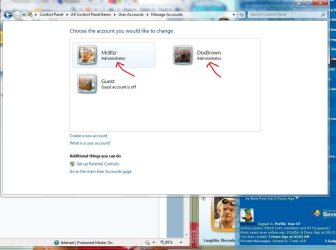
Did you make yourself as the User , an administrator acct. ?
 

Attachments

  • User_accts_Admin.JPG
    User_accts_Admin.JPG
    69.3 KB · Views: 214

My Computer My Computer

At a glance

Win7 Enterprise, Win7 x86 (Ult 7600), Win7 x6...AMD fx8350 4ghz, AMD-32 2400mhz, AMD-64 3200m...2gb, 4gb on the Ult 7600, 4gb on Technet RTM,...Draw my own Graphics, several nVidia cards
Computer type
PC/Desktop
Computer Manufacturer/Model Number
Built them myself, Science Experiments !
OS
Win7 Enterprise, Win7 x86 (Ult 7600), Win7 x64 Ult 7600, TechNet RTM on AMD x64 (2.8Ghz)
CPU
AMD fx8350 4ghz, AMD-32 2400mhz, AMD-64 3200mhz, AMDx64 2.8G
Motherboard
SIS 755, ECS-K8M890M-M (Ult 7600), GigaByte & others
Memory
2gb, 4gb on the Ult 7600, 4gb on Technet RTM, 32gb on FX8350
Graphics Card(s)
Draw my own Graphics, several nVidia cards
Sound Card
on motherboard
Monitor(s) Displays
19" flat scr, 28" I-Inc widescr,22" Emprex Widescr, 23" Acer
Screen Resolution
1280 x 1024, 1440 x 900, 1920 x 1080
Hard Drives
6 pata Ide HD's & 2 Sata HD's
added 80gb external on Ult 7600 computer,
numerous extra 1tb, 2TB, 3Tb SATA HD's
A collection of ext HD Docks w/ HDs
PSU
430w, 550w, 600w, 700, 800, etc
Case
All Generic Full Towers
Cooling
Open Air & a few fans, some w/ colored LEDs
Keyboard
Compaq & Dell recycled from GoodWill
Mouse
Made in China Optical Wired Mouse
Internet Speed
Fast Cable InterNet
Antivirus
AVG Free on 24 different Desktops, NO Problems!
Browser
IE 8 is preferred, but use FireFox sometimes
Other Info
Linksys Routers, switches, & Hubs
Too Many USB Flash Drives to count, Biggest is 64GB !
Eight computers in my home network.
Sixteen computers at my business network.
Linked via TeamViewer !
Lots of old used spare computer parts everywhere!
Did you make yourself as the User , an administrator acct. ?
Doc, for Test2 I made myself an administrator account; for the newly created Test3 I have made as standard user. Is that OK in your opinion? Thanks
 

My Computer My Computer

At a glance

Windows XP - Now Windows 7 Home Premium (64-b...
OS
Windows XP - Now Windows 7 Home Premium (64-bit).
You are welcome, Manhunter. And thanks for rep!
 

My Computer My Computer

At a glance

Windows 10 Pro x64 EN-GB1.6 GHz Intel Core i7-720QM Processor6 GBATI Mobility Radeon HD 5850 Graphics
Computer type
Laptop
Computer Manufacturer/Model Number
HP ENVY 17-1150eg
OS
Windows 10 Pro x64 EN-GB
CPU
1.6 GHz Intel Core i7-720QM Processor
Memory
6 GB
Graphics Card(s)
ATI Mobility Radeon HD 5850 Graphics
Sound Card
Beats sound system with integrated subwoofer
Monitor(s) Displays
17" laptop display, 22" LED and 32" Full HD TV through HDMI
Screen Resolution
1600*900 (1), 1920*1080 (2&3)
Hard Drives
Internal: 2 x 500 GB SATA Hard Disk Drive 7200 rpm
External: 2TB for backups, 3TB USB3 network drive for media
Cooling
As Envy runs a bit warm, I have it on a Cooler Master pad
Keyboard
Logitech diNovo Media Desktop Laser (bluetooth)
Mouse
Logitech Performance Mouse MX
Internet Speed
50/10 Mbps VDSL
Antivirus
Windows Defender 4.3.9431.0
Browser
Maxthon 3.5.2., IE11
Did you make yourself as the User , an administrator acct. ?
Doc, for Test2 I made myself an administrator account; for the newly created Test3 I have made as standard user. Is that OK in your opinion? Thanks

Sometimes 2 Admin accts for yourself is a safety net just in case of corruption, crash, etc. Even if you are the only user on the computer. If others use the computer, they don't have to have admin, just standard. ;)
 

My Computer My Computer

At a glance

Win7 Enterprise, Win7 x86 (Ult 7600), Win7 x6...AMD fx8350 4ghz, AMD-32 2400mhz, AMD-64 3200m...2gb, 4gb on the Ult 7600, 4gb on Technet RTM,...Draw my own Graphics, several nVidia cards
Computer type
PC/Desktop
Computer Manufacturer/Model Number
Built them myself, Science Experiments !
OS
Win7 Enterprise, Win7 x86 (Ult 7600), Win7 x64 Ult 7600, TechNet RTM on AMD x64 (2.8Ghz)
CPU
AMD fx8350 4ghz, AMD-32 2400mhz, AMD-64 3200mhz, AMDx64 2.8G
Motherboard
SIS 755, ECS-K8M890M-M (Ult 7600), GigaByte & others
Memory
2gb, 4gb on the Ult 7600, 4gb on Technet RTM, 32gb on FX8350
Graphics Card(s)
Draw my own Graphics, several nVidia cards
Sound Card
on motherboard
Monitor(s) Displays
19" flat scr, 28" I-Inc widescr,22" Emprex Widescr, 23" Acer
Screen Resolution
1280 x 1024, 1440 x 900, 1920 x 1080
Hard Drives
6 pata Ide HD's & 2 Sata HD's
added 80gb external on Ult 7600 computer,
numerous extra 1tb, 2TB, 3Tb SATA HD's
A collection of ext HD Docks w/ HDs
PSU
430w, 550w, 600w, 700, 800, etc
Case
All Generic Full Towers
Cooling
Open Air & a few fans, some w/ colored LEDs
Keyboard
Compaq & Dell recycled from GoodWill
Mouse
Made in China Optical Wired Mouse
Internet Speed
Fast Cable InterNet
Antivirus
AVG Free on 24 different Desktops, NO Problems!
Browser
IE 8 is preferred, but use FireFox sometimes
Other Info
Linksys Routers, switches, & Hubs
Too Many USB Flash Drives to count, Biggest is 64GB !
Eight computers in my home network.
Sixteen computers at my business network.
Linked via TeamViewer !
Lots of old used spare computer parts everywhere!
Did you make yourself as the User , an administrator acct. ?
Doc, for Test2 I made myself an administrator account; for the newly created Test3 I have made as standard user. Is that OK in your opinion? Thanks

Sometimes 2 Admin accts for yourself is a safety net just in case of corruption, crash, etc. Even if you are the only user on the computer. If others use the computer, they don't have to have admin, just standard. ;)
thanks, and I am indeed the sole user here. Much thanks to all for your help.
 

My Computer My Computer

At a glance

Windows XP - Now Windows 7 Home Premium (64-b...
OS
Windows XP - Now Windows 7 Home Premium (64-bit).
You are welcome. Glad to help :) Ask anytime :geek:
 

My Computer My Computer

At a glance

Win7 Enterprise, Win7 x86 (Ult 7600), Win7 x6...AMD fx8350 4ghz, AMD-32 2400mhz, AMD-64 3200m...2gb, 4gb on the Ult 7600, 4gb on Technet RTM,...Draw my own Graphics, several nVidia cards
Computer type
PC/Desktop
Computer Manufacturer/Model Number
Built them myself, Science Experiments !
OS
Win7 Enterprise, Win7 x86 (Ult 7600), Win7 x64 Ult 7600, TechNet RTM on AMD x64 (2.8Ghz)
CPU
AMD fx8350 4ghz, AMD-32 2400mhz, AMD-64 3200mhz, AMDx64 2.8G
Motherboard
SIS 755, ECS-K8M890M-M (Ult 7600), GigaByte & others
Memory
2gb, 4gb on the Ult 7600, 4gb on Technet RTM, 32gb on FX8350
Graphics Card(s)
Draw my own Graphics, several nVidia cards
Sound Card
on motherboard
Monitor(s) Displays
19" flat scr, 28" I-Inc widescr,22" Emprex Widescr, 23" Acer
Screen Resolution
1280 x 1024, 1440 x 900, 1920 x 1080
Hard Drives
6 pata Ide HD's & 2 Sata HD's
added 80gb external on Ult 7600 computer,
numerous extra 1tb, 2TB, 3Tb SATA HD's
A collection of ext HD Docks w/ HDs
PSU
430w, 550w, 600w, 700, 800, etc
Case
All Generic Full Towers
Cooling
Open Air & a few fans, some w/ colored LEDs
Keyboard
Compaq & Dell recycled from GoodWill
Mouse
Made in China Optical Wired Mouse
Internet Speed
Fast Cable InterNet
Antivirus
AVG Free on 24 different Desktops, NO Problems!
Browser
IE 8 is preferred, but use FireFox sometimes
Other Info
Linksys Routers, switches, & Hubs
Too Many USB Flash Drives to count, Biggest is 64GB !
Eight computers in my home network.
Sixteen computers at my business network.
Linked via TeamViewer !
Lots of old used spare computer parts everywhere!
Back
Top