Resident Evil 5 slow to install?

Sope

New member
Member
Local time
8:04 PM
Messages
46
Location
Wales, UK
Hi,

Me and my brother have essentially the same hardware and are both running Windows 7 x64.
I install my games to a separate dedicated partition whereas my brother installs to the default location on C:

Recently we both installed RE5 but it took nearly an hour to install on my setup which was maybe about 3x the length of time it took on my brother's PC. Additionally my system was very slow to respond during the install process despite my CPU usage meter showing very little activity. In contrast, my brother's system performance seemed completely unaffected.

I'm wondering if this is to be expected due to my choice of install partition, or might I have some sort of hardware or driver or even game disc problem? Since the install my system is back to normal and everything seems to be working as it should :confused:

Any ideas?
 

My Computer My Computer

At a glance

Windows 7 64-bitIntel Core i5 750 2.66GhzCrucial 8GB (4x2GB) DDR3 1333MHzSapphire HD 5850 1GB GDDR5
Computer Manufacturer/Model Number
Self-Built Jan 2010
OS
Windows 7 64-bit
CPU
Intel Core i5 750 2.66Ghz
Motherboard
Asus P7P55D Pro
Memory
Crucial 8GB (4x2GB) DDR3 1333MHz
Graphics Card(s)
Sapphire HD 5850 1GB GDDR5
Monitor(s) Displays
Benq G2420HDBL LED LCD 24" DVI-D 1920x1080
Screen Resolution
1680 x 1050
Hard Drives
Samsung SpinPoint F3 1TB SATAII 7200rpm 32MB Cache (x2)
PSU
Corsair HX 750W
Case
Antec 300
Cooling
Arctic Cooling Freezer 7 Pro rev 2
Keyboard
Microsoft Reclusa
Mouse
Microsoft IntelliMouse Explorer 3.0
Internet Speed
10 Mb/sec (cable modem)
Other Info
Sony AD7241S 24x DVD±RW SATA Dual Layer & RAM Burner + LightScribe
It could be a disc problem, or maybe a hard drive issue.

A scratched DVD will be very slow to read, and a hard drive with bad sectors can be slow too.

Since you don't notice slowness elsewhere, I suspect it could be a DVD issue.
 

My Computer My Computer

At a glance

Windows 7 Professional x64Intel i7 2600K OC'd @ 4620 MHz16GB GSkill Sniper 2133 Mhz (4x4GB)EVGA GeForce GTX 480 SuperClocked+
Computer Manufacturer/Model Number
Custom
OS
Windows 7 Professional x64
CPU
Intel i7 2600K OC'd @ 4620 MHz
Motherboard
Asus P8Z68-V Pro
Memory
16GB GSkill Sniper 2133 Mhz (4x4GB)
Graphics Card(s)
EVGA GeForce GTX 480 SuperClocked+
Sound Card
Realtek High Definition Audio
Monitor(s) Displays
2x Acer S273HLbmii 27"
Screen Resolution
2 x 1920x1080
Hard Drives
64GB Crucial M4 SSD

Storage: Hitachi 1TB 5400RPM, Samsung 1.5TB 5400RPM
PSU
Corsair HW Series 750w (modular)
Case
Cooler Master HAF 932 Advanced Blue Edition
Cooling
CM Hyper 212+ CPU cooler, 3x 230mm + 1x 140mm case fans
Keyboard
Logitech MK320 (wireless)
Mouse
Logitech MK320 (wireless)
Internet Speed
30 Mb/s : 2 Mb/s
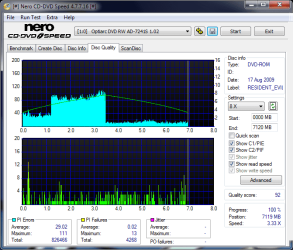
OK, here's a couple of results I got using Nero CD-DVD Speed :-

Optiarc_DVD_RW_AD-7241S_1.02_17-March-2010_16_17.png

Optiarc_DVD_RW_AD-7241S_1.02_17-March-2010_16_18.png

I'm unsure whether the first one testing "Disc Quality" is telling me if the disc is actually good or bad?
 

My Computer My Computer

At a glance

Windows 7 64-bitIntel Core i5 750 2.66GhzCrucial 8GB (4x2GB) DDR3 1333MHzSapphire HD 5850 1GB GDDR5
Computer Manufacturer/Model Number
Self-Built Jan 2010
OS
Windows 7 64-bit
CPU
Intel Core i5 750 2.66Ghz
Motherboard
Asus P7P55D Pro
Memory
Crucial 8GB (4x2GB) DDR3 1333MHz
Graphics Card(s)
Sapphire HD 5850 1GB GDDR5
Monitor(s) Displays
Benq G2420HDBL LED LCD 24" DVI-D 1920x1080
Screen Resolution
1680 x 1050
Hard Drives
Samsung SpinPoint F3 1TB SATAII 7200rpm 32MB Cache (x2)
PSU
Corsair HX 750W
Case
Antec 300
Cooling
Arctic Cooling Freezer 7 Pro rev 2
Keyboard
Microsoft Reclusa
Mouse
Microsoft IntelliMouse Explorer 3.0
Internet Speed
10 Mb/sec (cable modem)
Other Info
Sony AD7241S 24x DVD±RW SATA Dual Layer & RAM Burner + LightScribe
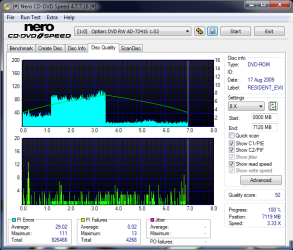
I'm not sure either, but I'm guessing that's not good.

Look at the discs. Is yours scratched considerably?
 

My Computer My Computer

At a glance

Windows 7 Professional x64Intel i7 2600K OC'd @ 4620 MHz16GB GSkill Sniper 2133 Mhz (4x4GB)EVGA GeForce GTX 480 SuperClocked+
Computer Manufacturer/Model Number
Custom
OS
Windows 7 Professional x64
CPU
Intel i7 2600K OC'd @ 4620 MHz
Motherboard
Asus P8Z68-V Pro
Memory
16GB GSkill Sniper 2133 Mhz (4x4GB)
Graphics Card(s)
EVGA GeForce GTX 480 SuperClocked+
Sound Card
Realtek High Definition Audio
Monitor(s) Displays
2x Acer S273HLbmii 27"
Screen Resolution
2 x 1920x1080
Hard Drives
64GB Crucial M4 SSD

Storage: Hitachi 1TB 5400RPM, Samsung 1.5TB 5400RPM
PSU
Corsair HW Series 750w (modular)
Case
Cooler Master HAF 932 Advanced Blue Edition
Cooling
CM Hyper 212+ CPU cooler, 3x 230mm + 1x 140mm case fans
Keyboard
Logitech MK320 (wireless)
Mouse
Logitech MK320 (wireless)
Internet Speed
30 Mb/s : 2 Mb/s
I'm not sure either, but I'm guessing that's not good.

Look at the discs. Is yours scratched considerably?

To the naked eye there's no obvious damage at all.

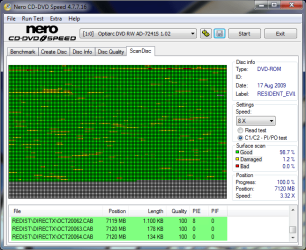
I'm just running a couple more tests with Nero CD-DVD Speed "ScanDisc" mode which I'll post shortly.

I guess it may be useful to run similar tests on my brother's RE5 disc for a comparison as I'm unsure what I'm looking at either.

When I was actually installing the game, I noticed the DVD drive was making a "buzz-buzz buzz-buzz" sound for long periods of time as if it was having to locate little bits of data from randomly different parts of the disc, and rather than spinning continuously, the DVD was being moved little bits at a time (if that makes any sense :confused:).
 

My Computer My Computer

At a glance

Windows 7 64-bitIntel Core i5 750 2.66GhzCrucial 8GB (4x2GB) DDR3 1333MHzSapphire HD 5850 1GB GDDR5
Computer Manufacturer/Model Number
Self-Built Jan 2010
OS
Windows 7 64-bit
CPU
Intel Core i5 750 2.66Ghz
Motherboard
Asus P7P55D Pro
Memory
Crucial 8GB (4x2GB) DDR3 1333MHz
Graphics Card(s)
Sapphire HD 5850 1GB GDDR5
Monitor(s) Displays
Benq G2420HDBL LED LCD 24" DVI-D 1920x1080
Screen Resolution
1680 x 1050
Hard Drives
Samsung SpinPoint F3 1TB SATAII 7200rpm 32MB Cache (x2)
PSU
Corsair HX 750W
Case
Antec 300
Cooling
Arctic Cooling Freezer 7 Pro rev 2
Keyboard
Microsoft Reclusa
Mouse
Microsoft IntelliMouse Explorer 3.0
Internet Speed
10 Mb/sec (cable modem)
Other Info
Sony AD7241S 24x DVD±RW SATA Dual Layer & RAM Burner + LightScribe
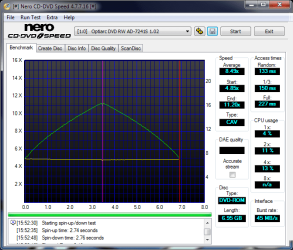
Yep, that might also suggest a drive problem.
 

My Computer My Computer

At a glance

Windows 7 Professional x64Intel i7 2600K OC'd @ 4620 MHz16GB GSkill Sniper 2133 Mhz (4x4GB)EVGA GeForce GTX 480 SuperClocked+
Computer Manufacturer/Model Number
Custom
OS
Windows 7 Professional x64
CPU
Intel i7 2600K OC'd @ 4620 MHz
Motherboard
Asus P8Z68-V Pro
Memory
16GB GSkill Sniper 2133 Mhz (4x4GB)
Graphics Card(s)
EVGA GeForce GTX 480 SuperClocked+
Sound Card
Realtek High Definition Audio
Monitor(s) Displays
2x Acer S273HLbmii 27"
Screen Resolution
2 x 1920x1080
Hard Drives
64GB Crucial M4 SSD

Storage: Hitachi 1TB 5400RPM, Samsung 1.5TB 5400RPM
PSU
Corsair HW Series 750w (modular)
Case
Cooler Master HAF 932 Advanced Blue Edition
Cooling
CM Hyper 212+ CPU cooler, 3x 230mm + 1x 140mm case fans
Keyboard
Logitech MK320 (wireless)
Mouse
Logitech MK320 (wireless)
Internet Speed
30 Mb/s : 2 Mb/s
Yep, that might also suggest a drive problem.

I did initially suspect my DVD drive as I've heard it doing similar things before.
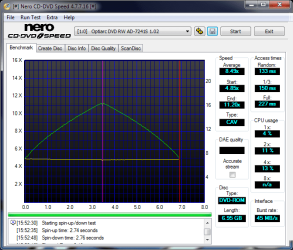
The second screenshot I originally posted is a benchmark of it's performance but I've nothing to compare it to yet. My initial uneducated guess though is that it doesn't look too bad.

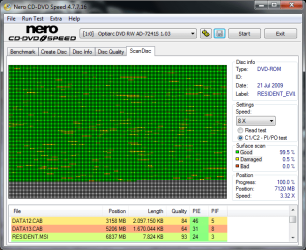
Anyway, here's my final 2 test results of the RE5 DVD :-

Read test
Optiarc_DVD_RW_AD-7241S_1.02_17-March-2010_18_13.png

PI/PO test
Optiarc_DVD_RW_AD-7241S_1.02_17-March-2010_18_40.png

I'll try to run some similar tests on my brother's setup for comparison.
 

My Computer My Computer

At a glance

Windows 7 64-bitIntel Core i5 750 2.66GhzCrucial 8GB (4x2GB) DDR3 1333MHzSapphire HD 5850 1GB GDDR5
Computer Manufacturer/Model Number
Self-Built Jan 2010
OS
Windows 7 64-bit
CPU
Intel Core i5 750 2.66Ghz
Motherboard
Asus P7P55D Pro
Memory
Crucial 8GB (4x2GB) DDR3 1333MHz
Graphics Card(s)
Sapphire HD 5850 1GB GDDR5
Monitor(s) Displays
Benq G2420HDBL LED LCD 24" DVI-D 1920x1080
Screen Resolution
1680 x 1050
Hard Drives
Samsung SpinPoint F3 1TB SATAII 7200rpm 32MB Cache (x2)
PSU
Corsair HX 750W
Case
Antec 300
Cooling
Arctic Cooling Freezer 7 Pro rev 2
Keyboard
Microsoft Reclusa
Mouse
Microsoft IntelliMouse Explorer 3.0
Internet Speed
10 Mb/sec (cable modem)
Other Info
Sony AD7241S 24x DVD±RW SATA Dual Layer & RAM Burner + LightScribe
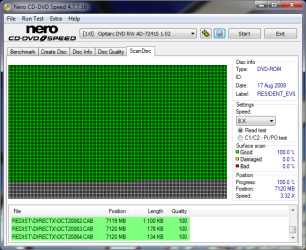
I just installed RE5 earlier today. At first the install went incredibly slow and I think it only got through 500mb in a little under 10 minutes... Shortly after however it jumped up to great speeds and finished the other 6 gig in no time. Not sure what caused the issue but it worked itself out eventually.
 

My Computer My Computer

At a glance

Win7 Ultimate x64Intel I5 4690k16gb Corsair DDR3 @1600mhzGTX 970
Computer type
PC/Desktop
Computer Manufacturer/Model Number
Home Built
OS
Win7 Ultimate x64
CPU
Intel I5 4690k
Motherboard
MSI Z97 Gaming 5
Memory
16gb Corsair DDR3 @1600mhz
Graphics Card(s)
GTX 970
Sound Card
Realtek HD 5.1
Monitor(s) Displays
Acer 23" LCD
Screen Resolution
1920x1080
Hard Drives
Samsung Evo III SSD
WD 1TB Black
PSU
EVGA Supernove 650w
Case
Diabolik
Cooling
Cooler Master
Keyboard
Logitech
Mouse
Logitech
Internet Speed
Fiber
Other Info
Logitech X-540 5.1 Surround Sound/
Logitech Rumblepad2/
Thrustmaster RGT FFB Wheel
When I was actually installing the game, I noticed the DVD drive was making a "buzz-buzz buzz-buzz" sound for long periods of time as if it was having to locate little bits of data from randomly different parts of the disc, and rather than spinning continuously, the DVD was being moved little bits at a time (if that makes any sense :confused:).

Generally not a good sign.

Have you used the drive for a lot of burning as well?

One simple way to eliminate the disc or the drive, would be to reinstall the game using your brothers disc.

If it installs quickly, then it's the disc. If it installs slowly (again) then it's probably the drive that's on it's way out.

When a burner goes, it usually goes pretty quickly.
 

My Computer My Computer

At a glance

8 Pro x64i7 3770K 4.6GHz16GB G.Skill Trident X 2666mhzx2 EVGA 780 Ti Superclocked SLI
Computer type
PC/Desktop
Computer Manufacturer/Model Number
Systems by SmartEyeball
OS
8 Pro x64
CPU
i7 3770K 4.6GHz
Motherboard
ASUS P8Z77 WS
Memory
16GB G.Skill Trident X 2666mhz
Graphics Card(s)
x2 EVGA 780 Ti Superclocked SLI
Sound Card
SB X-FI Surround 5.1 PRO USB / ATH-AD900 Headphones
Monitor(s) Displays
x3 Dell U2410 / 58" Samsung
Screen Resolution
5760*1200/ 1920*1200
Hard Drives
2x Intel 520 240GB (RAID 0) * 2x WD Caviar Blacks 2TB (RAID 0) * 2TB WD Caviar Black * Sony Optirac DVD
PSU
Silverstone Strider Evolution 1200W
Case
Thermaltake Level 10 GT Snow Edition
Cooling
Noctua NH-D14
Keyboard
Topre Realforce // Ducky Shine MX Black // Filco Ninja TKL
Mouse
Thermaltake Theron (Highly Recommended) + Razer Imperator
Antivirus
MSE
Browser
IE, FF, WaterFox
Other Info
GT Extreme V2 Sim Racing Cockpit + 40" LCD and K/B Mouse stand ▼
Fanatec CSR Elite Wheel + Clubsport V1 Pedals + CSR shifter/7G-H ▼Saitek X52 Pro ▼ TrackIR 5 Pro
Buttkicker v2 Seat Rumbler with Dedicated 5.1 and Sub Woofer attached to frame ▼
=
Bloody Big Grin
When I was actually installing the game, I noticed the DVD drive was making a "buzz-buzz buzz-buzz" sound for long periods of time as if it was having to locate little bits of data from randomly different parts of the disc, and rather than spinning continuously, the DVD was being moved little bits at a time (if that makes any sense :confused:).

Generally not a good sign.

Have you used the drive for a lot of burning as well?

The DVD Drive is only a couple of months old and has only been used a few times for burning. I noticed my firmware version was 1.02 whereas my brother's was 1.03. I've updated it to the latest version now (although the release notes only say it's a fix for W7 backup compatability).

I've got some benchmarks for comparison now :-

DVD drives compared
Optiarc_DVD_RW_AD-7241S_1.02_17-March-2010_16_18.png My PC
Optiarc_DVD_RW_AD-7241S_1.03_18-March-2010_12_08.png Bro's PC

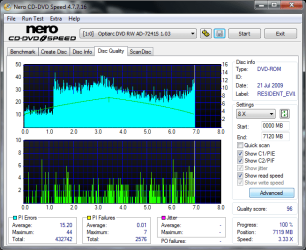
RE5 discs compared
Optiarc_DVD_RW_AD-7241S_1.02_17-March-2010_16_17.png My PC
Optiarc_DVD_RW_AD-7241S_1.03_18-March-2010_12_27.png Bro's PC

RE5 discs compared
Optiarc_DVD_RW_AD-7241S_1.02_17-March-2010_18_40.png My PC
Optiarc_DVD_RW_AD-7241S_1.03_18-March-2010_13_31.png Bro's PC

To me, the two DVD drives performance look similar but my RE5 disc has more errors......I think?

Anyhow, I'll just wait to see what happens with the drive and get it replaced under warranty if necessary. The game disc seems to play fine, and if I need to reinstall I can use my brother's disc.
Happily I don't think it's anything to do with the HDD.

Thanks guy's for all the input. :)
 

My Computer My Computer

At a glance

Windows 7 64-bitIntel Core i5 750 2.66GhzCrucial 8GB (4x2GB) DDR3 1333MHzSapphire HD 5850 1GB GDDR5
Computer Manufacturer/Model Number
Self-Built Jan 2010
OS
Windows 7 64-bit
CPU
Intel Core i5 750 2.66Ghz
Motherboard
Asus P7P55D Pro
Memory
Crucial 8GB (4x2GB) DDR3 1333MHz
Graphics Card(s)
Sapphire HD 5850 1GB GDDR5
Monitor(s) Displays
Benq G2420HDBL LED LCD 24" DVI-D 1920x1080
Screen Resolution
1680 x 1050
Hard Drives
Samsung SpinPoint F3 1TB SATAII 7200rpm 32MB Cache (x2)
PSU
Corsair HX 750W
Case
Antec 300
Cooling
Arctic Cooling Freezer 7 Pro rev 2
Keyboard
Microsoft Reclusa
Mouse
Microsoft IntelliMouse Explorer 3.0
Internet Speed
10 Mb/sec (cable modem)
Other Info
Sony AD7241S 24x DVD±RW SATA Dual Layer & RAM Burner + LightScribe
Back
Top