Connect to PPPOE automatically when it disconnects ?

persianmajid

New member
Local time
1:11 PM
Messages
19
Hi guys , please help me !
my Internet connection disconnects every 1 Hour at nights and that's when I want to download some files but I'm asleep and I can't wake up and reconnect it over and over , I used to use IDM for downloading but It only is able to reconnect Bridge and Dial-up Connections if I'm not wrong , and I set my broadband connection on PPPOE .

so can you help me with this ?
Thanks in advance .
 

My Computer My Computer

OS
seven
Hi guys , please help me !
my Internet connection disconnects every 1 Hour at nights and that's when I want to download some files but I'm asleep and I can't wake up and reconnect it over and over , I used to use IDM for downloading but It only is able to reconnect Bridge and Dial-up Connections if I'm not wrong , and I set my broadband connection on PPPOE .

so can you help me with this ?
Thanks in advance .

Do you have a router? If so what model and brand?

Many routers have a "keep alive" setting for a PPPOE connection... check yours.
 

My Computer My Computer

Computer Manufacturer/Model Number
Homebrew PC - "Alpha_Dawg"
OS
Windows 7 Ultimate 64 bit Steve Ballmer Signature Edition
CPU
Intel Core 2 Quad - Q9550 - 2.83GHz stock - OC'd to 3.6GHz
Motherboard
Gigabyte EP45-UD3P
Memory
4GB DDR2 800MHz (PC6400) OCZ Reaper
Graphics Card(s)
Nvidia GE Force 8800 GTS
Sound Card
Asus Xonar DX
Monitor(s) Displays
Samsung SyncMaster 2333HD
Screen Resolution
1920 x 1080
Hard Drives
WD Caviar Black 750GB - 7200RPM - 32MB cache
WD Caviar Green 1.5TB - 5400RPM - 64MB cache
WD Caviar Green 2.0TB - 5400RPM - 64MB cache
PSU
PC Power & Cooling Silencer 750
Case
Gigabyte 3D Aurora
Cooling
Case is Air - 5ea. 120mm fans (mix of Arctic and Xigmatec)
Keyboard
MS Natural Wireless KB
Mouse
MS Wireless Mouse
Internet Speed
50 mbps down/5 mbps up
Other Info
AVerMedia - AVerTVHD G2 Dual Tuner Card
I used to use IDM for downloading but It only is able to reconnect Bridge and Dial-up Connections

hi....maybe you need to do port forward in your router to let your idm connect on PPPOE.

my Internet connection disconnects every 1 Hour at nights and that's when I want to download some files but I'm asleep and I can't wake up and reconnect it over and over

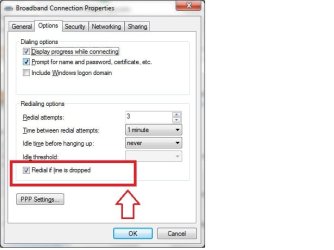
get it to auto redial(if not already on) in the dial up broadband connection
see the screen shot
 

Attachments

  • dialup.jpg
    dialup.jpg
    27.9 KB · Views: 445

My Computer My Computer

OS
windows 7 ultimate 64 bit,Windows 7 ultimate 32 bit,Windows XP sp3 home
Hi guys , please help me !
my Internet connection disconnects every 1 Hour at nights and that's when I want to download some files but I'm asleep and I can't wake up and reconnect it over and over , I used to use IDM for downloading but It only is able to reconnect Bridge and Dial-up Connections if I'm not wrong , and I set my broadband connection on PPPOE .

so can you help me with this ?
Thanks in advance .

Do you have a router? If so what model and brand?

Many routers have a "keep alive" setting for a PPPOE connection... check yours.

Thanks for the answer ' Darryl Licht ', but no I don't have any routers , just A modem . Can you help me ?


I used to use IDM for downloading but It only is able to reconnect Bridge and Dial-up Connections

hi....maybe you need to do port forward in your router to let your idm connect on PPPOE.

hi ... thanks , but as I said I don't have router .

my Internet connection disconnects every 1 Hour at nights and that's when I want to download some files but I'm asleep and I can't wake up and reconnect it over and over

get it to auto redial(if not already on) in the dial up broadband connection
see the screen shot

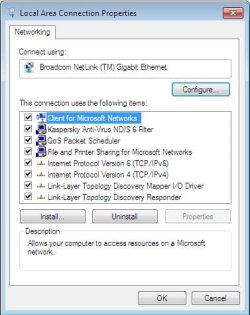
Yes , but that picture you sent will be shown in Bridge connection If I'm not wrong , not in this connection that I have for my PPPOE Connection :
Capture1.JPG
and when I right click and choose Properties , this box shows up :

Capture2.JPG


Can you guys help me more ?
 
Last edited:

My Computer My Computer

OS
seven
hi.....which modem(model/name) you have?
just type 192.168.1.1 in your browser with admin/admin or admin/password to check what all settings are there for to create a pppoe connection you'd need to set your user name/id there...right?
 

My Computer My Computer

OS
windows 7 ultimate 64 bit,Windows 7 ultimate 32 bit,Windows XP sp3 home
hi.....which modem(model/name) you have?
just type 192.168.1.1 in your browser with admin/admin or admin/password to check what all settings are there for to create a pppoe connection you'd need to set your user name/id there...right?

Thanks , My modem is TP-Link TD-8811 .I know about PPPOE setting you just mentioned . nothing about auto reconnection :( Apparently I have to use Bridge Connection :cry:
another Question If I use Bridge to connect to Internet , and Two Computers are connected to Modem , one with LAN and Another with USB , Can Both of them connect to Internet without any problems ?
Thanks again .
 

My Computer My Computer

OS
seven
persianmajid said:
no I don't have any routers , just A modem
and
My modem is TP-Link TD-8811

well its an External ADSL2+ Modem Router with nat....TD-8811

so over a pppoe connection you would have to do port forward only then your IDM will be able to connect ...for port forward try....PortForward.com - Port Forwarding for the TP-Link TD-8810 otherwise go with bridge mode.

my Internet connection disconnects every 1 Hour at nights
hi.....this maybe do to connection/dsl problem.....if the dsl link goes off then you should get your line checked...pppoe or bridged connection won't make a difference without dsl link :p

Can Both of them connect to Internet without any problems ?
.
i don't see a problem there but a pppoe connection with nat would certainly be better anyhow
 

My Computer My Computer

OS
windows 7 ultimate 64 bit,Windows 7 ultimate 32 bit,Windows XP sp3 home
Thanks for the info , I tried PFConfig , but it doesn't have IDM in its list ! Can you help me to do port forward ?
 

My Computer My Computer

OS
seven
If OP has no router...port forwarding isnt the answer!

persian: Have you contacted your ISP???
 

My Computer My Computer

Computer Manufacturer/Model Number
Homebrew PC - "Alpha_Dawg"
OS
Windows 7 Ultimate 64 bit Steve Ballmer Signature Edition
CPU
Intel Core 2 Quad - Q9550 - 2.83GHz stock - OC'd to 3.6GHz
Motherboard
Gigabyte EP45-UD3P
Memory
4GB DDR2 800MHz (PC6400) OCZ Reaper
Graphics Card(s)
Nvidia GE Force 8800 GTS
Sound Card
Asus Xonar DX
Monitor(s) Displays
Samsung SyncMaster 2333HD
Screen Resolution
1920 x 1080
Hard Drives
WD Caviar Black 750GB - 7200RPM - 32MB cache
WD Caviar Green 1.5TB - 5400RPM - 64MB cache
WD Caviar Green 2.0TB - 5400RPM - 64MB cache
PSU
PC Power & Cooling Silencer 750
Case
Gigabyte 3D Aurora
Cooling
Case is Air - 5ea. 120mm fans (mix of Arctic and Xigmatec)
Keyboard
MS Natural Wireless KB
Mouse
MS Wireless Mouse
Internet Speed
50 mbps down/5 mbps up
Other Info
AVerMedia - AVerTVHD G2 Dual Tuner Card
hi ... thanks , but as I said I don't have router.

gat - I have been with this thread since the beginning... please feel free to review yourself. I was merely going by what the OP said above...

Besides, that... most ISP's lock their supplied modem/router combos so that users cannot fiddle with them.
=================================================================

persian: If you can get into your modem/routers configuration here is the user guide...

http://www.tp-link.com/english/soft/200862161845.pdf

On page 11 it shows the setting for "Dial on Demand"
page 11.PNG

Either remove the checkmark or set to the max allowed, that should cure your issue!
 

My Computer My Computer

Computer Manufacturer/Model Number
Homebrew PC - "Alpha_Dawg"
OS
Windows 7 Ultimate 64 bit Steve Ballmer Signature Edition
CPU
Intel Core 2 Quad - Q9550 - 2.83GHz stock - OC'd to 3.6GHz
Motherboard
Gigabyte EP45-UD3P
Memory
4GB DDR2 800MHz (PC6400) OCZ Reaper
Graphics Card(s)
Nvidia GE Force 8800 GTS
Sound Card
Asus Xonar DX
Monitor(s) Displays
Samsung SyncMaster 2333HD
Screen Resolution
1920 x 1080
Hard Drives
WD Caviar Black 750GB - 7200RPM - 32MB cache
WD Caviar Green 1.5TB - 5400RPM - 64MB cache
WD Caviar Green 2.0TB - 5400RPM - 64MB cache
PSU
PC Power & Cooling Silencer 750
Case
Gigabyte 3D Aurora
Cooling
Case is Air - 5ea. 120mm fans (mix of Arctic and Xigmatec)
Keyboard
MS Natural Wireless KB
Mouse
MS Wireless Mouse
Internet Speed
50 mbps down/5 mbps up
Other Info
AVerMedia - AVerTVHD G2 Dual Tuner Card
gat - I have been with this thread since the beginning... please feel free to review yourself. I was merely going by what the OP said above...
a lot of water has flown under the proverbial bridge since that post by the OP

Besides, that... most ISP's lock their supplied modem/router combos so that users cannot fiddle with them.
virtual servers/port forwarding is a common thing nowadays......isp's block sites usually not router settings:p
plus....one imp fact that OP stated was ....
I used to use IDM for downloading but It only is able to reconnect Bridge and Dial-up Connections
hence the suggestion that PF might be a way out to connect in pppoe mode
regards.........thathagat
 

My Computer My Computer

OS
windows 7 ultimate 64 bit,Windows 7 ultimate 32 bit,Windows XP sp3 home
a lot of water has flown under the proverbial bridge since that post by the OP

I didnt take the time to look up his router as you did... good catch!

Darryl Licht said:
Besides, that... most ISP's lock their supplied modem/router combos so that users cannot fiddle with them.

thathagat said:
virtual servers/port forwarding is a common thing nowadays......isp's block sites usually not router settings:p

No really??? Cmon man!

...And YES many ISPs DO block the users access to THEIR modem/routers configuration! We (the users) are merely leasing/renting the ISP's equipment... therefore many ISPs lock users out of the config pages. A typical user has no business in the configuration of their modem/router and can do more harm than good!
 

My Computer My Computer

Computer Manufacturer/Model Number
Homebrew PC - "Alpha_Dawg"
OS
Windows 7 Ultimate 64 bit Steve Ballmer Signature Edition
CPU
Intel Core 2 Quad - Q9550 - 2.83GHz stock - OC'd to 3.6GHz
Motherboard
Gigabyte EP45-UD3P
Memory
4GB DDR2 800MHz (PC6400) OCZ Reaper
Graphics Card(s)
Nvidia GE Force 8800 GTS
Sound Card
Asus Xonar DX
Monitor(s) Displays
Samsung SyncMaster 2333HD
Screen Resolution
1920 x 1080
Hard Drives
WD Caviar Black 750GB - 7200RPM - 32MB cache
WD Caviar Green 1.5TB - 5400RPM - 64MB cache
WD Caviar Green 2.0TB - 5400RPM - 64MB cache
PSU
PC Power & Cooling Silencer 750
Case
Gigabyte 3D Aurora
Cooling
Case is Air - 5ea. 120mm fans (mix of Arctic and Xigmatec)
Keyboard
MS Natural Wireless KB
Mouse
MS Wireless Mouse
Internet Speed
50 mbps down/5 mbps up
Other Info
AVerMedia - AVerTVHD G2 Dual Tuner Card
If OP has no router...port forwarding isnt the answer!

persian: Have you contacted your ISP???


Disconnections is just at nights , It's weird but My ISP does it purposely to decrease the Download bandwidth :mad:


persian: If you can get into your modem/routers configuration here is the user guide...

http://www.tp-link.com/english/soft/200862161845.pdf

On page 11 it shows the setting for "Dial on Demand"
View attachment 61585

Either remove the checkmark or set to the max allowed, that should cure your issue!
Thanks for the picture , I think that's the only thing I can do about it .
SO What should I write in the box is I want it to reconnect immediately ?
Thanks again .
 

My Computer My Computer

OS
seven
SO What should I write in the box is I want it to reconnect immediately ?
Thanks again .

hi... as Darryl Licht already mentioned....
Either remove the checkmark or set to the max allowed

so set it to either 4320(max)
or uncheck.....dial on demand
 

Attachments

  • dod.PNG
    dod.PNG
    2.2 KB · Views: 545

My Computer My Computer

OS
windows 7 ultimate 64 bit,Windows 7 ultimate 32 bit,Windows XP sp3 home
hi... as Darryl Licht already mentioned....
Either remove the checkmark or set to the max allowed

so set it to either 4320(max)
or uncheck.....dial on demand
Thanks for the answer .
by the way If I uncheck it , I think it never dial , so It'll never reconnect , Am I wrong ? Or I don't get it ? can you explain a little more ? :D
 

My Computer My Computer

OS
seven
well......
If you tick Dial On Demand the modem will connect every time someone tries to access the internet.The Idle Time setting adjusts how long it will be with no internet activity before the modem automatically logs off. If you don't have dial-on-demand turned on and have set idle timeout to 0 then to reconnect you'll have to hit the 'Connect' button. tweak the settings and see what works best...cheers

Disconnections is just at nights , It's weird but My ISP does it purposely to decrease the Download bandwidth

you'll still experience disconnections:p
 

My Computer My Computer

OS
windows 7 ultimate 64 bit,Windows 7 ultimate 32 bit,Windows XP sp3 home
gat - I have been with this thread since the beginning... please feel free to review yourself. I was merely going by what the OP said above...
a lot of water has flown under the proverbial bridge since that post by the OP

Besides, that... most ISP's lock their supplied modem/router combos so that users cannot fiddle with them.
virtual servers/port forwarding is a common thing nowadays......isp's block sites usually not router settings:p
plus....one imp fact that OP stated was ....
I used to use IDM for downloading but It only is able to reconnect Bridge and Dial-up Connections
hence the suggestion that PF might be a way out to connect in pppoe mode
regards.........thathagat

Persian: Just set it to the max of 4320... what have you got to lose? It should work!
 

My Computer My Computer

Computer Manufacturer/Model Number
Homebrew PC - "Alpha_Dawg"
OS
Windows 7 Ultimate 64 bit Steve Ballmer Signature Edition
CPU
Intel Core 2 Quad - Q9550 - 2.83GHz stock - OC'd to 3.6GHz
Motherboard
Gigabyte EP45-UD3P
Memory
4GB DDR2 800MHz (PC6400) OCZ Reaper
Graphics Card(s)
Nvidia GE Force 8800 GTS
Sound Card
Asus Xonar DX
Monitor(s) Displays
Samsung SyncMaster 2333HD
Screen Resolution
1920 x 1080
Hard Drives
WD Caviar Black 750GB - 7200RPM - 32MB cache
WD Caviar Green 1.5TB - 5400RPM - 64MB cache
WD Caviar Green 2.0TB - 5400RPM - 64MB cache
PSU
PC Power & Cooling Silencer 750
Case
Gigabyte 3D Aurora
Cooling
Case is Air - 5ea. 120mm fans (mix of Arctic and Xigmatec)
Keyboard
MS Natural Wireless KB
Mouse
MS Wireless Mouse
Internet Speed
50 mbps down/5 mbps up
Other Info
AVerMedia - AVerTVHD G2 Dual Tuner Card
Back
Top