How to use XP and 7 at the same time

kittleboy

New member
Hi my friends,
How can i use my windows xp while i am in 7, without restarting, just to use a program that is run under xp only, ( change in a second ) ?
 

My Computer

Computer Manufacturer/Model Number
What is this, I chose every part myself
OS
7 Ultimate 32Bit
Graphics Card(s)
Onboard :(( - I love games
Hard Drives
I think 160GB
Keyboard
Microsoft
Mouse
Microsoft
Internet Speed
384kbps - Download Speed around 40kbps
According to your sys specs you are running Win7 Ultimate, so the answer is yes, using Virtual PC. You can download free Microsoft Virtual PC and XP mode here.

If you want to use your existing XP setup as a Virtual PC vhd (virtual hard disk), read this thread.

Kari
 

My Computer

Computer type
Laptop
Computer Manufacturer/Model Number
HP ENVY 17-1150eg
OS
Windows 10 Pro x64 EN-GB
CPU
1.6 GHz Intel Core i7-720QM Processor
Memory
6 GB
Graphics Card(s)
ATI Mobility Radeon HD 5850 Graphics
Sound Card
Beats sound system with integrated subwoofer
Monitor(s) Displays
17" laptop display, 22" LED and 32" Full HD TV through HDMI
Screen Resolution
1600*900 (1), 1920*1080 (2&3)
Hard Drives
Internal: 2 x 500 GB SATA Hard Disk Drive 7200 rpm
External: 2TB for backups, 3TB USB3 network drive for media
Cooling
As Envy runs a bit warm, I have it on a Cooler Master pad
Keyboard
Logitech diNovo Media Desktop Laser (bluetooth)
Mouse
Logitech Performance Mouse MX
Internet Speed
50/10 Mbps VDSL
Antivirus
Windows Defender 4.3.9431.0
Browser
Maxthon 3.5.2., IE11
I forgot to say that i can't run Windows XP Mode ( Because of my CPU );
And I have windows XP installed in drive C, and windows 7 in drive D
 
Last edited:

My Computer

Computer Manufacturer/Model Number
What is this, I chose every part myself
OS
7 Ultimate 32Bit
Graphics Card(s)
Onboard :(( - I love games
Hard Drives
I think 160GB
Keyboard
Microsoft
Mouse
Microsoft
Internet Speed
384kbps - Download Speed around 40kbps
Just follow the link to the thread I gave you, it tells you how to convert the existing XP setup from your C: drive to a vhd.

If you can not use Virtual PC, you can download Sun VirtualBox or VMware Player for free and mount a vhd to them.

The latest VWware player does not need virtualization technology to be enabled in BIOS so also older systems can run it.

Kari
 

My Computer

Computer type
Laptop
Computer Manufacturer/Model Number
HP ENVY 17-1150eg
OS
Windows 10 Pro x64 EN-GB
CPU
1.6 GHz Intel Core i7-720QM Processor
Memory
6 GB
Graphics Card(s)
ATI Mobility Radeon HD 5850 Graphics
Sound Card
Beats sound system with integrated subwoofer
Monitor(s) Displays
17" laptop display, 22" LED and 32" Full HD TV through HDMI
Screen Resolution
1600*900 (1), 1920*1080 (2&3)
Hard Drives
Internal: 2 x 500 GB SATA Hard Disk Drive 7200 rpm
External: 2TB for backups, 3TB USB3 network drive for media
Cooling
As Envy runs a bit warm, I have it on a Cooler Master pad
Keyboard
Logitech diNovo Media Desktop Laser (bluetooth)
Mouse
Logitech Performance Mouse MX
Internet Speed
50/10 Mbps VDSL
Antivirus
Windows Defender 4.3.9431.0
Browser
Maxthon 3.5.2., IE11
Just follow the link to the thread I gave you, it tells you how to convert the existing XP setup from your C: drive to a vhd.

If you can not use Virtual PC, you can download Sun VirtualBox or VMware Player for free and mount a vhd to them.

The latest VWware player does not need virtualization technology to be enabled in BIOS so also older systems can run it.

Kari

I have downloaded the latest version of VMware Player;
How should I mount a VHD!! to it?
and what should i do after that?
BTW, which one is better?

- I have a big problem now, i think
Right now i tried to install VMware Player 3, when i clicked on the setup, it brought a page ( Repair or Remove, I had installed it some days ago,but i removed it through "Programs and Features " in control panel ).
Then i clicked on removed, after finishing showed me restart now and restart later, i chose restart now.
After restart, again i clicked on setup, AGAIN, it says remove or repair ?!!!! ( I did it two times, but the results were the same )
What should i do now?
 

My Computer

Computer Manufacturer/Model Number
What is this, I chose every part myself
OS
7 Ultimate 32Bit
Graphics Card(s)
Onboard :(( - I love games
Hard Drives
I think 160GB
Keyboard
Microsoft
Mouse
Microsoft
Internet Speed
384kbps - Download Speed around 40kbps
Sorry it took some time before I could answer, had to take mother-in-law to cappuccino and ice-cream ;)

I just realized there might be a problem. To import a vhd to VMware Player, it needs a the settings file (.vmc). Disk2vhd only creates the vhd file, vmc file is only created when you create a new virtual machine in Virtual PC.

Please wait, I ask our VMware guru Jimbo to join this thread, if somebody can answer this it's him.

I'll be back...

Kari
 

My Computer

Computer type
Laptop
Computer Manufacturer/Model Number
HP ENVY 17-1150eg
OS
Windows 10 Pro x64 EN-GB
CPU
1.6 GHz Intel Core i7-720QM Processor
Memory
6 GB
Graphics Card(s)
ATI Mobility Radeon HD 5850 Graphics
Sound Card
Beats sound system with integrated subwoofer
Monitor(s) Displays
17" laptop display, 22" LED and 32" Full HD TV through HDMI
Screen Resolution
1600*900 (1), 1920*1080 (2&3)
Hard Drives
Internal: 2 x 500 GB SATA Hard Disk Drive 7200 rpm
External: 2TB for backups, 3TB USB3 network drive for media
Cooling
As Envy runs a bit warm, I have it on a Cooler Master pad
Keyboard
Logitech diNovo Media Desktop Laser (bluetooth)
Mouse
Logitech Performance Mouse MX
Internet Speed
50/10 Mbps VDSL
Antivirus
Windows Defender 4.3.9431.0
Browser
Maxthon 3.5.2., IE11
Sorry it took some time before I could answer, had to take mother-in-law ti cappuccino and ice-cream ;)

I just realized there might be a problem. To import a vhd to VMware Player, it needs a the settings file (.vmc). Disk2vhd only creates the vhd file, vmc file is only created when you create a new virtual machine in Virtual PC.

Please wait, I ask our VMware guru Jimbo to join this thread, if somebody can answer this it's him.

I'll be back...

Kari

wow, good boy.
I want Ice Cream :(
Thanks
 

My Computer

Computer Manufacturer/Model Number
What is this, I chose every part myself
OS
7 Ultimate 32Bit
Graphics Card(s)
Onboard :(( - I love games
Hard Drives
I think 160GB
Keyboard
Microsoft
Mouse
Microsoft
Internet Speed
384kbps - Download Speed around 40kbps

My Computer

Computer type
Laptop
Computer Manufacturer/Model Number
HP ENVY 17-1150eg
OS
Windows 10 Pro x64 EN-GB
CPU
1.6 GHz Intel Core i7-720QM Processor
Memory
6 GB
Graphics Card(s)
ATI Mobility Radeon HD 5850 Graphics
Sound Card
Beats sound system with integrated subwoofer
Monitor(s) Displays
17" laptop display, 22" LED and 32" Full HD TV through HDMI
Screen Resolution
1600*900 (1), 1920*1080 (2&3)
Hard Drives
Internal: 2 x 500 GB SATA Hard Disk Drive 7200 rpm
External: 2TB for backups, 3TB USB3 network drive for media
Cooling
As Envy runs a bit warm, I have it on a Cooler Master pad
Keyboard
Logitech diNovo Media Desktop Laser (bluetooth)
Mouse
Logitech Performance Mouse MX
Internet Speed
50/10 Mbps VDSL
Antivirus
Windows Defender 4.3.9431.0
Browser
Maxthon 3.5.2., IE11
Have you tried running the program in cability mode or downloaded the latest windows update that makes more programs cabable with the operating system?
 

My Computer

Computer Manufacturer/Model Number
Acer Aspire 5536
OS
windows 7
CPU
2.1
Motherboard
Acer
Memory
3GB
Graphics Card(s)
ATI Radeon
Sound Card
Built in 5.1 HD
Screen Resolution
15.4"
Hard Drives
250GB
Internet Speed
4MB
Have you tried running the program in cability mode or downloaded the latest windows update that makes more programs cabable with the operating system?

Thanks for answering;
Which program should i have tried in capability mode?!
Yes, I have the latest windows updates for both windowses installed. I myself updated both windowses some days ago.
 

My Computer

Computer Manufacturer/Model Number
What is this, I chose every part myself
OS
7 Ultimate 32Bit
Graphics Card(s)
Onboard :(( - I love games
Hard Drives
I think 160GB
Keyboard
Microsoft
Mouse
Microsoft
Internet Speed
384kbps - Download Speed around 40kbps
As good as Paulpp's tip is when installing older software, it has nothing to do with your issue, Kittleboy.

Jimbo still not checked in? I sent him a PM.
 

My Computer

Computer type
Laptop
Computer Manufacturer/Model Number
HP ENVY 17-1150eg
OS
Windows 10 Pro x64 EN-GB
CPU
1.6 GHz Intel Core i7-720QM Processor
Memory
6 GB
Graphics Card(s)
ATI Mobility Radeon HD 5850 Graphics
Sound Card
Beats sound system with integrated subwoofer
Monitor(s) Displays
17" laptop display, 22" LED and 32" Full HD TV through HDMI
Screen Resolution
1600*900 (1), 1920*1080 (2&3)
Hard Drives
Internal: 2 x 500 GB SATA Hard Disk Drive 7200 rpm
External: 2TB for backups, 3TB USB3 network drive for media
Cooling
As Envy runs a bit warm, I have it on a Cooler Master pad
Keyboard
Logitech diNovo Media Desktop Laser (bluetooth)
Mouse
Logitech Performance Mouse MX
Internet Speed
50/10 Mbps VDSL
Antivirus
Windows Defender 4.3.9431.0
Browser
Maxthon 3.5.2., IE11
As good as Paulpp's tip is when installing older software, it has nothing to do with your issue, Kittleboy.

Jimbo still not checked in? I sent him a PM.

I'm not getting you, what you are talking about, what do you mean by older software?!!!!

I haven't seem anything from Jimbo yet
 

My Computer

Computer Manufacturer/Model Number
What is this, I chose every part myself
OS
7 Ultimate 32Bit
Graphics Card(s)
Onboard :(( - I love games
Hard Drives
I think 160GB
Keyboard
Microsoft
Mouse
Microsoft
Internet Speed
384kbps - Download Speed around 40kbps
As good as Paulpp's tip is when installing older software, it has nothing to do with your issue, Kittleboy.

Jimbo still not checked in? I sent him a PM.

I'm not getting you, what you are talking about, what do you mean by older software?!!!!

I haven't seem anything from Jimbo yet
I mean exactly what I wrote: that Paulpp's post, answer to your question, has nothing to do with your issue. His answer is in no way related to your questions, and you should completely ignore it for now.

It would have been a valid answer if you had asked how to install a Vista driver or an older application to Seven but it is completely wrong answer or solution when we are talking about virtualization.

Kari
 

My Computer

Computer type
Laptop
Computer Manufacturer/Model Number
HP ENVY 17-1150eg
OS
Windows 10 Pro x64 EN-GB
CPU
1.6 GHz Intel Core i7-720QM Processor
Memory
6 GB
Graphics Card(s)
ATI Mobility Radeon HD 5850 Graphics
Sound Card
Beats sound system with integrated subwoofer
Monitor(s) Displays
17" laptop display, 22" LED and 32" Full HD TV through HDMI
Screen Resolution
1600*900 (1), 1920*1080 (2&3)
Hard Drives
Internal: 2 x 500 GB SATA Hard Disk Drive 7200 rpm
External: 2TB for backups, 3TB USB3 network drive for media
Cooling
As Envy runs a bit warm, I have it on a Cooler Master pad
Keyboard
Logitech diNovo Media Desktop Laser (bluetooth)
Mouse
Logitech Performance Mouse MX
Internet Speed
50/10 Mbps VDSL
Antivirus
Windows Defender 4.3.9431.0
Browser
Maxthon 3.5.2., IE11
In your answers, please suppose that i know nothing from computer;
explain everything.step by step.

Thankssssss
 

My Computer

Computer Manufacturer/Model Number
What is this, I chose every part myself
OS
7 Ultimate 32Bit
Graphics Card(s)
Onboard :(( - I love games
Hard Drives
I think 160GB
Keyboard
Microsoft
Mouse
Microsoft
Internet Speed
384kbps - Download Speed around 40kbps
In your answers, please suppose that i know nothing from computer;
explain everything.step by step.

Thankssssss

Virtualization technology is advanced enough so that I automatically assumed you know the stuff, at least some of it.

I sent jimbo a PM requesting his help. I think he comes when he has time, he's quite a lot on the road.

I'm waiting WMLite to send me MyOldPC virtualization application's trial version, it have to be requested by email, there's no direct download link. it seems that MyOldPC could be exactly what you are looking, it can convert vhd's directly to VMware format. i sent the email, now waiting them to answer.

Are you absolutely sure you can not run Virtual PC?

Kari
 

My Computer

Computer type
Laptop
Computer Manufacturer/Model Number
HP ENVY 17-1150eg
OS
Windows 10 Pro x64 EN-GB
CPU
1.6 GHz Intel Core i7-720QM Processor
Memory
6 GB
Graphics Card(s)
ATI Mobility Radeon HD 5850 Graphics
Sound Card
Beats sound system with integrated subwoofer
Monitor(s) Displays
17" laptop display, 22" LED and 32" Full HD TV through HDMI
Screen Resolution
1600*900 (1), 1920*1080 (2&3)
Hard Drives
Internal: 2 x 500 GB SATA Hard Disk Drive 7200 rpm
External: 2TB for backups, 3TB USB3 network drive for media
Cooling
As Envy runs a bit warm, I have it on a Cooler Master pad
Keyboard
Logitech diNovo Media Desktop Laser (bluetooth)
Mouse
Logitech Performance Mouse MX
Internet Speed
50/10 Mbps VDSL
Antivirus
Windows Defender 4.3.9431.0
Browser
Maxthon 3.5.2., IE11
In your answers, please suppose that i know nothing from computer;
explain everything.step by step.

Thankssssss

Virtualization technology is advanced enough so that I automatically assumed you know the stuff, at least some of it.

I sent jimbo a PM requesting his help. I think he comes when he has time, he's quite a lot on the road.

I'm waiting WMLite to send me MyOldPC virtualization application's trial version, it have to be requested by email, there's no direct download link. it seems that MyOldPC could be exactly what you are looking, it can convert vhd's directly to VMware format. i sent the email, now waiting them to answer.

Are you absolutely sure you can not run Virtual PC?

Kari

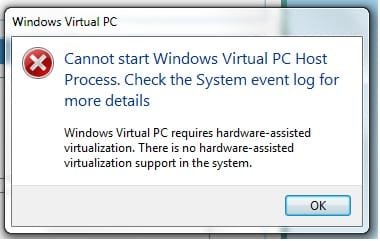
Yes, i tested it by some softwares from microsoft webssite which check the CPU ...

When i click on on Start>All Programs>Windows Virtual PC>Windows XP Mode

Error:
Untitled.jpg

When i click on on Start>All Programs>Windows Virtual PC>Windows Virtual PC
it opens a windows in my account. ( like a folder )

I have downloaded " VMware-converter-4.0.1-161434.exe "
is there anything i could do with this?

And i have a problem with removing VMware; i said in previous posts.
 

My Computer

Computer Manufacturer/Model Number
What is this, I chose every part myself
OS
7 Ultimate 32Bit
Graphics Card(s)
Onboard :(( - I love games
Hard Drives
I think 160GB
Keyboard
Microsoft
Mouse
Microsoft
Internet Speed
384kbps - Download Speed around 40kbps
Give me a couple of minutes, I'll test it. I'm home today all day so I have time.

EDIT: I tested the VMware Converter. The problem remains, it can not read vhd files, it needs a vmc file. As mentioned before, this vmc file is only created when you run a Virtual PC vhd first time.

This really is a Catch 22 situation: You can not use Virtual PC, so we need to convert an existing vhd to a format that is supported by VMware. To do this, we would need you to run this vhd once in Virtual PC, which you can not. :confused:
 
Last edited:

My Computer

Computer type
Laptop
Computer Manufacturer/Model Number
HP ENVY 17-1150eg
OS
Windows 10 Pro x64 EN-GB
CPU
1.6 GHz Intel Core i7-720QM Processor
Memory
6 GB
Graphics Card(s)
ATI Mobility Radeon HD 5850 Graphics
Sound Card
Beats sound system with integrated subwoofer
Monitor(s) Displays
17" laptop display, 22" LED and 32" Full HD TV through HDMI
Screen Resolution
1600*900 (1), 1920*1080 (2&3)
Hard Drives
Internal: 2 x 500 GB SATA Hard Disk Drive 7200 rpm
External: 2TB for backups, 3TB USB3 network drive for media
Cooling
As Envy runs a bit warm, I have it on a Cooler Master pad
Keyboard
Logitech diNovo Media Desktop Laser (bluetooth)
Mouse
Logitech Performance Mouse MX
Internet Speed
50/10 Mbps VDSL
Antivirus
Windows Defender 4.3.9431.0
Browser
Maxthon 3.5.2., IE11
I got the MyOldPC download link about half an hour ago, testing it now.

Kittleboy, I'll be back when I have the results of my test.

And Huisinro, thanks for the download link.

Kari
 

My Computer

Computer type
Laptop
Computer Manufacturer/Model Number
HP ENVY 17-1150eg
OS
Windows 10 Pro x64 EN-GB
CPU
1.6 GHz Intel Core i7-720QM Processor
Memory
6 GB
Graphics Card(s)
ATI Mobility Radeon HD 5850 Graphics
Sound Card
Beats sound system with integrated subwoofer
Monitor(s) Displays
17" laptop display, 22" LED and 32" Full HD TV through HDMI
Screen Resolution
1600*900 (1), 1920*1080 (2&3)
Hard Drives
Internal: 2 x 500 GB SATA Hard Disk Drive 7200 rpm
External: 2TB for backups, 3TB USB3 network drive for media
Cooling
As Envy runs a bit warm, I have it on a Cooler Master pad
Keyboard
Logitech diNovo Media Desktop Laser (bluetooth)
Mouse
Logitech Performance Mouse MX
Internet Speed
50/10 Mbps VDSL
Antivirus
Windows Defender 4.3.9431.0
Browser
Maxthon 3.5.2., IE11
ok,
Thanks
I am waiting....
 

My Computer

Computer Manufacturer/Model Number
What is this, I chose every part myself
OS
7 Ultimate 32Bit
Graphics Card(s)
Onboard :(( - I love games
Hard Drives
I think 160GB
Keyboard
Microsoft
Mouse
Microsoft
Internet Speed
384kbps - Download Speed around 40kbps
Got the download link from VMLite, installed MyOldPC Converter. Had to meet my real life friends, too, so I went first to pub. Back now, testing.

Very first, I just checked which file formats MyOldPC supports. After 30 seconds it was clear you can not use MyOldPC to convert your existing system or an image to any format supported by VMware.

See here. First, you can convert an image or existing system using MyOldPC to these virtual HD formats:

MyOldPC_02.png

But to be able to mount a vhd to VMware, it has to be one of these formats:
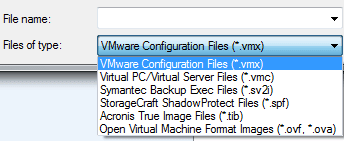
MyOldPC_01.png

(click images)

The problem is, MyOldPC creates virtual hard disk. But VMware needs a configuration file to mount existing vhd. These configuration files are only created when the new virtual machine is booted first time.

I really do not now how to create this settings file manually. These files contain so much individual information about vhd (MAC addresses etc) that it is not possible just copy it or write a new.

Next, i tried to convert an existing vhd to some other format. it was a no go, as this error message tells:
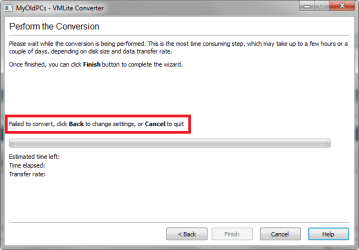
MyoldPC_5.png

Next I tried to convert my second Win7 rig to vhd using MyOldPC. It worked, and I mounted it succesfully to both VirtualBox and Virtual PC, but this does not help you because you don't have hardware virtualization.

Next step was to download and install VMLite, and to try to mount the vhd I just created to it. No luck there, VMLite installation failed two times, I have no more patience to play with it today.

So our saga continues. This issue interests me quite a lot, so I'm going to test all possible scenarios. I have enough old comuters with different OS's, so I'll find something.

Kari

 

My Computer

Computer type
Laptop
Computer Manufacturer/Model Number
HP ENVY 17-1150eg
OS
Windows 10 Pro x64 EN-GB
CPU
1.6 GHz Intel Core i7-720QM Processor
Memory
6 GB
Graphics Card(s)
ATI Mobility Radeon HD 5850 Graphics
Sound Card
Beats sound system with integrated subwoofer
Monitor(s) Displays
17" laptop display, 22" LED and 32" Full HD TV through HDMI
Screen Resolution
1600*900 (1), 1920*1080 (2&3)
Hard Drives
Internal: 2 x 500 GB SATA Hard Disk Drive 7200 rpm
External: 2TB for backups, 3TB USB3 network drive for media
Cooling
As Envy runs a bit warm, I have it on a Cooler Master pad
Keyboard
Logitech diNovo Media Desktop Laser (bluetooth)
Mouse
Logitech Performance Mouse MX
Internet Speed
50/10 Mbps VDSL
Antivirus
Windows Defender 4.3.9431.0
Browser
Maxthon 3.5.2., IE11
Back
Top