Option to extend partition is grayed out

You can only extend the volume adding adjacent unallocated space.

The easiest way, if the partitions have nothing on them would be simply delete them, expand the one you want and remake the partitions.
Or if possible & they have some DATA, move that DATA to another drive temporarily then delete resize,remake.

Otherwise maybe try extending and shrinking the volumes next to the unallocated after the target partition, choosing to leave the Unallocated space BEFORE the partiton.


Now about these cookies?
 

My Computer

Computer Manufacturer/Model Number
Custom (Self Build)
OS
Windows 7 Home Premium 64bit
CPU
Intel Core i7 2700k
Motherboard
eVGA P67 SLI
Memory
8GB Mushkin Redline Ridgebacks @1866
Graphics Card(s)
EVGA GTX570 SC
Sound Card
XiFi Titanium HD
Monitor(s) Displays
LG W2453V
Screen Resolution
1920x1080
Hard Drives
Intel 320 80GB -- Intel X25-V 40GB --WD Black 1TB x2 -- WD Blue 640GB
PSU
Seasonic x750
Case
Corsair 600T SE White
Cooling
eVGA Superclocked CPU Cooler
Keyboard
Saitek Cyborg
Antivirus
Kaspersky
Browser
IE
Other Info
LG BD/DVD
Hello Zaixionito, welcome to Seven Forums!


As Wishmaster has said you can only expand a partition to unallocated space to the right; have a look through the tutorials at the links below to get some ideas of how that works; be sure to keep us informed.
You could use a 3rd party program but there's always the chance of losing your data.

See "Method Two" in the first tutorial below

http://www.sevenforums.com/tutorials/2670-partition-volume-extend.html?ltr=P

http://www.sevenforums.com/tutorials/2668-partition-volume-delete.html?ltr=P

http://www.sevenforums.com/tutorials/2672-partition-volume-shrink.html?ltr=P

http://www.sevenforums.com/tutorials/2674-partition-volume-create-new.html?ltr=P
 

My Computer

Computer Manufacturer/Model Number
* BFK Customs *
OS
W 7 64-bit Ultimate
CPU
Intel Q9550 Yorkfield
Motherboard
ASUS P5Q Pro
Memory
8GB Dominator 8500C5D
Graphics Card(s)
ATI : XFX 5870
Sound Card
Realtek HD Audio 7-1
Monitor(s) Displays
1x 47" LCD HDMI & 3x 26" LCD HDMI
Screen Resolution
1920x1080P & 1920x1200
Hard Drives
1x 80GB Intel X25-M G2 SSD : 1x 500GB & 1x 640GB WD Caviar Black(s)
PSU
Corsair 620HX
Case
Cooler Master RC-690
Cooling
Tuniq Tower 120, 2x 140mm and 3x 120mm case fans
Keyboard
Microsoft 500
Mouse
Razer Diamondback 3G
Internet Speed
14 Mb/s
Other Info
1x Koutech 3Gb/s SATA HDD Hot Swap Rack
Nvermind

Thanks, I've figured out how to do it now.
 

My Computer

OS
Windows 7
Hello again Zaixionito.


We're glad you have found a solution that works for you; thanks for the update.
 

My Computer

Computer Manufacturer/Model Number
* BFK Customs *
OS
W 7 64-bit Ultimate
CPU
Intel Q9550 Yorkfield
Motherboard
ASUS P5Q Pro
Memory
8GB Dominator 8500C5D
Graphics Card(s)
ATI : XFX 5870
Sound Card
Realtek HD Audio 7-1
Monitor(s) Displays
1x 47" LCD HDMI & 3x 26" LCD HDMI
Screen Resolution
1920x1080P & 1920x1200
Hard Drives
1x 80GB Intel X25-M G2 SSD : 1x 500GB & 1x 640GB WD Caviar Black(s)
PSU
Corsair 620HX
Case
Cooler Master RC-690
Cooling
Tuniq Tower 120, 2x 140mm and 3x 120mm case fans
Keyboard
Microsoft 500
Mouse
Razer Diamondback 3G
Internet Speed
14 Mb/s
Other Info
1x Koutech 3Gb/s SATA HDD Hot Swap Rack
Hi guys, since its only 18 hours since last post. I would like to ask a question related to what this user is asking.

I have a friend who uses 40gb hard drive and its really short on sapce. Specially when windows vista takes about 50% of that hard drive and demand more every day.
Right now that old disk is separated into two partitions, one for windows on 30gb and one for other stuff on 7gb.

So we agreed to buy a new hard drive and copy over the data from his old disk to new disk. That is how ever, not very difficult.

But the problem is the partitions remains the same and we are left with a bunch of unused/unallocated space.
What can be done to expand this partitions without data loss?
 

My Computer

Computer Manufacturer/Model Number
Selvbuild
OS
Windows 7 Pro 64bit
CPU
Core 2 Duo E3400
Motherboard
Asus P5E-Deluxe
Memory
8GB DDR2
Graphics Card(s)
XFX Radeon 5970 Black Edition
Sound Card
Creative X-FI Soundblaster xTremeGamer
Hard Drives
4 hard drives
1 500gb OS (separeted in 2 partitions, system and personal files)
1 500gb for games
1 500gb for downloads
1 1tb for anime storage
PSU
650W
Case
Antec something
Cooling
Asus SilentKnight 2
If the unallocated space shows to the right of the partition in Disk Management, you can just right click on the partition and "Extend". If it is to the left, it is more complicated. Entend does not corrupt any data.
 

My Computer

Computer Manufacturer/Model Number
HP, Dell, Gateway, Toshiba - 4 laptops and 2 desktops
OS
Vista, Windows7, Mint Mate, Zorin, Windows 8
CPU
from 1.6GHz Duo to i7
Monitor(s) Displays
2x HP w2207
Hard Drives
5x HDD, 7x SSD, 12x Externals
Keyboard
with trackball - no mices
Mouse
Trackball mice
Internet Speed
DSL 6000
I see what you are up to.

But as I said, there is 2 partitions on disk I wish to clone over. In that case, if I close over first partition, then expand it and clone over second partition and expand it with the remaining space. Will that work?
 

My Computer

Computer Manufacturer/Model Number
Selvbuild
OS
Windows 7 Pro 64bit
CPU
Core 2 Duo E3400
Motherboard
Asus P5E-Deluxe
Memory
8GB DDR2
Graphics Card(s)
XFX Radeon 5970 Black Edition
Sound Card
Creative X-FI Soundblaster xTremeGamer
Hard Drives
4 hard drives
1 500gb OS (separeted in 2 partitions, system and personal files)
1 500gb for games
1 500gb for downloads
1 1tb for anime storage
PSU
650W
Case
Antec something
Cooling
Asus SilentKnight 2
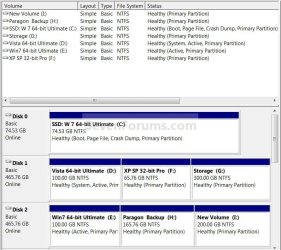
Let's use my drive map below using my "Disk 1"


If I wanted to recover the space on the "Storage" partition then I would move the data allready there to another partition then I could use #1

  1. http://www.sevenforums.com/tutorials/2668-partition-volume-delete.html?ltr=P on the "Storage" partition then I would use
  2. http://www.sevenforums.com/tutorials/2670-partition-volume-extend.html?ltr=P on the "XP partition to make one partition out of the 2, XP and Storage.
I hope this is clear enough?

Click this image to enlarge.
Goof.jpg
 

My Computer

Computer Manufacturer/Model Number
* BFK Customs *
OS
W 7 64-bit Ultimate
CPU
Intel Q9550 Yorkfield
Motherboard
ASUS P5Q Pro
Memory
8GB Dominator 8500C5D
Graphics Card(s)
ATI : XFX 5870
Sound Card
Realtek HD Audio 7-1
Monitor(s) Displays
1x 47" LCD HDMI & 3x 26" LCD HDMI
Screen Resolution
1920x1080P & 1920x1200
Hard Drives
1x 80GB Intel X25-M G2 SSD : 1x 500GB & 1x 640GB WD Caviar Black(s)
PSU
Corsair 620HX
Case
Cooler Master RC-690
Cooling
Tuniq Tower 120, 2x 140mm and 3x 120mm case fans
Keyboard
Microsoft 500
Mouse
Razer Diamondback 3G
Internet Speed
14 Mb/s
Other Info
1x Koutech 3Gb/s SATA HDD Hot Swap Rack
I see what you are up to.

But as I said, there is 2 partitions on disk I wish to clone over. In that case, if I close over first partition, then expand it and clone over second partition and expand it with the remaining space. Will that work?

I guess that would work. As long as you have unallocated space to the right of a partition (as explained by Bare Foot Kid), you can always expand a partition. In your case just make sure you leave enough room to bring in the second partition (which you should predefine in the rest of the space once the first partition is cloned in).
 

My Computer

Computer Manufacturer/Model Number
HP, Dell, Gateway, Toshiba - 4 laptops and 2 desktops
OS
Vista, Windows7, Mint Mate, Zorin, Windows 8
CPU
from 1.6GHz Duo to i7
Monitor(s) Displays
2x HP w2207
Hard Drives
5x HDD, 7x SSD, 12x Externals
Keyboard
with trackball - no mices
Mouse
Trackball mice
Internet Speed
DSL 6000
I see, that is reassuring.
Any suggestion for what tool I should use in order to complete this task fastest possible with least chance to screw it up?
 

My Computer

Computer Manufacturer/Model Number
Selvbuild
OS
Windows 7 Pro 64bit
CPU
Core 2 Duo E3400
Motherboard
Asus P5E-Deluxe
Memory
8GB DDR2
Graphics Card(s)
XFX Radeon 5970 Black Edition
Sound Card
Creative X-FI Soundblaster xTremeGamer
Hard Drives
4 hard drives
1 500gb OS (separeted in 2 partitions, system and personal files)
1 500gb for games
1 500gb for downloads
1 1tb for anime storage
PSU
650W
Case
Antec something
Cooling
Asus SilentKnight 2
Hello Zaixionito, welcome to Seven Forums!


As Wishmaster has said you can only expand a partition to unallocated space to the right; have a look through the tutorials at the links below to get some ideas of how that works; be sure to keep us informed.
You could use a 3rd party program but there's always the chance of losing your data.

See "Method Two" in the first tutorial below

http://www.sevenforums.com/tutorials/2670-partition-volume-extend.html?ltr=P

http://www.sevenforums.com/tutorials/2668-partition-volume-delete.html?ltr=P

http://www.sevenforums.com/tutorials/2672-partition-volume-shrink.html?ltr=P

http://www.sevenforums.com/tutorials/2674-partition-volume-create-new.html?ltr=P

I see, that is reassuring.
Any suggestion for what tool I should use in order to complete this task fastest possible with least chance to screw it up?

Hello again.


Use the methods in the tutorials I linked to, they are the "safest" to use on Windows 7 as that's what they were designed for.
 

My Computer

Computer Manufacturer/Model Number
* BFK Customs *
OS
W 7 64-bit Ultimate
CPU
Intel Q9550 Yorkfield
Motherboard
ASUS P5Q Pro
Memory
8GB Dominator 8500C5D
Graphics Card(s)
ATI : XFX 5870
Sound Card
Realtek HD Audio 7-1
Monitor(s) Displays
1x 47" LCD HDMI & 3x 26" LCD HDMI
Screen Resolution
1920x1080P & 1920x1200
Hard Drives
1x 80GB Intel X25-M G2 SSD : 1x 500GB & 1x 640GB WD Caviar Black(s)
PSU
Corsair 620HX
Case
Cooler Master RC-690
Cooling
Tuniq Tower 120, 2x 140mm and 3x 120mm case fans
Keyboard
Microsoft 500
Mouse
Razer Diamondback 3G
Internet Speed
14 Mb/s
Other Info
1x Koutech 3Gb/s SATA HDD Hot Swap Rack
Well, thanks for assistance. Worked great and solved my problem.

Used a program called DiskCopy or something to copy over C partition first, boot from old hard drive and extend windows partition that was newly copied, then create a new partition and copy over files to that partition from partition D on old disk.
Had to use Vista DVD to repair the boot configuration, after that it worked like a charm.

Thanks again.
Z.F.
 

My Computer

Computer Manufacturer/Model Number
Selvbuild
OS
Windows 7 Pro 64bit
CPU
Core 2 Duo E3400
Motherboard
Asus P5E-Deluxe
Memory
8GB DDR2
Graphics Card(s)
XFX Radeon 5970 Black Edition
Sound Card
Creative X-FI Soundblaster xTremeGamer
Hard Drives
4 hard drives
1 500gb OS (separeted in 2 partitions, system and personal files)
1 500gb for games
1 500gb for downloads
1 1tb for anime storage
PSU
650W
Case
Antec something
Cooling
Asus SilentKnight 2
Hello again Z.F.


We're glad you found a solution that worked for you, thanks for keeping us informed.
 

My Computer

Computer Manufacturer/Model Number
* BFK Customs *
OS
W 7 64-bit Ultimate
CPU
Intel Q9550 Yorkfield
Motherboard
ASUS P5Q Pro
Memory
8GB Dominator 8500C5D
Graphics Card(s)
ATI : XFX 5870
Sound Card
Realtek HD Audio 7-1
Monitor(s) Displays
1x 47" LCD HDMI & 3x 26" LCD HDMI
Screen Resolution
1920x1080P & 1920x1200
Hard Drives
1x 80GB Intel X25-M G2 SSD : 1x 500GB & 1x 640GB WD Caviar Black(s)
PSU
Corsair 620HX
Case
Cooler Master RC-690
Cooling
Tuniq Tower 120, 2x 140mm and 3x 120mm case fans
Keyboard
Microsoft 500
Mouse
Razer Diamondback 3G
Internet Speed
14 Mb/s
Other Info
1x Koutech 3Gb/s SATA HDD Hot Swap Rack

My Computer

Computer type
PC/Desktop
OS
Windows 7 X64 Bit
CPU
Intel(R) Core(TM)i7-4771 CPU @ 3.50GH
Motherboard
Asus Sabertooth Z87
Memory
Corsair 4x8 Vengeance (32GB)
Graphics Card(s)
NVIDIA GeForce GTX780
Monitor(s) Displays
LG
Screen Resolution
1920x1080
PSU
Corsair CX750
Case
Corsair 200 series
Cooling
H80i Liquid Cooler
Keyboard
Microsoft
Mouse
Microsoft
Internet Speed
good times-500-850 kbs bad times-50-100 kbs
If the unallocated space shows to the right of the partition in Disk Management, you can just right click on the partition and "Extend". If it is to the left, it is more complicated. Entend does not corrupt any data.

Hi Guys,

I know this is a very old thread but it relates exactly to my problem, and I assume this would adffect many others - so as qouted by here by 'whs' - "If it is to the left, it is more complicated"

I have 15GB of unallocated space that I want to merge, however it is on the left, [far left, 1st partition]. Is there a way i can get it across the the right. I want to merge it with my DATA partition [D:]

Cheers
 

My Computer

Computer type
PC/Desktop
Computer Manufacturer/Model Number
Custom Build
OS
Windows 7 Home Premium 64bit
CPU
i7-3770
Motherboard
ASUS P8Z77-V Deluxe
Memory
G.Skill 2133MHz - 16 GB
Graphics Card(s)
ASUS GTX 670
Sound Card
motherboard
Monitor(s) Displays
AOC e2795Vh
Screen Resolution
1920 x 1808
Hard Drives
OCZ Agility 4 - 128GB
WD 1TB - Black
PSU
Corsair HX850w
Case
Fractal Design F4
Cooling
Corsair H100
Keyboard
Microsoft Desktop 600
Mouse
Microsof Desktop 600
Internet Speed
ADSL - 8MB
Antivirus
Microsoft Security essentials
Browser
Firefox
It is always better to start a new thread stating your problem ab-initio putting out a screenshot of your drive.
 

My Computer

OS
Windows 7 Home Premium 32 bit
ok, sure.. just thought this thread was totally related to my issue, that all the info combined, it would make sense to keep it together in one thread.

Anyway, quick update, as it may help someone else.

I used Partition Wizard to move the System Recovery Partition to the right of the actual Partition I wanted to merge it with. In this case it was my Data drive [D:]
Simply use the "Move/Resize" option on the drive right next to the "Unallocated Partition". Keep repeating the process till you have the "Unallocated Partition" adjacent to the Partition you want to merge it with.
 

My Computer

Computer type
PC/Desktop
Computer Manufacturer/Model Number
Custom Build
OS
Windows 7 Home Premium 64bit
CPU
i7-3770
Motherboard
ASUS P8Z77-V Deluxe
Memory
G.Skill 2133MHz - 16 GB
Graphics Card(s)
ASUS GTX 670
Sound Card
motherboard
Monitor(s) Displays
AOC e2795Vh
Screen Resolution
1920 x 1808
Hard Drives
OCZ Agility 4 - 128GB
WD 1TB - Black
PSU
Corsair HX850w
Case
Fractal Design F4
Cooling
Corsair H100
Keyboard
Microsoft Desktop 600
Mouse
Microsof Desktop 600
Internet Speed
ADSL - 8MB
Antivirus
Microsoft Security essentials
Browser
Firefox
Unless we had a pictorial view of the drive we couldn't have given any suggestions. ( None will go through the number of posts here. Just by seeing the number of posts and views it had, people will simply turn away. And also our experience shows that while the OP may think it is a similar problem, it could well be different in many cases.)

Glad you got things sorted out yourself. Good going. :)
 

My Computer

OS
Windows 7 Home Premium 32 bit
cheers, thanks for the feedback
 

My Computer

Computer type
PC/Desktop
Computer Manufacturer/Model Number
Custom Build
OS
Windows 7 Home Premium 64bit
CPU
i7-3770
Motherboard
ASUS P8Z77-V Deluxe
Memory
G.Skill 2133MHz - 16 GB
Graphics Card(s)
ASUS GTX 670
Sound Card
motherboard
Monitor(s) Displays
AOC e2795Vh
Screen Resolution
1920 x 1808
Hard Drives
OCZ Agility 4 - 128GB
WD 1TB - Black
PSU
Corsair HX850w
Case
Fractal Design F4
Cooling
Corsair H100
Keyboard
Microsoft Desktop 600
Mouse
Microsof Desktop 600
Internet Speed
ADSL - 8MB
Antivirus
Microsoft Security essentials
Browser
Firefox
Back
Top